



|



Mike_da_Spike
-
Posts
3794 -
Joined
-
Last visited
-
Days Won
242
Content Type
Profiles
Forums
Events
Downloads
Store
Articles
Everything posted by Mike_da_Spike
-

[RESOLVED] After exit a table, PinballX does not close VPX reliable
Mike_da_Spike replied to FRAQATTAQ's topic in General
Can you post that logfile. And also when pressing J . -
I found a guy on reddit with the same question, but he didn't had luck. I'm not sure if daphne is able to switch to another monitor. I thought -adapter is what steam use to launch a game on different monitor. Another option is to switch the primary monitor just before you launch Daphne in a launch before script. And set it back with a launch after scripts. But I'm not sure if pinbalkX would like this. I use it before I launch PBX. Imy ayfield screen is the middle of 3 screens and set the primary to that one. And when pbx is closing it switch back to my left monitor as that is my desktop pc. I use this free tool : https://www.nirsoft.net/utils/nircmd.html
-
[RESOLVED] After exit a table, PinballX does not close VPX reliable
Mike_da_Spike replied to FRAQATTAQ's topic in General
Idk, it's in your settings 😜 maybe defaults? I see you set eXIt emulator to R and exit pinballX to J. What happens if you press R? During the game ? Not sure if my setup is common, but I exit PinballX and exit the emulator to the same joystick buuton and keyboard key -
[RESOLVED] After exit a table, PinballX does not close VPX reliable
Mike_da_Spike replied to FRAQATTAQ's topic in General
I don't see "Exit System Control Pressed" in your log, but a closure of vpx itself. So not sure if you pressed button 10 or 12, but looks like PBX didn't get the trigger to stop vpx -
[RESOLVED] After exit a table, PinballX does not close VPX reliable
Mike_da_Spike replied to FRAQATTAQ's topic in General
By default (and properly also in your previous version), VPX is shipped with openvr_api.dll (and a 64-bit variant) that uses SteamVR. This can be changed by using the OpenXR version of it, which works without SteamVR and directly with VD or the Meta software. https://gitlab.com/znixian/OpenOVR All unrelated to your issue and maybe an administrator can split this thread -
[RESOLVED] After exit a table, PinballX does not close VPX reliable
Mike_da_Spike replied to FRAQATTAQ's topic in General
You are running a pretty old version of 10.8. Still a beta. Please update to release version https://github.com/vpinball/vpinball/releases/tag/v10.8.0-2051-28dd6c3. Not to step on @Tom Speirs toes, but your log didn't indicate you pressed the quit emulator key. I think that Tom meant to set up another key/button within PinballX (settings.exe). Can you provide a new log.txt and your pinballX.ini after the changes? Btw, I'm running VR with 64-bit GL as well, and everything works butter smooth. -
[RESOLVED] After exit a table, PinballX does not close VPX reliable
Mike_da_Spike replied to FRAQATTAQ's topic in General
Are you sure ? VP started the gl version from 10.8. Any pre 10.8 must be a custom build. -
Thanks for the directory listing. Confirmed that all looks kkes fine. I have no ideas anymore .😵💫
-
I'm sorry buddy, but if command line doesn't work anymore (which should work in the past) you must ask the vendor. This is not PinballX related but zaccaria. You update the cab kast week to latest version, why you are working offline and not online ? If online works?
-
That's not the b2sserver process, but pinballx directx window to show a video. Can you open a command prompt in your pinballx root directory and do : dir /b>pbxdir.txt And post the pbxdir.txt here as well?
-
In Dutch we say: "U vraagt, wij draaien", literally meaning “You ask, we play.” It originated in the world of radio and DJs, where listeners could request songs and the host would play them on demand. But more loosely translated, it means: “Your wish is our command.” 😄 When you came to us with that peculiar request, we did scratch our heads for a moment. But once the POC was whipped up, complete with that animated GIF as shown in the release post above, we thought: what the heck, let’s ship it in this release! Who knows, maybe one day we’ll tweak DBM so you can rename all media to match Description/DisplayName too. Just planting seeds… In the meantime, I hope this shortcut speeds up your workflow a bit. And fingers crossed you’ll eventually make the leap back to PBX so you can unleash DBM’s full potential again. And hey, if we ever cross paths in real life: make mine sugar-free, and pass that beer to Scutters 😄
- 418 replies
-
- 1
-

-
- mikedaspike
- scutters
- (and 1 more)
-
Hotfix version 25.09.26.1 has just been released. During every release, we often spot something that isn't quite right. While we sometimes wait for the next release to address these issues, this was something we could fix quickly. Please download the latest version.
-
Version 25.09.26 is just released This release started out as a classic bugfix round… until @Thalamus threw in a rather unconventional feature request that got both @scutters and me scratching our heads. Turns out, Thalamus has set up his system in a way that’s highly efficient for his scripting workflow: The Table Name is simply the filename (i.e. the gamename field in the XML) The Display Name (i.e. the description field in the XML) is used for media naming. Now, this setup goes completely against DBM’s usual logic, but hey, we love a challenge. So we added a little undocumented “secret” feature to support it. If you add the following lines to your DBM settings file, the description field becomes drag-and-droppable for files. It simply inserts the dropped file’s name into the description field—nothing more, nothing less: [Secret] DropDescription=true Another bonus feature, yes, again for the MEGA AP : Anonymous login had been broken for a while, so a few releases ago we added support for user credentials (MEGA userID and password). Now, thanks to an updated NuGet package (see here ), anonymous login works again! For safety, credential-based login remains optional—you can choose whichever suits your setup best. We’ve updated several NuGet packages to their latest versions, and squashed a number of bugs to improve overall stability and usability. For a complete list of changes, fixes, and updates, check the Download section. Everything is listed there. As always, a big shoutout to @scutters for his invaluable help with this release


- 418 replies
-
- 2
-
-
- mikedaspike
- scutters
- (and 1 more)
-
Hey Guys, I just tested it on W11 24H2 with latest update and PinballX Core - Version 6.88 x64 I can get it to work on 2 different ways : copy the screenres.txt and the B2SBackglassServerEXE.exe to the table file folder copy the screenres.txt and the B2SBackglassServerEXE.exe to the PinballX root folder (where PinballX.exe is located) and off course the in the setting.exe in the , but that was already set I can see that B2SBackglassServerEXE.exe is running when Visual Pinball system is selected if this is not working for you, something fishy is going on, on your system. I can't find anything in my logfile that it is using b2s or not here's my logfile where B2S is working PinballX.ini log.txt Also a screenshot that B2SBackglassServerEXE.exe is running from the PinballX folder



-
Sorry for my late response as my cabinet is not fully operated yet. But, I updated to 106.2 as well and direct launch (and from PinballX is working fine.) Will this works for you ? steam -applaunch 444930 -skipmenu "Time Machine 2019" My steam folder is located in my pinball directory, so I need to launch it like this : This is the example of Joyrider on the first page and it is still working. If you use still use the old option from PinballX that will do the keypresses to go to the table, remove that and use this You can also user Joyrider his FX3Launcher (which is just a launcher) and set the parameters to Zaccaria. with custom images, it can show you something like this : and it will launch the table you selected , with the extra option from this menu

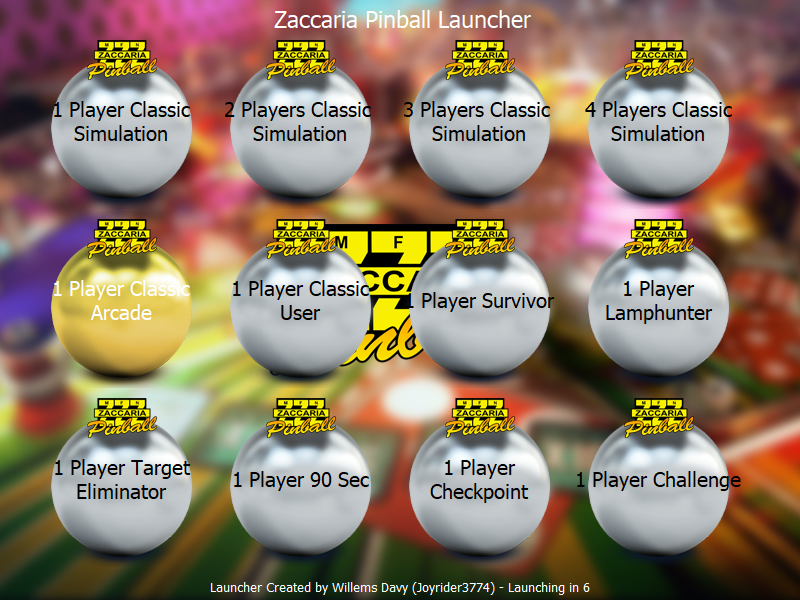
-
If it doesn't start from command line, you best can create a ticket at zaccaria. Maybe they changed parameters or something Edit : did you talk about update 106.0 from last Friday, 106.1 from Tuesday or 106.2 from yesterday, as 106.2 should have a fix for cabinet users
-
Did you see Scutters his 'edit' ?
-
Your logfile is incomplete. Can you browse through your vox files and launch one , quit table and quit pinballx and post your logfile again. According to your ini, it is indeed enabled
-
[PLUGIN] PinballX Loading Video & Image Changer (de-randomiser) V2
Mike_da_Spike replied to scutters's topic in User Projects
Lol. Here's my video : not squeezed I dint have table audio or launch audio, and the loading video is just my table file 20250925_082745.mp4 I need to tweak the script so it will goes faster to the table- 48 replies
-
- 1
-
-
- plugin
- loading video
- (and 2 more)
-
I didn't check the cabinet yet, but the release notes say it fixed the cabinet. As they have a direct table launch, I'm not sure what's wrong. Is the direct table launch working for you from the command line?
-
[PLUGIN] PinballX Loading Video & Image Changer (de-randomiser) V2
Mike_da_Spike replied to scutters's topic in User Projects
That's pinballx it's magic. I believe for VPX it waits until the vplayer is launched. For other systems, it is when the exe file is loaded. If you use the de-randomizer, I thought that if you dont have a matched video/image it will not shown anything. But not 100% sure, but @scutterscan tell if he is awake. Note: Loading media is a PinballX feature. When you launch a game, PinballX will show a screen with your media. If you rotate your screen before launching the game, PinballX will indeed show an incorrect location of the video, as it calculates the player when it launches the first command, not after the 'launch before'. To avoid these issues, I launch my PinballX when Windows is in portrait mode and set PinballX to horizontal. For VPX and Steam games, I don't need to rotate my screen anymore. It's not a solution, but a workaround. Maybe add a featurecrequest to have a setting per system to show the loading media after the 'launch before' is finished- 48 replies
-
- 1
-
-
- plugin
- loading video
- (and 2 more)
-
What' is your settings in 'Display Setting' and than "crop wheel images" ? Try this to set on the other value that you have. I used logos as well in the past with a nice underlay and all showed fine.
-
I can press the button for arround 1 second without scrolling. Sounds short, but 1 second is pretty long. Not sure what's going on for you. If you open windows joystick properties and you press a joystick button, is it showing for a long keyless?
-
I just tested latest version, but don't have that behaviour. Do you have X360CE version 4.0 or higher running, or any other program that simulates JOYKEYS ? please also add your pinballx.ini and log file
-
This is how I use Obx on cabinet and vr : Be aware that table could have differrent setti gs when playing flat and VR. I seperate the tabbke files, but you can also use 1 table file for noth dystems

