|



Itchigo
-
Posts
242 -
Joined
-
Last visited
-
Days Won
5
Recent Profile Visitors
5839 profile views




Itchigo's Achievements

Ultimate GameEx Guru! (4/5)
31
Reputation
-
So, weird.... I tried disabling other systems and using the Visual Pinball system exclusively. It seemed to break everything, and I only had the default 2 entries in the menu, despite my xml. So, I put things back the way they were and got everything working again. And, since I put everything back the same way it was before, the extra Big Game in all tables is gone now. 🙃 I have no idea what fixed it, but needless to say I backed up all my settings.
-
Will do Scutters, I won't be able to get it until this afternoon. I know I have it in my VPX.xml (all tables) once, and once in my Solid State.xml. I'm old school. I've been doing my xmls manually via notepad for years. Thanks Mike, I'll try that later today.
-
I know I have it in all tables, and once in a separate xml (Solid State.xml). Question: I have Visual Pinball enabled (vp9), and VPX in other systems. I'm using the alternative exe line for vp9 tables, and vpx is the default exe. Should I just be using Visual Pinball for VPX, disable other systems, and the alternative exe line will handle vp9 without having another system enabled?
-
Yes, this is under all tables. My all tables xml is the VPX.xml. I have Big Game once in my VPX.xml. Everything else I have are individual categories. Isn't there an option in the wizard that installs demo media? That's what I was thinking this was. It's not a huge deal, I'm just ocd with my cab. If I have 1,716 tables, I should have 1,716 screenshots, etc lol.
-
Ahh, gotcha. If I ever decide to pull the trigger and add a 3rd screen, that's the route I'm going to go. I just had a weird thought lol. I have an extra touchscreen car stereo I may be able to use as a screen... The squareish screen may be good for displaying a wheel logo. I know it has external source RCA inputs. That would be a first- 2 car stereos in one cab. I already have my old Kraco as my cab's amplifier. On a separate note I have an extra listing for a table, I think Pinball X added a game listing as demo media. I forgot how I fixed this a long time ago. I know I fixed it in the wizard, but I can't find where. When I have Pinball X open I see 2 Big Game (Stern 1980) titles, but my xml only has one Big Game in there. Edit: I just installed 6.99. This game is in the menu twice, but only only the xml once. <game name="Big Game"> <description>Big Game</description> <manufacturer>Stern</manufacturer> <year>1980</year> <type>SS</type> </game> PinballX.ini log.txt
-
I've been mulling adding a 3rd screen to my cab. I'm not sure if I want to add a dmd screen or not. I'd have 360 some tables to reconfigure (just dmd tables). But I was thinking, maybe I could have the wheel image (adjusted to fit) on the 3rd screen instead? But I'm not sure if Pinball X even supports this?
-
I got this fixed. I had also installed GameEx (when I was having exit key problems I tried GameEx, but never set it up. I deleted it for the sake of not having something else conflicting with PinballX. I reinstalled 6.95 (it's what I had on the desktop) and that did it. I think it was the reinstall that did it, not Game Ex. But, I wanted to make sure I didn't have 2 things fighting each other to read an xml- stranger things have happened... Thanks guys. 😀
-
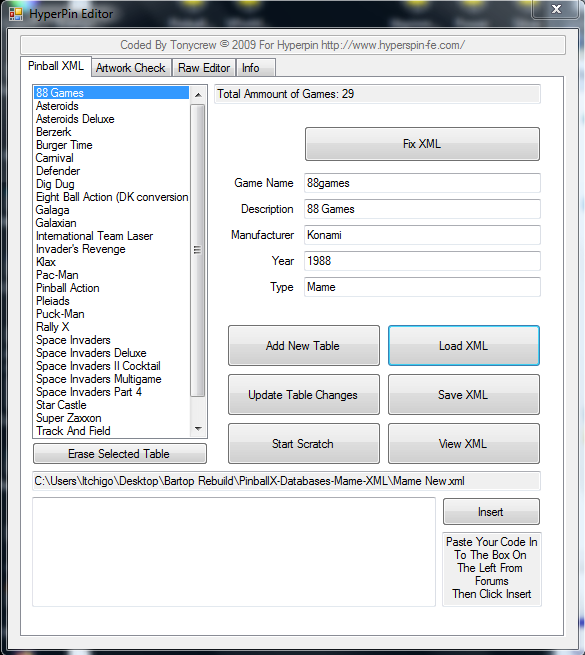
I normally use another xml as a base. I copy <?xml version="1.0" standalone="yes"?> <menu> Then I add this block for each game and change the gamename/mfg, etc <game name="beertruck"> <description>BeerTruck</description> <manufacturer>Custom</manufacturer> <alternateexe>beertruck.exe</alternateexe> <year>2002</year> <type>Other</type> </game> Then I paste the closing tags </menu> I do have the old Hyperpin editor, but I use that to check my lists and I don't create xmls with them. But if there's an error such as a missing tage, the Hyperpin editor will not open the xml, and that's not the case here.
-
So I checked my xml's and can't find anything wrong. I found 1 game that had a tittle of ' 88 Games, and I took the ' out with no success. I also tried moving the xmls (so it couldn't find the potentially bad xml) with no success. I also tried updating/reinstalling .net 4.8 and I still have the unhandled exception error in the settings wizard when I verify the setup. I don't have any Pinballx errors when verifying the setup, just a windows error about visual styles. Mame New.xml
-
I'll have to check my mame.xml then. It was the latest one I created, so it's entirely possible. I do them manually in notepad, maybe I missed a tag or something. You're right that only 1 system (Mame) is enabled as I don't think this rig could even handle vp8 lol. I was thinking that I may have a bad xml, but I loaded it in my Hyperpin Editor x64 and usually it won't load if I'm missing a tag or something. But I saw "Index was outside the bounds of the array" and didn't know what that meant. Thanks Scutters.
-
I had everything working, but now I'm getting this error. PinballX opens up and shows 0 tables, I hit select and it exits entirely. Do I have a bad xml or something? SetupWizard.log PinballX.ini log.txt
-
Actually, I have higher than that on my pincab. I think I have like 7 or 8 on the pincab running 7. But, the pincab is designed for 10, but I made it run 7 because I hate windows10. I had to use a ps/2 mouse to get 7 installed. (AMD X470 mb, Ryzen5 2600). But the pincab is much more stout, even if the build is 10 years old.
-
Thanks everyone. It works, so I'm going to roll with it. I'll check out the .net version, but the pc I made it from is very old. I don't know what it will support. I'm kind of amazed it works now because it's an old HP Pavillion with 1gb ram and no graphics card. Then again, how much pc do you need to run old 8 bit games lol. LOL! I saw he uploaded 6.96 right after I downloaded 6.95!
-
Ok, I'm not sure what happened, but it's working now. I have it to Esc quits, left/right moves the menu, and then start/select exits PinballX. I would have thought exit emulator would be the shutdown, but whatever lol. Mark that as fixed, but I can't tell you the solution other than using the start/select instead of exit emulator. FYI, PinballX will see 2 keyboards as it's working correctly with both plugged in. (I like to keep a keyboard plugged in in case I have to fix something). I still get an unhandled exception error when I'm in the setup wizard and verify, but I don't see any errors in the log or anything. The paths are correct, because Mame works correctly without errors. This doesn't affect anything during normal use. Unhandled exception.txt log.txt PinballX.ini
-
Just to add to this: I can quit the game and get to the exit menu, but not exit PinballX. I see on my cab I am using XPadder for an extra key to quit PinballX. I'm not sure why, but that's the way I had the cab working, and I looked at the cab to see how I did it there. (The cab used to be Mame and Pinball, now it's just pinball, and the bartop is all Mame). I have XPadder on the bartop, but XPadder won't see the Keywiz USB to program a key. PinballX also won't see the KeywizUSB in the Joystick settings, but it will see it in the Keyboard settings. Windows sees the Keywiz USB as another keyboard. Does PinballX recognize multiple keyboards? I don't know why I have a path error. The working path and table path are correct. It's pulling a different xml by default. I'll have to look at that further.