



|



Mike_da_Spike
-
Posts
3793 -
Joined
-
Last visited
-
Days Won
241
Content Type
Profiles
Forums
Events
Downloads
Store
Articles
Everything posted by Mike_da_Spike
-

[RESOLVED] Exiting Does Not Close PUP Packs
Mike_da_Spike replied to DJO Maverick's topic in General
I am experiencing unusual behavior, Tom. When I launch Batman 66 from PinballX and either play the game or wait for a few minutes, the closure is not executed gracefully, and the process is terminated after a timeout. However, if I simply launch the game, wait for a few seconds, and then exit, it closes promptly. My observation was that when pressing the exit button, PinupDisplay and PinupPlayer closed almost instantly, while VPPlayer and the editor remained active until the timeout. The VPPlayer stayed in the suspended status, even though the editor was no longer suspended after pressing exit. the following screenshot is just taken before I press the exit button: If I launch the same table without the front end, the 2 processes doesn't come in the suspend state. Not sure if that is causing any issue attached is the log (I also had a PinballX crash after exiting my last table) log.txt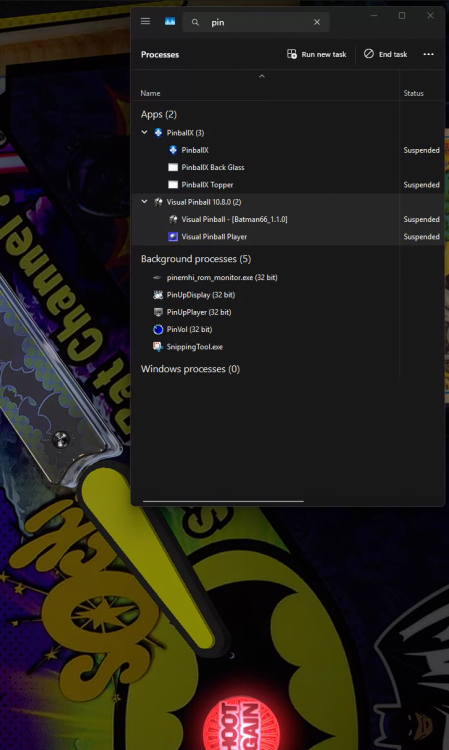
-
[RESOLVED] Exiting Does Not Close PUP Packs
Mike_da_Spike replied to DJO Maverick's topic in General
thanks for testing. No change indeed. -
[RESOLVED] Exiting Does Not Close PUP Packs
Mike_da_Spike replied to DJO Maverick's topic in General
Okay. Try disabling the plugin in PBX, and if that doesn't work, try disabling the DOF plugin in your B2B server. This is just for testing to see if it is working -
[PLUGIN] PinballX Pinemhi Challenge Table Launcher
Mike_da_Spike replied to scutters's topic in User Projects
Background for the 2.1.0 Release On my cab, I had the usual pinball systems: VP9, VPX, TPA, FP, FX3, etc. My VPX system alone contained over 1,100 tables, making it frustratingly difficult to search for a specific one. Since I mostly play tables from certain creators or groups, I wanted to reorganize my Pinball cabinet for easier navigation. My inspiration came from Robby King Pin, who structured his PinballX systems by different groups. From what I understand, he had over 50+ systems set up for VPX alone! While I wasn’t planning to go quite that far, I still wanted a better organization method. So, I started categorizing by author, with my first dedicated systems being Vpin Workshop and JP Salas. To achieve this, I used PinballX settings.exe to create identical systems for these two authors, with the only difference being the table path. Using DBM, I easily generated XML files, moved media to the newly created systems, and even transferred statistics seamlessly. Additionally, I moved all relevant files, including tables, B2S files, and any available INI/POV/VBS files to their new locations. Everything seemed perfect... until I tried launching a Pinemhi game. Unfortunately, Pinemhi couldn’t detect the correct game, since I had moved them into different systems. I realized I could set up Pinemhi individually for each system, but that would require dedicated systems just for launching Pinemhi games, an inefficient solution The Fix The best approach was to make Pinemhi aware that we have multiple systems configured similarly so that it can correctly identify and launch games without manual workarounds Setup: First make sure you have Plugin pinemhi launcher 2.1.0 : click on configure and make sure checkbox 'Search all systems with same configuration' is checked Thats it ! The only thing you need to take care of, is that you make systems, where the Working path, executable and Parameters are the same You can do it with the build in Visual Pinball system, or make them all in Other systems. In my setup, I even created a PinemHi system, added the 3 tables in it and now I can select it in PinballX from the main system view Here's an example how it looks on my cab: system.mp4
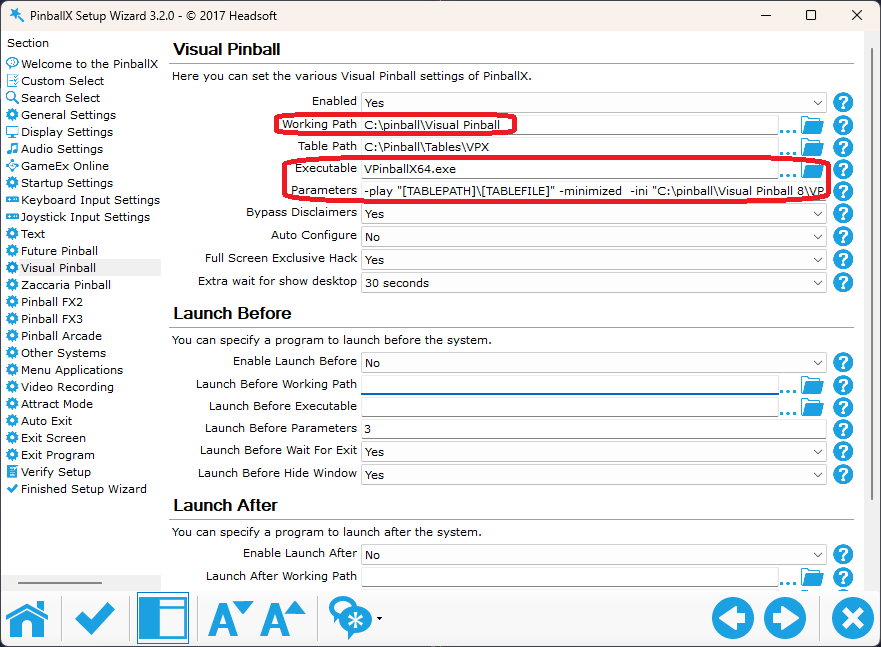
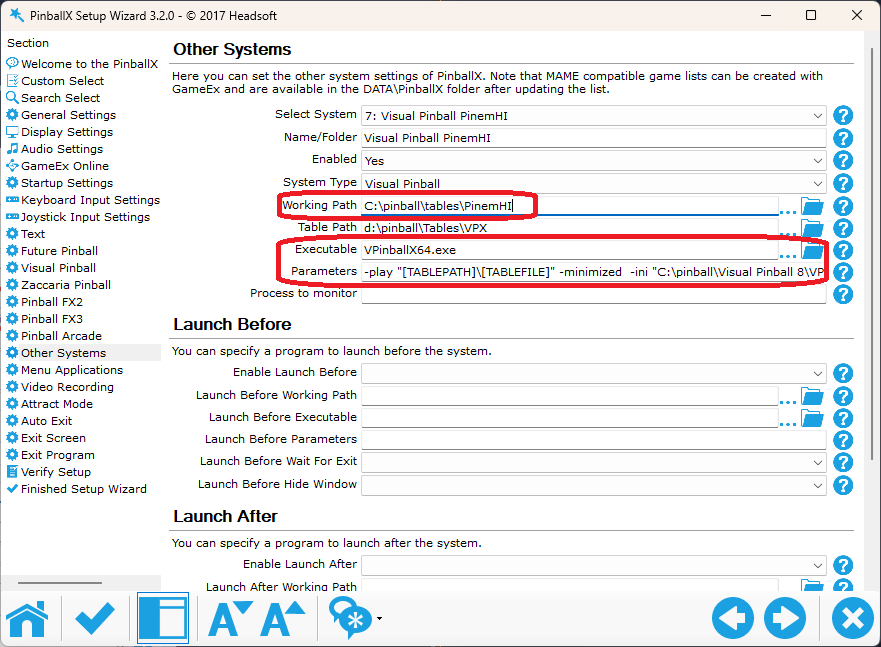
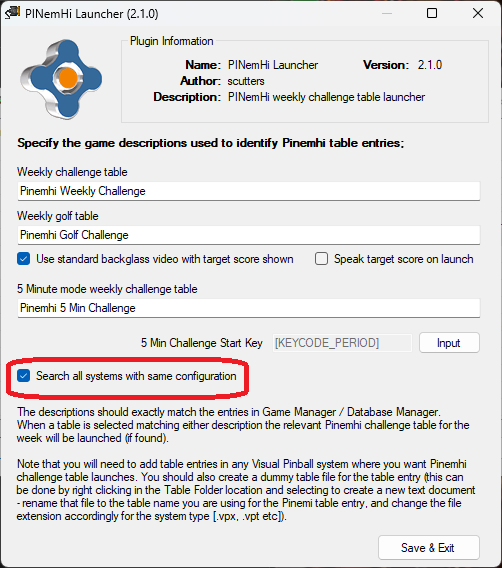

-
[RESOLVED] Exiting Does Not Close PUP Packs
Mike_da_Spike replied to DJO Maverick's topic in General
It looks like you have the same issue as I have. when you press the exit button, PinballX wants to close nicely Visual Pinball. But after sending that command, Pinballx Sees still the VP editor window open. After a timeout , it send a hard kill command, which causes that VP is forced to close, it close VP, but not all the sub processes that was opened 22:06:10.83 4/30/2025: Exit System Control Pressed 22:06:10.95 4/30/2025: Found Visual Pinball editor window 22:06:19.20 4/30/2025: Killing process 22:06:19.20 4/30/2025: Process Closed i discovered (on my system, not sure if it is yours as well) that DOF is the cull print. And not just DOF, but the Teensy implementation of it. When I remove the Teensy, from the DOF config (I actually made a 2nd system in DOF and use that) I also removed the Teensy from the cabinet.xml, and finally, I disabled the DOF plugin in PinballX. After these changes, all the tables closed quickly for me, including the PUP packs. I am not suggesting that DOF is the cause of your issue, but I noticed that you also use DOF. To be honest, I am unsure where I should address this issue. However, if you can confirm that it also functions without relying on DOF, we can align our concerns and explore potential solutions together. @Tom Speirs I still have a question. When 'Exit system control pressed' , are you closing the VP editor screen or the Player window ? I assume the editor, and that is fine.
-
I made 2 special video's which are available on FTP server as MP4. Below are preview gifs Topper DMD :
topper.gif.b8ee01f86bb650d5cf8dfd5fd5d0da3d.gif)
DMD.gif.850c47e6b2db04405ff86a4537b36759.gif)
-
@nas75is it working for you when rotating the video 90 (or 270) degrees?
-
Can you please post your pinballx.ini and log.txt files as attachments? As your pinballx launches in 270 degrees, you need your video also have in that position. Btw : Databasemanager has an easy to use rotation for videos
-
Version 25.04.27 is just released Just a small bug fix release this time. Our CEO, sharp as ever, spotted two pesky bugs while working with DBM. Naturally, we couldn't let them linger, so a quick fix was in order. And about flickering… we tackled it in the last release, but this should (hopefully) be the final step in making it a thing of the past. Your eyes deserve the best. Here an example for drag and drop, but also with the auto adding files it will look like this Old way : New way : Not the most thrilling update, but hey, smoother is better. A big thanks to @scutters for making this release happen!


- 418 replies
-
- 2
-

-
- mikedaspike
- scutters
- (and 1 more)
-
Did you read the PinballX manual? PinballX.ini is indeed the configuration file where all settings are. Each system also has an XML file in the databases directory, followed by the folder which is the system's name. The XML file with the same name as the parent folder is the main XML file. Other XML files will be shown in the lists menu.
- 1 reply
-
- 2
-
-

-
Hi everyone, When I switched from fuzzy search for DirectB2S files to exact match in B2S Server, I realized that many of my B2S files weren't properly matched with their respective VPX tables. To solve this issue, I built a simple and effective tool to scan your VPX directory and verify whether each .vpx file has a matching .directb2s file. Additionally, the tool does a cross-check for DirectB2S files, ensuring that there are no orphaned backglass files without a VPX table. How It Works: Select the VPX folder Choose a CSV output path Click "Generate CSV" Review the results in your favorite spreadsheet program Here's you can download the file : Download vpx-backglass-file-checker

-
- 2
-
-

Version 1.0.0
18 downloads
VPX & Backglass File Checker is a Windows application designed for users who use DirectB2S Match in B2S Server The VPX & Backglass File Checker is a Windows application designed to help users manage their Visual Pinball X (VPX) and DirectB2S backglass files efficiently. It scans a selected directory and checks whether corresponding .directb2s files exist for each .vpx file, ensuring that all required files for a table are properly paired. How to Use Select the Directory to Scan Click the Browse button next to "Select Directory." Choose the folder where your VPX and DirectB2S files are stored. The path will be saved for future use. Set the CSV Output Path Click the Browse button next to "CSV Output Path." Select or enter the location where the report should be saved. This path will also be remembered for next time. Choose a Delimiter Select the preferred delimiter (e.g., comma, semicolon, tab). This controls how the CSV file separates values. Generate the Report Click Generate CSV to scan the selected folder. The application will list detected files and their pairing status in the UI. A CSV report will be saved to the selected output location. -
I did a lot of testing the last couple of days. I first started to check the operating system, which had 2753 issues (according to the CBS log). When those were fixed, I still had the same issue, so I tried to check everything that was updated. I came to the conclusion that a table without a B2S file started quickly, with correct transitions, and closes PinballX in just a few seconds. Using B2S server without plugins works fine as well. It looks like VP 10.8 changes things a bit when having Visual Pinball start. When my DOF starts through B2S, PinballX is already switching from loading video to Visual Pinball. The long closure time looks like PinballX still sees the process for Visual Pinball, which takes a bit longer, waits until timeout, and then kills it. This is why it takes much longer to close for me. For now, I disabled my complete DOF (which I used mostly for lights and LEDs), and all looks stable now. So, definitely not a PinballX issue, but I am not sure where to address this. Is it b2s, PinMAME, VPX, or DOF? I am pretty sure it worked with a beta (or even nightly) version of VPX 10.8. But as I have been testing for almost two years, only working on VR stuff, I hardly focused on my cabinet. So, I want to focus more on my cabinet now, and not for testing, but just for playing.
-
Just curious, are you selling virtual pinball cabinet with pre-installed software ?if so, do you have a link?
-
Ok,sorry. I didn't understand you tried it. Did you updated pinballx as well To latest ?
-
did you try to copy boths files to the tables folder as @scutters mentioned in the linked post ? or are all the B2Sserver files in the sme directory where tables exists ?
-
Your are also using an older version of Pinballx. 6.11you have and Tom just released 6.59
-
Please provide your PinballX log file and your configuration file (pinballx.ini). Did you install the LAV codec as well?
-
Check the first post in this thread; that's where my files are.
-
I will do a deep dive on this. Both PCs have different purposes, but the hardware should be the same. Only my development PC has an OEM build on it. Something I will check in the coming weeks.
-
Just put this issue on hold. I noticed that my complete cab is slow, compared with my pc. Not sure what's going on, but a direct table launch from command line on my pc takes around 3-5 seconds and my cab around 19-21 seconds. Maybe that's causing why the transition from loading videos to table has some black screen time.
-
That's odd, as the parameter should be "-gamemode hotseat_2" instead of "-hotseat_2" same as the other parameters, I see i your INI file as well "-class -hotseat_2", this doesn't make sense as classic mode doesn't have players selection, thats only hotseat the other parameters that Pinball FX has (like "-gamemode Challenge_BallLimited") should also work. There are more mode's especially for PinballM, but couldn't find the parameter of it)
-
I reviewed your initialization file this morning, and it appeared correct. Please follow the procedure demonstrated in the video: open a command prompt, navigate to your Steam directory, and execute steam.exe using the parameters shown in the video. This should resolve the issue. If the problem persists, a malfunction with your pinball machine is suspected.
-
Nice one ! glad all sorted out
-
Edit the post and delete my previous response I tested it again, but now with correct parameters : 2025-04-20 06-44-19.mp4 As you can see in the video, it is launching for 2 players Did you enable cabinet mode In Pinball M ?


