



|



joyrider3774
-
Posts
811 -
Joined
-
Last visited
-
Days Won
63
5 Followers


joyrider3774's Achievements

GameEx God (Top Rank) (5/5)
295
Reputation
-
according to zaccaria pinball developper, you need to disable steam's online mode to offline in settings, when doing this according to them there will be no dialog displayed and the tables should continue to load

-
 more versitale is not really possible, well it is but it would break compatibility with previous installs as the ini file saves fully written word letters, which i have to change to just numbers then. Its possible todo but would require more work. What i could easily do however is instead of doing 4x5 is do 5x4 if thats fine ? edit: here is the 5x4 version: PinballFX3Launcher.zip
 -
12 is indeed the maximum, i downloaded delphi community edition again and quickly adapted the launcher program a bit. It now should support 20 buttons however the layout did change it's now 4 rows and 5 columns due to this i had to increase the launcher window size from 800x600 to 1000x800. (so you may need to adapt your background pictures). Button sizes remained the same (175 pixels) Here is the attached launcher exe (only), give it a try and see if it's ok. launch it once to make it expand the ini file with the new buttons (so you don't have to). it should be possible to just replace the current executable(s) you have I did not test it though i mean the launching capability but i think it should be fine, if not let me know PinballFX3Launcher.zip

- 18 replies
-
- 1
-

-
- mikedaspike
- xml
- (and 2 more)
-
In my guide all the way on the bottom i have a "history" section now, where i say per date (usually release dates of dlc) what i added to tablename list it makes it easier for people to see what the new additions were so can always check on that
- 18 replies
-
- 2
-
-

-
- mikedaspike
- xml
- (and 2 more)
-
no with latest update there are 9 new tables, and after you had made the xml / playlist i found out 3 tables were missing from xml / my guide so you are probablly missing all of these : i added treasure also but you can only launch it if you had unlocked it in campaign mode 2025-11-06 Added "Aerobatics Deluxe" to Table Name List Added "Combat EM+" to Table Name List Added "Earth Wind Fire EM+" to Table Name List Added "Farfalla EM+" to Table Name List Added "Spooky EM+" to Table Name List Added "POSTAL Brain Damage SS" to Table Name List Added "POSTAL Brain Damage 2025" to Table Name List Added "POSTAL Brain Damage Retro" to Table Name List Added "POSTAL Brain Damage Deluxe" to Table Name List 2025-10-19 Added missing "Battle Tank" to Table Name List Added missing "Tropical Retro" to Table Name List Added missing "Treasure" to Table Name List
- 18 replies
-
- 1
-
-
- mikedaspike
- xml
- (and 2 more)
-
@Mike_da_Spike zaccaria just got updated, it contains 9 new tables. They also invented a new table type mainly "EM+" which are more advanced electro-mechanical pinball tables which also include such features specific to the modern pinball tables, like more advanced layout, prism lamps, ear catching music tracks, more challenging rules. There are 4 new tables added related to the postal franchise and also aerobatics deluxe. Check the history on the bottom of the guide if you want to easily add those btw the 3 earlier ones i added might also still be missing. Just notifying so you are aware not a push to update. Btw they also made it possible now to select 5 ball games and selecting user physics from commandline (i updated that in the guide as well)
- 18 replies
-
- 1
-
-
- mikedaspike
- xml
- (and 2 more)
-
there were 3 tables missing in my list. Someone actually went through the list and told me which: Added missing "Battle Tank" to Table Name List Added missing "Tropical Retro" to Table Name List Added missing "Treasure" to Table Name List That's a total of 171 tables the game has i think thats more than zen might have at the moment 27 Remakes 27 SS 14 EM 4 Primal 8 POSTAL 1 Zombie Invasion 40 Retro 29 Deluxe 19 Award 1 Treasure 1 Viking
-
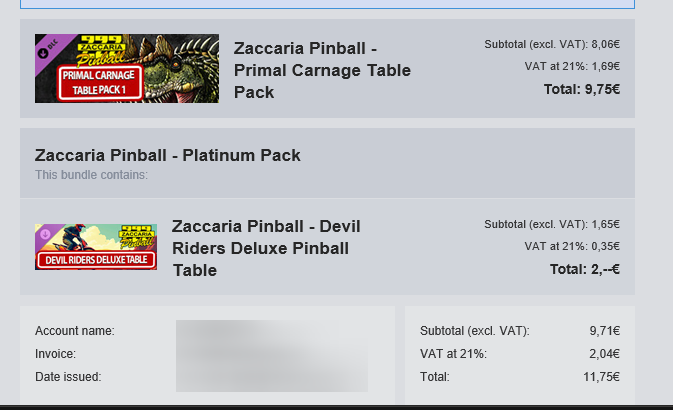
I had bought the platinum pack in the past. If you rebuy platinum pack the prices are (almost) half like i bought the devil riders deluxe table at 2€ or so due to that. I'm not sure if they are going to keep that perk or not. the primal carnage price is probably due to it being licensed tables, similar like to what it was with the postal tables
-
@Mike_da_Spike 5 new tables released today in 2 packs these are the names: Devil Riders Deluxe Primal Carnage SS Primal Carnage Deluxe Primal Carnage 2025 Primal Carnage Retro
- 18 replies
-
- 1
-
-
- mikedaspike
- xml
- (and 2 more)
-
The initial work was done a few years ago, but the tables names almost always follow a pattern. [NameTable] Retro [NameTable] Deluxe [NameTable] [year] (remake tables) [NameTable] (original) There are a few exceptions like for example mexico deluxe it uses a different base name for the deluxe table compared to retro, but usually i test them out from commandline and with zaccaria pinball you can easily see if it's correct as the game quits immediatly when a bad table name was given. For some tables they also mention the name in the DLC listings on steam (i think this was the case for the postal ones). But generally they use the displayname and you can find that name in the top left when a table is selected. As for the years you can find those on the table selection menu inside the game Also please let me know if i have missed a table or if there might be a typo in one of the table names in my guide, as they are case sensitive and i had made such fault before in the steam guide. Most of them i did test out manually from commandline but you never know
- 18 replies
-
- 1
-
-
- mikedaspike
- xml
- (and 2 more)
-
I've bought them in the sale also and have been playing the quests and tournaments a lot. No i don't have a new xml, i have not booted my pinball cabinet in a long time but i do enjoy playing zaccaria and pinball fx from time to time on my pc or steamdeck. I thought i would mention the changes i did normally thats what different with the current xml (unless maybe also the postal table not sure those were added already in the xml i had). but i have not been doing anything with my cabinet, i find i can play better and reach higher scores with my controller (especially when it comes to nudging tables)
-
I noticed this week zaccaria has gotten new tables and modes and so and been playing it a bit on my pc (not on my cabinet) so I've updated my steam guide, to add the newly added table names to the list as well as commandline parameters for the vr mode (provided by steam user mickey) as well as added the timeloop game mode info. Just for what it's worth these are the ones i added and may need to be added to the xml's of pinballx if people have not done so already. Blackbelt Deluxe Boxing Club Casino Cine Star Retro City Golf Cleopatra Clown Deluxe Earth Wind Fire Deluxe Future Gladiators Future World 2018 Future World Deluxe Future World Retro Gangsters Granada Retro Granada Deluxe Lucky Fruit Retro Magic Castle Deluxe Mexico Deluxe (this is not a typo, Mexico '86 Deluxe did not work) Moon Flight Retro Moon Flight Deluxe Pinball Champ Deluxe Pool Champion Deluxe Red Show Deluxe Soccer Kings Deluxe Star God Deluxe Star's Phoenix Retro Star's Phoenix Deluxe Strike Retro Supersonic Deluxe Time Machine Deluxe Top Hand Retro Tropical Deluxe Vampire Viking (artwork editor table) Wild Games Winter Sports Retro Wood's Queen Retro
-
only way i have ever gotten pinball FX from epic to work with epic services activated (so you are online and can submit scores to leaderboards) and do table launch is by using legendary but if your cabinet is always offline just link to epic's version exe directly as thats much easier but if you want to be online and have online score submission try this : Basically you can use legendary https://github.com/derrod/legendary to do this. First you download legendary.exe from release somewhere and run a cmd prompt. Then you normally do legendary auth to authorize yourself with epic games, once authorized you normally do legenday list to find the pinball FX game's appname but i know it's 56a31432931740cdb0112d237d7d65aa so what i did then is import my current Epic's pinball FX install location ("i:\Games\Epic Games\PinballFX") using legendary import 56a31432931740cdb0112d237d7d65aa "i:\Games\Epic Games\PinballFX" it should say it imported the game fine Once that is done you can launch the epic version using legendary using following command to launch wild west rampage table in classic mode legendary launch 56a31432931740cdb0112d237d7d65aa -Table 75 -GameMode Classic and basically thats the command you use in your frontend as well. Or you could also check which command legendary uses to make this work by running legendary launch 56a31432931740cdb0112d237d7d65aa --dry-run -Table 75 -GameMode Classic and it will show you the parameters it passes to pinballfx.exe intermediatary launcher (for unreal engine games), suffice to say never share that commandline with anyone as it will contain login credentials you only need to do the import and auth once (unless you get logged out or so) and then you can always do the 3rd launch command and use that in your frontends in theory once you did the authorization and import of the game you can then use always the last command to make it work from within pinballx but i never bothered with that. Steam version is way easier to use and i switched from epic to steam at the time early access ended
-
[RESOLVED] Flash not working on new installed PC
joyrider3774 replied to Mike_da_Spike's topic in General
i'm not sure but if i remember correctly they released a new file (not sure if it was the ocx file) that had a permanent block inside it to load it but i'm not sure this whats causing it. potentially the older file did not have this block yet if it is the cause