



|



Mike_da_Spike
-
Posts
3790 -
Joined
-
Last visited
-
Days Won
241
Content Type
Profiles
Forums
Events
Downloads
Store
Articles
Everything posted by Mike_da_Spike
-

Trying to Control Fx3 with legends pinball machine.
Mike_da_Spike replied to Izzylm9's topic in General
According to your log, your FX3 is not a legitimate FX3 install, but a piracy one. This approach is completely incorrect. Zen FX3 is a game available on Steam, and the only way to obtain the correct version of FX3 is to download it from Steam and utilize all its components. Adding a pirated version as non-Steam makes no sense—why would you launch it through Steam if you don't want to use Steam? Here's a video how to install the legend FX3. Including all After downloading it from Steam, you can use Joyrider's Fx3 launcher to select multiple game types as well. See the setup. https://github.com/joyrider3774/PinballX_Launcher_app If you continue to experience issues with your controller, please contact the retailer where you purchased it. -
Sounds from Pinball X playing during loaded FP Game
Mike_da_Spike replied to GuyMan's topic in General
I've never encountered this issue before. PinballX usually halts the audio. I use both FP and VP and have never experienced this myself. The strange part is, why would it play audio from another table? Are you certain you're not launching two instances of PinballX? The log indicates that backglass windows was initiated twice, although this entry is supposed to occur only once. 20:45:34.68 7/10/2024: C:\Games\Future Pinball\BAM\FPLoader.exe /open "C:\Games\Future Pinball\Tables\Aliens Legacy ULTIMATE Pro 1.03.fpt" /play /exit /arcaderender 20:45:40.30 7/10/2024: Created DirectX BackGlass Window 20:45:40.80 7/10/2024: Main display running full screen windowed. 20:57:29.95 7/10/2024: Created DirectX BackGlass Window 20:57:30.65 7/10/2024: Main display running full screen windowed. 20:57:36.71 7/10/2024: Exiting Can you try to alt-tab during game when you have the audio of another table, to check where it is coming from ? -
Sorry, I have a real dmd, so not able to test your setup
-
New System in Frontend, Defaults to other VPX Settings
Mike_da_Spike replied to Fiery Phoenix's topic in General
@Tom Speirs Today I experienced 1 time a load of a table that let PinballX get in a hung status as well : checking the log the last lines are : 06:43:40.53 10-7-2024: C:\pinball\Visual Pinball vr\VPinballX64.exe -play "C:\Pinball\Tables\VPX\Kiss (Bally 1979)_Bigus(MOD)3.0.vpx" -minimized -ini "C:\pinball\Visual Pinball VR\VPinballX64.ini" 06:43:40.59 10-7-2024: C:\Pinball\PinballX\vpauto.exe 06:43:44.42 10-7-2024: VPX Full screen exclusive mode detected 06:43:44.42 10-7-2024: VPX Full screen exclusive focus hack set 06:43:49.70 10-7-2024: Found PinMAME ROM: kissc 06:43:52.54 10-7-2024: Visual Pinball Player window foreground: 12 Closing the screen and rerun PinballX , all is working fine for the same table anything that can be optimized after launching the game and checking VP ? PinballX.ini log.txt
-
I don't use pups normally, so added pinup player to my system and added batman 66 to my system. I launched it with VPX 10.8 through PinballX, and the Pup shows fine for me. it also loads credits.mp4 with sound and video I made a video of it : I use the following versions : VPinballX-10.8.0-1975 64bit VPinballX_GL-10.8.0-1975 64bit PinUpDisplay_v150_beta_3 VPinMAME-sc-3.6.0-998 64bit B2SServer-2.1.2 attached also my log and ini file for reference PinballX.ini log.txt
-
I don't know the code of pinballx, so not 100% sure. But you don't use b2sserver in frontend. And if you use Pupplayer, the b2s file isnt needed as all should be in the pupplayer. Pupplayer is completely based on vlc for playing videos. Pinballx uses his own dx9 window. So I would say it doesnt have to do with it. But who am I ? Just thinking out loud : so the video is played, but behind the b2s file and only during attract mode? Is that what I hear ? If you rename the b2s file extension , so it wont load by b2sserver, will it show properly ?
-
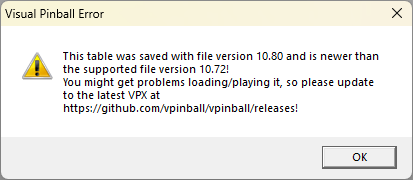
IDK. I use a real DMD and won't capture anything with DBM I capture sometimes manually the output to make a nice logo of it and create the follow video to be displayed on my DMD : it's just working as it should. The table file was saved in a newer version of VPX and could have some problems. Workaround : Open the table with a lower version (10.7.4 in your case), ignore the message and save the table. You won't get the popup again

-
Hey, can you post a video of what's happening? I know Pinup Player tries to keep VPX in front, so if any video goes to the back, it could be caused by that too. But if you show a video, we'll have a better idea of what's going on.
-
Trying to Control Fx3 with legends pinball machine.
Mike_da_Spike replied to Izzylm9's topic in General
If you install x360ce, it should work. I have a legit fx3 from steam and I put x360ce in the directory and it works perfectly. I don't have a legends pinball, but if you configure x360ce correctly it should work. By the way, for Fx I set up the steam controller and it works fine with the front end. Fx3 is also launched via steam and not directly on my cab. -
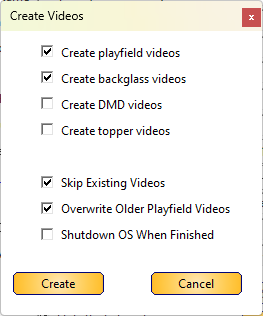
We (scutters and myself) use that as well. But thought behind it, is that not everyone wants the backglass video, but if you select the bg video in bulk videos, it will ignore the setting. I mostly use bulk video's, so I never forget a video to create
-
I've read more about the issues with Batman66 and VPX10.8. Is it necessary to use the GL version rather than the standard DX version? Does the DX version produce the same results? You said this issue doesn't occur with Popper. What are the command line parameters from Popper to launch this file? Perhaps opening a GitHub issue or inquiring on VPF or VPU forums would be the best approach, as the command line seems to yield the same issue.
-
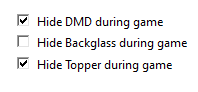
Thanks for the file. With your file and the code, I came to the following conclusion. if you have set the "Hide Backglass during video" for a table the 'Create Video' button will not create a backglass video (this is a PinballX limitation). Your PinballX log file shows : 21:04:30.64 7/7/2024: Hide DMD 21:04:30.64 7/7/2024: Hide Topper 21:04:30.64 7/7/2024: Not Hide Backglass! 21:04:30.64 7/7/2024: Waiting for threads If you use the ' bulk video' option And set the 'create backglass videos' to enabled it will ignore the "Hide Backglass during video" and make the video if you want it for a single file, simply check the checkbox , create the videos and uncheck it again This was created by design like this
- 418 replies
-
- 1
-

-
- mikedaspike
- scutters
- (and 1 more)
-
Can younpost the databasemanager.INI ? Your logfile of pinballx shows that your dmd is not hide. Therefor pinballx will not record the backglass, my assumption is that you uncheck rhe record of backglass in dbm
-
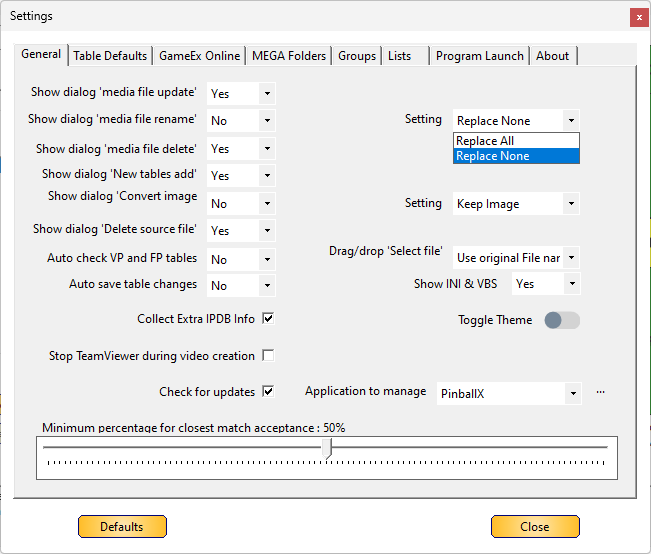
Renaming a table will not result in the loss or deletion of a Media file by Database Manager. In fact, renaming a table name is harmless, as the Database Manager will uses the table's filename for media files. Changing the table's filename will prompt by default a message dialog if you want to rename the associated media files accordingly to the new name. If you do not receive this message, it means you have opted out of this dialog, and you have two choices: to rename or not to rename. Should the Database Manager delete a table (by pressing the delete button, or by adding a new video), it will move the deleted media to the Windows Recycle Bin.
- 418 replies
-
- 1
-
-
- mikedaspike
- scutters
- (and 1 more)
-
The error indicates that the plugin cannot be found. PinballX is not related to the DOF directory location. It searches for the COM object that is registered when you install DOF or when you run RegisterDirectOutputComObject.exe. If only the Teensy is not working, the new location may not have the correct Teensy configuration (directoutputconfig30.ini), or your GlobalConfig_PinballX.xml may not correctly refer to a config file in <CabinetConfigFilePattern>, or this file may not have the Teensy board configured. We have also discussed issues with your MX LEDs in other posts. Everything was working until something was done that disrupted your system. Please refer to the following post (and the complete thread) to understand how everything is working:
-
New System in Frontend, Defaults to other VPX Settings
Mike_da_Spike replied to Fiery Phoenix's topic in General
Gotcha! That's a line I also removed -
New System in Frontend, Defaults to other VPX Settings
Mike_da_Spike replied to Fiery Phoenix's topic in General
May I know which parameter you are referring to? -
New System in Frontend, Defaults to other VPX Settings
Mike_da_Spike replied to Fiery Phoenix's topic in General
I think you should disable the vpx full-screen hack in the vpx system. It only worked for me with the DX version , not with GL. -
New System in Frontend, Defaults to other VPX Settings
Mike_da_Spike replied to Fiery Phoenix's topic in General
The update will not affect your media, database, or configuration. Only the necessary files will be updated. For more information, please refer to the documentation on how to perform an upgrade. -
New System in Frontend, Defaults to other VPX Settings
Mike_da_Spike replied to Fiery Phoenix's topic in General
There's in that window a pull down called "system type" for fp, vpx others -
New System in Frontend, Defaults to other VPX Settings
Mike_da_Spike replied to Fiery Phoenix's topic in General
Besides what scutters is mentioned, you can try to setup the system type as "other" instead of "visual pinball" -
New System in Frontend, Defaults to other VPX Settings
Mike_da_Spike replied to Fiery Phoenix's topic in General
After copying the new files for Pinmame, did you run the setup64.exe and click "Install" to update to the latest DLL? -
New System in Frontend, Defaults to other VPX Settings
Mike_da_Spike replied to Fiery Phoenix's topic in General
To be honest, I don't see errors in the log, only some warnings. The message dmddevicepup.dll is outdated is because that dllis older than x months and dmdext throws this warning. It just expects that it is updated at a point. I see you run dmdext 2.2.2. That's updated recently as well. As I said, I don't use puppacks during fx3, I just use native dmdext and that's working for me As zen fx3 just uses the dmdext and dmddevice from a specific path, maybe try to use an slightly older version. -
New System in Frontend, Defaults to other VPX Settings
Mike_da_Spike replied to Fiery Phoenix's topic in General
You properly won't use Freezy's DMDext, but Nailbuster his clone for showing the DMD. I don't use Puppacks for FX3, but thought that are 'driven' by DofLinX and dofLinx uses DOF. Is this only in the dmddevice.log ? or you really get an error message popup All the components uses each other. so Not sure what you did or not -
I use the pinballX capture . It is a 1 click, that first capture the PF via nvidia and rotate the playfield and 2nd it capture the backglass. I don't mind that the bg isn't synchronized with the pf. For me a 1 click that capture all and doing it via dbm, it also power off my cab after finishing
