|



Mike_da_Spike
-
Posts
3794 -
Joined
-
Last visited
-
Days Won
242
Content Type
Profiles
Forums
Events
Downloads
Store
Articles
Everything posted by Mike_da_Spike
-

New System in Frontend, Defaults to other VPX Settings
Mike_da_Spike replied to Fiery Phoenix's topic in General
After copying the new files for Pinmame, did you run the setup64.exe and click "Install" to update to the latest DLL? -
New System in Frontend, Defaults to other VPX Settings
Mike_da_Spike replied to Fiery Phoenix's topic in General
To be honest, I don't see errors in the log, only some warnings. The message dmddevicepup.dll is outdated is because that dllis older than x months and dmdext throws this warning. It just expects that it is updated at a point. I see you run dmdext 2.2.2. That's updated recently as well. As I said, I don't use puppacks during fx3, I just use native dmdext and that's working for me As zen fx3 just uses the dmdext and dmddevice from a specific path, maybe try to use an slightly older version. -
New System in Frontend, Defaults to other VPX Settings
Mike_da_Spike replied to Fiery Phoenix's topic in General
You properly won't use Freezy's DMDext, but Nailbuster his clone for showing the DMD. I don't use Puppacks for FX3, but thought that are 'driven' by DofLinX and dofLinx uses DOF. Is this only in the dmddevice.log ? or you really get an error message popup All the components uses each other. so Not sure what you did or not -
I use the pinballX capture . It is a 1 click, that first capture the PF via nvidia and rotate the playfield and 2nd it capture the backglass. I don't mind that the bg isn't synchronized with the pf. For me a 1 click that capture all and doing it via dbm, it also power off my cab after finishing
-
New System in Frontend, Defaults to other VPX Settings
Mike_da_Spike replied to Fiery Phoenix's topic in General
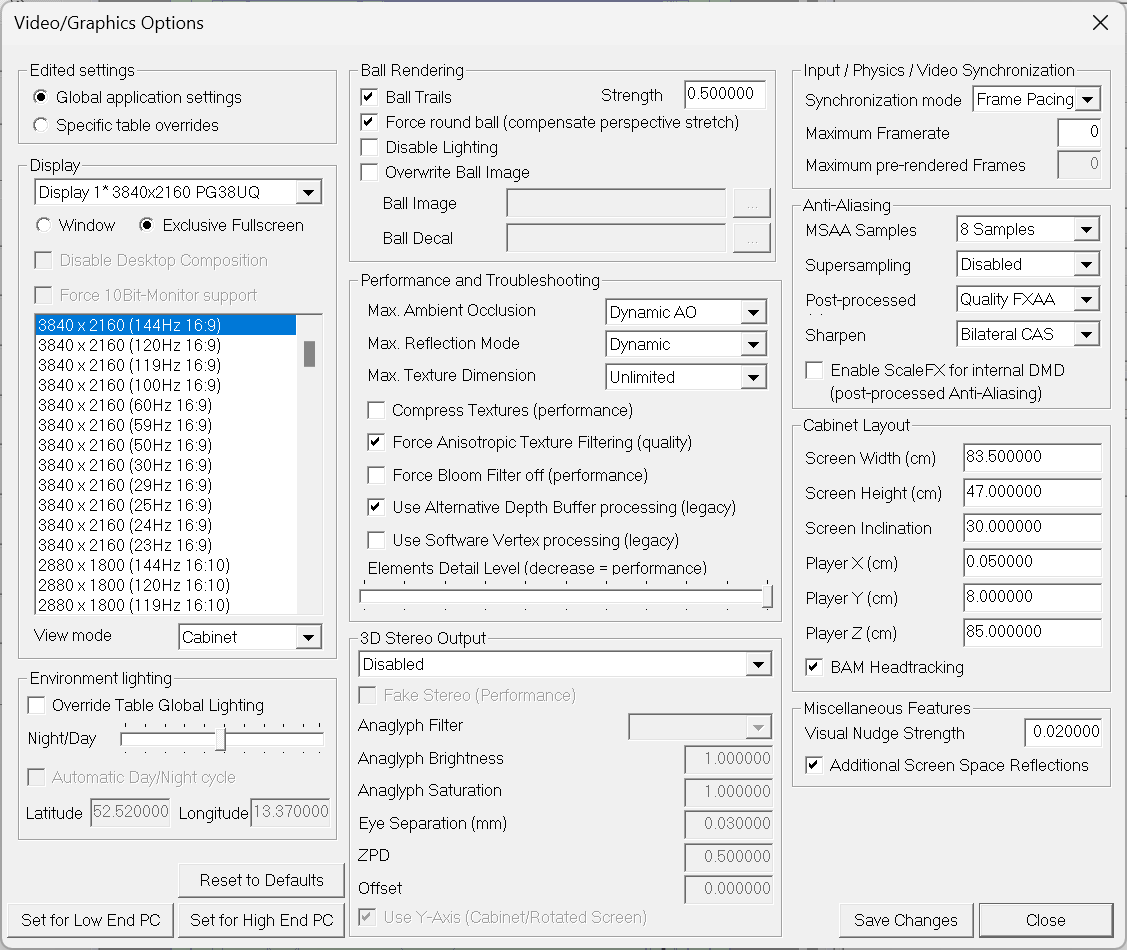
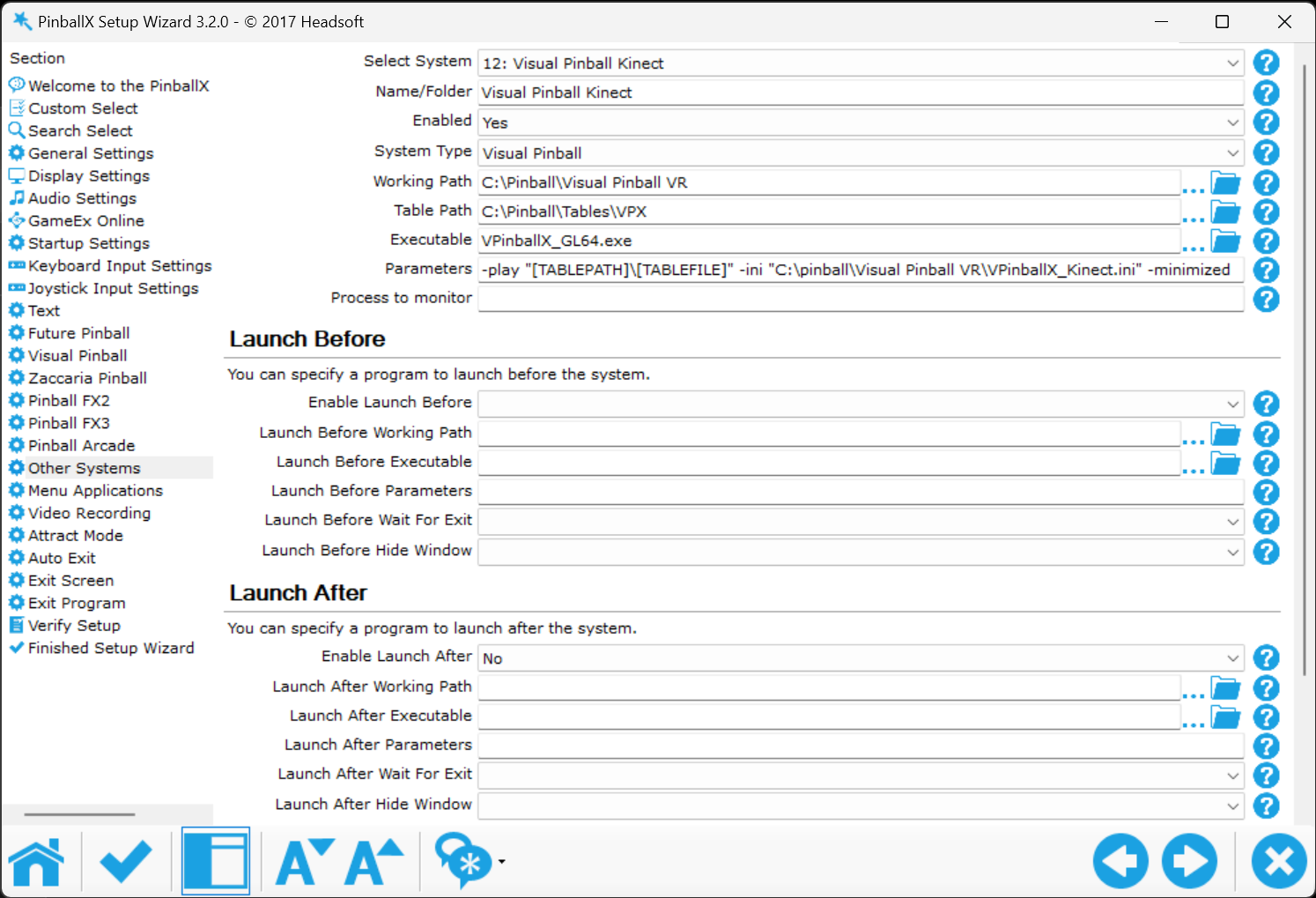
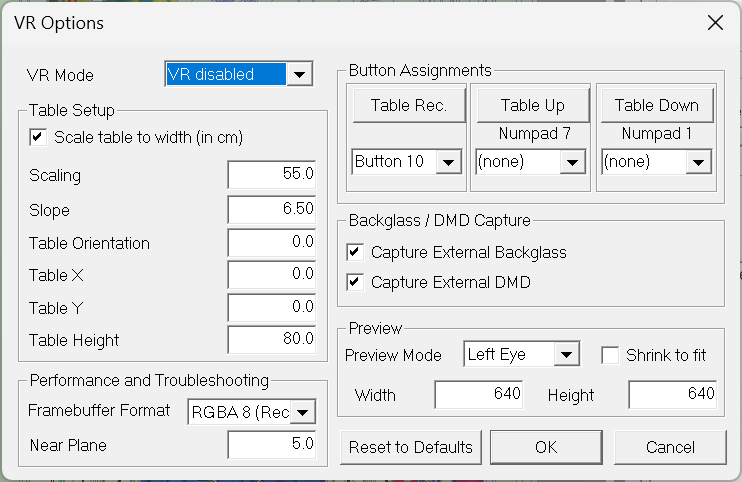
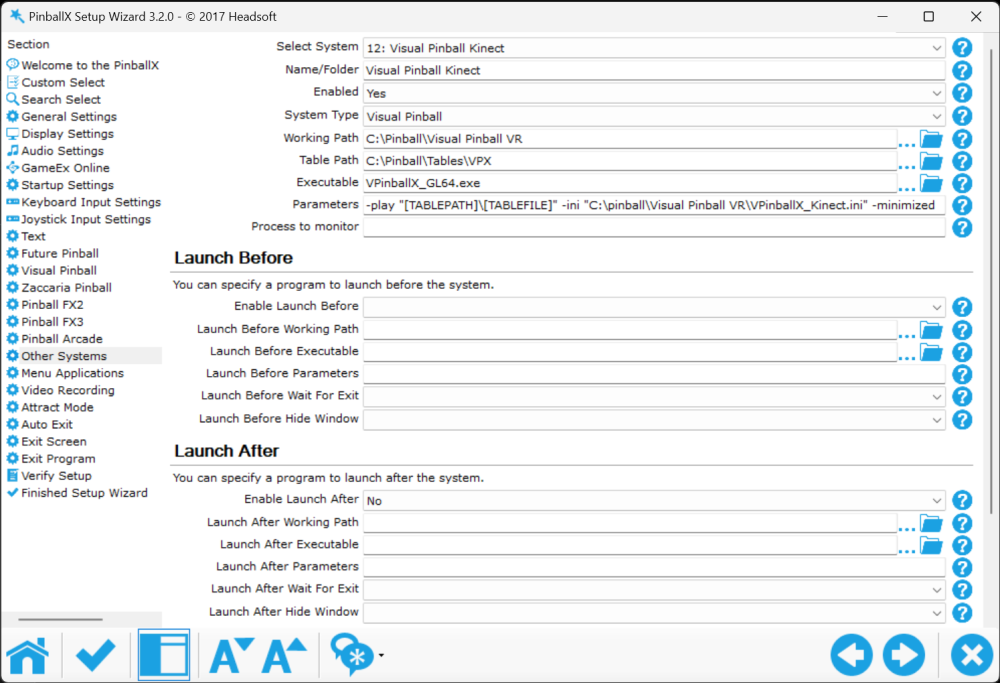
Not sure if it is working, But here are my settings from my cabinet 9I user GL for VR and Kinect, But the following are from the kinect setup (as I think that is closest to your setup) : VP settings : VR settings (as I don't use VR in this setup, I disable it) And my PBX system : I tested it with PBX as admin and with VPX as admin and all worked. I suspect that vpinmame is not up to date; otherwise, Tom needs to examine the code.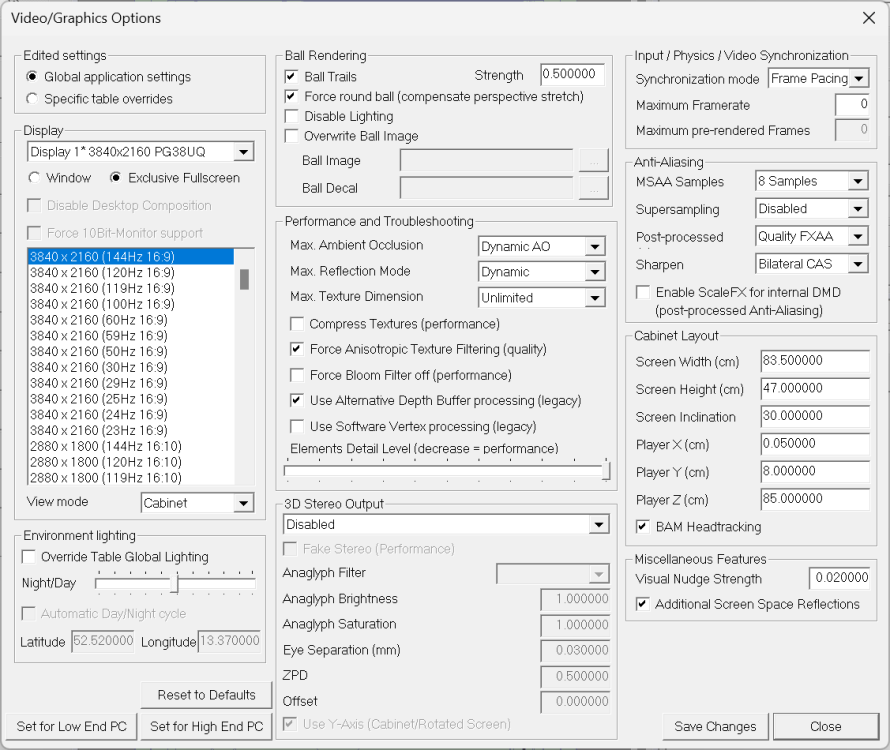
-
looks like this is the correct log for cabinet. not sure if this is the log when it failed or not. I know something about DOF, but I see a lot of errors in the log file, so not sure if that is causing an issue. try to reach out to Outhere on VPF. I thought he is the DOF expert now a days and maybe can help you.
-
Hi Lane, Thank you for your kind words. This is exactly what Scutters and I created it for: to make things easier for people. And your words really touched me (yes, I'm a sensitive person on some days of the year 😛 ).
- 418 replies
-
- 2
-

-
- mikedaspike
- scutters
- (and 1 more)
-
You can use the recording button to record all missing tables as well. Can take up some time, but will do all automatically
-
Hey, do you also use DOFlinx? If so, did you load it before starting PinballX? The DOF plugin for PinballX uses the DOF COM object. If your Teensy board isn't loaded, check your DOF log to see why it's not working. PinballX just passes the commands to DOF, and DOF handles them.
-
New System in Frontend, Defaults to other VPX Settings
Mike_da_Spike replied to Fiery Phoenix's topic in General
My guts says its not vpauto, but the process that will monitor vp after vpauto is launched(set to foregtound, check rom etc). @Fiery Phoenixcan test this by renamin vpauto.exe from the pinballx directory. Tom told me once to do it for some tests as I had same behaviour when using freezy dmdext 1.x during Pinballx . But thats my assumption as I don't know the code of PinballX. And a launch after will only work when exit is pressed and Pbx is already in a hung state at the moment. -
New System in Frontend, Defaults to other VPX Settings
Mike_da_Spike replied to Fiery Phoenix's topic in General
It more looks like Pinballx is in a loop during starting and validating the table. It kicks off the command line with parameters. It starts vpauto.exe but think it will check if vp is running, but cannot find it and looping ans PBX is getting in a not responding state. @Tom Speirsanything in code that could be done better? -
I think it is not updated after 2021 anymore,but not sure. Start indeed with command line. If that is working, you can add it to pinballx. Joyrider made a good tutorial with all the command line parameters, so must work !
-
New System in Frontend, Defaults to other VPX Settings
Mike_da_Spike replied to Fiery Phoenix's topic in General
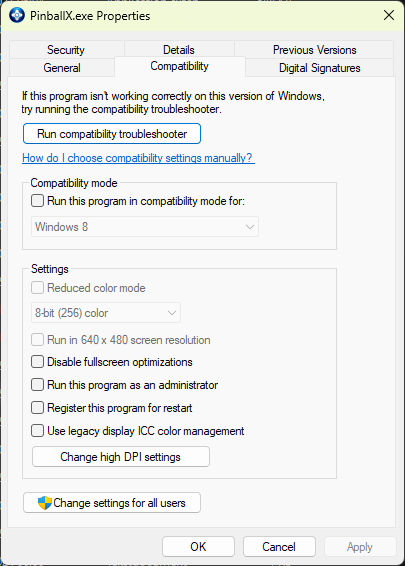
I did a test this morning with your PinbalLX.ini and VPX3d.ini I only renamed the INI to my VR setting, so it would be easy to us and changed the paths in PinbalLX Attached is my logfile. I launched multiple tables and they where all in 3d anaglyphic ! My thought is, that something in your setup is not up to date. So let's check step by step. Although I don't think it is an issue, your pinballX is running a few versions behind. So update this one I still see you run PinballX as administrator , that's really not needed. I have UAC to default level on cab and test system, and nothing will show a UAC popup We (Scutters and myself) advised it in the past as it worked better, but nowadays it should work without running in a higher privileged environment Try to set UAC to normal level and remove and remove run as admin from PinballX.exe (or any of your startup files) I'm really not sure about you VP setup, but for the core you need : VisualPinball 10.8 RC4 GL . Download this again and make sure you copied all the files (not only the exe) to your VP 10.8 directory Release Visual Pinball X 10.8.0 Release Candidate 4 · vpinball/vpinball (github.com) PinmameV3.6 Download and overwrite the files Release v3.6.0-998-a77c2d2 · vpinball/pinmame (github.com) I use the VPinMAME-sc-3.6.0-998-a77c2d2-win-x64, but up to you B2sServer 2.1.2 Download, overwrite all files and register the new file Release B2S Server v2.1.2 · vpinball/b2s-backglass (github.com) Try it with all of these above suggestions. Enough homework for you , please let me what happen log.txt
-
Using hardware capturing will be a 1 time click as you did with 10.7 as well. See It's an old guide, but still valid
-
For GL record playfield I would prefer to use the nvidia hardware capture as gdigrab won't work correctly. I capture videos for gl and works like a charm for me Btw. Database Manager can rotate videos with a single click (per table)
-
New System in Frontend, Defaults to other VPX Settings
Mike_da_Spike replied to Fiery Phoenix's topic in General
Can you send me some screenshots of your VPX video settings when you launch it with the VPX3D.ini file? I'll compare them with mine and see if we can figure out what's going on. Oh, and by the way, you don't need to run PinballX as an administrator anymore. That only necessary for debugging. Give it a try without admin privileges and see if that makes a difference. -
Thanks @Draco1962! Really appreciate it i will look tomorrow to ftp and if there are missing xmls, I will add them as wel Scutters and I have it on our 'future' list to add it into DBM as well, but it's hard to create the list dynamically. So it must be static , and as we are IT folks (read 'lazy people') we don't want to update a list every time. And it's been on our list for a couple of years already
-
I still use joyriders his xml. I never bought the later tables, so mine is from2021 as well. Maybe a good idea to add a sub category with xmls for systems @Draco1962(as you mentioned before)?
-
It's disappointing. I dedicated two hours to testing, installing, taking screenshots, and typing a post with all the necessary information because you mentioned it wasn't working. Yet, you request the XML, which had already ben posted. Nevertheless, being the nice person that I am (no comments, @scutters ), I've included it here once more. Zaccaria.xml
-
New System in Frontend, Defaults to other VPX Settings
Mike_da_Spike replied to Fiery Phoenix's topic in General
-extminimized force it to exclusive full screen, that's why I asked to change it. I had the same issue with VP 10.8 and PinballX a year ago, but I can't remember how I fixed it. I use GL for VR and Kinect, both from PinballX, and everything works fine now. But a lot was changed in the past year: pinmame, b2sserver, dmdext etc. So could be one of those as well -
New System in Frontend, Defaults to other VPX Settings
Mike_da_Spike replied to Fiery Phoenix's topic in General
@scuttersis using anaglyphics as well. But he is still using 10.7.x. He likes it as well and has multiple glasses to play with friends. Did you check to change the launch parameter for gl?. I need to check, but even think I skipp the -minimized with the gl version -
New System in Frontend, Defaults to other VPX Settings
Mike_da_Spike replied to Fiery Phoenix's topic in General
just curious, Are you using VR or headtracking with the GL version ? -
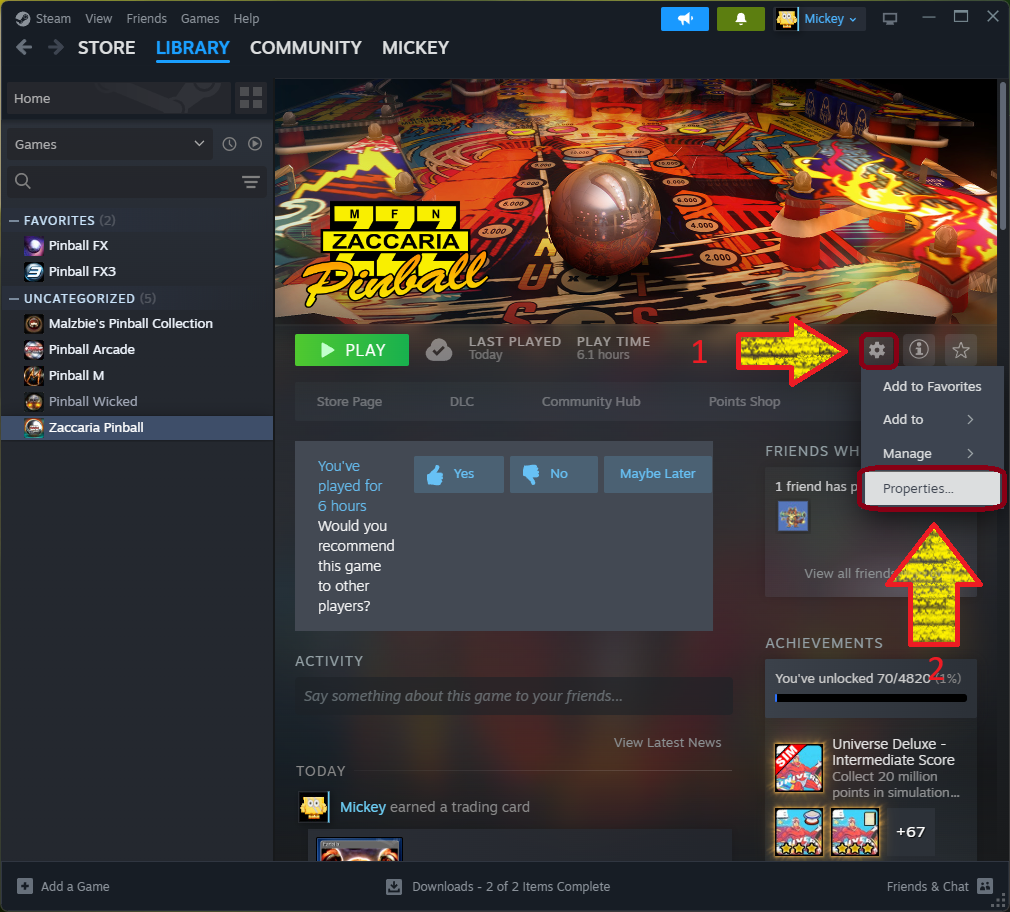
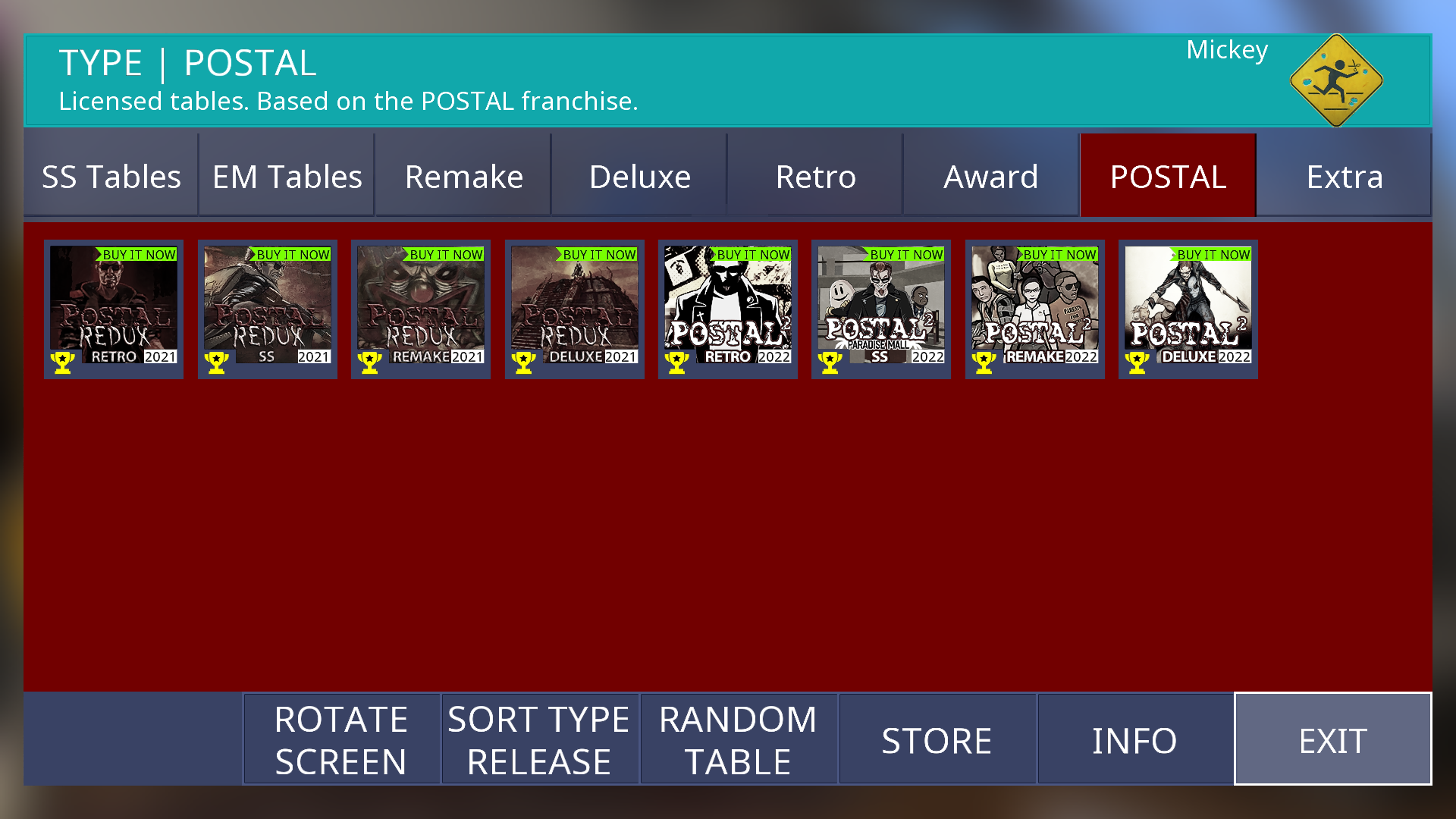
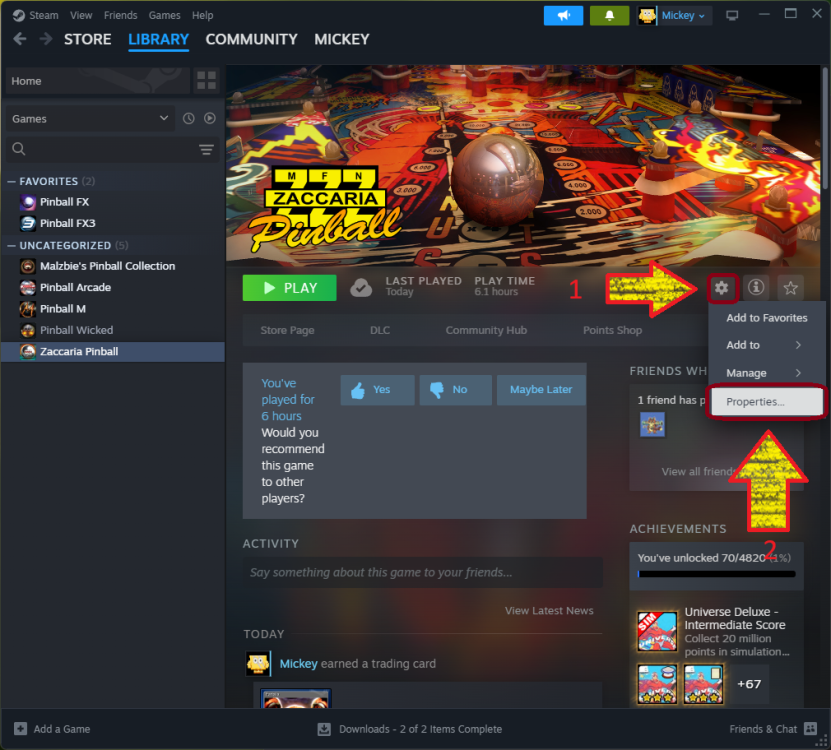
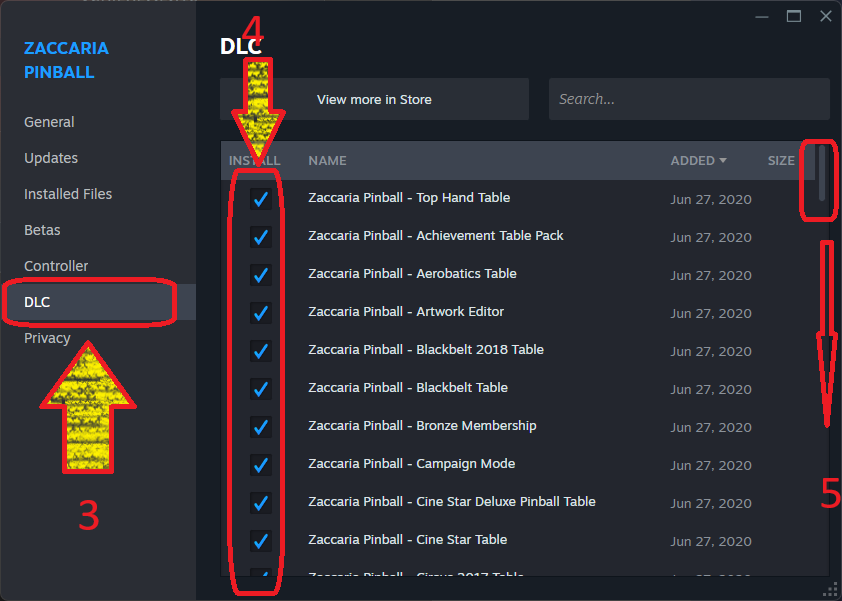
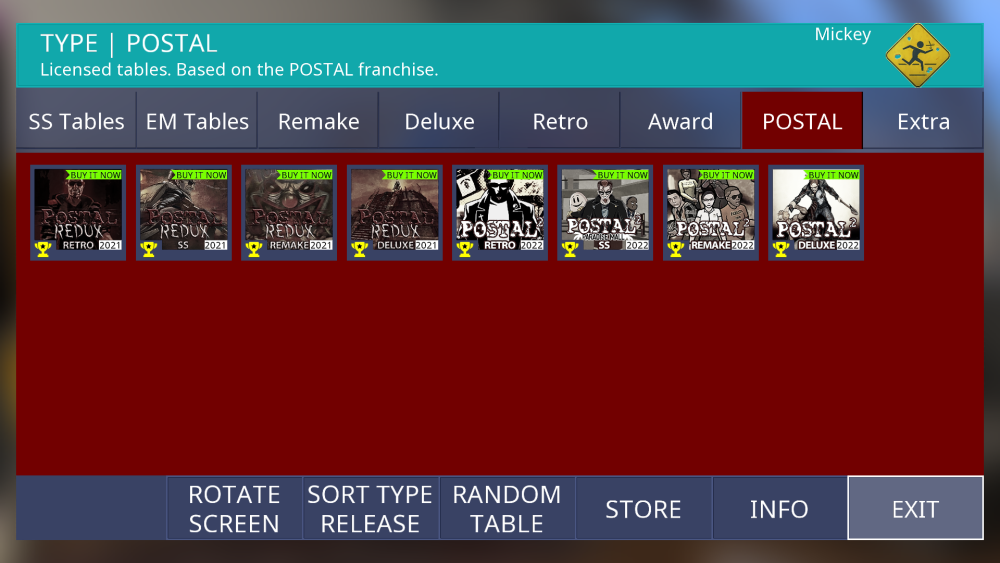
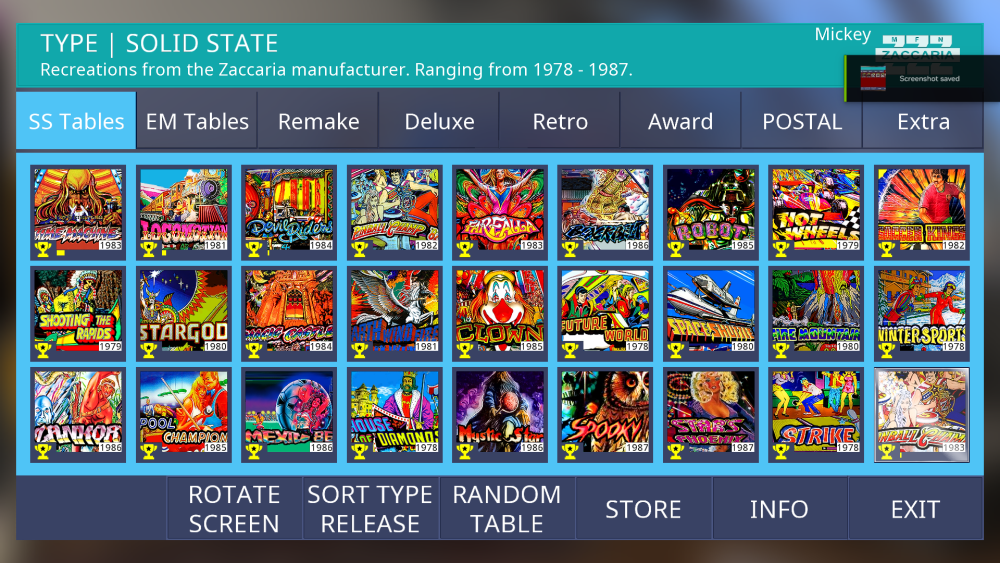
Not sure what update you expect in this post. all is working from command prompt Tables names should be defined as noted in the following post : https://steamcommunity.com/sharedfiles/filedetails/?id=2545556227 The table name "aerobaticsretro" is incorrect; the correct usage is "Aerobatics Retro." If an incorrect table name is initiated, the screen will go black (loading Zaccaria) and directly closes itself, similar to the behavior when accessing a table you do not own. I have installed Zaccaria this morning on my test system, configured it swiftly, and everything was functioning properly. also from command line and from PinballX Make sure you have the latest version of Zaccaria from Steam as well and check if all The DLC's are installed To check the DLC's installed. click on the gear icon (1) in Steam and select properties(2) click on the DLC (3) tab and check if all the DLC you purchased are checked (4) Scroll (5) when needed Launching Zaccaria and you will see "Buy it now" will not do a direct launch Tables without the "buy it now" do a direct table launch I hope this help
-
New System in Frontend, Defaults to other VPX Settings
Mike_da_Spike replied to Fiery Phoenix's topic in General
Try to replace -extminimized to -minimized -
If it works with an old version of DirectOutput 30.ini, you did something in the DOF tool that messed it up. If it is almost the same, the slight difference is the problem. As I said before, if it is only MX that's not working, the plugin and PinballX are fine. It's just an issue in a configuration in DOF.