|



Mike_da_Spike
-
Posts
3793 -
Joined
-
Last visited
-
Days Won
241
Content Type
Profiles
Forums
Events
Downloads
Store
Articles
Everything posted by Mike_da_Spike
-
Yes it has native support, and freezy updated the driver 2 weeks ago
-
Did this ever worked ? Do you have a dmddevice.log from pinballx folder as well? My assumption: Pinballx starts and uses dmddevice.dll. from pinballx log I see it uses the dmddevice.dll, but as you didn't provide this log, I assume it worked. Pinballx starts a game. It give the command to shutdown the dmd l, but the serumdll didn't do that (should be in the dmddevice.log from pinballx if it shutsdown). Visual Pinball starts but the Dmd will be initialized from a 2nd instant of dmddevice.dll (from the visual pinball folder). This logs shows it doesn't find de ZeDMD When visual pinball closes, it returns to pinballx , but crashes the mainform as it cannot access the dmd corre tly. Just an assumption, but almost the same as I had in previous version of dmddevice.dll for my pindmdv3 The only difference was that it showed in the dmddevice.log from visual pinball that the dmd gave an access denied. That's why I asked : did this worked before as freezy updated recently his dmddevice.dll (or dmdext) from 2.2.1 to 2.2.2 and the big upfldate was As pinballx works fine for me with dmdext for my real dmdpinv3, my assumption is that dmddevice.dll doesn't handle correctly the close command (or whatever it sends to stop the dmd) and during the 2nd instance it doesn't access your zedmd
-
I believe I understand the nature of your issue, and I may have experienced a similar problem with my pindmdv3 in the past. Could you please provide all of the files I have requested and answer the questions I have asked?
-
Please provide logs as described in is dll 2.2.2 freezy's latest dll ? If so, provide dmddevice.log from pinballx and from your visual pinballx directory. A wild guess would say, that it won't release the dmd corre tly. Did this work before ?
-

Slingshot failure with “Rockmakers” and flipper malfunction
Mike_da_Spike replied to Piffer's topic in General
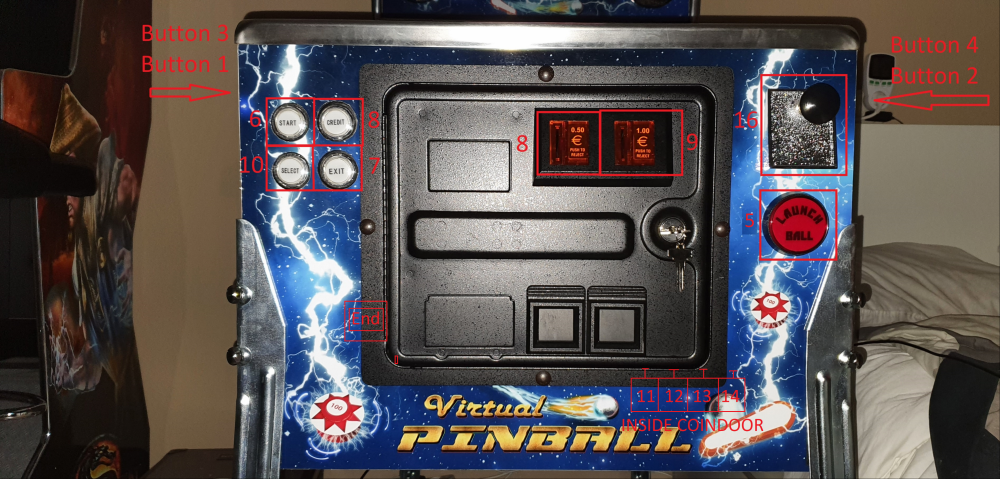
It's better to map the actual joystick buttons in Virtual Pinball instead of mapping a key to a button, as even milliseconds can add latency. Below are my assigned buttons, the real buttons, and how I have set them up in Virtual Pinball.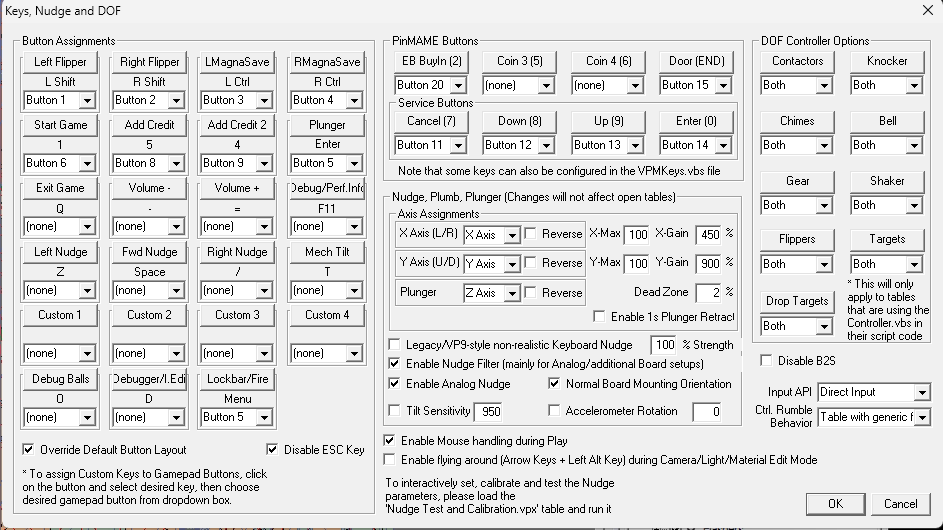
-
Slingshot failure with “Rockmakers” and flipper malfunction
Mike_da_Spike replied to Piffer's topic in General
The screenshot you provided indicates that you have not assigned any joystick buttons to Visual Pinball, only keyboard presses. Visual Pinball is capable of handling multiple different types of joysticks. If windows recognize your joystick controller, you can use it in visual pinball as well my assumption is that you have assigned the same keyboard keys to Visual Pinball and Pi nballx (is not the "v" key used to record videos?, that would explain a lot). I am unable to verify your pinballx.ini file at this time, but I recommend setting all Visual Pinball keyboard inputs to default and assigning joystick numbers instead. -
Slingshot failure with “Rockmakers” and flipper malfunction
Mike_da_Spike replied to Piffer's topic in General
Thanks for your answer. I really don't have a clue. Not sure what a "power failure in the slingshots" really mean. But if it is not DOF, i really won't have an answer. I use PinballX for a long time, and dont see strange flipper issues. I've seen it in the past with blocking joystick and with outdated vpinmame. But all occurs also outsidevof pinballx. The only weird thing is the lot of "ffmpeg.exe not found in application" message in the log when launching a table. I don't see configuration issues -
Slingshot failure with “Rockmakers” and flipper malfunction
Mike_da_Spike replied to Piffer's topic in General
No problem. While my German language proficiency is limited, I am a native Dutch speaker, though my Dutch language skills are also lacking. Upon reviewing the log, I noticed numerous entries indicating the absence of ffmpeg. Typically, when attempting to record a video or capture a screenshot, ffmpeg should only appear once. Given that you mentioned your Flipper device is behaving unusually, I would like to propose a hypothesis: is it possible that certain keys on your keyboard or joystick are obstructed or stuck? To test this, please open notepad.exe on your cabinet and create a three-line text document. Position the cursor on the middle line. If you are able to move the cursor up or down, it is likely that you do not have any sticky keys. Additionally, please access the Windows joystick devices and verify that none of the buttons are continuously pressed. This can also lead to unexpected behavior. Lastly, please inform me if you are running any tools such as JoyToKey, Gremlin Joystick, or similar software that could potentially cause issues. I hope this information proves helpful in resolving the matter. Please let me know if you require further assistance. -
Slingshot failure with “Rockmakers” and flipper malfunction
Mike_da_Spike replied to Piffer's topic in General
Do you mean you have real flippers and slingshots and they act this way, or you mean the flippers/slingshots in the virtual environment? Please provide required files as well after you reproduced your issue -
Good catch! I've verified that since the last update by Pinemhi and the latest Pinmame, several tables have been added and some have had their names changed. I will reach out to DNADisturber to include the new ones in the list as well. I've created a new list that is compatible with both the old 3.5 and 3.6 versions. Simply replace all the entries in the [ROMFIND] section of the PinemHI.ini file in the PinballX directory. pinemhi.txt @Tom Speirs do you want to add this version to a new rlease, or do you want for DNADisturber to have a original file ?
-
Whats the output from pinemhi.exe ? Pinemhi.exe is the tool that reads the highscore.Tom updated the pinemhi 'database' fileca couplecof releases back sonit should be compatable with 3.5 and 3.6 as well Can you post your pinballx logfile? I would give it a shot, but it should read the 3.6 vpinmame nvrams as well
-
Are you able to use pinemhi from the pinballx folder) to extract the highscore ?
-
Do you use pinup and pinballx? Maybe this is nore for a pinballx feature request
-
Indeed ! Alternate exe is not to use via sub menu or what so ever. If you have 2 differrent ini files for 1 system (let say VR and CAB), you need 2 different systems. If you make it more complex to use 2 ini files for a single table, there isn't a way to switch between ini files. An alternate way would be to build a program during launch before and do your magic to launch 1 of the 2 ini files. Another way is to make a pinballx plugin, that can switch the parameters of the ini file just before launch (justblike scutters his pinemhi plugin that will launch the correct table)
-
Exiting a table after a screenshot results in error, then crash
Mike_da_Spike replied to bmulligan's topic in General
Thank you, Tom. Next time, Mike should ensure his assumptions are verified! -
Exiting a table after a screenshot results in error, then crash
Mike_da_Spike replied to bmulligan's topic in General
I assumed you were aware of this issue, which I believed was one of the reasons you wanted to look at the screenshots.(Unfortunately, that person failed to include it in the bug thread list as well. ) -
Exiting a table after a screenshot results in error, then crash
Mike_da_Spike replied to bmulligan's topic in General
It's an older bug, and I think it's on Tom's list to rewrite the screenshot code as well. Is that correct @Tom Speirs or is this a bug you want to get solved ? -
It's an old habit to use PinballX as an administrator, but there's definitely no need to run PinballX, Visual Pinball, or any other pinball-related program as admin.
-
Ad a new System to PinballX like Pinball FX3 or VPX 10.7 but dont start
Mike_da_Spike replied to NEWER's topic in General
Start VP in the 'invisible' minimized window mode, but with enabled Pause Menu -
[PINCAB] My Virtual Pinball Cabinet build
Mike_da_Spike replied to Mike_da_Spike's topic in Gamer Rigs
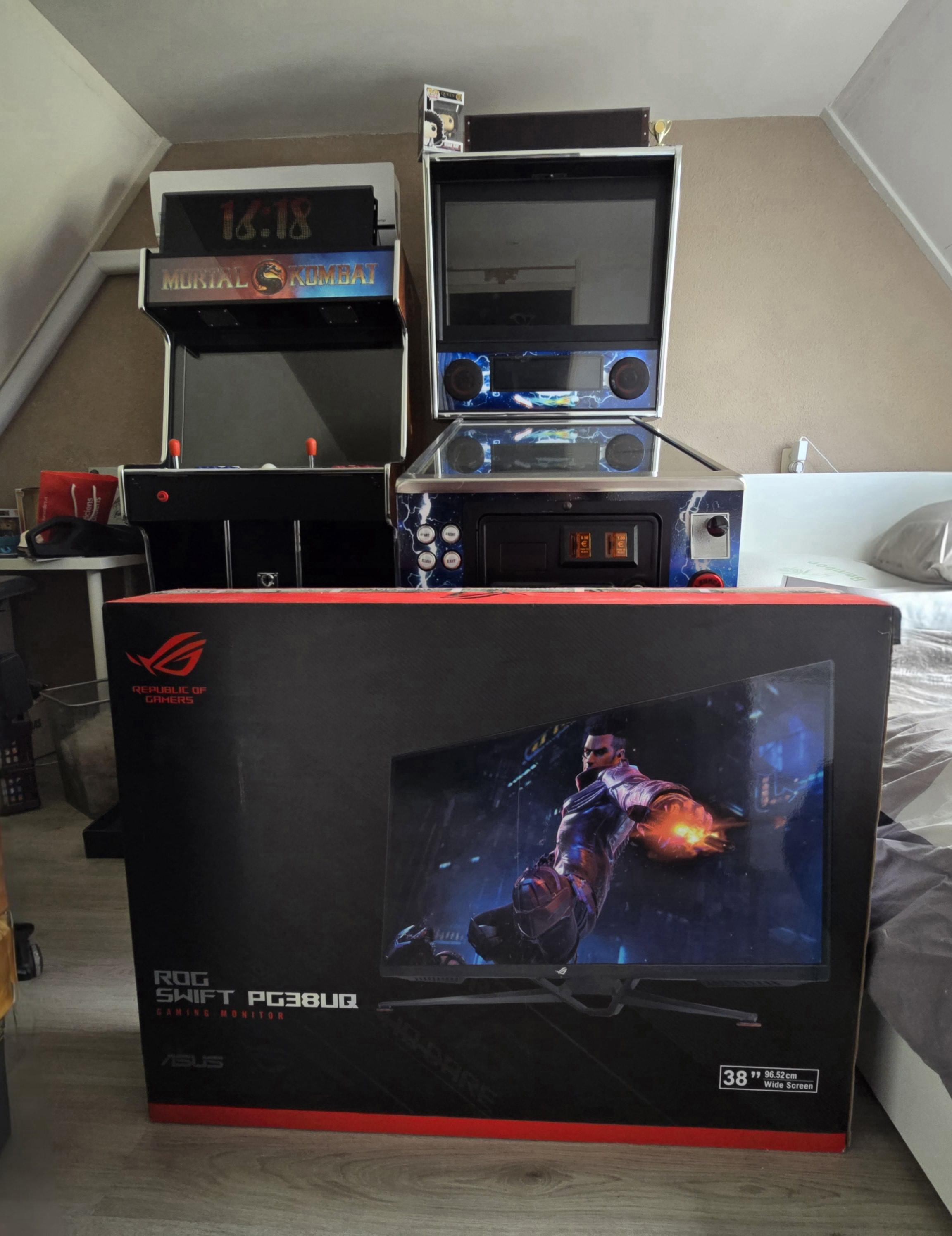
After less than 2 years of switching from tv to a qhd curved mo itor, I have finally purchased a non-curved monitor that should fit within my cabinet. The Asus Rog Swift PQ38UQ was on sale, and I was able to secure the last remaining unit. This is the only 4k non-curved monitor with a 144hz refresh rate that will fit within my cabinet. I intend to swap out my current monitor next week and will provide an update on the results. Attached is an image of the box already. I would like to express my sincere appreciation to @scutters for his prompt notification regarding the availability of the monitor last year. I am grateful for this assistance in facilitating the acquisition of this valuable asset, despite the subsequent impact on my financial resources. (Nah, just kidding. Scutterers has been helping me with my search for a monitor for at least 5 years now. So I'm really thankful for his help. Thanks mate!)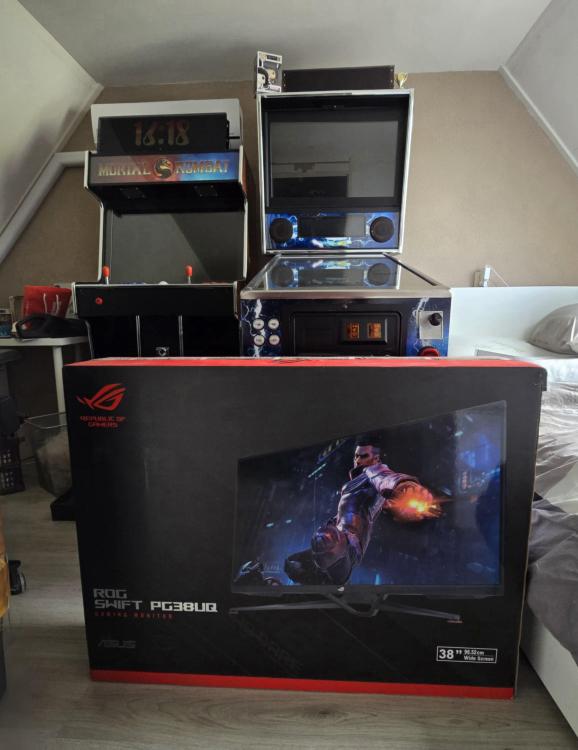
-
 Hey there, if your version of PinballX is really old (like, pre-.NET), the installation might see it as a new install (different app GUID) and overwrite some of your stuff. Just to be safe, back up your pinballx.ini and database directory before you install the new version.
 -
I took @Draco1962advice and translated the document via an online translator for you. Not sure if it make any sense, but looks German to me PinballX_Documentation2024.en.de.pdf
-
No sorry. Englisg is the only available languagefor the documentation But pinballX and database manager can both be set to german.
-
Did you read the manual that is send with PinballX .? A lot of stuff is covered in there
-
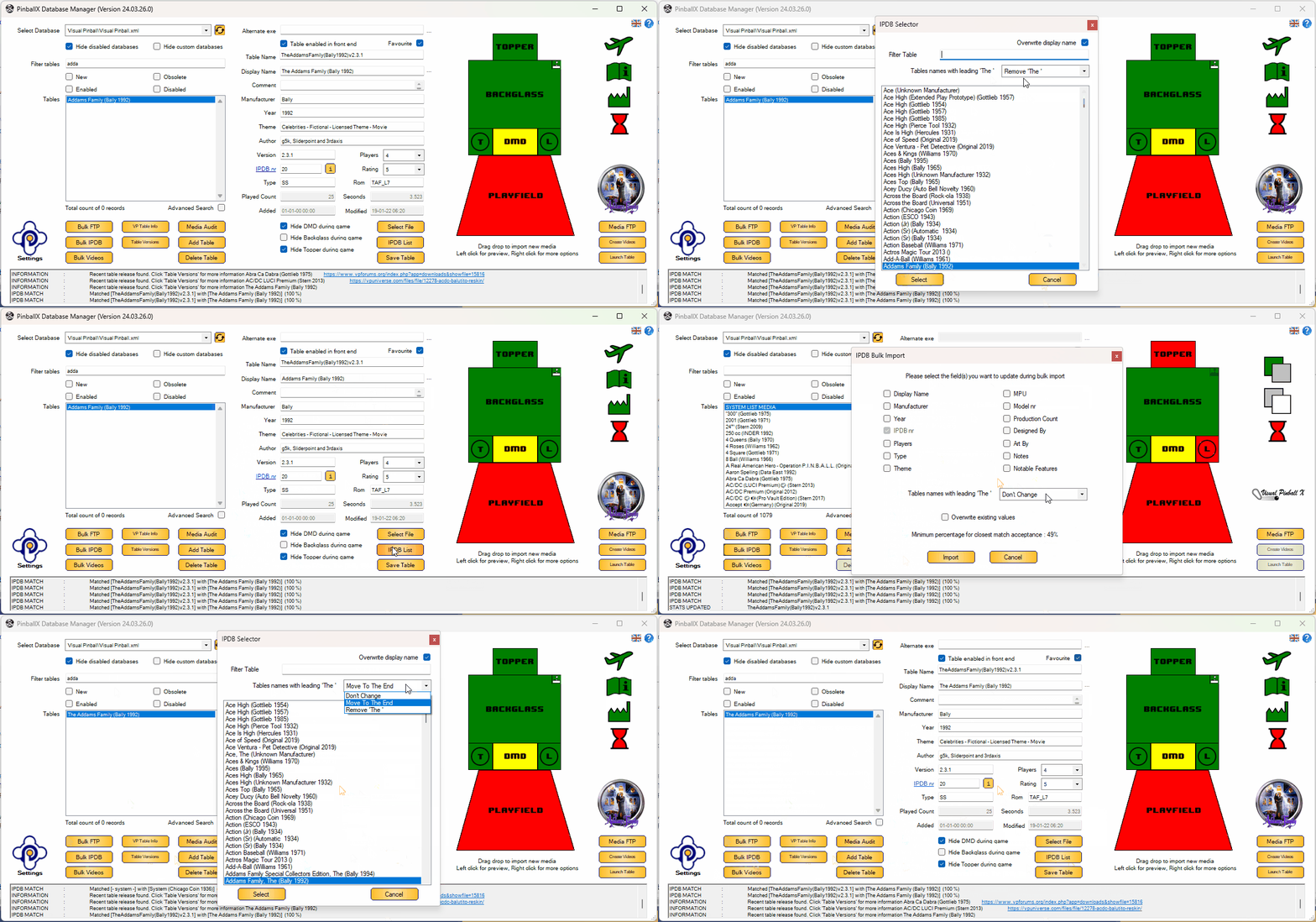
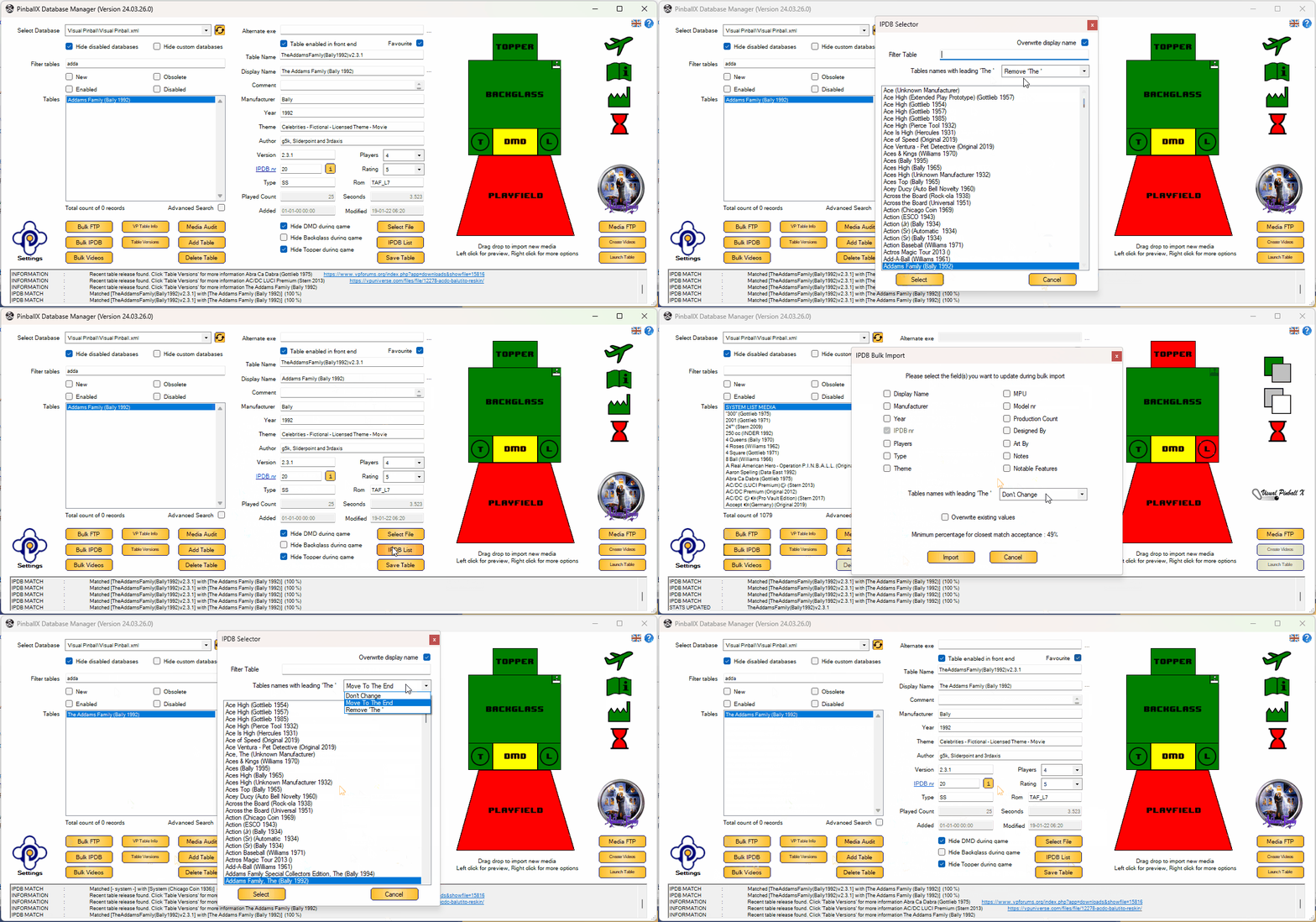
Version 2024.04.15.0 released: We've made a small but significant update to the IPDB dialog form, both manual and bulk. We understand that some users prefer not to have the word "The" as the starting word of a game title. In the wheel menu of Pinball X, games beginning with "The" are traditionally listed under 'T', which can be counterintuitive for those looking for 'The Flintstones' under 'F', 'The Addams Family' under 'A', or 'The Who's Tommy Pinball Wizard' under 'W'. To address this, we've introduced a new feature within the IPDB dialog. Now, you have the option to either move "The" to the end of a table name or remove it entirely. This adjustment will help locate your favorite games where you naturally expect them to be. Simply set up your preference once within the IPDB dialog, and all future IPDB changes will automatically apply this option, streamlining your gaming experience. Here's a small example video to show: In addition to other improvements, we've addressed some minor bugs in the bulk FTP dialog. While it may not be widely used, we believe in refining all aspects of our software. Special thanks to @scutters for his assistance in making this release possible.
- 418 replies
-
- 3
-

-

-
- mikedaspike
- scutters
- (and 1 more)