



|



Mike_da_Spike
-
Posts
3794 -
Joined
-
Last visited
-
Days Won
242
Content Type
Profiles
Forums
Events
Downloads
Store
Articles
Everything posted by Mike_da_Spike
-

[RESOLVED] Ayuda instalacion pinballx + tablas
Mike_da_Spike replied to javier saavedra saa's topic in General
If you have any questions, please let use know ! -
[RESOLVED] Ayuda instalacion pinballx + tablas
Mike_da_Spike replied to javier saavedra saa's topic in General
The documentation is enclosed in the PinbalLX installation as well : Adding tables easily to PinballX, can also be accomplished with the external tool Database Manager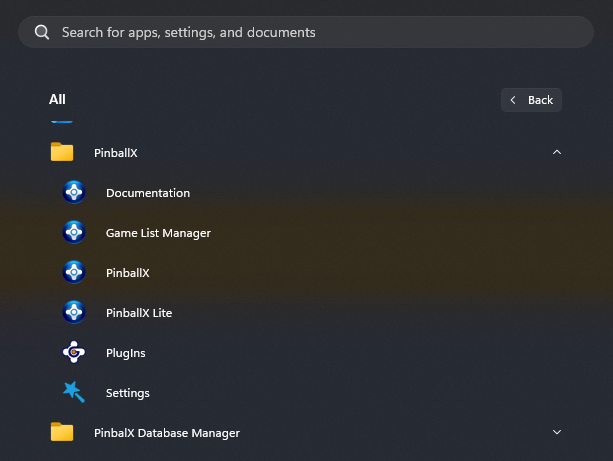
-
Which realDMD do you have ? And about DOF. Is that happening when you launch the table again ? Looks like table is launched, but it cannot fi d the player to bring to front. What's the rest of your setup ? I mean, do you installed mjr latest 64 bit DOF and use his latest pinballx plugin as well ? I also see that you run. Doflinx at startup. Is that latest version as well ? I only launch doflinx when system is needing it, but that's just me.
-
[RESOLVED] PinballX suddenly doesn't recognize the keyboard.
Mike_da_Spike replied to DesertStorm's topic in General
No not a focus. But I also can confirm that KB5058499 is causing the issue. It is strange that when a startup video is added, the ESC key allows skipping the video, but once the playfield and wheel load, the ESC key ceases to function. I do not see any indication of running as an administrator or having a touchscreen in my log. Nothing in eventlog as well log.txt -
[RESOLVED] PinballX suddenly doesn't recognize the keyboard.
Mike_da_Spike replied to DesertStorm's topic in General
Good catch @scutters! https://support.microsoft.com/en-us/topic/may-28-2025-kb5058499-os-build-26100-4202-preview-d4c2f1ee-8138-4038-b705-546945076f92 It's not a security patch, but just a "fix patch" And some fixes that should fix keyboard focus Maybe pbx is out of focus ? I say: blame MS ! (but maybe @Tom Speirs can think of something to fix it) -
[RESOLVED] PBX issues effecting VPX (6.07 and 6.87)
Mike_da_Spike replied to MulletLife's topic in General
Could the setting "AutoConfigure=True" be the issue, @Tom Speirs? Or does that still set the registry for pre-10.8 versions? -
 Could you please submit on issue in the support thread, including the relevant log file and settings file? Thank you!
 -
If you have questions, you can always ask !
-
It sounds a bit cliché, but read the manual. Not for not helping you, but to know what PinballX can do for you. It makes it easier to understand how to use and setup underlays, overlays etc. I thought in one of the old manuals, there was a section how to migrate from hyperpin., but I would say, make a fresh install. if your cabinet is running with emulators, you can set them up in pinballX. Gamemanager can help you to setup the tables for it. You can also use DataBaseManager, as @scuttersmentioned. Great tool which can add tables and media as well.but you need toread another manual.
-
That still means that you run pinballx as admin. Lowering uac proofs that. Still you need to check how to remove it. As I don't know how you build it, it could be set from shortcut, executable, registry or even in a group or local policy
-
You properly turned off uac, as pinballx is launching without a question.for permission Please try to enable UAC and set it to default setting :''Notify me only when apps try to make changes to my computer (default)' see: : https://support.microsoft.com/en-us/windows/user-account-control-settings-d5b2046b-dcb8-54eb-f732-059f321afe18 After this change launch PinballX. If it shows yiu to run as admin, click no and try if that works. Also attach your logfile after this change and test
-
Future Pinball Remove the logo from the Future Pinball table
Mike_da_Spike replied to crumols2k's topic in General
I'm only uses fp on VR, and don't have any logos. Are you using latest FP that TerryRed made? Googling a bit, I found this as well: https://pinballnirvana.com/forums/resources/future-pinball-logo-remover-version.5148/ Hope it helps -
Pinball HD Collection and other system issues
Mike_da_Spike replied to DakotaPinball's topic in General
I haven't purchased Pinball HD, so I don't know. But copying files from PC A to B can result in different results. Settings can be stored in the registry or in %appdata%. Two systems also have different monitor IDs. I don't believe PinballX is the problem. While I'd like to playfully blame Tom, I don't think PinballX is causing any system malfunctions. (That was a joke about Tom; the rest is serious.) I think it was mentioned somewhere in the PinballX documentation that if you add a system with direct table launch, it needs to work outside PinballX as well. That's not only for direct table launch but also for second monitor and/or DMD support. I should say that the issues should be split, then investigate the issues one by one, but also split those issues into chunks. For example, if PinballM is loaded through a launcher and all is working except player 2 shows the DMD shrieked, try doing it without the launcher (and lastly, without PinballX). Just see which step is causing the issue. Also, check if you do not have an app running as administrator. If you need to run a game as administrator, but PinballX isn't, that could also cause issues (exiting, running the before and after scripts). But to answer your question, @Draco1962, I don't know 😁. I don't have a clear view of what is causing what. -
Pinball HD Collection and other system issues
Mike_da_Spike replied to DakotaPinball's topic in General
try adding "/STAYINRAM" parameter for your future pinball system I still tested my version of Pinball FX3 with latest FX3 and my exit button still works Try testing FX3 without the launcher, so you just launch steam.exe with the correct parameters (Without the -offline as wel) And please, try to split issues. We can't help you if you have multiple issues in 1 thread. That will makes it over complexed -
[POLL]Which Windows operating system do you use on your cabinet?
Mike_da_Spike replied to Mike_da_Spike's topic in General
It doesn't to have to be another one, but adding tables can be done more easily with Gamelist manager or DataBaseManager -
Your log file does not show a launch that failed.
-
Version 25.05.22 is just released This version once again addressed some bugs that were identified. Some were long-standing issues we had never noticed, while others originated from the previous Spaghetti release. Besides cleaning up those bugs, we've also made some updates to refine the experience. And last but not least, we’ve introduced a new way to view media audits: instead of instantly copying them to the clipboard, they now open in a dedicated dialog. Hopefully, this makes things a bit more structured. In the next video, we demonstrated how to use the missing part of the video and how easily it is to identify missing media for a table (it is al described step by step in the documentation). Just check the download page for the full release notes. A massive shoutout to @scutters this release wouldn’t be the same without him!


- 418 replies
-
- 2
-

-
- mikedaspike
- scutters
- (and 1 more)
-
I'm using a real dmd for Pinball M. Do you use the externall dmd device in pinballlm to display your dmd, or just the internall dmd ? If using dmdext, check your ini for any rescale options
-
If this could be the case, did you updated to latest MJR release ?
-
Here is the Zaccaria Pinball database for May 2025
Mike_da_Spike replied to DakotaPinball's topic in General
Not sure what's going on for you. It should work with latest steam version. You can test it by setting up an extra system which won't use the launcher, but directly starts steam, like @Draco1962dI'd in the following post : https://forums.gameex.com/forums/topic/26401-guide-zaccaria-finally-has-direct-table-launch/page/2/#findComment-225137 If this works, change -"skipmenu_player 1" to 2 and retest. I tested this with latest version of zaccaria and worked. (And that's exactly what the launcher is doing as well) -
Log please with your config file
-
Did you setup as other system or as default system ?. For another user I tested this last week. On the laptop of my son in law, I installed steam, copied the zacaria launcher in a folder, created an other system with the launcher and BOOM .. everything worked. Please post config and log file after a zaccaria table won't launch.
-
[RESOLVED] Exiting Does Not Close PUP Packs
Mike_da_Spike replied to DJO Maverick's topic in General
Perhaps you could consider slowing down the release cycle a bit, Tom? I was still in the process of testing version 6.76 this morning.🤣 I plan to resume testing tomorrow, as I am currently feeling fatigued, but my initial observations were positive. Even with the DOF plugin enabled, the exit behavior was pretty good. I needed to update the DOF plugin to meet the latest standards, and I've significantly reduced the processing time compared to the previous version, which was based on an very old version of DOF. I've submitted a pull request to add my modifications on github to the original deployment Even my ryzen 5600x with rtx 3080 is already outdated -
Here is the Zaccaria Pinball database for May 2025
Mike_da_Spike replied to DakotaPinball's topic in General
Check this post nr 3 : https://forums.gameex.com/forums/topic/31319-here-is-the-zaccaria-pinball-database-for-may-2025/#findComment-225024 -
I don't use Pinball HD collection, but this maybe helps: https://github.com/joyrider3774/PinballHDCollectionLauncher/blob/main/README.md

