|



Mike_da_Spike
-
Posts
3789 -
Joined
-
Last visited
-
Days Won
241
Content Type
Profiles
Forums
Events
Downloads
Store
Articles
Everything posted by Mike_da_Spike
-

[RESOLVED] 6.57 XDMD: no PIN2DMD after starting table
Mike_da_Spike replied to Jopp's topic in General
Your dmddevice logfile shows you use version 2.3.0 for vpx : 2025/01/22 19:06:30.970 INFO | Starting DmdDevice API 2.3.0 (x64) through VPinballX 10p8.exe. [7] Yes, pbx can use this file. I use the internall xdmd for my real dmd, but pinballx works with my pindmdv3 and zedmd(hd) via freezy' 2.3.0 (and also 2.3.1 beta) If it shows an virtual dmd, it properly can't find your dmddevice.ini and will use default settings. I was searching for an article that you can use 1 pinballx.ini, but could not find it (although I have 1 dmddevice.ini) -
[RESOLVED] 6.57 XDMD: no PIN2DMD after starting table
Mike_da_Spike replied to Jopp's topic in General
Odd. Your config file shows that it should log. I checked your ini and see a lot of empty section, which are normally have with values. I'm not saying that it is causing issues, but it looks s strange to me. The dmddevice64.dll in your pinballx directory, is that of the same version as in your pinmame folder ( 2.3.0) ? -
[RESOLVED] 6.57 XDMD: no PIN2DMD after starting table
Mike_da_Spike replied to Jopp's topic in General
To which previous versions you refer to Tom ? He mentioned that the xdmd files from 8-8-23 works with latest release. So that will be version 5.99 ? The odd thing that I don't understand is that he uses dmddevice to use his pin2dmd. And launching a vpx table from pinballx won't mention anything about the pin2dmd. Not even that it cannot be found. Shouldn't all the hardware dmd's which are using dmddevice.dll be handled the same way in PinballX? @JoppI'm a bit curious. Can you post your dmddevice.log from the pinballx directory as well ? And also your dmddevice.ini from your D:\Program Files\Visual Pinball\VPinMAME folder. Are you using a global dmdext, or do you have a DmdDevice.ini in your pinballx folder as well ? If so, post that one as well -
[RESOLVED] PBX 6.56 crashes when launching tables
Mike_da_Spike replied to eduardNL's topic in General
I'm glad that Tom has resolved the issue. -
[RESOLVED] PBX 6.56 crashes when launching tables
Mike_da_Spike replied to eduardNL's topic in General
Thanks, I was about to ask you to split it, but you're faster than light! Your logfile only shows a start and exit of PinballX, not launching a table that is cause a crash. Can you reproduce the issue and post your logfile? -
[RESOLVED] PBX 6.56 crashes when launching tables
Mike_da_Spike replied to eduardNL's topic in General
Can you post your log file after a crash ? Also attach your pinballx.ini Are you using vpx 10.8 as well ? If so, Dx or GL ? Is it with all tables, or just some specific tables you encounter the issue with ? -
Dbm has an entry -system- in the table list that represents the system. Yu can set a playfield, backglass, dmd, topper and wheel image. You can even set an underlay/overlay for a specific system
-
It's all in the PinballX manual, ya know? It covers the directory setup, media types, and how to get everything set up. If you want the easy way, grab the Database Manager from the download page. Within DBM you can drag and drop your media right for a system as well(or get it from the gamex ftp, too). It's super easy to use, and the 2 guys keep updating it to work with the latest PinballX and add new features.
-
Please verify the installed versions of the C++ Redist.just repair them all, If repairs fail, uninstall and reinstall the package; in some cases, a clean reinstall is preferable. This preventative measure can significantly reduce troubleshooting time.
-
Please provide an update upon resolution. I'm really curious how this gets sorted out.
-
KERNELBASE.dll is a system file in Windows that is part of the Windows operating system. It is used to launch executable applications and handle system-level functions. When a program crashes and reports an error related to KERNELBASE.dll, it often indicates an underlying issue with the application or the system itself. Really odd that 5.47 is working and 6.54 isn't. Can you try to disable the 2 plugins? In rare cases a 'sfc /scannow' fixed some weird issues on my cab as well. Repairs of the c++ runtimes could also help This is also not good. I'm not able to check on the cabinet, but file netvideoplayer.dll is in my backup. Is that file not in your pinballx directory?
-
Please update to the latest PinballX version; if the issue persists, please submit a new log file and your pinballx.ini file.
-
Yeah, I have just only have a still logo, but made this from it
-
How about changing the executable to steam.exe instead of pinballfx.exe ? This should point the correct application in steam to launch All described in the following post:
-
Happy New Year, @Raitsa! I asked Tom the same thing last year, and he's already working on a GameEx cross-platform version: https://forums.gameex.com/forums/files/file/2555-gameex-cross-platform/.If that works, he planned a PinballX port too, I think. Tom' is still the best person to ask, but I wanted to chime in. 😀
-
But just wanted to say to everyone :

-
Pbx recorder will check if there is a 'global' screenres.txt. but if there is a screenres.txt inside the table directory it uses that. The thought behind to use screenres.txt is that people wants to record exactly what they see within vpx, so b2s is used to find the location of screens to capture
-
I thought you already had other, but this is the 7.1 stable version : https://www.gyan.dev/ffmpeg/builds/ffmpeg-release-essentials.7z
-
what is the behaviour you are seeing on your cabinet ? Is PinballX in a hung state ? did the last video created correctly (Beat The Clock (Bally 1985)) or is it hung during that FFMPEG process ? if this video table wasn't created correctly, it could be the ffmpeg command is in an endless loop : FFMPEG.exe -i "c:\users\pinball\appdata\local\temp\tmpe81887936480011.mp4" -vf "transpose=1" -vf "vflip,hflip" -c:v h264_nvenc -an -rc vbr_hq -cq:v 33 -b:v 0 -pix_fmt yuv420p -f mp4 -movflags +faststart "C:\PinballX\MEDIA\Visual Pinball\Table Videos\Beat The Clock (Bally 1985).mp4"
-
Just try the builded version (that's also on that page) https://www.gyan.dev/ffmpeg/builds/ download the essentials build and from the bin directory the ffmpeg.exe
-
I tested latest version and it captures with the right position. I only noticed that I needed a newer version of FFMPEG. otherwise I have a black mp4, where the conversion has failed of the first capture and move it to the correct folder
-
[RESOLVED] VPX not auto closing when quitting table in PinballX
Mike_da_Spike replied to rtkiii's topic in General
Yeah indeed. This log file is from 21 releases back. 6.41 should have this fix. As @scutterssays, if 6.41 didn't fix ot for you, post new logfile. -
[RESOLVED] VPX not auto closing when quitting table in PinballX
Mike_da_Spike replied to rtkiii's topic in General
Please add your Pinballx log after reproducing the issue -
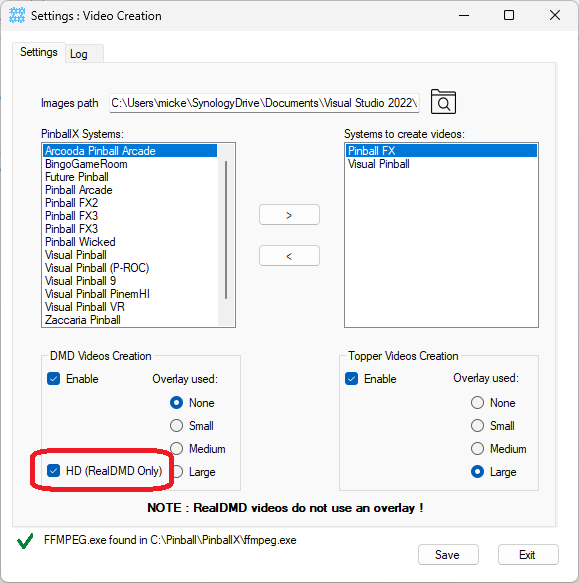
Uploaded new version and these are the release notes Version 4.0.0 -HD DMD Video Creation: Added support for generating high-definition videos for real DMDs (256x64 pixels) -Enhanced Performance: Completely re-coded the application for smoother and more efficient output. Utilizes the NuGet package Magick.NET for improved image handling. -New Name: Renamed the program to DMDVideoMaker to better reflect its functionality. Still fully functional for creating topper videos, but outputs that are DMD-like. If you have a 256x64 display, it is worthwhile to check the HD box: This will up/downscale the video to 256x64 pixels which results in a smoother . for example :

- 78 replies
-
- 1
-

-
- app
- application
- (and 1 more)
-
@Tom Speirs, according to the log, ffmpeg is capturing ddagrab=0, but monitor 0 is his backglass, should it not be ddagrab=2 (as monitor 2 is the playfield?)