



|



Draco1962
-
Posts
19243 -
Joined
-
Last visited
-
Days Won
663
Content Type
Profiles
Forums
Events
Downloads
Store
Articles
Everything posted by Draco1962
-
Good info to know and glad you found the issue. Marking as resolved!
-
Assuming you are using the option for the GameEx Arcade from within GameEx and (which would require that you have the option enabled within GameEx via the Setup Wizard), you will probably need to check a few settings in Internet Explorer. It might help to let us know what version you are running (click on Help>About Internet Explorer). Here are some steps I want you to follow in Internet Explorer: - Click on Tools>Internet Options - On the General tab and under Browsing History, Click the Delete button, then check Temporary Internet files ONLY and then the Delete button - While on the General tab and under Browsing History, Click the Settings button, - Next, click the Security tab, then click on the Trusted Sites zone and then the Sites button and under the Temporary Internet Files section select Every time I visit the webpage, then click OK - Making sure that the check box for Require Server Verification... is unchecked, type *.gameex.com within the field Add this website to the zone and the press the Add Button - Go to the Advanced Tab and select the following settings if not already selected: Enable third party Browser Extensions, Empty temporary internet files when the browser is closed - Click Apply, then OK and close all open browser sessions. Here are some further steps to follow via CMD prompt: - Click on Start and type CMD in the Search Programs and Files field (or Start>Run if using XP) - After opening the command prompt, type ipconfig /flushdns - close the command prompt Open a new internet explorer session and try again. If still not working, you may need to try reinstalling the Adobe Flash component again. Let us know if this resolved your problem or not.
-
hey bkenobi - would you mind providing a copy of how you have your script setup to load these profiles?
-
Usually recommended to uninstall ffdshow if previously installed prior to installing the Shark007 codec packs.
-
If running Vista or Windows 7, you can also run Windows Media Center (which comes already installed - you just add a few plugins as needed and configure as you like) as GameEx will run fine as a plugin from it (which was part of its intended purpose for those with WMC machines).
-
I mistyped, you are correct sir. The "Vista" codec pack is for XP and Vista.
-
The Shark007 Vista Codec Pack and the 64-bit pack are what you will need. Works great on my x64 Win 7 setup.
-

Feature & Enhancement Requests
Draco1962 replied to Tom Speirs's topic in FAQs, Guides, & Other Useful Information
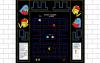
Maybe overriding MAME is not the answer, but working with the lay file to crop in the middle a background file, for example, that is 1680x1050. GameEx would read the lay for that ROM and crop the middle proportionately, allowing the background image to appear on either side of the game being played. Another alternative (and using far less code to read and make calcs based on the lay file and theme would be to code for a custom "background" image, so , if I am making a theme based on The Wall and want to have a wall background appear "behind" the game's bezel to fill in the Empty Spaces (black letter box bars) with the game displaying as it currently does within the bezel.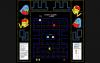
-
Feature & Enhancement Requests
Draco1962 replied to Tom Speirs's topic in FAQs, Guides, & Other Useful Information
Would it be possible to program GameEx to override MAME's handling of the bezels and apply it's own settings based upon the theme's default resolution? -
Feature & Enhancement Requests
Draco1962 replied to Tom Speirs's topic in FAQs, Guides, & Other Useful Information
Enhancement Request - Allow for proportionately scaled Bezels for High Def displays or any display bigger than 800x600. This will allow for greater flexibility in creating custom bezels for use on HTPC displays without so much "letter box" space showing when running games that originally displayed in lower image sizes and different aspect ratios. -
Ooo! Save me some of those gooey, peanut butter taffy things! And the rootbeer barrels! And bottlecaps...
-
At present, we have to store video snaps ini the same folder with static snaps. This should not occur and appears to be a bug if not displaying correctly. I would ask you to try deleting your cache files but I have done so myself and that appears to have little bearing on the issue recurring.
-
Hope you have a great birthday! Hope I don't see any cell phone videos of you on YouTube in a stupor trying to eat a "Double-Double" on the bathroom floor!
-
May still be part of the same issue - sometimes I can continue to navigate away or deeper into the menu (unless the dbs are loading) elsewhere and when I come back, the image is there when it wasn't before.
-
Are you encountering this on the primary menu where the emu resides as well as within the menu for the system? Does it seem like it is "stuck" trying to load the logos, but when you go into a specific game and come back out, the logos appear (same sometimes if you go in and out of system menus). If yes to any or all, then I have been encountering the same or similar issue as of late.I have tried the default-default skin as well as others and end up with the same results. At first I thought it may be something with Custom Menus, but even upon using the GameEx defaults, rebooting the PC, etc, I get the same results. All DirectX drivers and .net frameworks up-to-date, no changes in video drivers or anything else I can think of that may contribute. I have a Quad 4 system with 8GB RAM and a current video card so the common rule-outs have been ruled out.
-
"Shut up, Bevis!"
-
I think the use of terminology is throwing things off. Let's simplify things with some common-sense definitions Icon = Small, tiny image that represents a program or otherwise further defines the text following or preceding it Logo = Big, large image that represents a system, menu, sub-menu, program, emulator, etc. Snap = Static image taken from in-game play of a ROM or game Video Snap = Video taken from in-game play of a ROM or game
-
Oh, you meant the flag icons that are in about every theme available on the themes site?
-
I bought a 25' HDMI cable for use with my PC and I must say I love the look of some of the themes at 1080p! I have a Galaxy GeForce 440 video card which supports HDMI sound (nice that it installs the drivers for support - found under the Playback settings as long as the monitor is selected in display settings, I can choose to default to my PC speakers or the TV - SWEETNESS!). I bought the BlueRigger High Speed HDMI cable with Ethernet (25 Feet) - Supports 3D and Audio Return [Latest Version] through Amazon.com for $11.95 + Shipping. This was much cheaper than buying the oft pushed Monster cable from Best Buy for almost 10 times that amount and a few feet shorter. Hopefully this will allow me to improve and fine-tune future themes produced in the 1080p and 780p formats for HTPC. I am looking at putting together for my next few themes Media Center Studio format themes for Win 7 Media Center and theme related Windows Logon screen to accompany my GameEx themes as a complete package for those into the whole, cohesive Media Center experience.
-
The icons, if am understanding your reference, are generated by GameEx for the Arcade (MAME) games. There is not any means available to do so with other systems although I believe a few have requested that as a possible feature in the future.
-
[Q] Can you theme/modify the 'Statistics' Screens?
Draco1962 replied to Necromancyr's topic in General
Sounds like a feature request - go for it, Necro! -
Yes it does, Bro. So where ya been hiding? Are ya just visiting or hanging about for a while? Huh? Huh? LOL!
-
[Q] Can you theme/modify the 'Statistics' Screens?
Draco1962 replied to Necromancyr's topic in General
Yes. Look under \gameex\media\ for stats.png -
Good luck with that one! So far as I know it can be resized, however, since it is a relatively minor element, most of us have not played with the dimensions - trial and error! You can have a bar with no surrounding area but I would recommend that you have the pleasewait.png file saved as a transparency so that there is a file there, although it will not be visible. Remove it and likely GameEx will pull from the Default-Default theme. The bar (so far as I am aware) is not resizable and has always been split into 25 parts. I have used a blank bar in some themes with objects appearing to bounce, etc. Trial and error (or should I say explore and delight yourself and your creativity?). That would be a good question for Tom and/or Ben. What icons are you referring? Can you provide an example/file name? These logo files are hard-coded within GameEx and draw from the MAWS and GameEx dbs online. This is an easy one to answer - no, not formally. The forums are the only source of documentation other than the FAQs.
-
I have noticed some issues with updating previous posts as well which makes it a royal pain to get updates submitted. Maybe Tom or one of the admins that have access to the forum software can take a look at it and see if there is anything that can be done.

