|



Draco1962
-
Posts
19253 -
Joined
-
Last visited
-
Days Won
664
Content Type
Profiles
Forums
Events
Downloads
Store
Articles
Everything posted by Draco1962
-

Feature & Enhancement Requests
Draco1962 replied to Tom Speirs's topic in FAQs, Guides, & Other Useful Information
Actually, while in attract mode, the screensaver is loading ROMs and not playing videos. -
need some help with gameex and touchscreen bartop
Draco1962 replied to arcadepcnut's topic in General
Glad to see you back! The latest release may work better for you now - please give it a try and let us know how it works out for you. There are not many touchscreen users that frequent the forum actively so any feedback you can provide helps us to help others going forward. -
Cool deal! Can only be a plus for all!
-
Feature & Enhancement Requests
Draco1962 replied to Tom Speirs's topic in FAQs, Guides, & Other Useful Information
NEW FEATURE REQUESTS: A - Create speed settings for Selector Bar Animations. Currently set to one speed which is too fast for some animations. Allowing one to tailor the speed setting would open up some more creative effects in user created themes and appear more polished. Speed Scale of 1-10 increments preferable, similar to a mouse speed slider control from 1 - slowest to 10 - fastest. B - Enable/disable GameEx scaling of Selector Bar image elements would further enhance the Selector Bar animation options available to themes. This will allow for the placement of objects, say a ball for example, that could appear to bounce back and forth across the length of the selector bar. With current setting, said ball appears in the List as a vertically squashed, flattened ovoid. Depending on length of the word(s) in the Menu bar, ball would appear as a horizontally squished ovoid. -
I assume you mean this page of HK's Plugin LCD site. I see buttons to "Save" and "Exit." I will take a leap and assume once again that you meant Exit instead of Cancel. Again, please provide us with your log files and any configuration files related to the plugin. I am not familiar with it, however, we need to start somewhere to troubleshoot your issue. Thanks!
-
Can you post your log, please and someone will review it and try to help. Thanks!
-
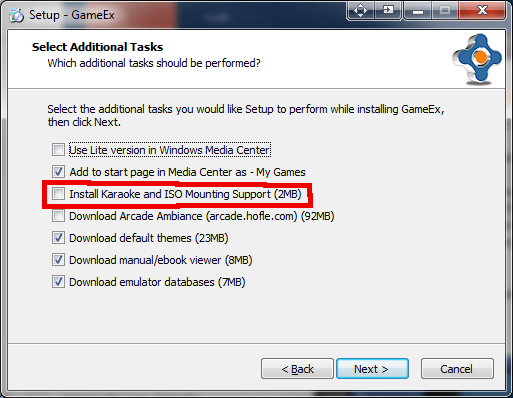
"The path to your DVD movies. For ISO support ensure you install ISO Support when installing GameEx." When you installed GameEx did you select ISO Mounting Support?
-
I think we need to get this setup down to the basics. First, I want to recommend starting with the Shark007 codecs Vista pack. It has FFDSHOW included. Second, I am beginning to think that we may be butting heads against a possible driver issue. With that being said, I think we need to know if you are running a special keyboard and/or mouse. If so, do you have the latest drivers installed? It is possible that reinstalling them might help, even if they are the latest. If you have a spare video card about, you might try installing it and disabling the integrated video. As Adultery said, if you cannot get a DVD running in Windows through Windows Media Player outside of GameEx, then why would it be expected to run through GameEx? You may want to review this article and follow the troubleshooting steps it provides.
-
Just out of curiosity, are you running an Nlite version or similarly stripped down version of XP? Also, would like to know if you are running through onboard video vs. a separate video card.
-
Also, I believe that Use VMR9/EVR should be set to Yes.
-
need some help with gameex and touchscreen bartop
Draco1962 replied to arcadepcnut's topic in General
Not entirely sure why he gave up so easily. Go to YouTube and there are few of successful touch screen bar tops... http://www.youtube.com/watch?v=hdsxHe0gmDY&feature=player_embedded I kinda wonder a bit about , though. Seems like a pretty cool idea. -
Please post a copy of your GameEx log.txt file immediately following your attempt to launch a DVD.
-
Just a few points of clarification. The menu bar shown in the example actually has an X coordinate of 960. That would be the halfway mark in the image. The "Back" "Home" and "Exit" should be starting to the right of that if that is the case. GameEx ignores the X coordinate altogether. Also, if the list of menu items is long, it will exceed the assigned width of the object when it should be bound within it, and yet cause the text to scroll into view when advancing the mouse/joystick to the right.
-
Feature & Enhancement Requests
Draco1962 replied to Tom Speirs's topic in FAQs, Guides, & Other Useful Information
The menu bar shown in the example actually has an X coordinate of 960. That would be the halfway mark in the image. The "Back" "Home" and "Exit" should be starting to the right of that if that is the case. GameEx ignores the X coordinate altogether. Also, if the menu items is long, it will exceed the assigned width of the object when it should be bound within it, yet cause the text to scroll into view when advancing the mouse/joystick to the right. -
Feature & Enhancement Requests
Draco1962 replied to Tom Speirs's topic in FAQs, Guides, & Other Useful Information
To be honest, I do not see myself revising my previous theme submissions to take advantage of enhancements or new features. In most cases, it would require an almost total reworking of the theme. I would liken it to living through my teen years again. Why would I want to do that? I have learned so much with graphics and image manipulation since my first theme that I would have to start over again. -
Feature & Enhancement Requests
Draco1962 replied to Tom Speirs's topic in FAQs, Guides, & Other Useful Information
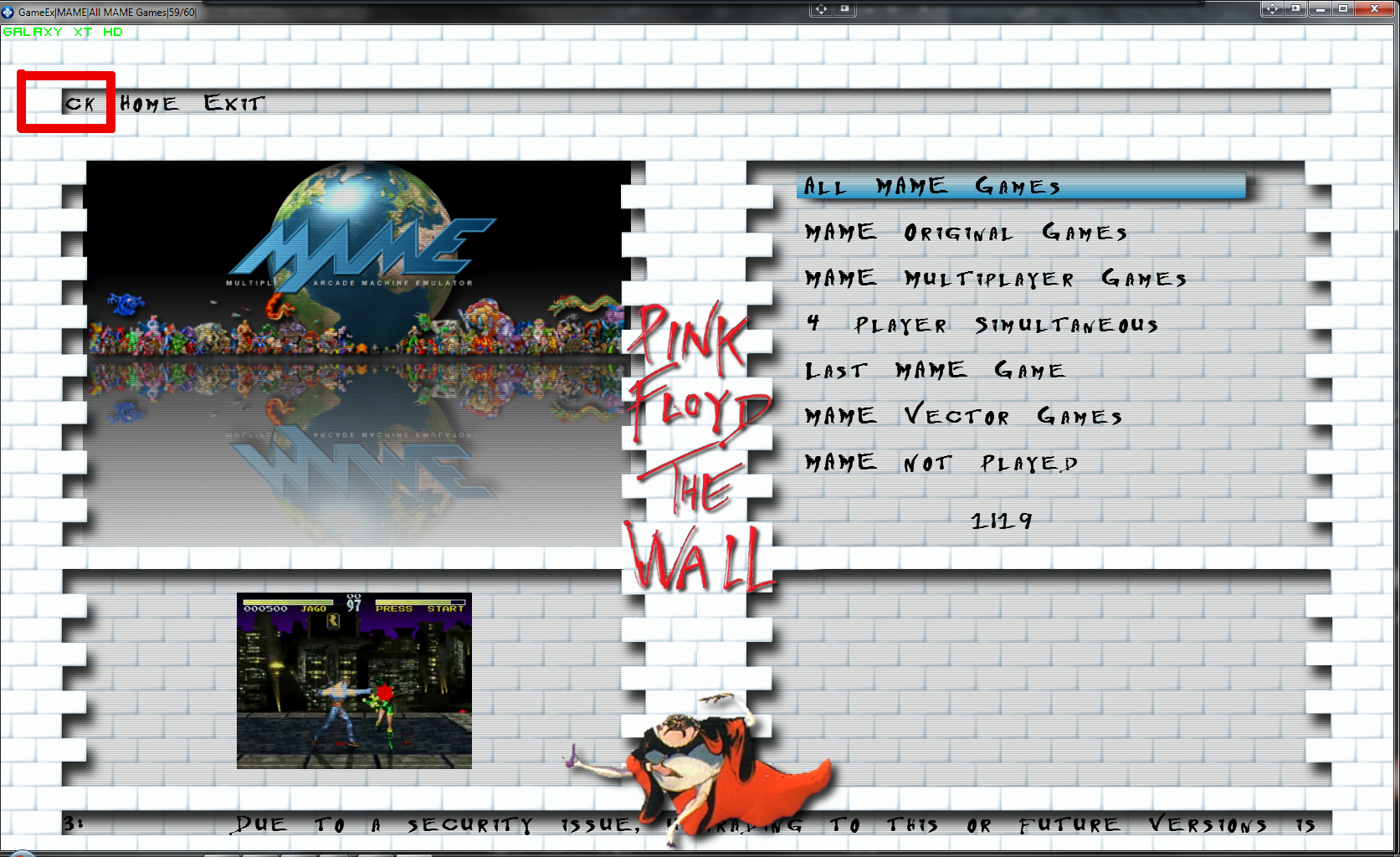
Putting this in as a feature request: While working a new theme utilizing the foreground top-most settings, I have noticed that, no matter how far right on the X coordinate I place the start of the menu bar, it defaults to the same location. I know that the text options displayed is dynamic relative to where in GameEx you are (Start, vs MAME or Emu), but regardless, we should be able to place the bar where we need it and regardless of the length of the bar, the text options should scroll forwards and backwards within the length of the bar selected for one's theme (just as they do in List view).
-
Glad it is working again! I will change this to [RESOLVED] !
-
need some help with gameex and touchscreen bartop
Draco1962 replied to arcadepcnut's topic in General
If others have made it work, then I think it can for you. I mean, you just joined and posted 2 days ago. There is a dearth of experience here that has yet to logon and read through the latest forum posts. It may take a little work to get to a solution. Of course, it is entirely your choice. Good luck! -
Also, I would make sure you have the .net framework installed, and you may want to take this time to get your shark007 codecs installed as well (if you are using 64-bit Win 7, you will need to download and install the x64 codec pack in addition to the 32-bit).
-
Others have contributed to translation corrections and I am sure Tom would welcome any assistance you can provide.
-
need some help with gameex and touchscreen bartop
Draco1962 replied to arcadepcnut's topic in General
I found an example of a bartop running GameEx in this thread at the Arcade Controls Forum. You could probably help us to help you decide by telling us exactly what you want to run on it. It may be that you need to incorporate a mouse splitter to allow for more than one "mouse" control. Additionally, many bartops with touch screen also have wireless game pads configured for other games that do not lend themselves well to touch screen controls of any kind. -
I played around with PaintShop Pro back in my DOS 5/Windows 3.0 days and it was one of the best programs then for the price. Look forward to seeing some more work!
-
I recommend uninstalling FFDSHOW and downloading the Shark007 codecs pack appropriate for your OS (If you are running WIN 7 x64, there are two you will need to download for both 64 and 32-bit flavors) for starters and see if this remedies your issue.
-
Can't wait to see Gals Panic show up in someone's tag! I am so gonna give them a hard time!
-
3D Cabs allows for the displaying of the .x format animated, rotating cabinet files available for download on the main GameEx site. Image1 = Logo or ROM Images or Video Snaps Image2 = 3D Cabinet or small video snap or Marquee or... Select1 = Menu Option Name or ROM Name or Program Name Select2 = Details as available for Select1 Select Bar is animated by changing colors over the span of the 15 images or all the same if not. You will have to play with the Theme Editor to position the image and various text elements within your theme based upon X & Y coordinates and Height/Width settings. You have the ability to create custom backgrounds/foregrounds and layouts on a per emulator basis. Logo files (the ones previously mentioned in Image1) are display globally. Pop-up Descriptions can be turned off within a theme and in the Setup Wizard under "Display Settings."