|



joyrider3774
-
Posts
811 -
Joined
-
Last visited
-
Days Won
63
Content Type
Profiles
Forums
Events
Downloads
Store
Articles
Everything posted by joyrider3774
-
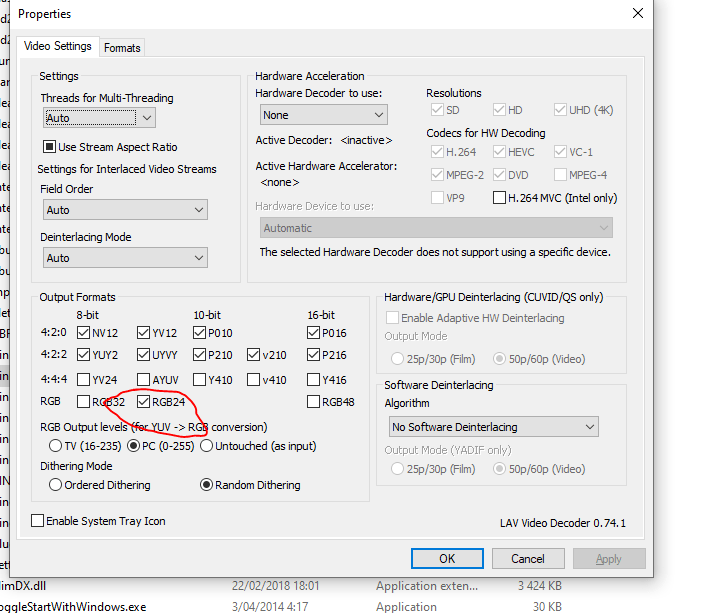
I use pbxrecorder myselve instead of game manager. Not really sure its what i started with. I've never tried game managers recording but pbx recorder has options to tell it how long to wait before recording (which is handy if some tables load more slowly, and not sure how game manager's recording would handle this) and how many seconds the video must be. It also records everything at the same time although does not seem to record the dmd with me but i also don't have a dmd screen. Does game manager's recording record backglasses etc also at the same time ? PBX recorder recordings can also be stopped or paused One thing you could look at is if your LAV codec output formats are setup like this but it would be weird if some recorded video's play and others not so i doubt this is the problem as they all use the same codec but you can verify (ignore red circle in screenshot, male sure all the checkboxes are the same with you)
-

PINemHi error upon exiting some games while running PInballX
joyrider3774 replied to JLPicard's topic in General
i think it's from the high score plugin i noticed a plugin in the user projects section with the same name. You could check plugin manager to see if there is a pinemhi plugin active an possibly disable the plugin to get rid of the error -
Try not to hijack topics, you have asked a few things unrelated to the forums topic, i think its better to create new topics so they stay on topic To anwser your question it's not a pinball x problem but a bug inside pinball fx3 which they have never solved (yet). There is a workaround goto the steam folder of pinball fx3 where the pxp files are. Locate mars.pxp and make copy of it in the same folder as the other pxp files and name it nars.pxp then in game manager goto the pinball fx3 to the mars game and rename the gamename from mars to nars (not the description) then save the list (it asks if you exit or change list). If you select mars table then it will start the nars.pxp file. Do note if they ever update mars.pxp you'll have to create a new copy of it
-
[RESOLVED] FTP Slow on port 21, not downloading on port 22
joyrider3774 replied to Mike_da_Spike's topic in General
initial connection and starting downloads is fast now for me on port 22 and downloads work with good speed. on port 21 i still have the slow initial connections for connecting and starting a download or if the connection times out due to not browsing the ftp fast enough and selecting a new directory (maybe mike had that problem) as before when i was connected (on port 21) i could browse fast unless i waited a bit and it had to make a new connection to show the directory listing. So port 22 is definatly faster now for me. Have not tried uploading using port 22 as i don't have anything to upload. Thanks for the fix i think i'll keep using port 22 as well now (explicit ftp over tls i was using). -
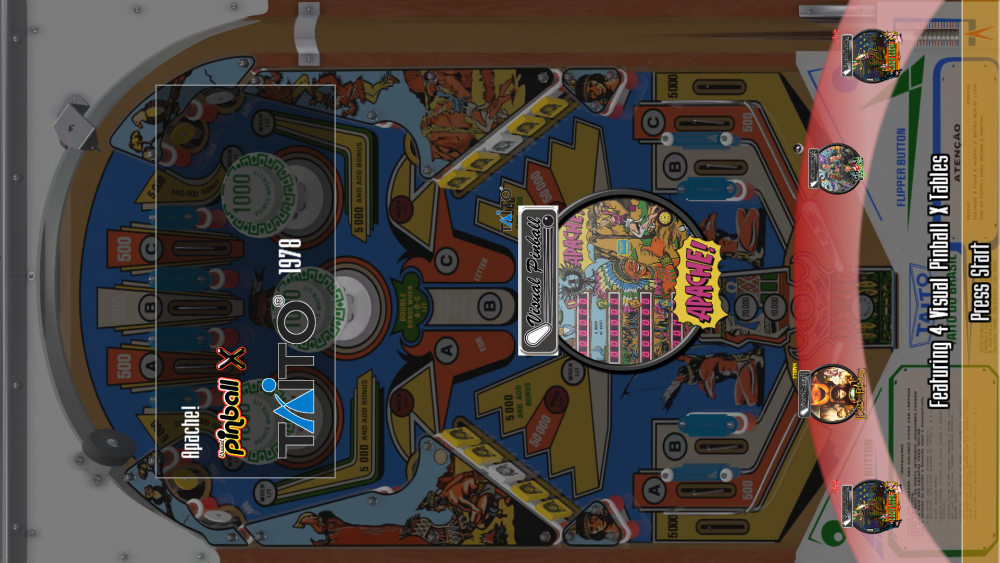
No not possible. All you can do is edit PinballX\Media\Images\underlay.png to get some similar effect but it will never look like the screenshot above. or use overlay.png to overlay an image i think that one can be same size as playfield size but underlay seems to get squashed if you do it seems to be lower part of wheels only i use this one to make it look like this:
-
I'm not sure but i don't think the "LColors" are the cause if i look at your last directoutput.log the 1st log entry starts at 2020.01.17 18:07:41.494 and the last one ends at 2020.01.17 18:07:54.016 so thats only 13 seconds while the exceptions of the "LColors" were occuring. If you want to be sure you could try removing them from your config but i doubt it will have an impact. If i look at your last posted log.txt i do see the following 16:22:21.9 1/16/2020: Loaded Plugin:"DirectOutput PinballX Plugin" Version 1 By Swisslizard 16:25:29.1 1/16/2020: PlugIn: "DirectOutput PinballX Plugin" Initialized OK and thats indeed 3 minutes between loading and initializing the directoutput plugin so its definatly dof related but i'm can't see what exactly. when looking at the pinballx directoutput pluigin log you pasted a few posts back i see: 20.01.16 04:22:21.993 Initializing DOF 20.01.16 04:25:28.950 DOF initialized so it's the DOF initialisation that takes 3 minutes but i don't know why there isn't any log entries between them I don't know if it would make a difference but your pinball X version is still at 3.74 while latest is 4.06 if i remember correctly. Did it load faster in the past ? Do you know when the problems started happening like when you added a new toy or after you updated pinball x version or something you changed DOF related ?
-
i don't have DOF since i only have one led strip and no extra toys but in the global config there seems to be setting to clear the log file on startup as well as disable logging. Have you tried setting enable logging to false (temporary for example to see if it makes a difference) the should be named like this somewhere (i think GlobalConfig_B2SServer.xml ) see https://directoutput.github.io/DirectOutput/class_direct_output_1_1_global_configuration_1_1_global_config.html#a42d2e81f230d9ecfd5f80aa50d31c6a9 <EnableLogging>true</EnableLogging> <ClearLogOnSessionStart>true</ClearLogOnSessionStart> if your log file is getting spammed with entries it might cause delays or even not clearing the log on every session start might cause delays if the log file keeps growing and it has to be opened for adding new things
-
i think it's payed worth the money if you are starting out though. Although i do have my pinball fx3 stuff also on my mega account (i use it as a backup mostly). But Here's a shared link https://mega.nz/#F!FoBUCIRK!PMxsIhrWJvU6pHkrOuwtew most williams pfx3 stuff i recorded myself using two instances of obs studio. So dmd is synced to playfield if it applies (for example junkyard) you should consider either creating the videos yourselve (enable attract mode and play a game till game over then the pinball table will go in attract mode and you can record the table using obs studio or even your video card recording) or getting access to the ftp. Most people upload their video's there in the other section.
-
[Resolved] PBX Recorder is recording windows "behind" my playfield
joyrider3774 replied to gpstevens's topic in General
I don't see how updating pinballx can have ann effect on pbxrecorder. As far as i'm aware it only loops over the database xml files and all the rest is autohotkey scripting and using ffmpeg.exe. Have you tried disabling fullscreen exclusive mode inside visual pinball settings and not pinball x settings? Also you could try updating ffmpeg.exe but could be its the exclusive mode inside vpx not pbx -
@Mike_da_Spike are you using latest freecam mod and latest tpa from steam? If so does the dmd still work with you as mine and halen's stays black while cameras and table selection still works. Just wondering if you got the same problem. Freecam mod is definatly the way to go but could be dmd does not work a few of us have that problem. It's also not as easy to setup as pinball fx3 no table launching support without freecammod and no free cabinet support it costs 150 us dollar to get the support but its not worth it anymore. Pfx3 will get more tables eventually and is superior when it comes to physics. Freecam mod can give you cabinet support but you need the cam files or setup the camera's using freecam mod yourselve
-
Check the williams volume 5 topic
-
don't know about t-arc sorry
-
You mean for positions? Just calaculate it yourselve and see what fits. Depending on your setup backglass should start for y position at 0 and x position at 1080 or 1920 it depends if you have landscape or portrait in your windows setup and how your screens are setup which is primary etc and location against each other. For dmd x 1280/2 - dmdwidthyouwant /2 + width of playfield monitor (1080 or 1920) height see what fits top dmd should be 1024 - dmdheightyouwant - bottomspacing(35 for example) if you place a default backglass image or if you start a table that already has a backglass and goto cabinet options from that screen you will see the backglass and dmd and can see where it positions. It's no rocket science on official zen studio forums there is a topic domewhere that explains it in more detail. I have excact same resolutions as you but even then depending on setup in windows and backglass images you use the offsets (especially for dmd) will differ. i also have a 2 monitor cabinet. on pinball x ftp or here on my mega link you can find the backglasses i use along with the template. I got all tables check also the faq it has an example https://www.pinballfx.com/?page_id=7754
-
[RESOLVED] FTP Slow on port 21, not downloading on port 22
joyrider3774 replied to Mike_da_Spike's topic in General
i'm having a similar problem for some time now. initial connection takes a while before it happens and i can see files once i do see them i can browse the ftp normally. But when i want to download something it also takes a while before it starts (probably because it makes a new connection). but once it starts downloading downloading the queue seems to go ok. I'm pretty sure my isp does not throttle ftp in belgium. I'm using tls connection using filezilla also. once download starts it seems to go fast as far as i can tell. Not sure whats causing it but i seem to remember about a year ago i did not have this problem. I don't really consider it a problem and i'm used to it already but i'm not sure if that's what mike is seeing -
place backglass image files in the games folder from steam where the pxp files are. Name your images exactly the same as the table pxp files minus extension. so citadel.pxp -> citadel.png or citadel.jpg (not sure what it accepts). That should show the backglass, pinball fx3 does not supply ingame backglasses you have to provide them yourselve. There are some on the pinball x ftp or check official zen forums someone has posted theirs there also. I think thats what your after but not sure as it could be i misterpreted your last message
-
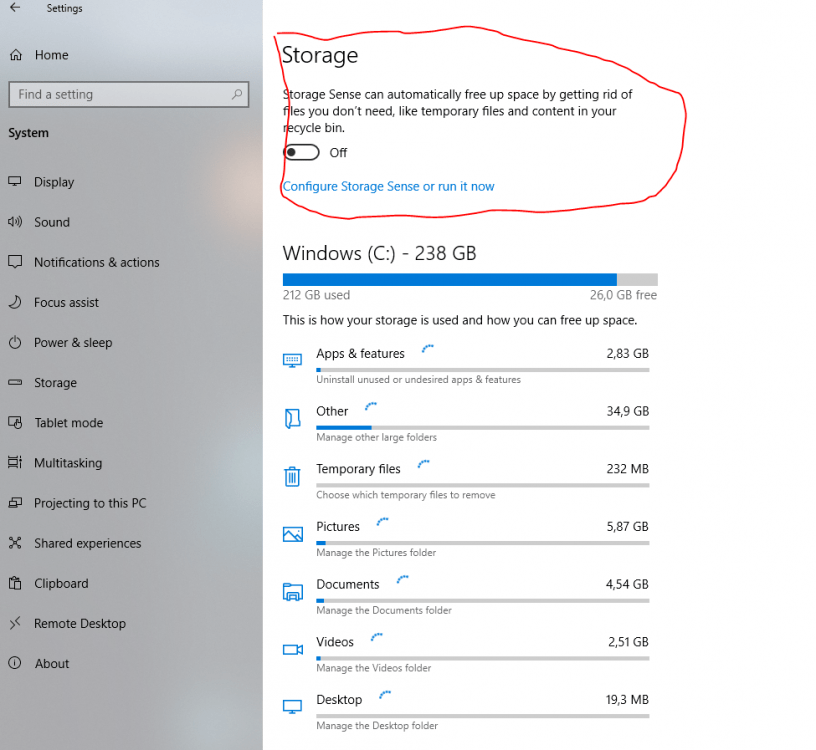
there's also a wheel cache in the temp folder of windows that pinballx uses (%Temp%\PinballX\WheelCache). Maybe the low disk space and this cache folder has something todo with it 4gb left is indeed really low. Or perhaps windows was cleaning up the temp folder automatically to free up disk space and the wheel cache kept getting erased. I know windows 10 has some options to auto free disk space (storage sense or something) best to disable that setting to prevent temporary files and thus wheel cache to be erased
-
ah yeah i left out pinball fx2 as the only tables i owned were tables also available on pfx3 and they carried over
-
i don't have the williams packs for pinball arcade, i only bought everything after they lost the license. do you think that build in cabinet support is still wordt the 150$ ? it's a lot of money and i don't know if it's any good at all. I currently use freecam mod which worked fine in the past but currently dmd only shows black image, maybe it gets fixed. did you ever try the freecam mod and if so do you find the build in support better ?
-
Hey just starting this topic to see if i might be missing something someone else has installed or perhaps to give other people some idea's but which system do you have configured inside pinball x ? I currently have 13 systems configured pinball wicked pro pinball visual pinball 9 visual pinball X zaccaria pinball bigscore pinball bingo gameroom a comic book reader demon's tilt future pinball malzbies pinball collection pinball arcade Pinball FX3 are there more games like demon's tilt on steam that still can be configured and have a portrait mode ? I did buy some other pinball games but none had the potential to be (easily) added as a system for pinballx
-
i also just uploaded my table video's + synced dmd videos (568x170) + backglass screenshots for steam and backglass video's including the (synced to playfield) dmd in both ehanced graphics and normal graphics. The backglass video's and screens i use are only 1024x768 though but maybe someone can use them or at least use the dmd video's i extracted from them
-
UPDATE 26/12/2019 Cine star Deluxe 2019 Playfield video + 1600x1200 backglass image + 1920x1080 backglass image uploaded to ftp all named cinestardeluxe.XXX Redshow Deluxe 2019 Playfield video + 1600x1200 backglass image + 1920x1080 backglass image uploaded to ftp all named redshowdeluxe.XXX Do note on backglass images on deluxe tables for some reason the game crops images if they are in 4:3 format, i kept the same screenshots as it would display ingame. If you don't like this take the 1920x1080 versions to display in pinballx for the deluxe tables. (that's what i do untill they might fix this problem)
-
it does select and load the table but you end up on the screen with the preview on the right and you have to press enter once for play and then once more enter to actually play the game. As far as i'm aware and in my case the script never pressed those two enter buttons for me i always do it manually using my launch button. Key input in pinball x can and will probably defer from zaccaria pinball keys. However in the table menu you can goto options and redefine keys or you can remap your buttons only during zaccaria pinball gameplay using a simple autohotkey script. What i did was make nudge left and nudge right be linked to left and right arrow key inside zaccaria by changing the controls. Then i remapped my left magna and right magna save buttons on the cabinet (default LCTRL / RCTRL) to left and right. I also remapped my launch button key (default ampersand / 1 key) to enter/return key this way i can go left and right (not up / down) using nudge buttons and just press launch button twice on table menu to start the game it also allows me after a game to choose continue / restart to start a new game using only cabinet buttons. Here is a simple example on such autohotkey script. I use them for a lot a of systems with different key assignments depending on the system (except for visual pinball). #noenv &::Enter 1::Enter LCtrl::Left RCtrl::Right put that in notepad and name your file zaccaria_remap.ahk (not zacarria_remap.ahK.txt) then you can right click and choose compile on the script which will produce an zaccaria_remap.exe (compiled script) also change key bindings to what your cabinet is actually using for buttons or leave things out if you don't need them remaps. more info here: https://www.autohotkey.com/docs/misc/Remap.htm but basically it's buttontochange::tonewkey and check here for the key list https://www.autohotkey.com/docs/KeyList.htm The create 2 .BAT files also in notepad name them zaccaria_launch_before.bat and in that file put in start Zaccaria_remap.exe it will start your compiled script. Next create the second batch file name them zaccaria_launch_after.bat and in that file put in taskkill /IM Zaccaria_remap.exe it will close the zaccaria_remap compiled script gracefully if it does not close add /F at the end. In pinball x settings for your zaccaria pinball setup add the launch before and launch afterscripts .bat files tell it to not display the window and wait for exit to true. thats what i do for zacarria but you can probablly do the same by just remapping keyboard in zaccaria to some of your cabinet buttons. The reason i use remaps is because i have both a plunger and a launch / start button. My plunger when pressed in also acts as a button and by default it uses return / enter already but it's easier to press a start / launch button so i added an extra key that will send return key i added some example bat and ahk remap script here but you'll have to adopt for your cabinet zacaria launch example files.zip edit: if you really want the launcher script to press those last 2 return buttons automatically for you, you need to introduce a new sleep value long enough to load the table and be on the table menu then just send 2 return keys (keyup / keydown) with small sleep value in between them. It's easy to modify the script todo that but then you will never be able to change the table options (like classic mode etc) the game remembers last chosen option but if you want to change it you still can now which won't be possible if you let it press those last 2 returns after loading the table
-
did you download latest version of ahk script and did you compile the script to an exe using authotkey ? (check posts above)
-
New wheels for williams pinball volume 5. Extracted Table audio is available on ftp in my folder. Have not created any table video's yet but i think mike da spike already uploaded his files. Images come mostly from vpuniverse b2s preview pictures, logo's come from ftp although i did modify circus voltaire logo



-
Mega Docklets Style Zaccaria Pinball Wheel Images
joyrider3774 replied to Draco1962's topic in PinballX Media Projects
New Game Cine Star Deluxe (2019) game name is cinestardeluxe