



|



joyrider3774
-
Posts
811 -
Joined
-
Last visited
-
Days Won
63
Content Type
Profiles
Forums
Events
Downloads
Store
Articles
Everything posted by joyrider3774
-
Hey, I can't really tell at what table view the existing video's i had found on the ftp are recorded from pinball fx2 / 3. I want to record video's for my missing tables using shadow play (nvidia recording). I think the most viable views are either view 2 or 7. I recorded yesterday some of the williams tables already in pinball fx3 i made playfield video's for both the plain table view (without added extra's like the 3d models) as well as with the extra models and i recorded them in view 2 and 7 but i'm not sure which one people usually use. Also which would be recommended as the default one (the one named after game name) view 2 or 7 and with the extra models enabled or without them ? When i'm finished i can upload them to the ftp for other people to use and i could upload all the versions i create (4 video's per table 2 views once with and once without extra's enabled) but i'd like to know suggestions about this for which to be the default I also have problem when recording video's in pinball fx3 using nvidia shadow play features. It seems all saved video files from this game have around second 1-2 some corrupt frame. When i play the unprocessed video in vlc i quickly see a green screen, when i post process using ffmpeg, ffmpeg mentions something about this in the console window and i think it erases that "block" because afterwards when i view the movie processed with ffmpeg i do not see that green screen anymore but i do see a small hickup at the time it used to encounter that green screen. It is noticiable if you look at it but for media usuage i think it might be fine. I'm just wondering if someone else had this problem with pinball fx3 recordings & nvidia shadow play ?
-
i removed the brackets for now in my descriptions it was an easy replace all
-
Ok, it's uploading to /-PinballX-/Other Uploads/Joyrider3774/Zaccaria Pinball/Table Videos but it could take a while i have slow upload speed only around 5mbit and all 97 video's together are about 1.5 gig. I'm not really good at optimizing the size and stuff and as mentioned before i messed up initially with ffmpeg (not all video's are equal in length) but i did not recreate the video's. I also did not check every video file but i think they are ok at least they play in my pinballx version i'm currently running on my main pc. It should be finished in about 2 - 3 hours. Maybe someone can recode (again) with ffmpeg to reduce size. But it's a start until something better comes along edit: forgot to mention i play & recorderd them without the glass visible from cabinet (in game) and there is no audio but i think that's the standard way (no audio) for video's edit2: just quickly skimmed over all video's (fast forwarding in vlc) and they all recorded ok as far as i can tell so should be usuable edit3: all files have uploaded Edit4: it should not matter which database you use as i named the video's based on game name not description and we all use the same ones since the launcher expects them to be the names as the game expects it to be in the settings file. So should work out of the box when using this launcher, but i uploaded my database xml file as well
-
Hi, I searched a bit in google and forums here but could not find the answer. It seems pinballx is hiding the brackets like "(" and ")" and any text between them from the description tag of the menu xml's (system's games). I looked a bit around but could not find a way to disable the hiding of this text. I have a zaccaria pinball.xml database that has in the descriptions some brackets to indicate which version of the table it is. Like "Black Belt", "Blackbelt (Remake)" and "Blackbelt (Retro)" but when running pinballx itselve i see 3 times "Blackbelt" without (Retro) and "(Remake)" addition. Is there perhaps a setting i can set somewhere (perhaps only for this emulator) to enable showing of this text between brackets ? edit: sorry seems i have placed this question in the wrong section it should have been posted in the general section of pinballx not gameex
-
Thanks for your database xml i used it but it seems it was missing the latest table (star's phoenix (Remake)) so i added it in. It's basically your database file with the extra table added. If anyone needs the table entry it's name is sphoenix2018 .. here's a database file with the table added in Zaccaria Pinball.xml I also just finished creating video's for 97 tables (out of 98 i have not unlocked the treasure table yet), but i messed initially with my ffmpeg arguments to do post conversion and not all video's are 1 minute in length but it'll do some are 59 seconds some 49 and one even 26 seconds. Luckily not much is going on in these tables in "attract mode" so it'll do I recorded them at 60 fps using my nvidia 1070 gtx The launch script is also working perfectly, i did not have any problems yet launching a table using this latest version
-
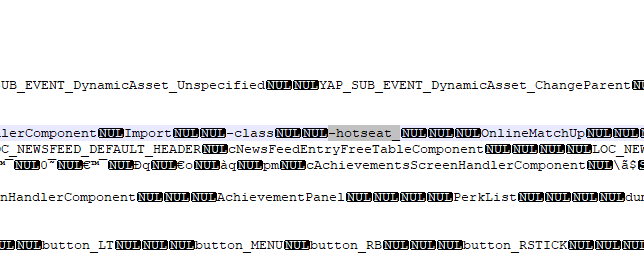
i looked it in the executable and found a -hotseat_x right besides the -class parameter where x needs to be a number 2 3 or 4 so adding -hotseat_2 will start 2 player hotseat mode. for example "steam.exe -applaunch 442120 -offline -hotseat_2 -table_Citadel" will launch sorcer's lair in offiline mode with 2 player hotseat local multiplayer. I have not tested if -class works along this case or not but you can if you like these are the cmdline's i know off: -offline -> be in offline mode (not sure exactly what it does but i'm guessing it won't submit scores etc or show data) -hotseat_x -> (x= 2 3 or 4) local multiplayer hotseat (not sure if it needs cabinet mode) -table_XXX -> (XXX = pxp filename without extension) load table (needs cabinet mode) -class -> enable arcade classic physics, as far as i'm aware there is no way to enable tournament physics on the williams tables (yet)
-

Mega Docklets Style Zaccaria Pinball Wheel Images
joyrider3774 replied to Draco1962's topic in PinballX Media Projects
thanks for this they look great -
Zaccaria Pinball launcher and media generator
joyrider3774 replied to Carny_Priest's topic in PinballX Media Projects
I just bought the whole zaccaria game (all dlc) and found this topic soon after. My pinball cab has not arrived yet but i wanted to prepare as much as i could. I had problems with with the recording software, i'm not sure why but launching the tables using the recording software did not work correctly most of the time and the obs recording thing acted weird also. luckily source was included so what i did was modify the script to let it use the new direct launcher to launch the tables and let it record using my nvidia card by making sure i see no notifications of recording started / stopped etc and assigned a single button to the recording features of nvidia (i took f9). I also rotate my screen before hand 270 degrees so video's are recorded in orientation pbx expects them to be. The only downside is i have to rename and convert using ffmpeg manually afterwards. I did not take the time to figure that thing out as i can make it work. And i clear out my recordings folder before starting. The tables are looped over chronologically based on the xml anyway so pretty easy to rename afterwards. It did not fail to start a game once yet basically i replaced the whole start table section (with this https://pastebin.com/Jw3NHQCL ) and removed the ffmpeg stuff. It's a bit of hackery doo dah but it's working. To do a one minute recording using nvidia settings you basically just send the key event, sleep for one mine and send another key event like so: (f9 in settings for nvidia for recording), i could have easily removed the hardcoded 1 minute value and used the settings from the script itselve but i was a bit lazzy SetKeyDelay, -1, 100 SendEvent, {F9} Sleep, 60000 SendEvent, {F9} i'm fine with this system for now and i can create the playfield video's. anyway i could not have made my hackery doo dah work without having the original script so thanks for that as well as for the direct launcher couldn't have done it without it, now hoping to see my (mini) pinball cab to arrive soon so i can all test it out. I'm currently running pinballx on my main pc to simulate it all and create the playfield video's edit: i uploaded my video's to the ftp in /-PinballX-/Other Uploads/Joyrider3774/Zaccaria Pinball/Table Videos it's a bit big 1.5 gig and not perfect. They have no sound and i recorded without the pinball table's glass visible as that's how i play

