



|

scutters
-
Posts
2122 -
Joined
-
Last visited
-
Days Won
190
Content Type
Profiles
Forums
Events
Downloads
Store
Articles
Everything posted by scutters
-
Just reread the post and noticed this. I'd expect navigation in pinballx to be a lot quicker and smoother with that option off (so pinballx is only loading a video rather than the backglass), that is what i was suggesting to check - not to turn it on. It sounds like you have something else going on . Make sure you don't have any compatibilty settings set for pinballx as suggested by Tom, and reinstall lav filters from https://www.pinballx.com/
-
 That's what was confusing me then - i was looking for a disabled table! I can recreate the error using your current database files (with the table deleted), i will try to reproduce using my own database files with just having a table disabled next. I think it's because the table you disabled (then deleted) was on your favourites list. Edit - sorry, still investigating
 -
Hi @vothar Thanks for the files and the info. Can you confirm my understanding is correct... you disabled (not deleted) a table in database manager, and then in pinballx when paging in any list other than 'All Tables' the error occurs? Also, which table was disabled, and under which system?
-
Are you running a really low spec pc?.. game manager shouldn't crash. Give the alternative app PinballX Database Manager a go and let us know if that loads ok; But please also attach all the files requested before (log.txt, pinballx.ini etc). Thanks
-
[PLUGIN] PinballX Loading Video & Image Changer (de-randomiser) V2
scutters replied to scutters's topic in User Projects
You really need to attach your PinballX.ini, Log.txt and PBXLoadingImage_log.txt files (PBXLoadingImage_log file is in the plugins folder) to know what's happening... but, i'd guess the plugin isn't enabled in pluginmanager.exe (in pinballx folder) -
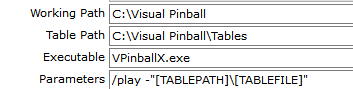
You may have Use DirectB2S enabled in the front end settings. As previous posts, we'll need to see your pinballx.ini file. For me, i'd say no - disable it. VPX tables so use vpinballx.exe. Settings for VP system should look something like this (depending on install path);
-
For info pinemhi v1.3.1 doesn't support many (any?) of the color rom mods like AC/DC. @Dna Disturber was working on a new version that would include them. Edit - as the AC/DC recording is correct should pinballx just use pinballx dmd config size/pos for it's recording area for all, or am i missing something)?
-
Just the pinballx.ini file, cheers. You are running an old version of pinballx though (3.47), so update that first and post the ini file and new copy of log.txt as well if the issue is still present.
-
Thanks mate I have frames @ 128*32 for most of these, but they don't look very good used as company logos in the additional detail area - so i scaled to 512*128 with a new overlay and then resized to 512*160 to stop pinballx stretching them more horizontally when used in the front end. So these logo gifs are pretty much specifically only for use in additional detail area. If you need source frames for another use i can send them over to you. I posted the some company logo images @128*32 a while back; https://www.gameex.info/forums/topic/23059-company-logos-12832/
- 29 replies
-
- 1
-

-
- company logos
- gif
- (and 4 more)
-
Animated Company Logos View File These are an improved version of DMD style company logo animations (originally posted https://www.gameex.info/forums/topic/24176-animated-system-logos-wheels) along with some neon type animations to cover other years / manufacturers. Png files included are animated pngs. Note that the previews are on a white background, these files look better where they are intended to be used, on the dark semi transparent Additional Detail area of PinballX. Files included (ALT is used to indicate alternatives for the main version of a file, remove the ALT part to use it in PinballX); DMD Style Alvin G.gif Bally (1991-).gif Bally (1991-)ALT.gif * Alternative Bally animation, could be renamed and used for games listed as Midway Barnstorm Games.gif * Not a 'real' DMD animation. Improvised. Capcom.gif Data East (1991-).gif Data East (1991-)ALT1.gif * Alternative DE animation, rename to use Data East (1991-)ALT2.gif * Alternative DE animation, rename to use Farsight Studios.gif * Not a 'real' DMD animation. Improvised. Form Slingers.gif * Not a 'real' DMD animation. Improvised. Gottlieb (1992-).gif Gottlieb (1992-)ALT1.gif * Alternative Gottlieb Premier animation, also used as as Premier JP Salas.gif * Not a 'real' DMD animation. Improvised. Inder (1993-).gif * Not a 'real' DMD animation. Improvised. Midway (1991-).gif * Not a 'real' DMD animation. Improvised. Original.gif * Not a 'real' DMD animation. Improvised. Premier.gif * Duplicate of Gottlieb (1992-)ALT1.gif Sega (1981-).gif SegaALT1 (1981-).gif * Alternative Sega animation, rename to use SegaALT2 (1981-).gif * Alternative Sega animation, rename to use Spinball.gif Spinball S.A.L..gif Spooky Pinball.gif * Not a 'real' DMD animation. Improvised. Stern (1999-2010).gif Stern (2011-2016).gif Technetium Games.gif * based on ftp dmd video Williams (1991-).gif Williams (1991-)ALT.gif * Alternative Williams animation, rename to use Zen Studios.gif Neon Effect (pre DMD) Allied Leisure.apng Astro Games.apng Atari.apng Automaticos.apng AutomaticosALT.apng * Talleres del Llobregat Bally (-1990).apng Bally Midway.apng Bally Wulff.apng Barni.apng Bell Games.apng Bensa.apng Bill Port.apng Chicago Coin.apng Christian.apng * Christian Automatic / Christian Tabart CIC Play.apng Cirsa.apng Data East (-1990).apng EMAGAR.apng Epic Games.apng Epic Pinball.apng Europlay.apng Game Plan.apng Geiger.apng Gottlieb (-1979).apng Gottlieb (1980-1991).apng Grand Products.apng Hankin.apng HankinALT.apng I.D.I..apng Iberomatic.apng Iberomatic S.A..apng IDSA.apng Inder (-1985).apng Inder (1986-1992).apng Interflip.apng Jac van Ham.apng Jersey Jack Pinball.apng Jeutel.apng Joctronic.apng Juegos Populares.apng LTD.apng MAC.apng MAC S.A..apng Maresa (-1975).apng Maresa (1976-).apng MARSA.apng Midway (-1990).apng Mylstar.apng No Image.apng No Image.png Nuova Bell Games.apng Petaco.apng Peyper.png Pinstar.apng Playmatic.apng Rally (-1965) Rally (1966-) Recel.apng Recreativos Franco.apng Rowamet.apng Sega (-1980).apng Segasa.apng SLEIC.apng Sonic.apng SonicALT.apng Sport Matic.apng Stargame.apng Stern (-1980).apng Stern (1981-1998).apng Taito.apng Taito do Brasil.apng Tecnoplay.apng Unidesa.apng Universal de Desarrollos Electronicos.apng * same as Unidesa Videodens.apng Williams (-1990).apng Zaccaria.apng Other (matching display type of era / tables) American Pinball.gif Dutch Pinball.gif Magic Pixel.apng Malzbie Games.apng Mr Game.gif Pinball Fantasies.gif Stern (2017-).apng OrbitalPin.apng OrbitalPinALT.gif VPW.apng These files should be placed in your PinballX\Media\Company Logos folder. The files are named to display the animations only for years ranges in the brackets, but can be renamed to display for all years if that is preferred. As always with these things keep the ones you want, delete what you don't!. To display the animations in PinballX make sure you're up to date and have Show Additional Detail enabled under General settings in Settings.exe. If you display company logos as wheel overlay images (Settings.exe->Generel Settings->Wheel Overlay Images option) the gif images will not display correctly in the wheel. Copy a static png logo image with same file/company name as the gif back to the company logos folder (that file will be used for the overlay, with the gif displayed in Additional Detail area), or disable the wheel overlay option. The animations need PinballX V4.84 or later to work. If the logo's aren't being used / picked up by PinballX please check your database table entry Manufacturer name, the company name should match the name of the file, if it doesn't change the name of file or update the manufacturer info for those table(s). Submitter scutters Submitted 05/09/20 Category Wheel Images
- 29 replies
-
- 3
-

-
-
- company logos
- gif
- (and 4 more)
-
.thumb.gif.67f8960b13abfeb0adf425cb64dee154.gif)
Version 2.4.4
710 downloads
These are an improved version of DMD style company logo animations (originally posted https://www.gameex.info/forums/topic/24176-animated-system-logos-wheels) along with some neon type animations to cover other years / manufacturers. Png files included are animated pngs. Note that the previews are on a white background, these files look better where they are intended to be used, on the dark semi transparent Additional Detail area of PinballX. Files included (ALT is used to indicate alternatives for the main version of a file, remove the ALT part to use it in PinballX); DMD Style Alvin G.gif Bally (1991-).gif Bally (1991-)ALT.gif * Alternative Bally animation, could be renamed and used for games listed as Midway Barnstorm Games.gif * Not a 'real' DMD animation. Improvised. Capcom.gif CapcomALT.gif Data East (1991-).gif Data East (1991-)ALT1.gif * Alternative DE animation, rename to use Data East (1991-)ALT2.gif * Alternative DE animation, rename to use Farsight Studios.gif * Not a 'real' DMD animation. Improvised. Form Slingers.gif * Not a 'real' DMD animation. Improvised. Gottlieb (1992-).gif Gottlieb (1992-)ALT1.gif * Alternative Gottlieb Premier animation, also used as as Premier JP Salas.gif * Not a 'real' DMD animation. Improvised. Inder (1993-).gif * Not a 'real' DMD animation. Improvised. Midway (1991-).gif * Not a 'real' DMD animation. Improvised. Original.gif * Not a 'real' DMD animation. Improvised. Premier.gif * Duplicate of Gottlieb (1992-)ALT1.gif Sega (1981-).gif SegaALT1 (1981-).gif * Alternative Sega animation, rename to use SegaALT2 (1981-).gif * Alternative Sega animation, rename to use Spinball.gif Spinball S.A.L..gif Spooky Pinball.gif * Not a 'real' DMD animation. Improvised. Stern (1999-2010).gif Stern (2011-2016).gif Technetium Games.gif * based on ftp dmd video Williams (1991-).gif Williams (1991-)ALT.gif * Alternative Williams animation, rename to use Zen Studios.gif Neon Effect (pre DMD) Allied Leisure.apng Astro Games.apng Atari.apng Automaticos.apng AutomaticosALT.apng * Talleres del Llobregat Bally (-1990).apng Bally Midway.apng Bally Wulff.apng Barni.apng Bell Games.apng Bensa.apng Bill Port.apng Chicago Coin.apng Christian.apng * Christian Automatic / Christian Tabart CIC Play.apng Cirsa.apng Data East (-1990).apng EMAGAR.apng Epic Games.apng Epic Pinball.apng Europlay.apng Game Plan.apng Geiger.apng Gottlieb (-1979).apng Gottlieb (1980-1991).apng Grand Products.apng Hankin.apng HankinALT.apng I.D.I..apng Iberomatic.apng Iberomatic S.A..apng IDSA.apng Inder (-1985).apng Inder (1986-1992).apng Interflip.apng Jac van Ham.apng Jersey Jack Pinball.apng Jeutel.apng Joctronic.apng Juegos Populares.apng LTD.apng MAC.apng MAC S.A..apng Maresa (-1975).apng Maresa (1976-).apng MARSA.apng Midway (-1990).apng Mylstar.apng No Image.apng No Image.png Nuova Bell Games.apng Petaco.apng Peyper.png Pinstar.apng Playmatic.apng Rally (-1965) Rally (1966-) Recel.apng Recreativos Franco.apng Rowamet.apng Sega (-1980).apng Segasa.apng SLEIC.apng Sonic.apng SonicALT.apng Sport Matic.apng Stargame.apng Stern (-1980).apng Stern (1981-1998).apng Taito.apng Taito do Brasil.apng Tecnoplay.apng Unidesa.apng Universal de Desarrollos Electronicos.apng * same as Unidesa Videodens.apng Williams (-1990).apng Zaccaria.apng Other (matching display type of era / tables) American Pinball.gif Dutch Pinball.gif Magic Pixel.apng Malzbie Games.apng Mr Game.gif Pinball Fantasies.gif Stern (2017-).apng OrbitalPin.apng OrbitalPinALT.gif VPW.apng These files should be placed in your PinballX\Media\Company Logos folder. The files are named to display the animations only for years ranges in the brackets, but can be renamed to display for all years if that is preferred. As always with these things keep the ones you want, delete what you don't!. To display the animations in PinballX make sure you're up to date and have Show Additional Detail enabled under General settings in Settings.exe. If you display company logos as wheel overlay images (Settings.exe->Generel Settings->Wheel Overlay Images option) the gif images will not display correctly in the wheel. Copy a static png logo image with same file/company name as the gif back to the company logos folder (that file will be used for the overlay, with the gif displayed in Additional Detail area), or disable the wheel overlay option. The animations need PinballX V4.84 or later to work. If the logo's aren't being used / picked up by PinballX please check your database table entry Manufacturer name, the company name should match the name of the file, if it doesn't change the name of file or update the manufacturer info for those table(s).- 1 comment
- 2 reviews
-
- 6
-
-
- company logos
- gif
- (and 4 more)
-
PinballX Enhancements/Features Requests
scutters replied to Draco1962's topic in FAQs, Guides, & Other Useful Information
Can the Company overlay options be changed to use the old png images rather than the first frame of a gif (if used)?. The first frame of gif isn't always suitable to use as a static image for the wheel overlay option. This could be done with a new media folder 'company overlay logos' (like systems have a folder 'system overlay logos') I guess another option would be to place in the gif a 0ms delay frame as it's first frame holding an image more suitable to display as a wheel overlay - but a 0ms frame is displayed very quickly as part of the gif animation rather than just being skipped, so that has other issues. Hope that makes sense. Anyway, thanks for animated gif possibilities in the front end Tom! EDIT - This was fixed in PinballX v4.33. Thanks Tom! -
I'm not a DOF user, but have a look at https://www.vpforums.org/index.php?showtopic=44264&p=449571
-
Attachment in fiirst post updated to V1.1.1 (small bug fix)
-
Not much help but sounds like an OBS config error so best bet is their forums https://obsproject.com/forum/
-
Glad it worked for you, no idea why it would break a front end. Post back if you need get any problems with the pinballx setup!
-
Ahh, ok misunderstood. Visual Pinball settings right?.. check that box and try that Post a screenshot of your visual pinball key/joy settings if still no luck
-
Yes. Do the buttons work in visual pinball when you launch a table directly (outside pinballx)?
-
@jejegameex Thanks mate, plenty of changes and fixed my dodgy 1920x1080 code! I am trying to switch to the inbuilt pinballx video creation instead of pbxrecorder but i'll give this version a go when i get chance. For info, what issues did you have with the later version of ffmpeg, errors or just unusable output?
-
 Sorry.. i have to hold my hand up there, it's my fault media is saved to match the table / file name - main reason is to guarantee uniqueness in the saved media file names. Glad you like it other than that though!
 -
@joyrider3774 same here.. it's not just you!
-
@johnwillsey Please give this version a go (just the exe again). Hopefully fixes your issue (based on my best guesses without the log). If that does the trick we'll get a patched version out officially. Thanks.
- 418 replies
-
- 1
-
-
- mikedaspike
- scutters
- (and 1 more)
-
Thanks for confirming. Enjoy you pinballing weekend!
- 418 replies
-
- 1
-
-
- mikedaspike
- scutters
- (and 1 more)
-
@axeguitar21 No problem.. I think i see the issue. Can you open pinballx settings.exe and under Other Systems for system2 (visual pinball x) remove the path from the Executable entry, so from "C:\Visual Pinball\VPinballX.exe" to "VPinballX.exe" Let us know if that sorts it out. If it does we'll have a look at the code to see if we can sort it out to work either way by stripping off the path in the app.
- 418 replies
-
- 2
-
-
-
- mikedaspike
- scutters
- (and 1 more)
-
I think that message may be a warning only, but please attach DBManagerLog.txt from your pinballx\log folder, and your pinballx.ini file from your pinballx\config folder. Thanks. Also, where is vpinballx.exe located in your setup, are C:\Visual Pinball\VPinballX.exe and C:\Visual Pinball\Tables paths correct for the exe and the tables folder?
- 418 replies
-
- 1
-
-
- mikedaspike
- scutters
- (and 1 more)