|


.gif.6d0defdbb7838a856f87aa25d43c69ad.gif)
scutters
-
Posts
2122 -
Joined
-
Last visited
-
Days Won
190
Content Type
Profiles
Forums
Events
Downloads
Store
Articles
Everything posted by scutters
-
.thumb.gif.704e8e80bff8d8baa365115adc2ca31b.gif)
[RESOLVED] Left shoulder button on game controllers exits back to PBX?
scutters replied to tabascoman77's topic in General
We're going to need those pinballx,ini and log.txt files attaching! -
One small change suggestion would be to action 2, just to say 'but under a single parent folder' or something like that.
-
Thanks, but no problem, update your guide. We'd never have figured out the solution if you hadn't posted the question and tried the suggestions!
-
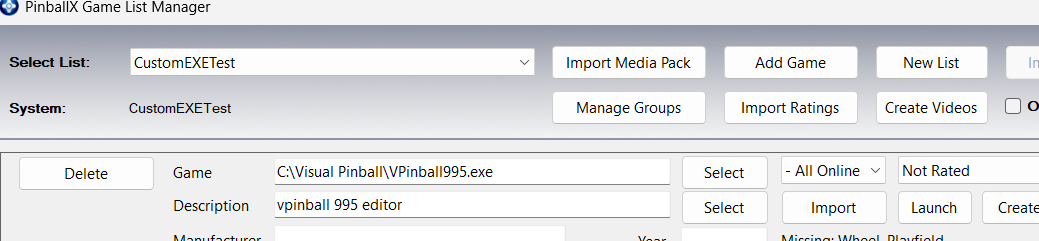
It appears that for Custom Exe systems Game Manager will make any exe in subfolders available as well. So if all the games are installed under e.g. C:\PcGames\ as e.g. C:\PcGames\Game1\Game1.exe etc then setting your Table Path to C:\PcGames\ should make them all available for selection (and will include the full path to the exe in the game name)
-
For a simple test of the theory i used the VP995 editor as the exe set up like; (no launch before/after needed for my test) Then in Game Manager (Database Manager has some issue with Custom Exe systems which we'll address in a future release) you can add any exe found under C:\Visual Pinball as a game. Note that the game includes the full path; When launched from PinballX the VP995 editor launches and is closed from PinballX Note - The PinballX log file will show the launch as "C:\Visual Pinball\C:\Visual Pinball\VPinball995.exe ", which wouldn't work but as the exe is launched ok i assume this is just an issue with the logging for Custom Exe systems in PinballX. The changes you'd need to make to this configuration to test on your set up would be to change the Table Path folder to the root folder containing your game exes (can be in sub folders), and add the launch before after stuff for your screen switching.


-
I know this is (hopefully) now resolved, but just in case it's not here's a late curve ball.. Maybe try using the 'custom exe' system type instead and point the database xml directly at the game exe's. More info here, Custom EXE question - General - Spesoft Forums (sorry, should have considered that before but i've never used 'custom exe' so had forgotten about the option)
-
No time to test properly at the moment, but the code makes sense and is definitely more readable than a magic one liner! (only downside to it is having to maintain the gamen.exe entries in the bat file)
-
Yes it does. You should have the option to add/remove to favourites from the menu that appears when you select a game, and favourites should appear under the Lists option from the same menu. But you may have 'one click launch' enabled so don't see this menu. Please attach your PinballX.ini and log,txt files so we can see what settings you have.
-
You can ask AI to convert that cmd to request a clean exit, and wait a few seconds before killing if still running if you want/need to later. Hope things go well with Rocket Launcher anyway!
-
That might work (if process to monitor accepts the pinballx parameter names). It shouldn't be set to Explorer! Failing a change to PinballX to extract the process name the lnk file uses, something like this might work as a launch after; Parameters used are a powershell command to get the actual exe and kill it; powershell -command "$t = (New-Object -ComObject WScript.Shell).CreateShortcut('[TABLEPATH]\[TABLEFILE].lnk').TargetPath; Stop-Process -Name ([System.IO.Path]::GetFileNameWithoutExtension($t)) -Force" (note, even if that does work it make not be a clean way to close the pc game!)

-
I did post a version 2.1 some time ago, PBX Recorder - captures Playfield, Backglass and DMD videos and images - FAQs, Guides, & Other Useful Information - Spesoft Forums (but i won't be updating it again!), you can try that version if you want. It sounds like you were using the 'default' recorder in database manager (which just calls the inbuilt PinballX ffmpeg recording functions). I think all the options you want are available if you use it's own recorder (which you have to select in DBM options). @Mike_da_Spike describes how to use it in this post (and also in the documentation) - https://forums.gameex.com/forums/topic/23840-app-pinballx-database-manager-2605080-supports-touch-play-as-well/page/15/#findComment-223806. Nice! 👍 (but i think that potentially this could be slightly slower in PinballX than using fully compatible media foundation videos, if PinballX navigation is still fine for you on your hardware then not a problem)
-
Sorry, i meant attach one of the videos you have issues with in PinballX rather than recording a video of the issue.
-
PbxRecorder isn't supported actively anymore so any changes to the encoding there (if that's the issue) are unlikely. If you want to stick with pbxrecorder you could try changing the existing output options it already has (mp4/flv etc) to see if that helps, or try the recorder built into Database Manager instead. For PinballX attaching an example video might help Tom to look into it further, as well as confirming you've tested it against all the Media Foundation setting options available in PinballX 7.23 (Yes, No and Sample Grabber) with no success.
-
Don't think there's much that can be done about the first issue (except maybe physically move the exit button to somewhere else). The 2nd issue is probably media related (could be launch audio file or loading media mode). We'll need the log and ini files to check, but make sure the log file shows a table launch affected by issue 2.
-
@Mike_da_Spike is correct, it's so you can have two instances of the plugin running at the same time. So you could e.g. have high scores on one display and comment text on another, or on the same screen, or whatever really.. if you only want/need one instance then only enable one in plugin manager.
-
Sounds like an issue with modifier keys (shift/alt/ctrl) not sending 'repeats' when held down following a windows update (KB5083769), see Autorepeat stopped working on certain keys since latest update - Microsoft Q&A (but i don't think the fix proposed there will work!) Instead, here's a few different possible solutions/workarounds. Easiest/least risk first; Remap to use a different key Uninstall KB5083769 Try the KeyRepeatAssist tool here - GitHub - Jione/AutoCAD-Shift-Fix: Fixes the Shift key temporary override issue in AutoCAD caused by Windows 11 and specific laptop firmwares. · GitHub If you're confident with the registry then try the suggested fix here - https://vpuniverse.com/forums/topic/14168-pinup-player-v20-beta-files/page/3/#comment-94429
-
PinballX Enhancements/Features Requests
scutters replied to Draco1962's topic in FAQs, Guides, & Other Useful Information
You're correct. You'd need to set up 'active filters' for the by manufacturer lists. But they would be unsorted. Adding a date prefix to the table descriptions would sort them, but as you suspect that would also affect the All Tables order as well. Maybe a possible enhancement for PinballX would be to have an option 'sort by' field in the active filter which could be set to any of the fields used in the filter and default to table description if not set. -
@Tom Speirs This is the table, https://vpuniverse.com/forums/topic/8066-new-vp10-alert-game-of-thrones-le-stern-2015-vpw/ Seems to be working for me in PinballX 7.12, but i've only tried it on desktop (not on the cab), launch and exit ok (with a B2S backglass file). 10:17:45.50 07/04/2026: C:\Visual Pinball\\VPinballX64_10_8_DX.exe /minimized /play -"C:\Visual Pinball\Tables\Game of Thrones (Stern 2015).vpx" 10:17:56.39 07/04/2026: Set Visual Pinball Player Foreground 10:17:56.61 07/04/2026: Visual Pinball Player window foreground: 7 10:17:58.58 07/04/2026: Exit System Control Pressed 10:17:58.89 07/04/2026: Found Visual Pinball editor window 10:17:59.85 07/04/2026: Process Closed @TT11 I have slightly different launch parameters to you (i include the /minimized flag so the VPX editor window is minimized on launch), i don't think that'll make a difference but you could try it. I am also using VPX 10.8 final DX version. What version of VPX is the VPinballX_BETA.exe you're using for Game Of Thrones (and is it the same as the version of VPinballX.exe you used to launch the GOTG table in the log file without an issue)?
-
Agree then, the issue is that PinballX isn't receiving button presses after launching VPX, but key presses are ok. A few things to try; Launch a different table from Pbx if you haven't already tried that, just in case it's table specific. Maybe try an EM table instead to take pinmame functions out of the picture. Try changing VPX input API (in vpx key prefs) to Direct Input instead of Xinput Run Pbx as admin to see if that helps. If none of those work then it'll be over to @Tom Speirs to see if he has any ideas!
-
Damn, you're cursed with some weird issues!. Not sure if this is related to the backglass thing or something totally different. Do you have 'exclusive fullscreen' enabled in VPX preferences (if not try that), and let us know if you have any other background processes running (anything like MSI afterburner or even reshade) as they may be a factor. Also note that there is an updated version of PinballX out, so update 1st that before any retesting and attaching the log file.
-
Sorry, i meant to map and try a different key rather than a button in PinballX for exit emulator, so it doesn't match the Q button key in VPX. It does sound like for some reason PinballX doesn't recognise your button presses after launching VPX, if key presses work but not buttons it might help narrow things down a little (although to what i'm not sure!)
-
Yes, my bad. And yes, i forgot a backglass screen is displayed for desktop mode as well. I think the videos play if useB2S is set to on if B2S server isn't found or there is no B2S (you may have installed B2S to it's own folder rather than the old default of the visual pinball\tables folder). Not sure why you have issues with UseB2S set to off though. If you rename your PinballX\Media\Visual Pinball\Backglass Videos folder to something else as a test does the default Pinballx backglass video play at all?
-
Looking at the logs what i think is happening is that PinballX is not recognising button 7 in game as an exit emulator request. Instead, what i think is happening is that the button press does nothing, but when you press Q to exit VPX that keyboard input is recognised by PinballX (as mapped as exit emulator key in PinballX key preferences) and then PinballX then closes the table (not VPX). To prove this can you remap the exit emulator key in PinballX to something that's not used by VPX or PBX and then try and exit a table with that key rather than Q. Not sure why button 7 wouldn't work in game to exit the emulator though, might be a similar issue to https://forums.gameex.com/forums/topic/31700-702-version-break-many-things-for-me/#findComment-227203
-
@pcraenme Is this a test setup before moving to cab build or are you just playing on desktop? If you're a desktop user you might be better off enabling 'desktop mode' in Pinball general settings. That would remove the backglass window. I note from the vpx keys config screenshot in your other thread you B2S/backglass disabled in vpx, so the settings / screen setup you currently have seem inconsistent. (i'm not sure how this relates to this issue, but more information on setup you're trying to create could help)
-
Strangely, from the log that exit looked ok. Pbx recognised the exit system button press and then found & closed a vpx process 10:32:41.94 24-3-2026: C:\vPinball\VisualPinball\VPinballX64.exe /play -"C:\vPinball\VisualPinball\Tables\Breakshot (Capcom 1996) VPW v1.0.vpx" 10:32:48.27 24-3-2026: Visual Pinball Player Foreground 10:32:48.32 24-3-2026: Visual Pinball Player window foreground: 6 10:32:51.31 24-3-2026: Found PinMAME ROM: bsv103 10:32:58.21 24-3-2026: Exit System Control Pressed 10:32:58.50 24-3-2026: Found Visual Pinball editor window 10:32:59.43 24-3-2026: Process Closed 10:32:59.58 24-3-2026: Getting high score 10:32:59.68 24-3-2026: Writing high score 10:32:59.81 24-3-2026: Created DirectX BackGlass Window Did you have another VPX window open before launching from Pbx?