|

.gif.6d0defdbb7838a856f87aa25d43c69ad.gif)
scutters
-
Posts
2122 -
Joined
-
Last visited
-
Days Won
190
Content Type
Profiles
Forums
Events
Downloads
Store
Articles
Everything posted by scutters
-
I missed that two were two GPU's active when i first looked at the log file, as both are being used for different screens that probably is a factor. I don't have a two GPU set up to test on to try and reproduce. @NEWERTry different combinations of GPU connections as suggested above and attach a screenshot of the windows ids being shown
-
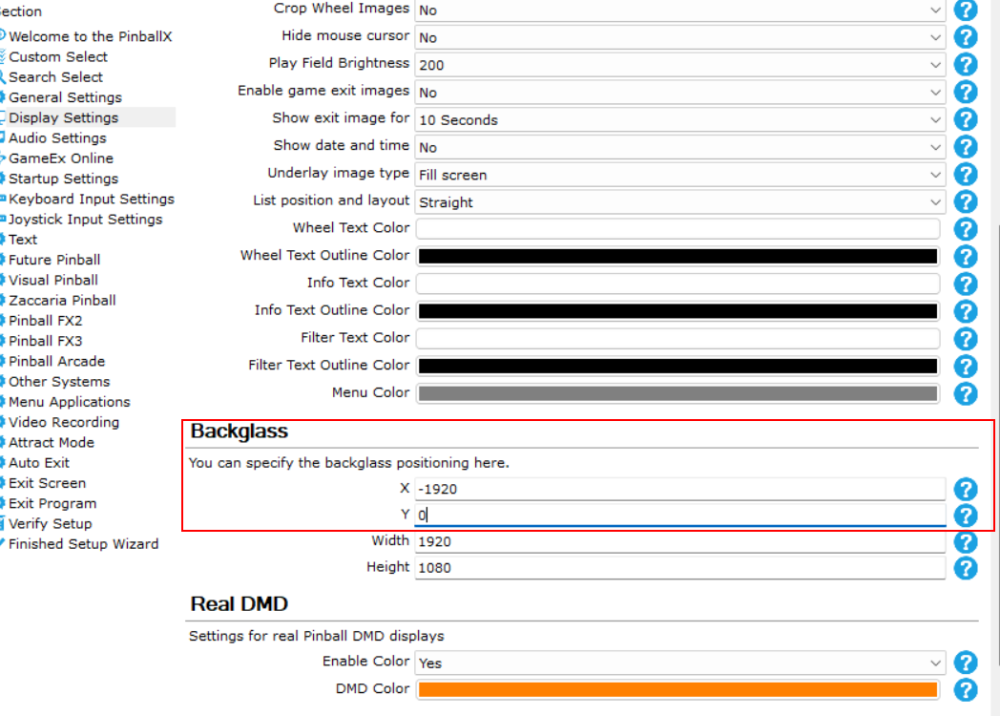
Your graphics drivers have probably been updated and messed up your screen numbers. I think you have 3 options; Clear the relevant parts of the windows registry (see https://support.displaylink.com/knowledgebase/articles/736116-windows-display-properties-identify-numbers-are) Although PinballX settings.exe only allows monitor numbers 1-5, you can manually adjust the pinballx.ini file to higher numbers by adjusting the 'monitor=' bit under the [BackGlass] section. This would be hit and miss, so try and edit to 6 and open pinball to see if that works, and if not close pinballx and edit again to 7, try pinballx again and repeat.. Set the Backglass monitor id to the same as the DMD moniotr id and then use the x and y offset values to move it (relative to the DMD screen, so maybe x = -1920). In this section of Pinballx setttings; Option 3 is probably the easiest (and safest) method so i'd recommend trying that. As i don't know how your screens are layed out in windows i can't suggest what the values for the x offset should be (-1920 is just a guess).
-
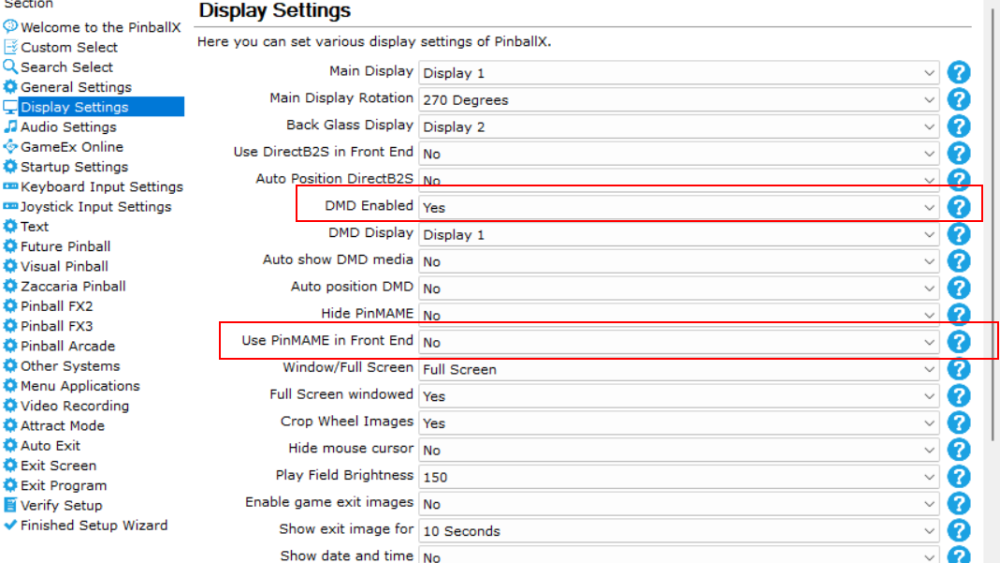
Was originally raised as https://forums.gameex.com/forums/topic/31383-backglas-and-dmd-all-on-the-same-monitor-i-try-so-much-few-days-but-no-solution-need-help/ @NEWER This is your Pinballx.ini DMD section; [DMD] Enabled=False monitor=1 x=0 y=0 width=1250 height=320 AutoPositionPinMAME=False UsePinMAME=True AutoShowMedia=False So it looks like you do not have the DMD screen active in PinballX, but are instead using the vpinmame DMD. Is that intentional? These two settings;
-
@Draco1962 it's in the wrong forum! can you move please?, ta. @NEWER Not sure what you mean, are the DMD and Backglass appearing on the same monitor in PinballX or after launching a table with Visual Pinball? (it looks like your DMD isn't enabled in PinballX.ini?) Can you post a photo of what you're seeing.
-
.thumb.gif.704e8e80bff8d8baa365115adc2ca31b.gif) Good spot. It's probably something i could try and address in the stats plugin, but will wait to see if @Tom Speirs confirms it's a deliberate change to PinballX or if it's something that will be fixed there first.
Good spot. It's probably something i could try and address in the stats plugin, but will wait to see if @Tom Speirs confirms it's a deliberate change to PinballX or if it's something that will be fixed there first. -
Indeed there is, through the settings app;

-
 You probably had a D drive at one time and installed PinballX there, if that is the last place you installed PinballX then that is where Database Manager will look. Run the PinballX installer to update/overwrite in its current install location and that should clear this.
 -
I don't normally use the wheel overlays, but yep when i enable them they seem hit and miss between systems for me too. Will need @Tom Speirs to check
-
@bushav I agree with Mike, it may be the extra wait time you have set for Visual Pinball. My guess is that PinballX will ignore key presses until after it has found the Visual Pinball window, and it probably only looks for that after waiting for those extra 30 seconds.
-
Not seeing the same behaviour here; 10:23:42.14 28/06/2025: C:\Visual Pinball\VPinballX64_10_8_GL.exe -minimized -play "C:\Visual Pinball\Tables\24 (Stern 2009).vpx" 10:23:47.47 28/06/2025: Visual Pinball Player window foreground: 5 10:23:48.11 28/06/2025: Exit System Control Pressed (note this is just testing on the desktop pc, and the 24 table file here is actually 8 ball [EM] - so no vpinmame rom involved]) From your log; 17:25:44.97 6/27/2025: C:\Visual Pinball\VPinballX.exe -play "C:\Visual Pinball\Tables\bad cats_vpw_v2.03.vpx" -minimized 17:26:49.11 6/27/2025: Visual Pinball Player Foreground 17:26:49.11 6/27/2025: Visual Pinball Player window foreground: 64 17:26:49.80 6/27/2025: Found PinMAME ROM: bcats_l5 17:26:52.34 6/27/2025: Exit System Control Pressed 17:26:52.91 6/27/2025: Found Visual Pinball editor window 17:26:53.51 6/27/2025: Process Closed It looks like the table is a bit slow to load, but the exit system press is recognised shortly after. Difference might be DOF initialising in VPX or something slowing down the load?, not sure as i don't use DOF
-
Just a note, the Led Zeppelin and the Beat The Clock issues may (or may not) be unrelated. There's a difference in the log entries; Led Zeppelin ends with; 20:31:14.56 6/22/2025: C:\Visual Pinball\VPinballX64.exe /play -"C:\Visual Pinball\Tables\Led Zeppelin Pinball 2.5.vpx" And Beat The Clock ends with; 21:07:09.76 6/22/2025: C:\Visual Pinball\VPinballX64.exe /play -"C:\Visual Pinball\Tables\Beat The Clock (Bally 1985) VPW v1.0.vpx" 21:07:15.57 6/22/2025: Visual Pinball Player Foreground 21:07:15.57 6/22/2025: Visual Pinball Player window foreground: 5 21:07:21.93 6/22/2025: Found PinMAME ROM: beatclc2 I'd suggest changing the launch parameters for Visual Pinball as Mike has suggested and then retest for both tables. If still an issue; For Led Zeppelin check you aren't using a full album track or something as launch audio, this would delay the table launch considerably (and i suspect when launched through DBM, PinballX would not play the launch audio). Also try the non pup pack version if you are using a pup pack for the table. For Beat The Clock as the table appears to try to launch (vpinmame starts as seen in PinballX log) it may be resource related or an issue in VPX itself where the launch fails and VPX quits back to the editor window. Check windows event viewer for anything suspicious at the time of the attempted table launch.
-
[RESOLVED] Ayuda instalacion pinballx + tablas
scutters replied to javier saavedra saa's topic in General
It looks like PinballX was copied from another install, not installed by the setup program. That log file was probably copied across from the other pc as well. @javier saavedra saa Please download the latest version of PinballX and use the installer to upgrade the current files (install over the top), that will ensure that any required .net runtimes are also installed at the same time) -
@DakotaPinball Please attach copies of your PinballX.ini and log.txt files And can you also confirm what you mean here; Are apng wheel images working now, or were they working before but not now?
-
So long as you use a version of PinballX later than V4.84 and use the .apng file extension they should work. Raise an issue in the PinballX forum if they don't. The file you posted animates for me in PinballX V6.87.
-
I just noticed in your first video that the backglass for the first table does briefly appear (around 16secs in) and then immediately closes. So it looks like VPX is at least trying to start the table, and then it quits back to the editor for some reason. Why does it work from the command prompt and not PinballX?, not sure but probably linked to the weird UAC / admin permission stuff above. Update PinballX if you haven't already and then try again, post the new log.txt file after, and if the tables don't launch please check Windows Event Viewer, under Windows Logs\Application to see if any critical error is logged there when the table launch fails.
-
[RESOLVED] PinballX suddenly doesn't recognize the keyboard.
scutters replied to DesertStorm's topic in General
The keyword for me in that update is 'Preview', i think most people who don't work for MS would translate that as 'Beta' (and may have bugs) Removing the update restores keyboard functions in PinballX for me. I'd suggest trying the same to confirm. -
[RESOLVED] PinballX suddenly doesn't recognize the keyboard.
scutters replied to DesertStorm's topic in General
I can reproduce by installing "Cumulative Update Preview for Windows 11 Version 24H2 for x64-based Systems (KB5058499)" (PinballX doesn't respond to keyboard input [although they are recognised in Settings], but i don't get touchscreen detected in the log) @DesertStorm Can you check windows update history, do you have this update installed? -
[RESOLVED] PBX issues effecting VPX (6.07 and 6.87)
scutters replied to MulletLife's topic in General
I'd also try with plugins and the launch on startup "PBXinitsecondary.bat" & on game launch "WinActivate.exe" all disabled just in case there's something going on somewhere else. -
Wrong forum!. @Draco1962 can you move it PinballX\General please? @Rent-a-Pinball i'm not familiar with hyperpin but i can't think of any reason you wouldn't be able to install PinballX in parallel to start with while you configure PinballX and add the tables etc, that way you'd still have hyperpin available. There's a document covering most stuff included with the PinballX install. I'd also recommend adding PinballX Database Manager at the same time, once you have configured the emulators (not sure what you have) in PinballX settings you can then bulk add all the table entries, and grab or create media in bulk as well. Not sure what the extra's are but yes they should, there's plugins available to extend the core PinballX functionality for stuff like DOF.
-
@pepeleches - but don't forget to update PinballX as well first!
-
Thanks for the info, but now i'm looking at it more i'm afraid i need more info too.. Are you using a keyboard or joystick/buttons to navigate and launch the tables?, and if using buttons are you using joytokey or similar to also translate button presses to keystrokes? Your pinballx button configuration is also confusing - quit, pageleft and exit emulator are all mapped to the same button? (just quit and exit emulator would be normal) Also, please update PinballX to the latest version and retest. If problems persist open a command prompt and run; "C:\Visual Pinball\VPinballX64.exe" /play -"D:\mesas vpx\2 in 1 (Bally 1964).vpx" Does that work?
-
Please also post a screenshot from Visual Pinball of your Preferences -> Configure Keys, Nudge and DOF settings. There might be double mapping between PinballX and Visual Pinball functions for a key/button (probably with VP exit game)
-
Try changing your launch parameters by adding the the -minimized flag to minimise the VPX editor during the load. i.e. change to; -minimized -play "[TABLEPATH]\[TABLEFILE]"
-
Agree, looks like launch audio is/was the main factor. When you get chance can you try again without the loading video and with the DOF plugin disabled, just in case they are smaller contributors. Also, not sure how your VPX is configured, but try VPX in windowed and exclusive fullscreen modes. If the remaining delay is a focus thing then the DX version in fullscreen normally helps with that.
-
@Tom Speirs Not sure if the launch audio file being used is the issue here for @DJO Maverick yet, but it appears that launch audio tracks fade out at around 5 seconds.. but the table doesn't actually launch until the audio track completes. Using this test mp3 https://pixabay.com/sound-effects/beepbeepbeep-53921/ table load times can be slowed down by a minute. Can launch audio playback be stopped as soon as it fades out, or play to completion without blocking the table load... or something?