



|


.gif.6d0defdbb7838a856f87aa25d43c69ad.gif)
scutters
-
Posts
2122 -
Joined
-
Last visited
-
Days Won
190
Content Type
Profiles
Forums
Events
Downloads
Store
Articles
Everything posted by scutters
-
.thumb.gif.704e8e80bff8d8baa365115adc2ca31b.gif)
[RESOLVED] Few VPX tables not working after update PBX 6.57
scutters replied to Re-Creator600's topic in General
That i can't explain, but good find! -
[RESOLVED] Few VPX tables not working after update PBX 6.57
scutters replied to Re-Creator600's topic in General
Please try the Register flexdmd to be used instead of UltraDMD option (bottom right button in your screenshot), UltraDMD uses XDMD so an issue with XDMD could be the cause and using FlexDMD instead may resolve it -
[RESOLVED] Few VPX tables not working after update PBX 6.57
scutters replied to Re-Creator600's topic in General
The only pattern to tables that you are having issues with is that i think they all use FlexDMD (or XDMD if flexdmd isn't installed). Do you have FlexDMD installed? (https://github.com/vbousquet/flexdmd/releases), install instructions are here If you do have flexdmd installed in your c:\visual pinball\vpinmame folder can you run flexdmdui.exe and post a screenshot of what that shows? (it's strange that the tables open ok outside pinballx , but it's possible not having flexdmd installed and registered is the underlying issue) -
[RESOLVED] PBX 6.56 crashes when launching new Metallica table...
scutters replied to tabascoman77's topic in General
Good find.. not sure if the loading videos is a symptom or a cause. The renamed files (with .bu.Mp4) is normal while PinballX is active and they should get renamed back on a clean exit of PinballX (by the loading video plugin) Can you post a copy of PBXLoadingImage_log.txt from the plugins folder after a crash has occurred, there might be more clues there. Maybe one loading video is corrupted in some way, depending on how many you have that might be tricky to locate though. -
[RESOLVED] PBX 6.56 crashes when launching new Metallica table...
scutters replied to tabascoman77's topic in General
Think it'll need @Tom Speirs to investigate but can you confirm if you're running the GL or the DX version of VPX 10.8 RC7? (it might be worth trying the alternate x64 version to see it the if that helps) -
Happy new year to all!
-
One method would be to change this section in dmddevice.ini (in visual pinball\vpinmame folder) ; a DMD that renders with nice dots on a computer monitor [virtualdmd] enabled = true so that enabled = false. Then freezy's dmd shouldn't open. Might do as a quick fix workaround? Would probably need to see the pbx recorder log file and ini to see what's going on. But hopefully progress will be made with the native pbx recording option in the other thread.
-
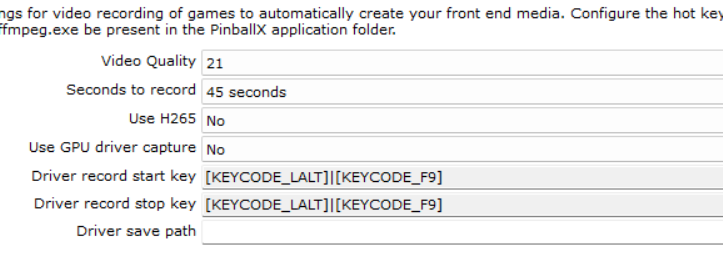
@wrd1972 What VPX version are you using (OpenGL or DirectX)? Not sure if that is a factor or not. I think these are the default video record settings anyway; .. so not wildly different to what you have. You can actually make the recording shorter by manually editing the the PinballX ini file (find the [VideoCapture] section and change Seconds value below it). It may be worth trying 5 second videos just to see if that having smaller files to process helps. Sorry, i don't have much else to suggest at the moment - except to maybe check the videos from the last failed recording attempt to see if they're present (they may not be as one is a temporary file anyway) but if they are, are they valid videos files that you can open? (c:\users\pinball\appdata\local\temp\tmpa8fb38194112011.mp4 & C:\PinballX\MEDIA\Visual Pinball\Table Videos\Blue Note (Gottlieb 1979)a.mp4)
-
Yeah, i think that was one of the issues Tom fixed in the recent changes for VPX10.8. Update to the latest PinballX and let us know if that fixes it (new log file if it doesn't!)
-
[PLUGIN] PinballX Loading Video & Image Changer (de-randomiser) V2
scutters replied to scutters's topic in User Projects
Sorry, not as part of this plugin. The control for the use of still image & gif or just loading video (and the file location) are controlled by PinballX so it would need a feature request and change there. One option that might be of interest would be to use a loading video with gif incorporated into it, i did an app a while ago that should be able to do that (it's a while since i used it with a gif overlay though), see; -
@Tom Speirs Think this is the same issue as https://forums.gameex.com/forums/topic/30739-resolved-version-of-pinballx-past-607-fail-on-my-system/ and https://forums.gameex.com/forums/topic/30642-installed-pinball-x-620-stuck-on-title-screen/ Workaround appears to be to copy dmddevice .dll & .ini to the PinballX folder.
-
This thread is about exit times, a different issue. Please raise this as a new issue attaching your PinballX.ini and Log.txt files, also state what version of VPX you are running (DX or GL, 10.8 RC?) and if VPX is set to run fullscreen or windowed.
-
Just got to keep trying the new versions as they come out. (you're not the only one seeing the slower exits)
-
I can't reproduce your initial issue with my virtual dmd but it is linked somehow to the zedmd changes. So no, not everyone has to copy dmdevice to the pinballx directory.. you're only the 2nd as far as i know. I don't think you'll need to keep it updated though as it's effectively inactive (as in not displayed). Not sure if you had the issue because at one time you had a real dmd installed or not. If you do want to display something on the dmd screen (not sure if you meant you disabled the pinballx dmd screen or the dmdevice virtual display) then the stats plugin might help and you can display game data. That should work regardless. The media file matching is something that'll probably be fixed soon so make sure to check back for PinballX updates.
-
Did update2 solve it?
-
Nice! Must be related to the zedmd changes somehow, for some reason pbx thought you still had a real dmd (or something). For the media try turning File Matching to on in settings for now (known issue).
-
Might be related to https://forums.gameex.com/forums/topic/30642-installed-pinball-x-620-stuck-on-title-screen/ - or might not be!, that issue was noted as starting with V6.11 not V6.10 like yours. There were changes to the ini file reader/writer with V6.10 so try renaming statistics.ini in the databases folder first to rule that bit out. Logging changes would need doing in pinballx so only Tom can help there, but i suppose you could try running procmon and comparing traces if you fancy a challenge (there'll be a lot of stuff shown!!)
-
Please try V6.23. Think Tom has fixed the issue with the GL version of VPX, looks like it works for me anyway (although with the randomness of the issue it's hard to be 100% certain).
-
See Section 3.3, Downgrading PinballX Basically, on the PinballX download page click See Changelog, select the version and click the download text in the changelog area. That sounds like a different issue. Probably needs a new thread with the ini file attached as well.
-
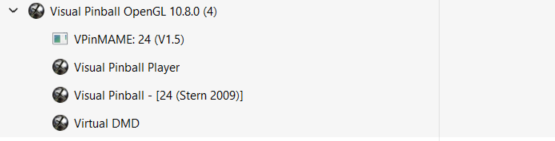
I could reproduce on the desktop too, just took longer for me (and sorry Mike the pinemhi exe rename didn't work for me) My log ending before i killed PinballX; 11:11:53.24 06/12/2024: Launch System 11:11:53.24 06/12/2024: Hide DMD 11:11:53.24 06/12/2024: Hide Backglass 11:11:53.24 06/12/2024: Waiting for threads 11:11:53.27 06/12/2024: Disposing display 11:11:53.37 06/12/2024: Set Plugin data 11:11:53.63 06/12/2024: C:\Visual Pinball\VPinballX64_RC6_GL.exe /play -"C:\Visual Pinball\Tables\24 (Stern 2009).vpx" 11:11:53.66 06/12/2024: C:\PinballX32\vpauto.exe 11:12:02.01 06/12/2024: Visual Pinball Player window foreground: 8 11:12:02.74 06/12/2024: Found PinMAME ROM: twenty4_150 11:12:15.35 06/12/2024: Exit System Control Pressed 11:12:18.16 06/12/2024: Created DirectX BackGlass Window 11:12:18.17 06/12/2024: Created DirectX DMD Window 11:12:18.76 06/12/2024: Main display running full screen windowed. 11:12:25.69 06/12/2024: Launch System 11:12:25.69 06/12/2024: Hide DMD 11:12:25.69 06/12/2024: Hide Backglass 11:12:25.70 06/12/2024: Waiting for threads 11:12:25.74 06/12/2024: Disposing display 11:12:25.88 06/12/2024: Set Plugin data 11:12:26.14 06/12/2024: C:\Visual Pinball\VPinballX64_RC6_GL.exe /play -"C:\Visual Pinball\Tables\24 (Stern 2009).vpx" 11:12:26.15 06/12/2024: C:\PinballX32\vpauto.exe From the log it looks like when PinballX hung it hadn't recognised the Visual Pinball Player window after the table had loaded (so it hung and was still showing the Loading screen behind VPX). In task manager the visual pinball player process was present though, just for some reason PinballX hadn't seen it; @Tom Speirs Any ideas? Edit - I haven't seen the problem at with DX or GL versions of VPX RC6 when used under 'Other Systems' with the 'System Type' set to 'Custom' instead of 'Visual Pinball' (as PinballX doesn't then do any foreground window checks etc for VP so that makes sense). It's of no use to people who have all VPX tables under the main Visual Pinball system entry, but if you use Other Systems then it might be worth a go.
-
There was a bug in the number of tables shown under favourites but that was resolved a while ago. Can you attach your database xml files along with the usual log.txt and pinballx.ini files.
-
Same behaviour as above using VPX 10.8 RC6 released today. DX version doesn't exit cleanly and PinballX hangs, GL version exits ok and PinballX returns to wheel when in fullscreen mode.
-
@tomimpakt Are you using active filters for the 80's, 90's etc lists? A quick how to;
-
Can you confirm what version of VPX (and DX or GL), VPM and freezy you're using? We're assuming at the moment that it's a VPX 10.8 RC5 issue (or maybe VPM). But if you're running 10.7 then that goes out of the window. If you are running 10.8 RC5 then maybe either try switching to the other variant (DX/GL) or try with RC4 instead.
-
I think primarily it was to address an issue where VPX could start from PinballX without focus, as indicated in the settings tooltip "Activate VP 10 window when it is running full screen exclusive.". But it may well do some other stuff too, @Tom Speirs would need to advise the finer details.
