



|


.gif.6d0defdbb7838a856f87aa25d43c69ad.gif)
scutters
-
Posts
2122 -
Joined
-
Last visited
-
Days Won
190
Content Type
Profiles
Forums
Events
Downloads
Store
Articles
Everything posted by scutters
-
I'm a stand at the cab guy for all my table tweaking. If i'm adding a new table i'll have downloaded all the files i know i'll need on the desktop pc before, but when it comes to changing pov and anything colour /brightness related i think you need to be at the cab. I don't do anything with a remote desktop.
-
Sounds like you're on the right lines anyway (i think!!), glad your enjoying the ride
-
Been a while since i've used game manager but i thought media imports happened in real time. Do you have any trace of the new wheel images in your Pinballx\media\databasename\wheel images folder (maybe you have two wheel images for the same table one named as the table name and one as the table description)? I'm biased, but things are a little more obvious if you use database manager, your choice though!
-
Munsters is a 'scripted' pup pack table so that does need pinup player working and the files in the \pinupsystem\pupvideos\ subfolder for the videos to work. Twilight Zone is a rom based table but i think there may be an optional pup pack for that, so that table should work as normal with a backglass if you're not trying to run the pup pack (does either of the pupvideos folders have a subfolder named tz_92 or tz_94 [whichever rom you use for that table] with any files in it? - those would be the pup pack for that table)
-
Ahh.. ok i thought you had a 'pinup system' folder in your pinballx folder. There are more questions from your screenshot though! I have no idea what the pinupplayeronly folder is. On my system i have only the c:\PinupSystem folder with the same folders and files in it as you have, but no pinupsystem_v_1_xxx folder, and the pupvideos folder is only in the c:\PinupSystem folder I'd try removing the C:\pinupplayeronly , c:\pinupsystem_v_1_xxx , and c:\pupvideos folders (maybe back them up somewhere 1st to be safe) to clean up the folders and see if things make more sense then. To be honest though you'll probably have better luck raising pup pack questions on vpforums (it's not really a pinballx thing and you're more likely to have other baller installer users there)

-
My understanding of the baller installer is that pinup player & dependencies are installed with it, and pup packs should 'just work' when a VPX table is launched that uses them (assuming you have the pup pack files) Best place to read up is https://www.nailbuster.com/wikipinup/doku.php?id=puppack_troubleshoot But be warned - pup packs do have a cpu overhead, you might get some performance issues if you're on a low end cpu. I have no idea about the first two, seems odd to me (i've never used baller), what's in the 'pinup systems' folder (exe's? - if so is that where pinup got installed?). Pupvideos is normally where the puppacks go (under a folder of their game or rom name)
-
Looks like pinballx core v5.41 just crashed out after table launch with no error logged so not sure what the issue was, maybe a .net runtime thing with win7 sp1 Glad the 'legacy' version worked for you anyway
-
Yes it does
-
Any chance you grabbed a copy of the pinballx log.txt file before you restored the clone?, that and a copy your pinballx.ini would file would help a lot. Otherwise it's just a guess, maybe you installed the .net core version and there's an incompatibility somewhere?, i'd suggest trying again with the pinballx xp/vista version - functionality is the same as the regular pinballx but it uses .net framework runtime libraries.
-
.thumb.gif.704e8e80bff8d8baa365115adc2ca31b.gif)
[Resolved] Text at the bottom of the screen is suddenly missing
scutters replied to SixOfTwelve's topic in General
All i can suggest is to enable 'show date and time' in display settings to see if pinballx shows date time on the playfield screen, might point to something if that does or doesn't show . To be honest i don't know, maybe @Tom Speirswill have more insight -
I think you might be talking about the stats plugin?, post a screenshot if not. Temporarily changing the resolution should still work either way. If you want to hide the DMD for games with segment scoring on the backglass then that's as simple as unchecking the 'use exeternal dmd' checkbox in pinmame settings for the rom the table is using. Think of underlays/overlays as layers, underlays appear under the wheel images, overlays on top of the wheel images. I don't think many people use overlays but like underlays you'll probably find some in the downloads section, on the FTP or in the media projects forum. Underlays can be full screen or the original style (bottom 1/3rd ish of the screen), that's controlled in Settings, under display settings, 'underlay image type' - having that setting at full screen for original style underlays will stretch the underlay as you noticed. That's going to be awesome!... you're a full on vpin addict now! , looking forward to the build thread!!
-
[Resolved] Text at the bottom of the screen is suddenly missing
scutters replied to SixOfTwelve's topic in General
You're on the latest version (5.41) and log & ini look ok to me. Does other text appear ok (menus etc), and were you using a custom font in the pinballx\media\fonts folder? -
This screen? I think all you could with that is temporarily change your screen resolution and make your changes. Don't change size or location of anything just change the other display info as you want and then change the display resolution back.
-
@chadman Your issue sounds like a VPX 10.7.x beta issue - see https://www.vpforums.org/index.php?showtopic=44135&p=499397 , do you know what version of VPinballX.exe you have installed? (right click on the file, properties, then details tab) edit - it might not be that issue, but worth bearing in mind. Mike might well be onto something with the install and music paths..
-
fpram files are used for future pinball high score data. You won't have any files in the folder until you've opened a future pinball table, if you haven't played any future pinball tables don't worry about the warning.
-
Please attach your pinballx\log\log.txt, pinballx\config\pinballx.ini and pinballx\databases\statistics.ini files, try and add two copies of the statistics.ini file - one before a restart after adding a favourite and one after a restart where the entry has been cleared (and let us know which table you set as a favourite) thanks.
-
@lees1964Thanks mate! Good looking cab you've got there but you do need to sort yourself out some wheel images, but you can leave that for a while.... now it's time to play!!!
-
Thanks mate, glad you're up and working - now you can enjoy actually playing! (but make sure you get those working settings backed up!)
-
I'm pretty sure all the plugins i've done i've changed the runtime to .net 4. Seems to fairly universally installed and will work with pinballx .net core & legacy (32/64bit) versions. I guess it wouldn't take much to convert the plugin template to C# via online converters, but if you choose to go with .net core then any plugins won't be backward compatible with legacy pinballx
-
@lees1964 Are you running jok2key or similar? (from your vpx config it looks like you only have keys mapped). A bad config in joy to key mappings might be the cause of your button issues. If that is the case then i'd try mapping joy buttons directly in pbx / vpx and turn off the joy to key input mapper.
-
Possibly, i'm a button user so wouldn't have noticed a change to key input (but i'd have guessed it would have been as far back as when video recording ability was added to pinballx). I guess you also had 'V' mapped as a key input elsewhere to cause the problem in game?
-
What you're describing shouldn't happen, so i'm afraid we're really going to need your pinballx.ini and log.txt files.. make sure the log is after an occurrence of the pf video recording taking place and the table exiting.
-
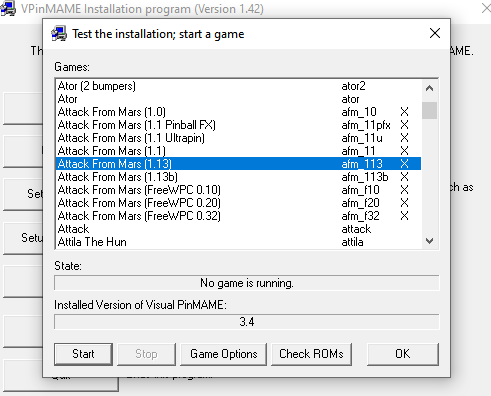
Ignore 64bit vpinmame, and like having dmddevice.ini file in the dmdext folder and dmddevice64.dll it won't cause a problem - they just won't be used by visual pinball. I see i called the vpiname setup.exe 'settings.exe' above (a pinballx habit, looks like you worked that out though!), i also overlooked one other thing - when you change the vpinmame defaults it'll only apply to new roms, for existing roms you need to go into the 'test' option of vpinmame, select the rom and then check the 'game options' match the default screen. In your log you have 'Attack and Revenge from Mars' which actually uses the 'Attack from Mars' rom, afm_113 which is probably why you couldn't find it, but it's there... Check the 'game options' for that rom and then try 'start'. From a quick look your latest dmddevice.ini looks ok so hopefully you'll see dmd appear... edit - had another look at your dmddevice.ini, you have useregistry = true. This is fine if it's deliberate and you know the vpinmame registry keys, but you're probably better off with this set to false so the position info in dmddevice.ini is used for the dmd location on screen.
-
Just like pinball scores!!!
-
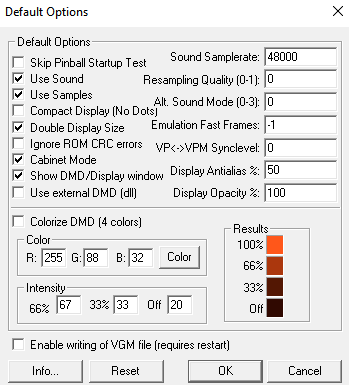
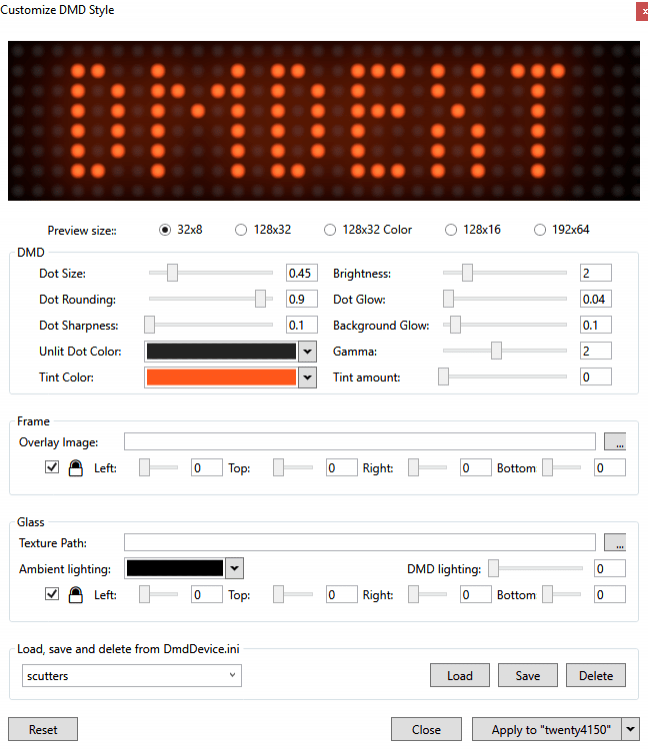
Ok, so no dmd when launched form PinballX or VPX. In that case go to your visual pinball\vpinmame folder and open settings.exe to go into vpinmame settings. If not done already make sure you've clicked 'install' and then 'setup paths', next click 'setup defaults' you should get a screen like this; Select /check 'use external dmd' to use freezys dmddevice and then uncheck 'show dmd display window' (to hide the default pinmame dmd window as you don't want two dmd's). Click ok. Now you need to edit the dmddevice.ini file (in the visual pinball\vpinmame folder), you want [virtualdmd] enabled set to true, stayontop true and all the [pindmd*] entries set to false. Size and position info can be changed later. Go back to vpinmame\settings.exe and click 'Test', select a rom you have from the list and then 'Start' hopefully you can now see a dmd somewhere - you should be able to drag/resize it and then right click and save position globally (also has options to customise style but that's an adventure of it's own!) Most of this is set and forget unless you want to tweak something later, so once you've got it set how you want make a backup and you'll soon be able to spend more time playing at the cab!


