|



u-man
-
Posts
664 -
Joined
-
Last visited
-
Days Won
9
Content Type
Profiles
Forums
Events
Downloads
Store
Articles
Everything posted by u-man
-
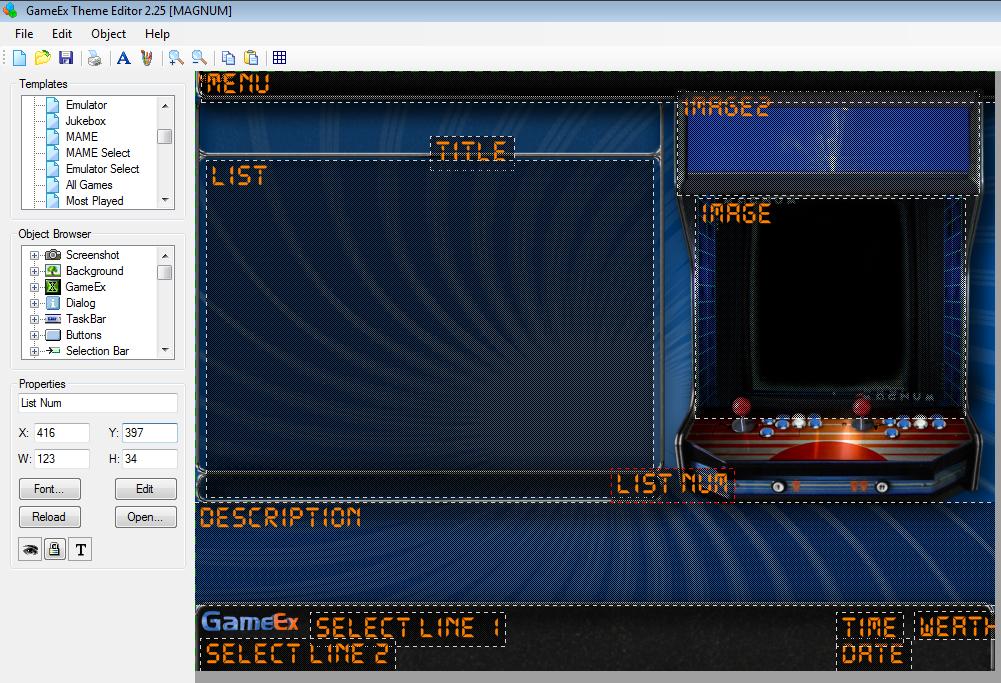
hello Draco, i think i described it not so well . so here is a picture for better explaination: if you look at the ListNum field and how it is placed, then the truncation will appear. it will be truncated exactly where the list field ends. it happen on both sides... left and right, but NOT on top or bottom (off course ). if the listnum field on the picture would be completely on the right of the list-field, you will see nothing at all later on in GameEx. hope that is better explained thx, u-man
-
Hello Theme-Skinning-guys, I recently find out, that the ListNum field can not be placed anywhere in a theme. it needs to be under or over the List field, if it is left or right of it, it will be somehow "truncated" (i.e. it overlaps a little with the List field) or not visible at all (if it is completely outside the range, either on the left or right side of the List field). is this behaviour normal? what advices could you make? does this happen only to me ? in short words: the ListNum field has dependencies with the List field. are there any workaround for this? thx, u-man
-
hello dishwater63, you will find them in your theme folder. the sound is a file called "introsound.wav", you can put here whatever sound you like, as long as it have the same name. the same goes for the "GameExLogo.png" file. just replace it with your own stuff BUT with the same name and you are good to go. off course you need to know, which theme you are currently using and what the name of the theme is. if you dont know it, start your setupwizard and check what theme is currently used. then go to the theme folder inside your GameEx folder, and change the names accordingly. hope that helps, if not, feel free to ask . good luck, u-man
- 7 replies
-
- 1
-

-
- Theme Editor
- edit
- (and 1 more)
-
Anyone remembers Wasteland , the mother of all Post-Nuclear RPGs is back with full attack first impressions in FULL HD: video starts to be real cool at about 2min. it looks awesome for me, the most i like it is turn-based, so no hectic stupid ego-shooter. cannot wait to see this. i loved that game soooooooooo much. it was the reason to learn english.... yes it is true . as they founded more than 2,900,000$ .... this game will be epic, because it is of the makers from the very first Wasteland. more INFOS here: http://www.kickstarter.com/projects/inxile/wasteland-2
-
thank you all for replying.... the thing with windows 7 is, that it comes with FW 3.5 pre-installed. you can only de-install it, by using the windows activating/deactivating feature (same thing for windows media player). when i try to install FW 2.0 for example, then it tells me, either that it does not work with my OS or that there is a newer version installed. previously every FW from 3.5 till 4.0 was listed in my programs system extension. after installing 4.5, all other stuff goes away and only 4.5 is listened. first i thought i have deleted other stuff, but nope, after reinstalling everything, i realized that with 4.5 all other stuff goes away. more and more, i think it is some "hiccup" with cache or preferences, which still resides somewhere, even if you uninstall and install all the stuff again. for example i dont know from where the Theme-Editor or GameEx gets the info, where my Background Video is saved. it is not saved in a .ini, that is for sure. i found out that on my XP-cab, the location of the last opened video is remembered, when i open the video or audio dialog in the theme-editor. on XP the dialog opens and the last choosen video is showed in a preview-window of this dialog. this video is shown, regardless if i have ever choosen a video for this section (Mame, Start, Emu, Jukebox etc.) or not. hope you understand me . maybe this "remembering" goes wrong/broken (hiccup) on my Windows7 64bit PC. that would explain, why it doesnt matter if i choose my own theme or a default one. i would need to put this thing into a new, clean and fresh state, where this wmplib dont try to open a (previously remembered) video or audio file for the preview-window in the dialog. i did not get rid off this, by uninstall and reinstall again, this info/preference/cache resides somewhere in the system and is not "reset-ed". maybe that helps. i know it is not a GameEx error, but maybe you know the dependencies with the wmplib and where to look for that stuff. to keep it simple: the dialog window of the video/audio option in the theme-editor, invoked by WMP-components, needs a resetting. i have attached the logs. if you open the theme-editor log, you can see that there is no path to a video, but the theme use videos for background and the path to them are stored somewhere else. thank you all, for even listening to this troubleshoot log.txt ThemeEditor.txt
-
hello again i reinstalled .NET Framework to 4.5 and all Visual C++ stuff from 2005 till 2012, both 32bit and 64bit version. i reinstalled Windows Media player 12. i tried a new user account. tried safe-mode. all with no luck. i think i will give up, i would need more info on the invoked processes of the theme-editor by choosing video or audio. or the invoked processes of the HTCP section of Setupwizard. not knowing where to look or search, is a fight against windmills . as anything else is doing well, i have no intention for a reinstall of a new OS, maybe when i found more apps not working. the log: System.BadImageFormatException: Die Datei oder Assembly "Interop.WMPLib, Version=1.0.0.0, Culture=neutral, PublicKeyToken=null" oder eine Abhängigkeit davon wurde nicht gefunden. Es wurde versucht, eine Datei mit einem falschen Format zu laden. Dateiname: "Interop.WMPLib, Version=1.0.0.0, Culture=neutral, PublicKeyToken=null" bei AxWMPLib.AxWindowsMediaPlayer.AttachInterfaces() bei System.Windows.Forms.AxHost.GetOcxCreate() bei System.Windows.Forms.AxHost.TransitionUpTo(Int32 state) bei System.Windows.Forms.AxHost.CreateHandle() bei System.Windows.Forms.Control.CreateControl(Boolean fIgnoreVisible) bei System.Windows.Forms.Control.CreateControl(Boolean fIgnoreVisible) bei System.Windows.Forms.AxHost.EndInit() bei w.a() bei p.q(Object A_0, EventArgs A_1) bei System.Windows.Forms.ToolStripItem.RaiseEvent(Object key, EventArgs e) bei System.Windows.Forms.ToolStripMenuItem.OnClick(EventArgs e) bei System.Windows.Forms.ToolStripItem.HandleClick(EventArgs e) bei System.Windows.Forms.ToolStripItem.HandleMouseUp(MouseEventArgs e) bei System.Windows.Forms.ToolStrip.OnMouseUp(MouseEventArgs mea) bei System.Windows.Forms.ToolStripDropDown.OnMouseUp(MouseEventArgs mea) bei System.Windows.Forms.Control.WmMouseUp(Message& m, MouseButtons button, Int32 clicks) bei System.Windows.Forms.Control.WndProc(Message& m) bei System.Windows.Forms.ToolStrip.WndProc(Message& m) bei System.Windows.Forms.ToolStripDropDown.WndProc(Message& m) bei System.Windows.Forms.Control.ControlNativeWindow.WndProc(Message& m) bei System.Windows.Forms.NativeWindow.Callback(IntPtr hWnd, Int32 msg, IntPtr wparam, IntPtr lparam) WRN: Protokollierung der Assemblybindung ist AUS. Sie können die Protokollierung der Assemblybindungsfehler aktivieren, indem Sie den Registrierungswert [HKLM\Software\Microsoft\Fusion!EnableLog] (DWORD) auf 1 festlegen. Hinweis: Die Protokollierung der Assemblybindungsfehler führt zu einer gewissen Leistungseinbuße. Sie können dieses Feature deaktivieren, indem Sie den Registrierungswert [HKLM\Software\Microsoft\Fusion!EnableLog] entfernen. ************** Loaded Assemblys ************** mscorlib Assembly-Version: 2.0.0.0. Win32-Version: 2.0.50727.5466 (Win7SP1GDR.050727-5400). CodeBase: file:///C:/Windows/Microsoft.NET/Framework64/v2.0.50727/mscorlib.dll. ---------------------------------------- ThemeEditor Assembly-Version: 1.0.0.0. Win32-Version: 1.0.0.0. CodeBase: file:///C:/Program%20Files%20(x86)/GameEx/ThemeEditor.exe. ---------------------------------------- Microsoft.VisualBasic Assembly-Version: 8.0.0.0. Win32-Version: 8.0.50727.5420 (Win7SP1.050727-5400). CodeBase: file:///C:/Windows/assembly/GAC_MSIL/Microsoft.VisualBasic/8.0.0.0__b03f5f7f11d50a3a/Microsoft.VisualBasic.dll. ---------------------------------------- System Assembly-Version: 2.0.0.0. Win32-Version: 2.0.50727.5467 (Win7SP1GDR.050727-5400). CodeBase: file:///C:/Windows/assembly/GAC_MSIL/System/2.0.0.0__b77a5c561934e089/System.dll. ---------------------------------------- System.Windows.Forms Assembly-Version: 2.0.0.0. Win32-Version: 2.0.50727.5468 (Win7SP1GDR.050727-5400). CodeBase: file:///C:/Windows/assembly/GAC_MSIL/System.Windows.Forms/2.0.0.0__b77a5c561934e089/System.Windows.Forms.dll. ---------------------------------------- System.Drawing Assembly-Version: 2.0.0.0. Win32-Version: 2.0.50727.5467 (Win7SP1GDR.050727-5400). CodeBase: file:///C:/Windows/assembly/GAC_MSIL/System.Drawing/2.0.0.0__b03f5f7f11d50a3a/System.Drawing.dll. ---------------------------------------- System.Runtime.Remoting Assembly-Version: 2.0.0.0. Win32-Version: 2.0.50727.5420 (Win7SP1.050727-5400). CodeBase: file:///C:/Windows/assembly/GAC_MSIL/System.Runtime.Remoting/2.0.0.0__b77a5c561934e089/System.Runtime.Remoting.dll. ---------------------------------------- System.Management Assembly-Version: 2.0.0.0. Win32-Version: 2.0.50727.5420 (Win7SP1.050727-5400). CodeBase: file:///C:/Windows/assembly/GAC_MSIL/System.Management/2.0.0.0__b03f5f7f11d50a3a/System.Management.dll. ---------------------------------------- mscorlib.resources Assembly-Version: 2.0.0.0. Win32-Version: 2.0.50727.5466 (Win7SP1GDR.050727-5400). CodeBase: file:///C:/Windows/Microsoft.NET/Framework64/v2.0.50727/mscorlib.dll. ---------------------------------------- AxInterop.WMPLib Assembly-Version: 1.0.0.0. Win32-Version: 1.0.0.0. CodeBase: file:///C:/Program%20Files%20(x86)/GameEx/AxInterop.WMPLib.DLL. ---------------------------------------- System.Windows.Forms.resources Assembly-Version: 2.0.0.0. Win32-Version: 2.0.50727.5420 (Win7SP1.050727-5400). CodeBase: file:///C:/Windows/assembly/GAC_MSIL/System.Windows.Forms.resources/2.0.0.0_de_b77a5c561934e089/System.Windows.Forms.resources.dll. ----------------------------------------
-
ok i see and understand..... i dont have a wmplib.dll anywhere. i just have a wmp.dll and that i have in the system32 and in the SysWOW64 folder. did you mean that? or is there a really a wmplib.dll which i am missing? i try to remember what i did around christmas, and i think i deinstalled stuff, either Microsoft Visual C++ stuff or Microsoft .NET stuff or worst case BOTH. i was naiv and thought, i just keep the most current version. i can only guess that it has something to do with it.
-
the videos are montages of a selection of games because they represent the choosen emulator and that they play only 15seconds is normal, they will play full length when you enter the emu.
-
getting closer ... now i get the error: the modul Interop.WMPLib.dll was loaded, but the DLLRegisterServer-Entrypoint was not found. be sure that Interop.WMPLib.dll is a valid .DLL or .OCX-File and repeat the task.
-
if i try: regsvr64 Interop.WMPLib.dll i got error "regsvr64" couldnt be found. pls be sure, you typed the correct name and try again.
-
i thought that maybe this is not the same .dll and i dont know if this is really the right path for a 64bit OS. but i will try it this way too. EDIT: nope, i got errors when i do this, says it is incompatible with this version of Windows and i should check if this module is compatible with a x86-version (32-bit) or x64-Version (64-bit) of "regsvr32.exe". maybe restart is needed or wrong path for 64bit OS.
-
just for info: in screensaver mode with game-mode on, you can start the current game if you like it or you have never seen it and want to try it. just insert coin and there you go .
-
i searched my PC for it, but only place where it is, is my GameEx folder. from what i have read, people have it here: C:\Windows\System32. but the people did not tell which OS they used . so maybe it is different on 64bit, thats why i am asking and i do not have it at all, except in GameEx. so i think it is not a good sign, if i dont have it in the windows folder too. thats why i am asking, if someone could attach one, for me to download.
-
not wanting to bump this thread again, but i would need some help for my last try to solve this on my own. has anyone with windows 7 64bit, this "Interop.WMPLib" installed (with the exception of the GameEx folder) ? where is it exactly placed? path direction? pls attach this "Interop.WMPLib", so i could manually install it. that would be all thanks in advance
-
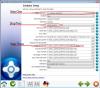
lets keep your example for now. did you setup NES properly in your Setupwizard of GameEx? 1.): in the Emulator Setup section of the Setupwizard of GameEx you need to select your NES Emulator via the PopupMenue. 2.): then you need to choose a Logo for the NES with the according Popup Menue. 3.): your video needs to be in the Video Snap Path. you need to setup this path to the direction where your NES videos are placed. this works for me at least. good luck
-
thank god, that he gave us europeans SCART and ehuonder is absolutely right. there is much rubbish outthere. stuff that claims to be Scart or S-Video. Its often of poor quality (made in China), maybe even does not work. so take care and keep your eyes open while buying.
-
Hello Joplin66 and welcome to the forums, i can be wrong, but unfortunately i think you can not have both at the same time: a preview video (not individual rom videos) AND the logo artwork. for that task, you would need to edit your preview video and put the logo artwork all together, resulting in a video which contain both. this video would be need to be in the same size like your theme. if you are capable of using some video-editing software (i.e. Adobe Premiere or even better Adobe After Effects) you could do this. as this is not a easy task (but it is a solution) i am afraid, you need to decide what is to show up in GameEx: the logo artwork or the preview video. hope that helps a little .
-
i would say, it depends on your pc which you want to move to your cab. you did not wrote your processor specs and how much ram you have. upgrading to windows 7 makes only sense for me, if you have a Coreduo at least and if you have more than 4GB Ram. if not, i would recommend to stay with XP, because it do not eat up much resources from your PC. the minimum requirements for Windows 7 are much higher than with XP. if your cab have a CRT-screen, then stay even more with XP. a CRT-screen in most circumstances is low-resolution VGA (640x480). so why putting a decent processor in your cab, if you will play only VGA resolution? something more than a Pentium4 would be somehow oversized IMHO. if budget is no matter, you can crank it up off course. end of line with a Pentium4 would be Playstation2 and Model3 emulators, these Emus are too CPU hungry, all Emus below that, are fine with a Pentium4.
-
OMG, OMG..... i have see this waaaaay too late , its like in my real life. laughed my ass off, Draco maked my day with his post. BIG THX to all you Arcade-mics outthere , this was really a nice suprise for me and a german would say "i have wee-wee in my eyes ." I should watch this section a little more..... man, man, man. its coming soon..... aaaah and cheers:
-
http://reassembler.blogspot.de/p/cannonball-open-source-outrun-engine.html Cannonball - The Enhanced OutRun Engine Cannonball is a program which allows you to play an enhanced version of Yu Suzuki's seminal arcade racer, OutRun, on a variety of systems:60 fps gameplay (smoother than the original game)True widescreen mode (extend the play area by 25%)High Resolution mode (improves sprite scaling)Time Trial ModeCheatsCustomisable Music High Score SavingWestern, Japanese & prototype track supportAnalog & Digital controllers supportedFixes bugs present in the original gamethe best thing is... if you have a "real" Outrun-Cab and have a little knowledge about Eprom-ing, you can pimp up your Outrun and have one unique dedicated CAB
-
hello again, i just wanted to clearify, that with my last post, i didnt want to offend anybody here in the forum nor the admins or Tom. the offending language belongs to Microsoft (M$) and other software, which leaded to my problem, nobody is aware off. with the 2 options i have (leave it like it is, or complete re-install of PC) i turned into rage-mode. i understand all the consequences of my behaviour, but the latest news, ruined my weekend and that was just too much for me. i.e. try to google "Interop.WMPLib", "Error", "Solution" and you know what i mean. i apologize any trouble i made and excuse if anybody was offended. can not do anymore than this.
-
nobody else didnt even tried or in case of Draco even knowed that such feature exists.... all this crap **** with updates.... haaah so nice.... a reinstall then..... **** off MS and all the other buggy **** outthere
-
here is something what i found about this: http://www.codeease.com/resource-file-resx-compile-error-in-64-bit-windows-7.html so it seems that this error is not only windows media player dependent, it has something to do, how things are compiled. i am no coder, but it seems to me, that the WMP lib in the GameEx installation is faulty. please Tom, take at least a look on this. Is GameEx not compiled with Visual Studio?
-
naaah.... i will rather leave it like this. I would spend one week just to have all my Apps and PlugIns again. I will try to solve this, if it dont go away, than i will maybe think about this, as I only have trouble with GameEx and only with "portions" of it. All my Apps like Adobe AfterEffects render properly and the codecs do their job properly. it has to do with the Interop.WMPLib, and i am happy that other Apps do not use it.
-
the OS was a fresh install 1-2 years ago. I reinstalled GameEx, but with no success. the eventviewer says the following: - System - Provider [ Name] Application Error - EventID 1000 [ Qualifiers] 0 Level 2 Task 100 Keywords 0x80000000000000 - TimeCreated [ SystemTime] 2013-02-16T17:35:13.000000000Z EventRecordID 13281 Channel Application Computer REBEL-PC Security - EventData SetupWizard.exe 1.0.4632.12510 5048493d unknown 0.0.0.0 00000000 c0000005 053dbab3 3f1c 01ce0c6be47b3675 F:\EMU_GAME_BASE\GameEx\SetupWizard.exe unknown 37e83837-785f-11e2-9b35-8000600fe800 i also think that this is codec-related. something is messed up here. the libraries have wrong dependencies with 32bit / 64bit codecs, something like this. thank you for trying to help me to resolve my problem. the event-viewer is some help at least. i have many mpg2 codecs, at least 3 of them. MainConcept Encoder Windows MPG2 Encoder and that Shark007 Codecs.