|



Mike_da_Spike
-
Posts
3796 -
Joined
-
Last visited
-
Days Won
242
Content Type
Profiles
Forums
Events
Downloads
Store
Articles
Everything posted by Mike_da_Spike
-
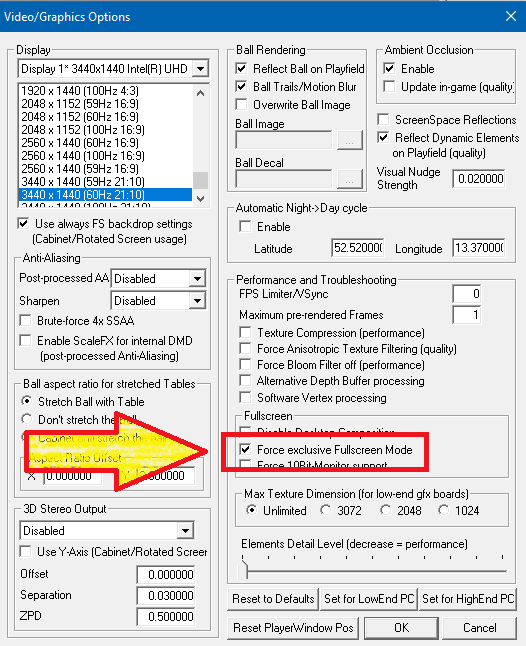
Just curious. Is VP running in full screen exclusive mode ? As your setting in PinballX is to : Maybe play around with those 2 settings bit. And also checks @scuttersquestions :

-
 I don't have FP setup, but as you decribed, you are on the right track. You have created batch files that would modify the registry and you want to add it to the launch before and launch after. this is an example I use for my other system "Visual pinball (p-roc)" I just added some startup and close batch files in a folder and launch them during start and closure. Does this answer your question ?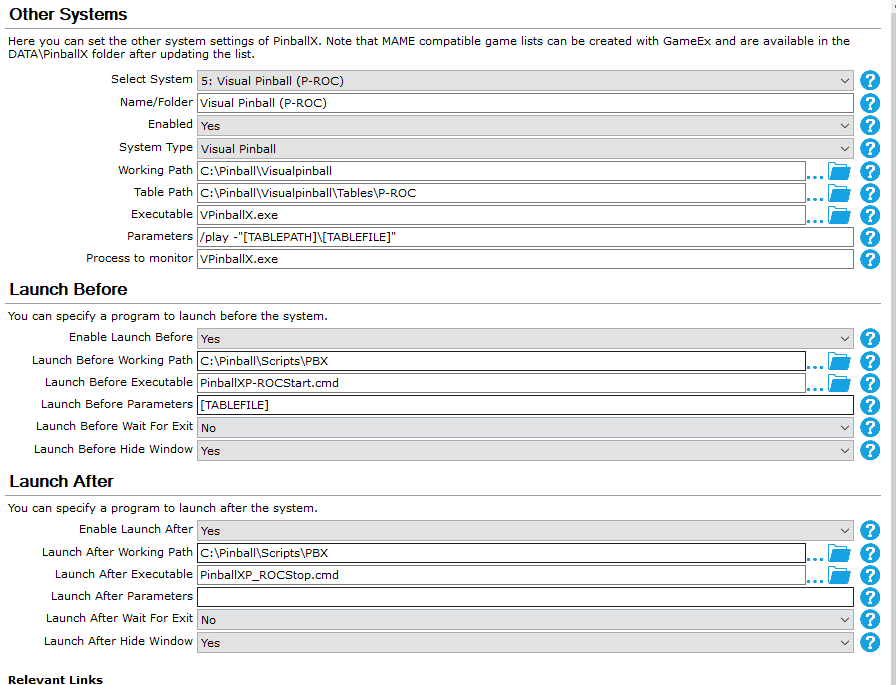
-
[RESOLVED] Multiple versions of Visual Pinball (again)
Mike_da_Spike replied to nwwoods's topic in General
According to your log, you have 2 databases. As I understand your request, you want just want to see all tables. You can use Scutters said, your all tables option in the menu. When you want all visual pinball tables combined, you can group them together, and that will be added to the list. There is no option to 'quit' a system. You need to select the system list from menu again -
Did you check if visual pinvall is running as admin ? Can you try to set pinballx to run as admin and retry ?
-
Don't say it is the magic bullet, but you can give it a try to put it to the original vp exe. To make a distinguish between vpt and vpx, you can create 2 different systems. 1 for vpt with the correct exe and 1 for vpx. You can also use 1 system and use alternate exe for the tables that needs another exe to launch. (Databasemanager has the alternate exe option in the gui)
-
What is " C:\Visual Pinball\customVP.exe" ? Is this a modified version of vp ?
-
Do you have visual pinball running as admin ? Check if that exe file run as admin. Try also to run pinballx as admin. Please attach your pinballx.ini and a log.txt file after the issue occur (as attachment) Edit: assuming that the tables you added are visual pinball tables, as batman and whoa nelly are not fx3 tables.
-
PinballX crashes when using the browse page in a filter
Mike_da_Spike replied to Mike_da_Spike's topic in General
thought it could be a Plugin that is causing this, but even with all the plugins disabled I can reproduce this log.txt -
I have a filter with 2 Tables in it. Filter is called 'PinEMhi' and only has a filter on file '*pinemhi*' This only shows 2 tables for me It works perfectly, but when I use the "browse page" button, PBX is crashing and throws out an error in the log and exists: 06:43:08.09 22-9-2021: Index was outside the bounds of the array. 06:43:08.10 22-9-2021: at PinballX.FrmMain.ProcessKeyboard() 06:43:08.10 22-9-2021: at PinballX.FrmMain.RenderFrame() 06:43:08.10 22-9-2021: at PinballX.FrmMain..ctor() 06:43:08.18 22-9-2021: Disposing Plugins 06:43:08.27 22-9-2021: Showing Taskbar 06:43:08.43 22-9-2021: Unhiding Mouse Cursor 06:43:08.50 22-9-2021: Bye log.txt PinballX.ini PinEMhi.ini
-
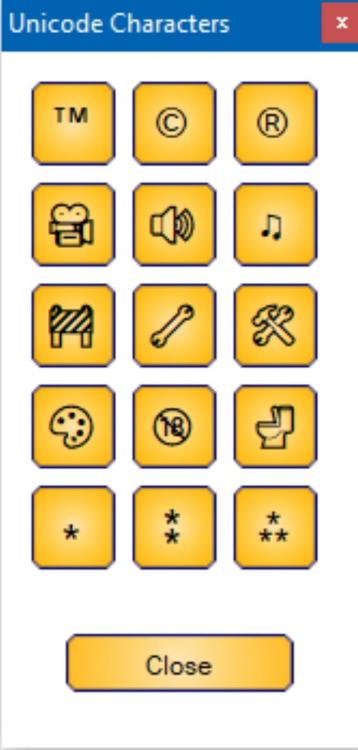
Yes, unicode has 1, 2 and 3 stars as well. unicode has a lot images, but the above ones are the ones we think that are usable for tables
-
Didn't understand what you exactly wanted to accomp6ish with the word "play" But now I think I do. You can also do it the other way : all tables are playable, except for some. In my cabinet I added a unicode character in the description name. So i have 'under construction', ' work in progress etc You can filter er on those as well. But maybe Tom wants to add a free text field as you requested as well.

-
Its indeed a DOF problem. I totally turned of my undercab lights. Maybe 350 addressable rgb leds is a bit too much as undetcab leds Not sure why your undercab config triggers your strobes. I never seen my strobes flashing during pbx

-
Press menu button, and select system
-
How to start PinballX with Favorites instead of All tables
Mike_da_Spike replied to eustonr's topic in General
Nice solution. But, i just learned my grandkids, to use the shutdown option in exit menu. They know, when they do a hard power off the cabinet that grandpa get grumpy and they are not allowed to touch the cabinet for a while Tell me about it ! Check the main screen of Databasemanager and you see the favourites as well. Set the language to US and it is 'favorites' again. Thats what you get when programing with an UK guy (otherwise you should only have Denglish words ) -
Adding proper backglass image for FX3 table in PinballX
Mike_da_Spike replied to testfly's topic in General
No problem. Glad I could help you. -
How to start PinballX with Favorites instead of All tables
Mike_da_Spike replied to eustonr's topic in General
I never checked it, but thought that PinballX shows the list at start, when it was closed. Maybe not for favorites. You can create a filter as well where you have your favorites tables in. I thought it could start with a filter as well. I will check the cabinet later today when I'm home to check the behavior of the favorite list (and filter) -
No. My strobe flashers doesn't flash. Only the rgb are flashing Sorry for the confusion My undercab are addressable leds via teensy. Same as my leds at both sides of the cab. I have a ledwiz board in it.
-
Sorry, I thought with the strobe, you mean the 2 white flashers next to the 5 rgb flashers. I have that for years. And I turned off undercab, as it was a bit too much for me. Sorry for my bad understanding
-
Adding proper backglass image for FX3 table in PinballX
Mike_da_Spike replied to testfly's topic in General
I thought you mean that FX3 systems shows 180 tables. It is just adding 26 tables from FX3 that you don't have in your list. I never check my "all systems", as that contains 1200+ tables I use filters and systems to separate -
Adding proper backglass image for FX3 table in PinballX
Mike_da_Spike replied to testfly's topic in General
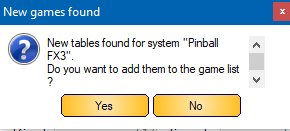
your pinballfx3 media folder is 8 gig ???? must be your table video folder that is filling up that Maybe put the media files on dropbox (or anything similar) and send me a PM EDIT :i've imported your FX3 database file, but I just see 74 records in it (not 180) When I let database manager add the missing tables I see 101 : and showing 99 in Pinballx (This is caused your Tesla table is set to disabled) So not sure why you see 180 tables ? Maybe your Steam directory is screwed up ?


-
Just checked my cab, but I don't have strobe flashers when browsing the tables Only the RGB , but I changed them to red (As I didn't like the white ones) And not sure when version 3748 was added. I update my cab every week and automatically download and update DOF as well

-
Adding proper backglass image for FX3 table in PinballX
Mike_da_Spike replied to testfly's topic in General
No problem I Just want to have satisfied people -
Adding proper backglass image for FX3 table in PinballX
Mike_da_Spike replied to testfly's topic in General
Sorry, no video how to use it, but a lot you can adjust in the settings ( auto add etc) If its auto add and you have 183 tables , you properly have "obsolete " tables as well. With advanced search, you can properly search on the latest added. By default, you will be asked if you want to add tables and if you want to save your database file I don't see any errors in your logfile, so nothing that PinballX couldn't not handle. Can you zip the following directories and post them : pinballx\databases Pinballx\media\pinballx fx3 i will check your database file and your media on my pc -
Good catch ! I will check in the weekend as well. I update dof on regular bases. And didn't noticed the flashers flashing yet. It must be ffarges update if he updated that line.
-
I need to dig into that, as I searched for that a couple of years ago. I thought you can disable the rgb flashers in the xml you created for pinballx. I will check on my cab in the weekend. The flashers will only flash from left to right (or other way around) when browsing tables.