



|



eustonr
-
Posts
6 -
Joined
-
Last visited
-
Days Won
1
eustonr's Achievements

Member (1/5)
3
Reputation
-
I'm like a dog with a bone - I cant let stuff go - So - I coded a solution - for anyone else in my situation and wants to boot with "Favourites" on, regardless of what you had last run - I created a simple AHK - that needs to run before PinballX - so I put it in the PinballX.bat file like so : start /min set_favs.exe start "" pinballx.exe The set_favs.ahk AHK looks like this, and has to be compiled - we need to modify the PinballX ini file before PinballX runs, which is why we have to use the .bat file . FileRead, configfile, c:\PinballX\Config\PinballX.ini if not ErrorLevel ; Successfully loaded. { found:=regexmatch(configfile,"filter_favorites=False") if ( found > 0 ) { StringReplace, configfile, configfile, filter_favorites=False , filter_favorites=True configfile:=RegExReplace(configfile, "filtername=(.*)" , "filtername=Favourite Tables") configfile:=RegExReplace(configfile, "lastselected=(.*)" , "lastselected=") FileMove, c:\PinballX\Config\PinballX.ini, c:\PinballX\Config\PinballX.bak, 1 FileAppend, %configfile%, c:\PinballX\Config\PinballX.ini DllCall("FlushFileBuffers") } } ExitApp This all presumes your PinballX install is in c:\PinballX And thats it - Favourites will always be set on boot, or restart, regardless. Just watch "Favourites" spelling. I'm in the UK, so I use British spelling. I've changed it in the settings to use the correct local spelling - so if you use this, and you are in the US, make sure you change "Favourite" in the code above to "Favorite"
-
Hi Mike - After your post above I did some tests my end. Turns out PinballX DOES record and set the last list or system you had - so it will start up with that list or system on next startup - including favourites. But - and here's the big but - instead of recording it at the time its set, PinballX only records the current active list/system when you exit cleanly via the menus. (ie, ESC, then select "reboot", "exit", or "shutdown"). However - if you shutdown (like everyone in my house does) by hitting the momentary switch at the base of the cabinet (which causes windows to shutdown cleanly, but force terminates anything running) - it will NEVER set this. So that's why on my cabinet it always starts on "All Tables" - no matter what it was on last time it was used. Now that I know it works this way, I have a good workaround - because I can set it to favourites, restart via PinballX - and then forever after it will stay on favourites on bootup, even if someone changes it last time the cabinet was used... Thats a win for me.... But perhaps a nice feature might be an option in PinballX to start on a specific list or system regardless of what it was last time you cleanly exited? Just a thought. thanks.
-
Hi I've been running with PinballX for a while now in my cabinet - and I'm finally getting around to getting it the way I'd like, so even my kids can use it... When my cabinet starts, it starts with "All Tables" - I would instead like it to start with the "Favorites" list - is that possible? I thought maybe a commandline option - there doesnt seem to be a setting anywhere for this that I can find. Or may be an AHK to do the job as a last resort.. I'm running the latest version - 5.19 thanks
-
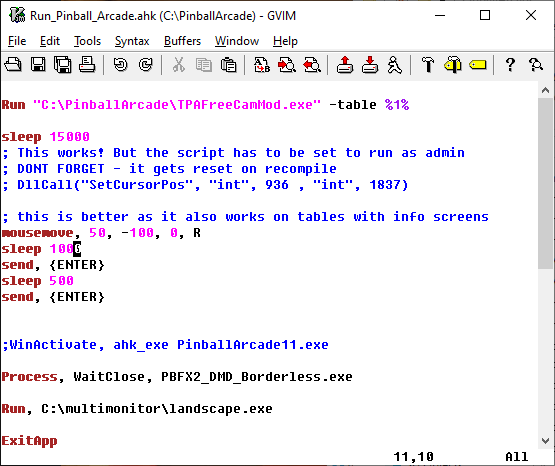
My solution handles the info screens as well, because I'm using a relative mouse move, then a couple of ENTERs, so I can dismiss the info screen (if any) and start the table automatically - whether I get an info popup or not. . That might not work for someone who maps the ENTER to a ball launch though - but changing the ENTER to a CLICK in my code should work too... I'm quite happy with freecammod now its working. I used Cevo's DMD, backglass, and POV files from the ftp site - its a nightmare without those. (thanks cevo!) The only real issue I have now is the time it takes to start a table. Visual Pinball is a LOT faster. So is Zaccaria, and thats with steam too.
-
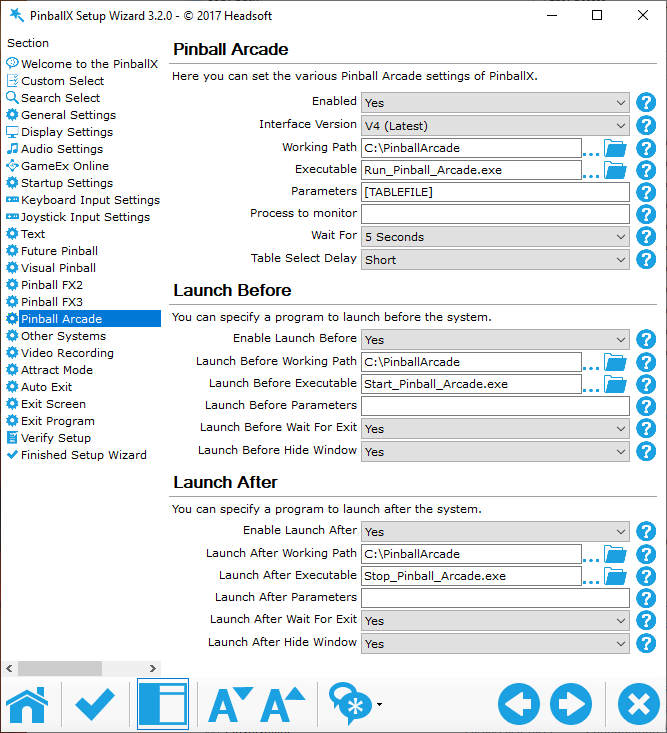
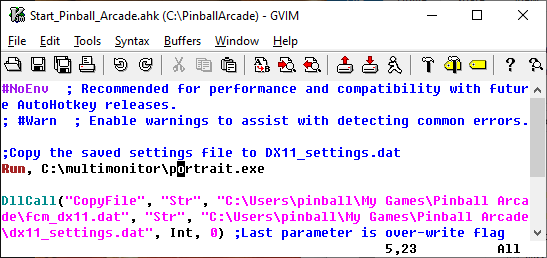
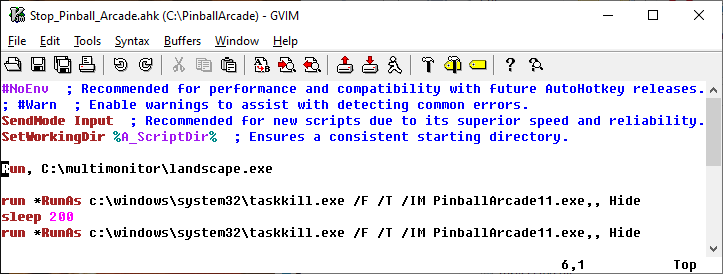
Ah, after a good nights sleep, I worked it out. My problem was AHK cant sent keystrokes/mouse movement to TPA Free Mod without being in Admin mode. I knew this of course, but I was caught out because within the script I did this : RunAs, Administrator, password mousemove, blah, blah RunAs Stupid mistake - That doesnt work - it only sets admin mode for anything run via the run command - and nothing else. I had to set the compiled script as admin via properties instead. For anyone interested, these are my config and scripts. It all works great - without having to exit pinballx. And I think its simpler than other solutions I've seen around. PinballX Run_Pinball_Arcade.ahk - compled and set as "run as administrator" - this is all necessary because FreeMod has a bug - and doesnt land the mouse in the right place on table start. And I want the table to start automatically. Start_Pinball_Arcade.ahk Stop_Pinball_Arcade.ahk - compiled and set to run as Admin - This script is necessary as PinballX cant/doesnt kill TPA when you hit the exit button.
-
Hi, After many hours, I've given up. I have a home made cab, and I was setting up Pinball Arcade today with PinballX and tpafreecammod. It works - it loads the right table, However the START button isnt in focus. So hitting my launch button doesnt work. The mouse position is just shy of the start button - maybe 50 pixels to the left and down - so maybe its a tpafreecammod bug. Dunno. Anyway I tried loads of things to fix it - but I've given up, as AHK cant send keystrokes, joy or mouse commands to Pinball Arcade. It just needs either a mouse co-ord, or even a right arrow key stroke - but for the life of me I cant get it to register with TPA. I think tpafreecammod is intercepting the input, and I dont know how to stop it. I've turned off hotkeys in tpafreecammod, but it makes no difference. My "inovative" (but unsatisfactory) solution in the end (after wasting a day on it) was to map my flippers to the d-pad in x360ce. That at least (with a tap of the right flipper) gives me focus on the start button and I can start the table without reaching for my keyboard. And the dpad doesnt affect the play. But thats not good enough, really. Anyone have any ideas? The table I was trying was Star Trek Vengence. I havent setup any of my other tables yet in PinballX - so the issue might be specific to that table. I'll try the others tomorrow.
