|

.gif.6d0defdbb7838a856f87aa25d43c69ad.gif)
scutters
-
Posts
2122 -
Joined
-
Last visited
-
Days Won
190
Content Type
Profiles
Forums
Events
Downloads
Store
Articles
Everything posted by scutters
-
Don't think i use PinballXStatus flag anywhere Mike. Maybe it's something to do with the 'online' initialisation status of PinballX for those two values, but that's just a guess. I'd be tempted to just change code to work for status 6 or 10 and see what happens!.
-
Think it's an FP thing. Maybe this workaround will work for you
-
A few quick answers; Normally you'd create another VP system (under Other Systems in settings). But if you don't think you'll have many VP9 tables in your final setup then you can use the 'alternateexe' flag in the xml to tell PinballX to override the normal executable used for a system, handy if you're dealing with a handful of tables. As you're starting out, setting up another system for either VP9 or VPX is probably easiest. For access to the FTP yes. But there is a vast amount of media freely available in the downloads section as well as in some media projects threads. You're talking about in game?. The options need changing in VP for that under the preferences menu 'Add missing tables' in settings (under general settings) should work to auto add them. Other stuff; Have a look at PinballX Database Manager as an alternative to Game Manager - i'm biased , but it has quite a few extra features (e.g. can auto add new tables and makes 'alternateexe' use a bit easier as well as lots of other stuff).
-
.thumb.gif.704e8e80bff8d8baa365115adc2ca31b.gif)
Complete Reinstall? Any advice to make life easier.
scutters replied to Deadbolt Don's topic in General
Loading media by table rather than in random needs the derandamomiser plugin (change the loading media mode in settings, copy the plugin dll file to the pinballx\plugins folder and and enable the plugin in plugin manager - see info on that page). Probably worth posting that in a new thread as a specific issue (don't forget to attach your log and ini files!) It's always worth recording your own playfield videos imo, that way the video you see will match the table/version you're using. Probably why you're not finding some on the FTP. I think there are some on a mega link somewhere though, might be a link buried in the database manager support thread (database manager can download media from mega links too once set up) -
Complete Reinstall? Any advice to make life easier.
scutters replied to Deadbolt Don's topic in General
Enable Show System in Settings.exe (under general settings)? Agree with Mike though, once you start updating tables i suspect you'll have very few VP9 tables left enabled in PinbalX so might not be much of an issue when you get to that stage I did write up some stuff for setting up a vituapin controller a while back, but it's for V3 rather than V2 so not sure how much is relevant - https://forums.gameex.com/forums/topic/22391-virtuapin™-digital-plunger-kit-v3-nudge-and-tilt-setup-for-visual-pinball-10/
-
Gotcha.. that would be a problem with that solution (that i overlooked) Yep, the 'use playfield images' option working is internal to pinballx so would need Tom to look at for any possible improvement
-
Ok.. as you're using table images rather than videos i think using 'loading images' could work for you (if you have some spare disk space); Backup the contents of your media\loading images folder somewhere (can just be copied, no need to delete from the loading images folder) Copy table images from from the media\databasename\table images folder to the media\loading images folder Right click on the image files just copied in file explorer and select to rotate left (or right) twice (i'm going from memory that loading images need to be rotated 180deg from table images - but might be wrong). This will work for multiple image files if selected, so no need to do one at a time. In settings set to use 'loading folders' Copy the loading image derandomiser plugin to your plugins folder and enable it in pluginmanager Hopefully you should now have the table images used as loading images. Been a while since i've tested loading images with the plugin so sorry if here's any issues (or step 2 isn't needed)!. If they don't look any better then you can disable the plugin and remove the images in media\loading images and restore the files from backup, and change back to use playfield image in settings.
-
Not sure if you're using loading videos or letting pinballx take a screenshot and show that during table load. That setting is controlled in Settings.exe->General Settings->Table Loading Media mode, loading videos have generally a better result (for me anyway). Please attach your pinballx.ini and log.txt files!
-
Narrowed it down a bit more as it works ok on a test install to a clean directory. Turns out it's the usepinmame flag in the pinballx.ini file (?). Using this ini file with V5.33 32bit Game Manager crashes after a couple of seconds. Change the to UsePinMAME=False and Game Manager will work. PinballX.ini log.txt PinballX will launch ok whichever way the flag is set
-
Sorry, not tried using Game Manager in a while. Turns out i get the same issue if i try to open it with the 32bit version installed. I can open it ok using a 64bit install though. I'm guessing you're probably using a 32bit PinballX install? If so, try checking the 64 bit option during the install options to see if that fixes it.
-
I get the same with 5.32 (32 bit) Log and ini attached. log532.txtPinballX.ini (i'm upgrading hardware on the cab so they ini probably won't make much sense as it's from a test install on desktop) Error shown in log; 21:31:58.85 24/12/2021: Loading Game Statistics and Scores 21:31:58.91 24/12/2021: Loading Surfaces 21:31:58.92 24/12/2021: Error. Exiting 21:31:58.92 24/12/2021: 21:31:58.92 24/12/2021: Method not found: 'Void Direct2d.CFont..ctor(System.String, Direct2d.Device, System.Windows.Forms.Form, System.String, Single, Boolean, System.Drawing.FontStyle)'. 21:31:58.92 24/12/2021: at PinballX.FrmMain.am() 21:31:58.92 24/12/2021: at PinballX.FrmMain.a(Boolean A_0, Boolean A_1, Boolean A_2, Boolean A_3, Boolean A_4, Boolean A_5, Boolean A_6) 21:31:58.92 24/12/2021: at PinballX.FrmMain..ctor() 21:31:58.92 24/12/2021: Disposing Plugins Last good version appears to be v5.28 Download that for now via the download page and click the See changleog at the bottom next to the What's New label, select 5.28 then download option from there EDIT - The X64 version of PinballX 5.32 appears to work ok (but i am using a different ini and media to test), so if you're on a 64bit windows version you could try selecting that in the install wizard options for 5.32 instead of rolling back to 5.28

-
@DBrown67 The backglass style wheel gifs i did will probably run a lot smoother than the apngs on your setup. An alternative animated wheel type with smaller files and less overhead (..though admittedly not much use if you like round wheel images)
-
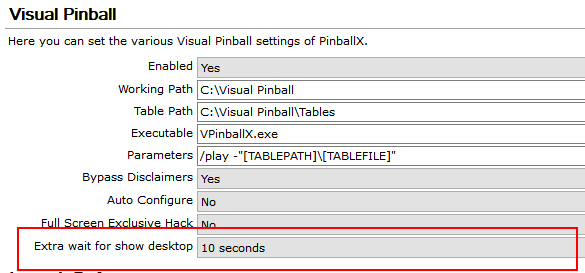
I can't see the images either, but going by the description try adjusting this flag in settings; (think there's a tpyo in the description of that setting "Additional wait before showing desktop. Needed for bug tables on some systems", it's for big tables (slower to load on some systems) not bug tables ) That should add time before pinballx hides the loading screen. for the loading gif you could just create a small fully transparent image and then on ezgif.com make a one frame gif from it. That should work to hide it..
-
Can you attach these files?. Might be a clue in there..
-
Probably best as a feature request- https://forums.gameex.com/forums/topic/22259-pinballx-enhancementsfeatures-requests/ for PinballX/Game Manager to not clear the custom xml fileds. You can set table ratings in database manager as a workaround, but that's not as ideal as being able to do it in the front end after playing would be
-
Please also advise if PinballX is running normally for all enabled systems (to rule out corrupt database xml) other than that i don't have many ideas except as Mike says, what happened before the issue started (any windows, hardware, pinballx changes etc)?
-
There is a performance overhead to using apng wheel images, i've seen some huge (file size) animated wheel images on VPU and that won't help. Not sure if Tom can do anything like the old static wheel image caching to improve that (cache the first frame or something?)
-
Can't see any issues in the log or ini files. Did you install or reinstall the lav codecs? If you did that can you confirm if the backglass problem is for all tables or only some, and attach a zip file with some of the backglass media where you have the issue.
-
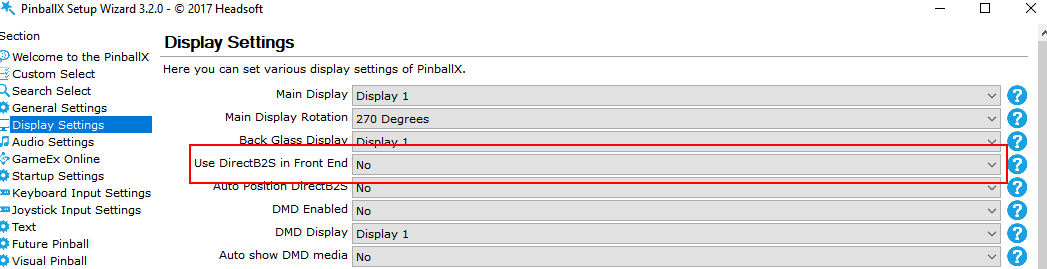
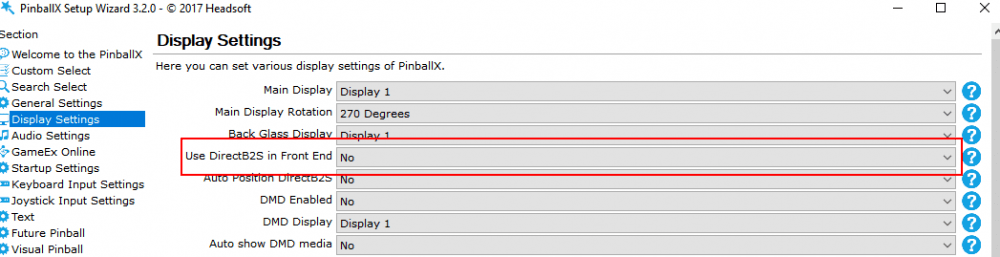
Are you using the actual backglass file or videos/images in PinballX? It's this setting in PinballX; If set to Yes try setting to No and use videos/images for the backglass as you do for playfield. Please also update your LAV codecs, that might help with the DMD videos. If those are not the issue(s) then please attach you Pinballx\Log\Log.txt and PinballX\config\pinballX.ini files.
-
[RESOLVED] Not displaying all tables in VP xml file
scutters replied to Gooseleggs's topic in General
Have you inadvertently opened the 'recently added' tables list rather than looking at 'all tables' or the 'visual pinball' tables view in PinballX?. The text at the bottom of the pinballx screen will tell you what list you are viewing. You can select a game and then in the menu select to show 'all tables' instead if that is the issue. -
Thanks Tom. Media working for me with file matching on or off, and log now shows OS and CPU info; 22:12:23.96 02/12/2021: PinballX - Version 5.26 x64 22:12:23.97 02/12/2021: Microsoft Windows 10 Pro 64-bit (16GB) 22:12:23.97 02/12/2021: Loading Settings 22:12:23.98 02/12/2021: Initialize Component 22:12:24.17 02/12/2021: Initialize Display 22:12:24.21 02/12/2021: Testing Flash engine. 22:12:24.66 02/12/2021: Loading PlugIns 22:12:24.67 02/12/2021: Looking for startup images 22:12:25.01 02/12/2021: Hiding Cursor 22:12:25.03 02/12/2021: Hiding Taskbar 22:12:25.04 02/12/2021: Getting GPU and CPU Information 22:12:25.09 02/12/2021: CPU: Intel(R) Core(TM) i7-5960X CPU @ 3.00GHz 22:12:25.09 02/12/2021: 8 cores, 16 threads
-
I'm only using a test install (with the default PinballX install media for Road Kings and Big Gun) and i can recreate it, with table videos one named as a table description and one named as the table name (both exactly) they both disappear in the front end when i set 'file matching' to No. As both files match exactly either the table name or description they should both still be found. file matching set to yes and videos are then found. Good to know! - thanks Mike
-
Same for me; 09:03:27.76 02/12/2021: PinballX - Version 5.24 x64 09:03:27.79 02/12/2021: Unknown Operating System 09:03:27.79 02/12/2021: Loading Settings 09:03:27.81 02/12/2021: Initialize Component 09:03:28.05 02/12/2021: Initialize Display 09:03:28.09 02/12/2021: Testing Flash engine. 09:03:28.29 02/12/2021: Loading PlugIns 09:03:28.30 02/12/2021: Looking for startup images 09:03:28.71 02/12/2021: Hiding Cursor 09:03:28.73 02/12/2021: Hiding Taskbar 09:03:28.74 02/12/2021: Getting GPU and CPU Information 09:03:28.84 02/12/2021: CPU: Intel(R) Core(TM) i7-5960X CPU @ 3.00GHz 09:03:28.84 02/12/2021: 1 core, 1 thread It's a win 10 pro machine, processor 8 core 16 thread
-
Not sure what the problem is, normally the access denied is a rights issue but if PinballX is running as admin that shouldn't be the case. Try pausing in game in FP - what happens if you exit from a paused game, same error / behaviour? Also try removing the buttons mappings from FP, then try launch and exit from PinballX and see if that functions correctly to help narrow down the problem.
-
Long shot as you only changed buttons, but did you change the run as admin rights on FP or PinballX? Might be worth trying PinballX running as admin for the access denied error. If that doesn't work can you post a screenshot of your FP button setup? thanks.