|



Stu1983
-
Posts
936 -
Joined
-
Last visited
-
Days Won
7
Content Type
Profiles
Forums
Events
Downloads
Store
Articles
Everything posted by Stu1983
-
I tested and it's working, I had to take a screenshot (F12) in Sega Rally while in game to get it to appear in the screenshot.vdf but its working fine now. Thanks again Tom. I have noticed a couple of issue though. When Sega Rally didn't appear I decided to delete the steamdata.ini When I went back to GameEx I only had 1 Steam game even though the log said it found 40. I went back in again and there were 2 games. Out and in again and there were 13 Then 28, then 33 then 42 (40 Steam + 2 shortcuts that aren't in the log) I delete the steamdata again and the same again, though this time it went 7, 20, 32, 42 I also have noticed that over the last couple of nights I have had no videos, the log says 21:01:54.3 10/09/2012: Failed Opening Video: f:\games\gameex\media\steam\video\92300.flv All the files are present and play fine in VLC Strangely the 2 shortcuts have working videos
-
Yeah that's what I thought when I seen it there... to be honest if this had been available last week, I probably wouldn't even have thought of trying to integrate Steam with GameEx I would have just set GameEx to launch this as a program. Now that Steam is integrated though I think it is a much better way as it keeps everything in one system and allows for wrappers
-
Yeah I think this is great, I've tried over the years to try and get some GameEx users on Steam but never really got much interest but maybe with the new integration feature it'll get the ball rolling
-
Thanks, I'll test when I get home I think the benefit is that it's a really easy way to add other PC games to GameEx and also keeps all your games in one list rather than 1 'Steam Games' section and another 'Other PC Games' section. Previously I would have created a batch file for each PC game that I wanted to add to GameEx and the batch file would then kick of an Xpadder profile or AHK script specific for that game then the batch would start the game and wait for it to finish before closing. Using this method I can just add the game to Steam and have a wrapper in the normal Steam folder The only disadvantage is that it ties up your Steam account while playing a non Steam game but that's not a problem for me as I can only play 1 game a time. I'm also curious to know if the appID Steam generate is unique to that game or to my system. e.g if you where to have the same game installed would it have the same appID? If it does then we can create custom wrappers that will work on any system, regardless of where the game is installed or what the shortcut is called. I added FileZilla to Steam as a test (hoping you may also have it) the generated ID is 17714365825227423744
-
Cool, sounds like you have it all under control then
-

Arcade/Retro themed desktop wallpapers
Stu1983 replied to Krakerman's topic in GameEx Media Projects
Check out some of the work done by RETROnoob over at deviantart I love his wallpapers -
Very nice work indeed KRC, these are very unique
-
I don't know how I missed that, mine is located D:\Steam\userdata\42944198\760\screenshots.vdf The only issue with using that file is, if you delete a shortcut from Steam then it still stays in the screenshots file. So GameEx would always see the game. Unless you can cross reference an entry from the screenshots file with the shortcuts.vdf as the shortcuts.vdf is kept up to date
-
Yeah I just looked and I've been using it for 6 years now, certainly doesn't seem that long Happy Birthday GameEx
-
Request time again I think this one may require a bit more work though. Steam makes it really easy to get non Steam games working through GameEx. Before you integrated Steam and we had to use URLs we could easily add a none Steam game to Steam and then create a URL from Steam that would launch the game along with the overlaygui. Obviously this doesn't work with your integration as we don't need to worry about URLs anymore. How much effort would it take to add an option to let us specify a directory containing Steam URL files, you could then launch them using your current method as they just contain an appid? I have looked and looked but I can't find any reference to how Steam generates these new AppIDs I does create a shortcuts file in the userdate/uid/config directory but this doesn't include the ID Example URL [{000214A0-0000-0000-C000-000000000046}] Prop3=19,0 [InternetShortcut] URL=steam://rungameid/11501351716352163840 IDList= IconFile=E:\PC\Sega Rally Revo\SEGA Rally.exe IconIndex=0 HotKey=0 Obviously these games won't exist on Steam so you can't scrape data for them but you could just use the URL name or the generated ID to look for local meta data. I think the IDs are unique to each file, if I delete the game from Steam and add it again it will always get the same ID. Also all the IDs for shortcuts seem to be 20 characters
-
Thanks KRC, looking good
-
Added wrappers for: 2630 - Call of Duty 2 13520 - FarCry
-
Thanks Tom it's working now
-
It probably is something to keep an eye on, currently there are over 1500 titles on Steam. If we're saying 20% of these will need a wrapper, that's theoretically 300 wrappers, they are between 200kb and 1200kb uncompressed. Even if we allow 500kb, we are talking an extra 150mb of disk space for a GameEx install Personally that still doesn't bother me as if I'm using Steam I'll be running on a large enough hard drive anyway and if I'm not I'll just not download the wrappers. Also... unless someone is going to be very, very nice and treat me, we'll never test anywhere near the whole Steam library
-
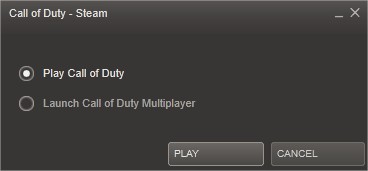
Here's something to watch out for... I tested a Call of Duty 1 the other night and it launched straight in the game so I thought it didn't need a wrapper. This was on my none GameEx system which was logged into Steam at the time. Last night I tried to play the same game but this time through GameEx but I was presented with the following: So after a bit of investigating, it would appear that different things can happen depending on whether you are logged into Steam before starting game or not. If my system is already logged into Steam then I don't get that launcher but if I start the game without being logged in it appears. It's not big deal I've now created a wrapper for it, it's just something to be aware of as it also happened with Call of Duty 2 and Far Cry 2620 - Call Of Duty wrapper added to the FTP nullPointer - Take a look at this AHK, I think it's a bit neater using variables at the top, most of these scripts are just copy and paste and change the window title so using this as a template will be handier

-
It was actually Tom's idea, they are already being bundled with the current installers, he says they compress really well. I doubt we're going to need all that many wrappers. Most games start fine, out of just over 110 games tested we've only needed to create 18 wrappers. It's an optional download when running the installer, just like the databases (which are much much bigger), so if you don't have Steam then don't tick the boxes. It may seem strange to have wrappers for games you don't have but you also have databases for system you may never use?
-
I theory all these wrapper will be bundle with GameEx so not sure if there's any reason for people to be downloading them manually? Maybe I'm missing something though?
-
yeah I've been harassing Tom into adding a couple of extra features to the Steam support like 'Launch Before and After'
-
Tom, is the RunAfter implemented any differently than normal? I'm trying to run xpadder, it's supposed to load my default profile which lets me control GameEx but what seems to happen is: I exit the game, GameEx appears, I can't use my controler then about2 seconds after GameEx reappearing GameEx minimizes, I restore GameEx and my controller is working It's a if Xpadder is stealing focus away from GameEx Tried launching xpadder from a batch file but GameEx seems to hang then, I think it's waiting for xpadder to close, maybe its the RunBefore NoWait and RunAfter NoWait options that I require
-
I spent more time playing games rather than checking configs Do you have a list of what all you have check, so I can skip them? It'll be tomorrow evening before I look at any I don't have morrow wind so don't know what it's like but take a look at the Binding of Isaac wrapper, it was a bit more of a challenge to get going Hand to use the mouse down, sleep, mouse up approach as the launcher wasn't registering the normal click, not sure if thats any help but its something to keep in mind
-
Yeah I had hoped so too but it doesn't work well with my setup.I have all the class controllers, NES, SNES etc so I have the needto be careful with my xpadder setup. It's something I meant to look into as I think it would only take minor tweaking of his plugin to make it work, from memory it was something as simple as having an option to NOT launch a profile is all that is required PC Games are the only system that I need to change profiles on
-
Thanks Tom Seeing as I'm on a role with getting my requests fulfilled.. Do you think you could pop round and cut the grass for me
-
Sorry but I have another request Is it possible to have a launch before and a launch after? I need to send a default Xpadder profile before starting any Steam game Thanks
-
Only last 'markup' issue 'Dead Rising 2' is showing as 'Dead Rising® 2' This is a age restricted game so maybe the problem lies there Is there anything can be done to scrape the data for these age restricted games? Or should we just create our own meta data?

-
I restored my old vdf, downloaded the latest GameEx and deleted the steamdata.ini but still 2 entries I'm happy to go with the new vdf fix, unless you really want to get to the bottom of it?