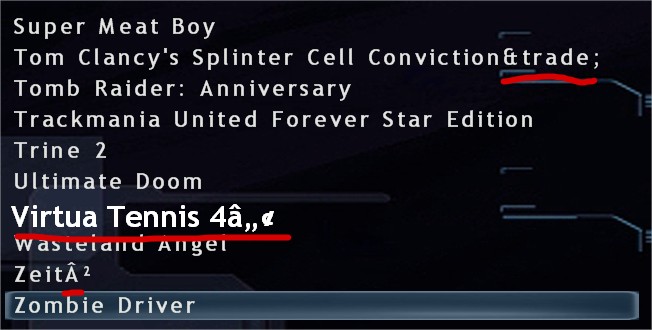
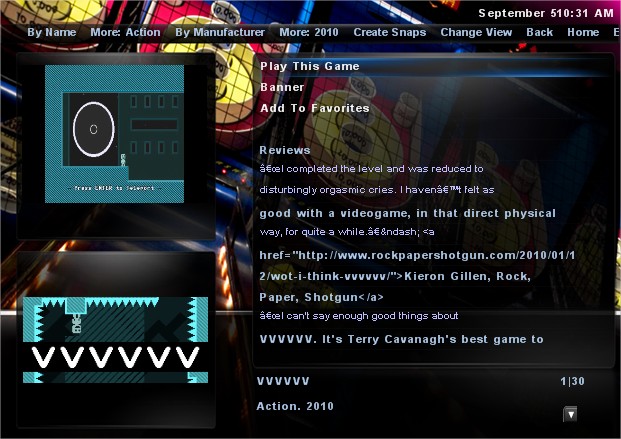
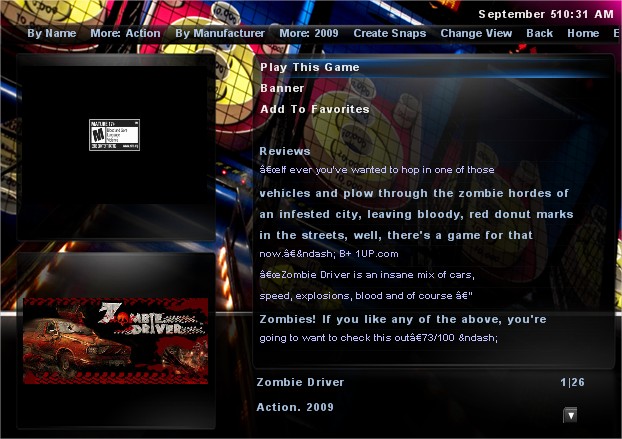
|



Stu1983
-
Posts
936 -
Joined
-
Last visited
-
Days Won
7
Content Type
Profiles
Forums
Events
Downloads
Store
Articles
Everything posted by Stu1983
-
I decided to try something, I renamed my config.vdf to config.bak then logged into Steam, it created a new config.vdf which is much cleaner than the last one 70kb down to 12kb Now the extra Worms Reloaded and the Modern Warfare for the dedicated server entry have gone ...all is at peace with the world
-
Well I now know why there are 3 entries, the first is the dedicated server, second is single player and third is multiplayer I would be nice if we could tell the difference other than all 3 showing the same name but I can live with it as is. Worms Reloaded is a bit stranger, the first entry fires up the game but the second does nothing, its logs into steam then sits there until GameEx gives up are restores itself
-
Turns out instead of copying Virtua Tennis to my new HTPC, I moved it, so even though steam thought it was there it wasn't and you were right not to display it Le_game_code is now also gone I still have Toki Tok and a Bang Bang Racing enry even though these are delete but it's because Steam doesn't bother deleting the demo of a game when you purchase the full version, so even though I can't play these demo anymore steam still felt the need to hold on to the data, I have now delete these folders manually so that's them gone. I would still like to know where the 2 Worms Reloaded and 3 Modern War entries are coming from though, I'll do some more digging
-
I generally use AHK, I just like the more advanced WindowInfo tool that AutoIt has. I decided to give it a go for making the wrapper yesterday and thought it was pretty good. I actually had the same thought as you, couldn't see any reason to use AHK over AutoIt but then I failed miserably trying to get it to do a simple thing like remap a keyboard key So back to AHK for me The AutoIt WindowInfo tool still is much better but the information it provides works with AHK anyway so I use AutoIt's info tool but script in AHK I hadn't heard of AHK_L until you mentioned it. Does it offer much more than AHK? I really don't think it matters what we use, as we end up with an exe at the end
-
dlc is just downloadable content, they shouldn't show because they can't actually be played themselves I can't remember what the Worms DLC is but Street Fighter for example has extra costumes for characters as DLC or Dirt 3 has extra cars. What about a AppID black list? That way as we find these odd ID's that don't fit the rules you can ignore them? A blacklist folder beside the config and wrapper, if a file exists there with the appid it is ignored but GameEx. That way I can upload any I find to the FTP and your can include them automatically with each release. This may even be useful as a parental filter if someone didn't want their kids playing a certain game Virtua Tennis "71390" { "InstallDir" "C:\\Games\\Steam\\steamapps\\common\\Virtua Tennis 4" "UpdateKBtoDL" "0" "HasAllLocalContent" "1" "UpToDate" "1" } Call of Duty 3 "42690" { "UpdateKBtoDL" "0" "InstallDir" "c:\\games\\steam\\steamapps\\common\\call of duty modern warfare 3" "HasAllLocalContent" "1" "UpToDate" "1" "maintenance_time" "1322606430" } "42750" { "UpdateKBtoDL" "0" "InstallDir" "c:\\games\\steam\\steamapps\\common\\call of duty modern warfare 3" "HasAllLocalContent" "1" "UpToDate" "1" }
-
I've uploaded a config and wrapper for The Binding Of Issac
-
Hey nullPointer, I hope you don't mind but I recompiled your scripts and my own. I noticed that the 2 you made weere only 800kb but mine were 1200kb So I thought I must grab the lastest AHK and recompile my own, I done this and mine recompiled to 200kb so done yours as well Looks like we both need to update our AHK version on our dev PC I've put them back on the FTP
-
tested the latest version on my problem PC, I've now got a list of games and it's nearly perfect. There are a few issues: All games seem to be there bar 1 - Virtual Tennis, didn't get a chance to check my other system that was happily show Virtual Tennis last night (I'll check later) I have a few extra unexpected entries, though not that many considering the number of extra entries in the vdf I'm getting 3 Call of Duty Modern War 3 entries - I can understand if there where 2 as Steam has a separate entry for single/multiplayer but not sure why 3 I've no idea what Le_game_code is and forgot to check the ini before leaving the house (will check later) Toki Toki [38700] is actually uninstalled "38700" { "HasAllLocalContent" "0" "UpToDate" "0" "InstallDir" "" "UpdateKBtoDL" "0" "maintenance_time" "1324936191" } this is probably coming from the demo though Steam doesn't show the demo for me "38710" { "InstallDir" "c:\\games\\steam\\steamapps\\common\\ toki tori demo" "UpdateKBtoDL" "0" "HasAllLocalContent" "1" "UpToDate" "1" } I have 2 Worms Reloaded [22600] entries I'm thinking the 2nd might be from the DLC "22630" { "HasAllLocalContent" "1" "UpToDate" "1" "InstallDir" "c:\\games\\steam\\steamapps\\pimpdaddystu\\worms reloaded preorder dlc" }


-
I swear I posted this before but I don't see it I hadn't noticed the Steam section in the Setup Wizard, I've tried it and it is working 100% thanks Tom I have found a minor bug in the Wizard though - it doesn't search the section headers or descriptions, I searched for Steam but the only result was 'Text / Language' Instead of only being able to download the wrappers via the installer could an option be added to the Steam section of the setup wizard? I'll see if I can test the latest version on my problem PC when I am home for lunch in a hour or so
-
That's fine Tom, I can easily create a dummy txt file to sit beside the ahk script to help me find them if need be
-
It enables a special kettle like effect on your PC, when it's enabled you will see the effect of steam rising from your monitor Seriously though, if you have Steam installed on your PC it will allow GameEx to automatically find all your games and launch them without having to load the Steam interface. Thanks Tom for getting this working so well and so quickly
-
Great work Tom, most of my issues are now fixed. I've made a list: Fixed Individual INI's - Tested and fixed - I've uploaded my VVVVVV ini to the FTP Multiple Wrappers - Tested and fixed Description scrapping instead of reviews - Tested and fixed installdir varible (used to remove uninstalled games) - Tested and fixed Missing games (Not available on Steam anymore [OutRun]) - Tested and fixed Auto Loging Support - Tested and fixed Still outstanding Weird Text - fixed All the markup appears to be fixed but I'm still seeing the odd large font in the games list (see the original screenshot of Virtual Tennis) there are a couple of others I noticed this morning before work but the only one I can remember is DarkSiders (50620) No games detected on main Steam PC -Fixed Looking at GameEx log and it detects steam OK but can't find any games I took a look at he Steam config.vdf and wish I hadn't I think there will be some work required here, the list of apps is huge, I have only 76 games installed on this system but there has been lots of others installed and removed in the past. The InstallDir variable should sort most but there are lots of others that would still be picked up e.g. downloadable content and keys I think a combination of 'InstallDir' and 'UpToDate' set to 1 is the start to a way forward as that seems to correspond best to what I have installed. It gets a bit trickier though as there are a lot of entries with UpToDate set to 1 and InstallDir set to "c:", I've no idea what these are one example "63212" { "HasAllLocalContent" "1" "UpToDate" "1" "InstallDir" "c:" } We could throw away any that just point to a drive letter and no path but there are also the following: "458" { "HasAllLocalContent" "1" "UpToDate" "1" "InstallDir" "c:\\games\\steam\\steamapps\\pimpdaddystu\ eam fortress 2 - summer 2011 dlc" } I think the key is in the AppID - having looked through about 50 games on steam and every actual game ends in a 0, if the last digit isn't 0 it appears to be DLC for the full game There are exceptions though as some games have more than 10 items of DLC so they also end in 0 It would be a huge start though to cleaning up the list I've attached my vdf for you to have a look NoGameDetected-config.zip
-
No problem Before we create too many of these is it worth rethinking the naming? I think the AppID is definitely essential but it makes it quite pain to work out which loader is for which game e.g. you have to jump back to steam create a desktop shortcut and find the ID from the url. My only alternative suggestion is to use a name similar how we've been naming the zip files 'AppID - Game name' Tom, would it be much effort for you ignore everything after the first '-' in the file name and still do a match? Any other suggestions? Stu
-
I haven't actually checked the GameOverlayUi side of things at all yet. I was waiting to see if Tom would change the ini side of things to indivual INI's, I see he has now, so I will try and recheck these games tonight. As Tom said the GameOverlayUi problem doesn't require a wrapper so I just check that the game loads, full screen without any keys or mouse clicks.
-
Thanks Tom
-
no problem, it's not that big a deal, I'd far rather have a working site and have to wait the 30 seconds the odd time I remember to search
-
Last bugs for today... promise Text is being displayed a bit weird in places on the game list screen, see attached screenshot I have 'OutRun 2006: Coast 2 Coast' (AppID 4730) installed but it doesn't appear in my list. It is listed in the config.vdf I know the problem but have no idea what the solution would be. The problem is this game has been removed from Steam so it isn't available for purchase on their site anymore. Anyone that purchased it can still install/remove it I assume your code can't find it on the site so skips over it.
-
Maybe another bug for the list I've tried this GameEx exe on another system (my main Steam/Dev system) but I don't get the Steam Games section in Emulated Games I've checked the GameEx log but could not see any reference to Steam
-
I have near 300 Steam games (I'm a sucker for their sales) I've went through all the games that I have currently installed tonight and checked it they need a wrapper or not out of 76 tested only 14 required a wrapper, I've created 13 wrappers (posted in the first message) I skipped "From Dust" as it's a bit of a pain in the ass, it launches a crappy 'uplay' app. It could probably be created but I doubt I'll ever want to add this game to GameEx so I couldn't be bothered fighting with it. I've checked the following games A.R.E.S. AaAaAA!!! - A Reckless Disregard for Gravity Age of Empires Online Aliens vs. Predator Atom Zombie Smasher Batman: Arkham City Battlestations: Midway Battlestations: Pacific Bionic Commando Rearmed BIT.TRIP BEAT BIT.TRIP RUNNER Bunch Of Heroes Burn Zombie Burn Call of Duty Call of Duty 2 Call of Duty: Modern Warfare 3 Cities XL - Limited Edition Command and Conquer: Red Alert 3 Crysis Crysis 2 Darksiders Dead Rising 2 DEFCON Defense Grid: The Awakening Demolition, Inc. Deus Ex: Human Revolution Devil May Cry 4 DiRT 3 Dungeon Defenders F.E.A.R. 3 F1 2011 Flight Control HD From Dust Grand Theft Auto Grand Theft Auto IV Gratuitous Tank Battles Half-Life Half-Life 2 Jamestown Kane & Lynch: Dead Men Left 4 Dead 2 LEGO Batman: The Videogame LEGO Indiana Jones: The Original Adventures Lego Star Wars Saga LIMBO Max and the Magic Marker NightSky Orcs Must Die! OutRun 2006: Coast 2 Coast Renegade Ops Revenge of the Titans Rock of Ages Rocket Knight Saints Row: The Third Shank Shift 2 Unleashed Sonic and SEGA All Stars Racing Sonic Generations Street Fighter IV Super Meat Boy Team Fortress 2 Terraria Tower Wars Toy Soldiers TrackMania United Trine Trine 2 Unstoppable Gorg Virtua Tennis 4 VVVVVV Wasteland Angel Worms Reloaded Worms Ultimate Mayhem Zeit² Zombie Driver I didn't check them through GameEx, I just launched them in windows to make sure they went in game
-
Another bug for you Tom I think you need to look at the 'installdir' variable in the config.vdf I've now uninstalled VVVVVV from steam but it still appears in my list in GameEx, Steam still leaves the entry in the config.vdf but it deletes the path in the 'installdir' variable e.g. "installdir" ""
-
Is it possible to have the search Flood Control relaxed a little? Maybe it's just my bad vocabulary skills but I'm forever searching for a misspelled word, I immediately try to correct my mistake but have to wait 30 seconds to search again. It also makes it a pain to find something when you're not sure what term to search for e.g. 1st result returns nothing useful so you rephrase the search term. I understand the benefits of having it enabled but can it just be relaxed a little to something like 'x' posts in a 5 minute window
-
I thought I would get the ball rolling early and create a place for us to share wrappers for the upcoming Steam integration feature. These should go in: GameEx\MEDIA\STEAM\WRAPPERS I'll start with my Zombie Driver wrapper Update - I've attached some more that I created tonight 12210 - Grand Thef Auto IV.rar 19030 - Rocket Knight.rar 21660 - Street Figther IV.rar 31410 - Zombie Driver.rar 35700 - Trine.rar 35720 - Trine 2.rar 50510 - Burn Zombie Burn.rar 50820 - Magic Marker.rar 55230 - Saints Row The Third.rar 57800 - Doc Clock The Toasted Sandwich of Time.rar 65800- DungeonDefenders.rar 70600 - Worms Ultimate Mayhem.rar 105430 - Age of Empires Online.rar
-
I've now tested the wrapper function with Zombie Driver and that worked perfectly as well. Would it be possible to add support for multiple wrappers? I can see the need for a wrapper to get past a launcher but also I may like to load a different Xpadder profile. For now I could easily combine the 2 but then my wrapper is only good for my system. I've tried putting an autoit exe and a batch file in the wrapper directory but GameEx picked the exe over the bat file. There is also a slight issue with the description, you don't seem to be handling quotes, I've attached 2 screenshots, they are coming through as “ One last thing, you are grabbing the reviews, although the reviews are useful would the 'About the Game' and the 'Key Features' not be more useful


-
You have been busy This is excellent progress, I've only been able to test 2 games on this system but I'll get more tested at home later. I love that it grabs the video and info. Super Meat Boy worked perfect but VVVVVV only worked for a min or so then GameEx kicked in even though VVVVVV was still running. A quick check revealed that VVVVVV doesn't start the overlaygui so I modified the steamconfig entry for it: [AppID_70300] hasbeenlaunched=true overidewaitprocess=VVVVVV Now it also works perfect Some requests: I would really like GameEx to log in to Steam for me. I don't want to have to reach for a keyboard before starting a game. Setting Steam to remember password doesn't work either as I run Steam on a couple of PC's, it's a bit of a pain the way steam handles this: Scenario: PC-A turned on and logged into Steam Turn PC-B on and log into Steam PC-A gets logged out PC-A now forgets the stored password and next time you try to log in or start a game it will ask you for it again My 2nd request is about the steamconfig.ini In it's current form we can't easily share the ini as I will likely have completely different games installed than you. I believe the settings that go in the ini will be unique for each game, not each PC? So if I have already worked out how to start a game e.g. VVVVVV then others shouldn't have to. Rather than a forum post with people sharing their ini settings, separate ini's in a Steam sub folder might be a better approach, that way people could send you their new ini's which could the come bundled with new versions of GameEx saving new users any hassle at all. Thanks for adding this support so quick Tom
-
This is good news, I've recently just made the switch from pSX to ePSXe for my HTPC build. I'm not a big Playstation gamer but the few games I tried worked just as well in ePSXe as they did in pSX but ePSXe offers far better graphics enhancements so the games look much better on a big screen. Stu