|



Adultery
-
Posts
10152 -
Joined
-
Last visited
-
Days Won
159
Content Type
Profiles
Forums
Events
Downloads
Store
Articles
Everything posted by Adultery
-
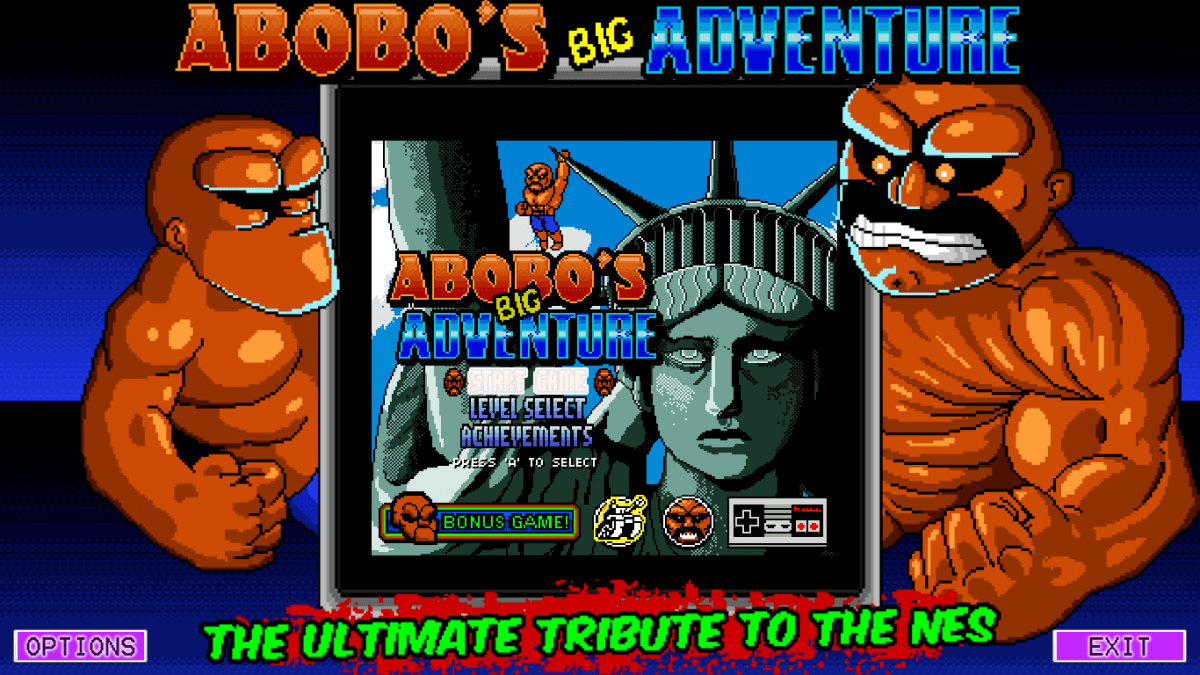
ABOBO'S BIG ADVENTURE 1.4.1 (GUI/KEY MAPPER INTEGRATED VERSION) Here's the full changelog (I trimmed some posts to keep it centralized): Version 1.4.1 I added resolution to the options so you can specify how big you want the game to be. Ditched the buttons and am just drawing buttons onto the form so it doesn't look wonky in bigger resolutions. The buttons ill always be on top. Even if you specify the resolution of your screen in the options. For programs that don't have a command line to kill them, you can now just write Kill in the "Exit Command" space to kill the process on closing. (No need to specify anything else, it kills in code now). Did a few other code optimizations. Version 1.4 Now launches in full screen! Added custom overlay.png functionality Create your own to fit your machine/situation/resolution, just name it overlay.png and put it in the exe's root folder. Image will be scaled to fit your screen, soit's suggested you try and get close to your monitor's resolution. If you don't want to use an overlay, just take the overlay.png fie out of the root folder. [*]Integrated options for your key mapping software of choice Specify your EXE or BAT file's position OPTIONAL: Add command line arguments for before and after the game window launches OPTIONAL: Set the key mapper to launch each time you run the game [*]Added a "DONATE" button so you can show your support to the game devs! If you donate to the game designers you get "Abobo's Little Adventure" for free! Unfortunately I'm broke these days, but if I can donate I'll integrate that game (or design a quick interface for it too) [*]Settings for the keymapper are saved internally now, so you set it once and the app remembers your options automagically! [*]Stepped away from using Picture Boxes and now paint the graphics directly onto the window. This is way more clean and accurate than my old method (as you can see from the images above). [*]The options window got a "Read More" tab to take you to Abobo's "WTF is this game?" info page. [*]I really tweaked the display area as best as I could. Now in addition to the viewable image being centered perfectly on the screen and a bit bigger, it fits more awesomely with the artwork. If the overlay is too small/big for your setup, I'd be happy to send you a scaled copy and/or the PSD. Just ask. [*]I added functions to save and write the Cookie Container upon open/exit. This has been deployed and tested and working fine on my machine. The game settings are saved locally as a cookie container ("abobo.sav") thanks to some overrides and a little work with serialization No more temp files, no more cookies to worry about. G'head, do your maintenance! Consider this final, I've done all I set out to do. Enjoy my tweak on a rad flash game! I take no credit for the game itself, or any of it's components (even the artwork is freely available)... I just made the GUI to tie it all together for my cab (their offline version is pretty "plain jane" and doesn't handle joy mapping software). Make sure you show your support for a great free game! Requires .NET Framework 4.0 and (obviously) Flash installed to run. Download the updated version here! Check out Abobo on the web: http://abobosbigadventure.com/ Official Abobo Trailer:


-
Beat ya Chazz! Lol!
-
For #1: I use xpadder and have no issues with it. I don't use a cps3 emu though since MAME does a great job emulating them and the added emulator really isn't needed anymore. For #2: If you're setting up global escape and it isn't saving that's not good. Is your custominput.ini set to read-only or something?
-
All his tool did was change the black from absolute black to black with a tiny white balance. You can do that pretty easy in Photoshop. Here it is by the way:
-
Awesome idea! C'mon Ben! You and Flash should submit something!
-
Updated to 1.0.4
-
Hate to bump an old thread, but since I started coding I've become more proficient with some things (like xml parsing/writing) and have really gotten comfortable with the plugin system. As if I don't have enough irons in the fire, there's gonna be a big overhaul of this plugin soon, so if anyone is using this and has any features they'd like to see added, now's the time.
-
I think it's Tom's texture drawing class but no one knows for sure but him. I honestly think this is related to artwork somehow.
-
What does runitgame.bat look like after you launch the game?
-
Try running a game with one of those themes and after if falls back to the list, exit GameEx and post your log so we can see what's going on in there.
-
As he stated the literal translation is Primary sound driver I should have mentioned that (I looked it up before I responded). @eckimo: Can I see your theme.ini for this: theme=Leon GameEx Also, if you could please try the default theme for me and see if you have the same issues. Please also disable GameBase support so we can get rid of that error.
-
Can you please post your GameEx.ini file?
-
What settings did you change? Anything is possible.
-
20:54:13.3 09.03.2012: --**-- 20:54:13.3 09.03.2012: ERRORS DETECTED: EXITING 20:54:13.3 09.03.2012: Object reference not set to an instance of an object. 20:54:13.3 09.03.2012: at ag.ad() Well something's not initiaizing for you or you missed a path during setup. What's happening is GameEx is supposed to run a test loop. Only Tom knows what ag.ad() does for sure, but I'd guess it's got something to do with drawing to the screen. Did you try and run the check at the end of Headkaze's Setup Wizard and see if it finds anything?
-
I was looking at the new Samsung Smart Phone / Pad hybrid (Android FTW). The iPad is just too rich for my blood. Does Jungool play well on an HD device?
-
Not like I know my shizzle like you do but... If I was making the same theme on a 32-bit, would I just hit the wall at some point? Or are you distributing the workload based on the resources that are available? The theme size is the problem right ? Obviously dynamic loading would completely solve this problem, since it wouldn't load each image every time the editor loads, I get that. Wouldn't it also speed up the loading process? The way it is now you almost need a background worker and status label since it just sits there stuck until the theme loads up. Help me to learn HK.
-
Nice work Ben! You're always upping the ante!
-
Caesar, Games Database just to name a couple.
-
You must have missed this in your "search"...
-
I'm not sure I'm ready to commit a machine to it yet. What' your overall impression of it as an OS?