|



Adultery
-
Posts
10152 -
Joined
-
Last visited
-
Days Won
159
Content Type
Profiles
Forums
Events
Downloads
Store
Articles
Everything posted by Adultery
-
Nice!!!! I'll be after this one tonight! Hey thanks guys! It was nothing really... It was more about having a central DB of all the high scores to spread around to other projects. Added to the HiScore XML too.
-
Game Info 1.1.8 is here! Check out the GameEx Hi-Score competition in style with this slick add-in! Go to the "DOWNLOADS" tab for more information!
-
Wow dude, you're sooooo far behind. It's virtually impossible to provide support to such an outdated version. What you're looking to do is map the escape key in the emulator's setup, unless you're saying you don't have an ESC key and need to use the S key, in which case, you'll need to use the advanced config for that emulator. I use global escape via a key combo, but I don't think your version supports that... It may not even have Setup Wizard... I just don't know for sure.
-
So if you manually mount the CCD file and load the mounted image the sound works, but if the loader loads the image it doesn't? That's strange... Can you post your runitgame.bat? Open it in a text editor (Right Click, Edit) and copy/paste the data here after you load up the CCD in GameEx. Additionally, here are a few changes in your GameEx.ini that you need to address: Does that help any?
-
Good call DazzleHP! I think you nailed it. Make sure the plugin your updating is highlighted.
-
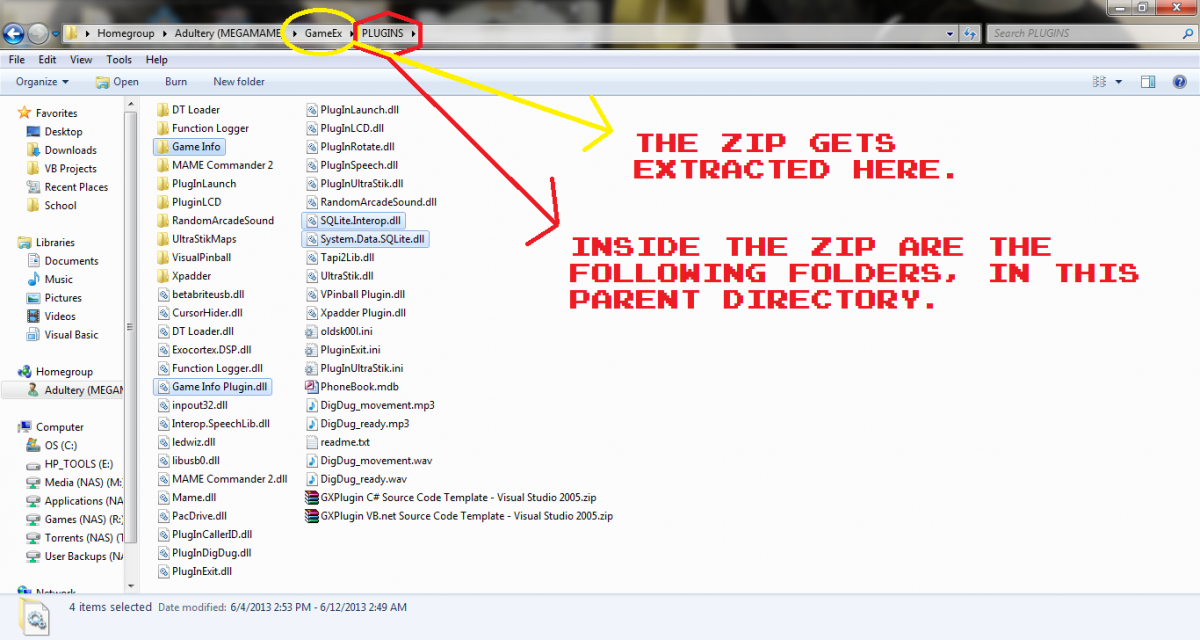
Give this one a try, see if it works.This will at least take care of the issue with the Event Timer. I'd be lying if I said I can't see why your update isn't working, has to be some problem with the extraction of the file. The log should be in debug mode and would look more like this: Can you do a search for Game Info Plugin.dll and make sure you're not installing it in multiple locations or something? (Maybe you have a GameEx > PLUGINS > PLUGINS directory structure going on or something?) The ZIP gets extracted to the GameEx directory, not the Game Info one. So it will look like this: Can you also see if you have Debug Mode selected in the configuration? It's under MORE... >> Debug Mode (make sure it's checked) If you're still having trouble the debug mode is much more thorough, and I'll be able to diagnose things faster.
-
Make a MAP file. You can keep the integrity of the rom set and change the way the name is displayed. Check this out: http://www.gameex.info/forums/topic/13328-release-map-file-maker/
-
Ahh do you have multiple filters in the rom filter section? Does it say *.cue;*.ccd or something similar? If your answer is yes on that, it's something I need to fix (I may be using old code that doesn't split filters into an array like it's supposed to). I can fix that (assuming you're using the plugin). Nevermind, you're not using the plugin.
-
Nope it's crashing in the event timer... Do you use an ambiance file or does your music load up right away when you launch gameex? Edit: I see by your ini you launch the juke on startup, so this is a bug in the plugin. I'll add a delay to the juke display to fix this problem when I get home.
-
Yes the new version isn't in GameEx yet. You can get it from the downloads tab at the top of the forum. It's crashing on the dialog form it seems, try the new version for sure and if it happens again, reup your log.
-
Can you post your log from GameEx > Plugins > Game Info?
-
@helpman: You can disable it on a per emulator basis, or by adding [NOINFO] to the emulators command line. @drac: As long as Windows recognizes it as a display (and it does usually) this plugin will work on it.
-
It's really a shame that I don't have the ability to add menu items to GameEx via the plugin system. I could see a Hi-Score menu under MAME. Ahh the possibilities! I wish you guys could see this plugin in all its glory on a two screen setup. I absolutely love the way it looks, especially when there's people over. Just the Last.FM features alone make it a great little add-on... But dual monitor cabs are rare, and if I had a cpanel I don't know where you could really put a second screen.
-
Awesome!!
-
I personally don't keep bin/cue/iso without 7-zipping nowadays since I store my games on my NAS server, so there's a huge benefit to mounting as opposed to keeping those big files on your cabinet.
-
I'm unable to reproduce this behavior. Can anyone else confirm or deny?
-
Are you running GameEx in Windowed mode? The plugin is designed for dual monitors but works on one as long as Game Ex isn't running full screen. You also can't run it over top of full screen emulators. there it's a key combo to hide and show the display. it's SHIFT+TAB I think.
-
Version 1.1.1
221 downloads
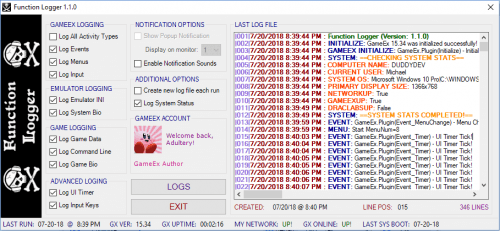
It's a Plugin Development tool that does some logging of plugin data. If you need to know what event is triggered when, this tool is your friend! You can log everything, only events, only menu changes, and only inputs with a check in the appropriate box. Select the option to log GameData if you're tracking the GameExInfo variables, and select the UI Timer option to log GameEx timer ticks. I've been using this plugin for a while so I can learn my way around GameEx's PlugIn system, and I added an interface for the end user so you don't have to struggle to learn the ins and outs like I did my first time. Visit the official RELEASE THREAD for questions or comments. -
Version 1.3.8
1080 downloads
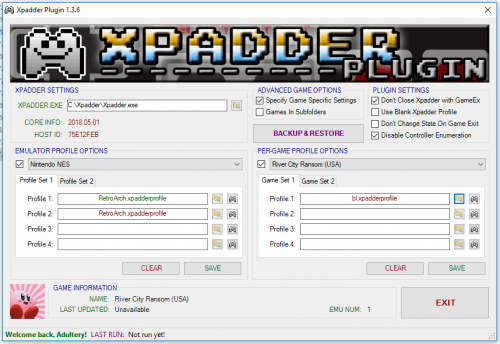
What is it? It's an Xpadder plugin for GameEx, silly! Seamlessly integrate Xpadder with GameEx with just a few simple clicks. Set the path to your Xpadder.exe, select your emulators from the drop down list, then set up your controller profiles. When GameEx runs the emulator you select, the magic happens in the background. No need to worry about .bat files or messy LaunchBefore/LaunchAfter commands. Say farewell to blank Xpadder profiles! This plugin handles the launching, the closing, and the profile switching quickly and easily without the hassle. If you use Xpadder, you'll love it! /end sales pitch How do I use it? It's simple really. Here's the rundown: Create your Xpadder profiles, or use your existing ones. Unzip the PLUGINS folder to your GameEx directory. Launch the Plugin Manager from your GameEx start menu folder. Point the plugin at Xpadder.exe Select the emulator (or GameEx interface) from the drop-down list. Browse to your Xpadder profiles. Click "SAVE" Click the "EDIT" button next to the profile to load it and edit it from the configuration screen. Play your games! Check the box to leave Xpadder running when GameEx exits Check the box to enable using blank Xpadder profiles instead of killing the process Questions or comments? Head to the official release thread located here. -
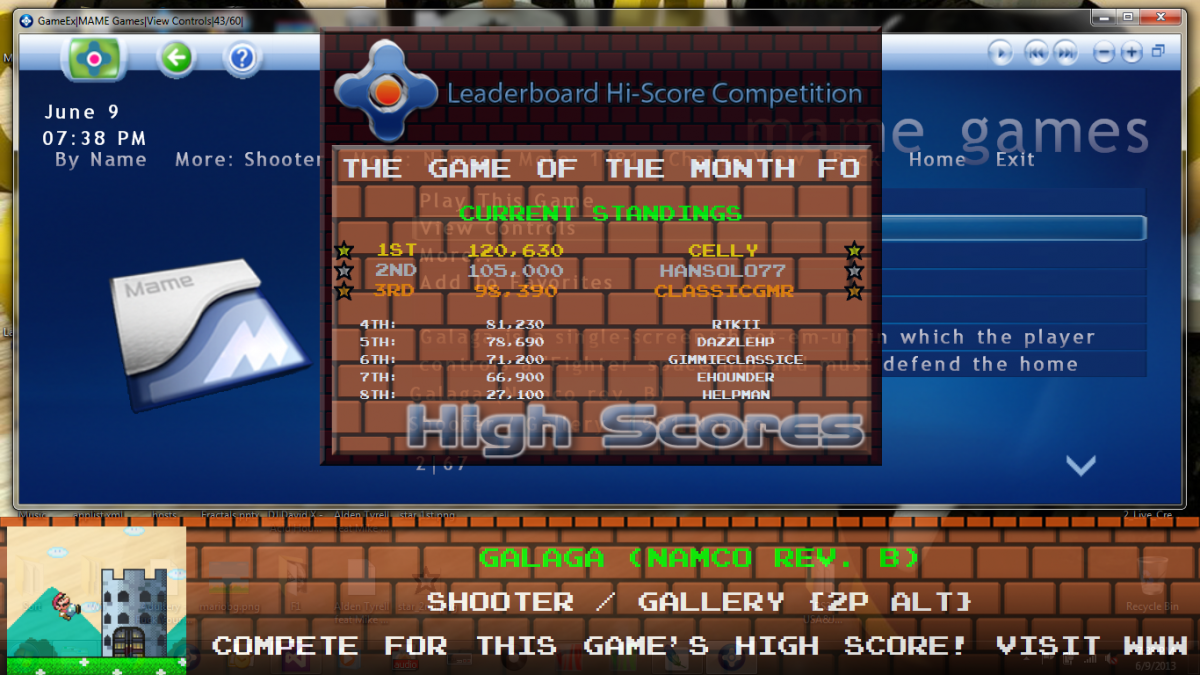
1.1.8 Is Out!! Here's a list of changes: Fully integrates the GameEx Hi-Score leaderboard and monthly competitionsCustomizable image for the Hi-Score display If you haven't checked it out already, the Hi-Score comp is where it's at! You can use the plugin to see the top 10 leaderboard, scores, and announcements. The database is downloaded over the 'net, so if your cab doesn't have a net connection, you can download the xml here also: Link Just drop it in to the PLUGINS >> Game Info folder, and reap the benefits. (Try selecting Galaga and see it in action!) BIG UP to GimmeClassics for maintaining the Hi-Score database! Without whom this wouldn't be as current as it can be. Get it from the new GameEx downloads section.

-
Version 1.3.6
801 downloads
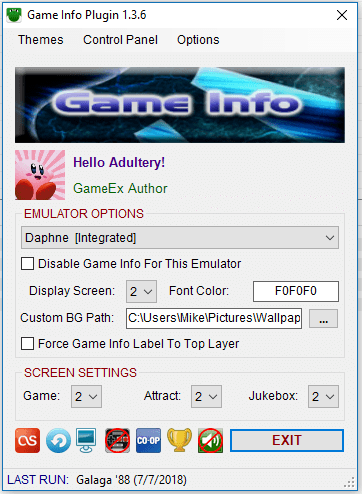
Here's a list of features so far: The plugin keeps track of total time played for that game, and session time played. The timer view alternates every 60 seconds. There are two main views which rotate every 5 minutes. The first displays the following Game Title Snap Game Name (or ROM name if you don't use a database for said system or no entry is found) System Name (your emulator's Title Text setting) Developer and [YEAR] Category If either of the previous two is unavailable, Number of Players is displayed The second display includes Game Name and System Name in addition to the following: In Game Snap Last Played Data (This is the last time you played the game with the plugin enabled) and [Overall Play Count] Game Description if available The current time is displayed in the lower right corner Text now is measured against screen length and scrolls to accommodate long info (No more auto ellipse!) Custom user-defined images for Game Mode and Attract Mode Screensaver mode that prevents screen burn-in while Game Extender is running Attract Mode popup shows game info when the game changes Dialog forms that display on certain functions Update notification if a newer version of Game Info is available (disabled by default) Jukebox Mode that displays "Now Playing" data (REGISTERED USER FEATURE ONLY!) Jukebox integration for the screen saver (album art displayed in the logo field) (REGISTERED USER FEATURE ONLY!) Dialog form shows brief info about the game you select before you even start it up! Plugin update notification lets you know if a new version of the plugin is available when you launch GameEx Custom themeing/skinnig If you wanted to disable it for a certain emulator, just add [NOGAMEINFO] or [NOINFO] to the emulator's command line. To hide/show the Game Info while in a game or hide/show the jukebox info, press SHIFT+TAB To refresh or force update the jukebox info, press SHIFT+SPACE Integrated support for GameEx *.db3 and *.mdb files to keep better track of play times Supports GameEx's Hi-Score competition directly *Online only feature! Custom text for labels via the Plugin configuration Replaces GameExtender Viewer in some situations with a more customized image viewer Add sound effects to specific actions in the plugin's theme Visit the official RELEASE THREAD for further details and a complete changelog, or for bug reporting and feature requesting. You can also download new themes for Game Info here (if you don't want to use the downloader that is baked into the config) and get the Last.FM patch from here to enable the Last.FM integration for your jukebox. -
Version 1.2.8
1150 downloads
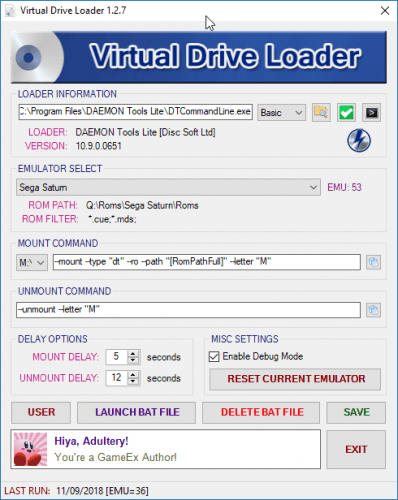
Simply put, it's a plugin for virtual drive loaders. It currently supports Daemon Tools, Alcohol, and Virtual Clone Drive natively. The plugin also supports GameEx's Roms In 7-zip and Roms In Subfolders options, making it your only native choice for these features if you use them. Some other features for the plugin include: Emulator Specific Setup Select the emulator you wish to use the loader on from the drop down menu Set up your mount and unmount commands If you don't have this set up the fields will populate based on found mounting software Headless Mode Add switches to the GameEx emulator command-line to bypass the emulator configuration Using [DTLOADER] or [DTOOLS] in the emulator's CL will mount using the default drive Using [DTLOADER-SCSI] or [DTOOLS-SCSI] in the emulator's CL will mount using the default SCSI drive Using [DTLOADER-IDE] or [DTOOLS-IDE] in the emulator's CL will mount using the default IDE drive Using [ALCOHOL] in the emulator's CL will mount using the default Alcohol drive (both 52% and 120% are supported) Using [CLONEDRIVE] in the emulator's CL will mount using the default Virtual Clone Drive drive Using [MAGICISO] or [MAGICDISC] in the emulator's CL will mount using the default MagicISO/MagicDisc drive NOTE: If you installed these programs using the default options, no setup is needed for Headless Mode to work Any questions or comments? Feel free to ask 'em. I also like feature requests and very much appreciate bug reports (these are especially helpful if you also attach a copy of your log file in the GAMEEX>PLUGINS>DT LOADER folder). Leave your comments or get the full changelog at the release thread located here. -
Version 1.0.1
80 downloads
Here's the usual plugin for development purposes. Basically like it's GameEx cousin, it logs the PinballX variables as they pass through the GameEx events. It's my ground floor entry into the plugin system for PinballX... I had to make a bunch of adjustments to the included template anyways, and I whipped this up in about an hour. Learnin' the in's and out's as it were. Try it if you were going to take a crack at some programming for this beast! -
Did you try my Virtual Drive Loader plugin? I keep all my ISOs in 7zips and mount them with the plugin. Super easy to use. http://www.gameex.info/forums/topic/12415-plugin-virtual-drive-loader/ You don't have to use launch before and after command in most cases.
-
Function Logger (PinballX Edition) - Version 1.0.1 Here's the usual plugin for development purposes. Basically like it's GameEx cousin, it logs the PinballX variables as they pass through the GameEx events. It's my ground floor entry into the plugin system for PinballX... I had to make a bunch of adjustments to the included template anyways, and I whipped this up in about an hour. Just extract the attached rar file to your PinballX installation folder and enable it in the plugins menu, you'll be good to go. Download it here: http://www.gameex.info/forums/files/file/14-function-logger-pinballx-edition/