



|



Adultery
-
Posts
10152 -
Joined
-
Last visited
-
Days Won
159
Content Type
Profiles
Forums
Events
Downloads
Store
Articles
Everything posted by Adultery
-
I really think you'll find these images in the mp3's folder if they're not in the GameEx album art folder.
-
Bwahahaha! Thanks for the share.
-
New plugin released! Check out QuickLaunch - Your all in one solution to launching multiple programs at once! More info here: http://www.gameex.info/forums/files/file/39-quicklaunch/
-
Well, you don't have to wait anymore Krak. http://www.gameex.info/forums/files/file/39-quicklaunch/
-
QuickLaunch GameEx Edition: 1.1.9 PinballX Edition: 1.0.2 Add applications to launch before, after, and with your games using this simple plugin! Specify variables to build your command lines on the fly! Launch as many programs as you want (as long as you give each one a unique name)! It's like GameEx's Launch Commands on steroids! SETUP Select the emulator you wish to add your applications/BAT files to from the drop down menu Click [ADD] to add a new application Click [EDIT] to edit the currently selected application Click [REMOVE] to delete the currently selected application ADD NEW APPS QUICKLY Enter a unique name for the process (If you don't, your previous app info will be overwritten!) Click the [...] button and browse to your EXE or BAT file Enter your command line arguments Select the launch type (Launch Before, Launch After and Also Launch fully supported!) Save it and play! SUPPORTED COMMAND LINE VARIABLES FOR GAMEEX SUPPORTED COMMAND LINE VARIABLES FOR PINBALLX Any questions or comments? Feel free to ask 'em. I also like feature requests and very much appreciate bug reports. Thanks again for using it! [GAMEEX VERSION] DOWNLOAD LINK: Get it from the Community Download Portal, or use the DracLabs Plugin Downloader. [PINBALLX VERSION] DOWNLOAD LINK: Get it from the Community Download Portal.
-
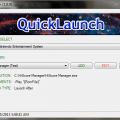
Version 1.1.9
485 downloads
Add applications to launch before, after, and with your games using this simple plugin! Specify variables to build your command lines on the fly! Launch as many programs as you want (as long as you give each one a unique name)! It's like GameEx's Launch Commands on steroids! SETUP Select the emulator you wish to add your applications/BAT files to from the drop down menu Click [ADD] to add a new application Click [EDIT] to edit the currently selected application Click [REMOVE] to delete the currently selected application ADD NEW APPS QUICKLY Enter a unique name for the process (If you don't, your previous app info will be overwritten!) Click the [...] button and browse to your EXE or BAT file Enter your command line arguments Select the launch type (Launch Before, Launch After and Also Launch fully supported!) Save it and play! SUPPORTED COMMAND LINE VARIABLES Any questions or comments? Feel free to ask 'em. I also like feature requests and very much appreciate bug reports. Thanks again for using it! -
It'll be worth the wait, don't worry. Already have most of the backend done... just need to hit the cosmetics hard. End of the week maybe.
-
That's not my theme. Its Draco's. This may be a GameEx issue as opposed to a rss issue... Can anyone else duplicate? What happens if you don't use rss or use another feed?
-
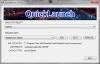
Nice try! Flattery will get you everywhere! I was thinking something like this perhaps...
-
I'm working on something new. I can't maintain Ben's code like I can my own. I am going to approach this a little differently and see if I can't come up with a better solution to this plugin (maybe not better per se, but in a way I can more easily manage/maintain the code). Nothing on Ben, but his stuff is just too fierce for an amateur like me (see way out of my league).
-
Could you post up the log file and the ini for me to use in testing?
-
I have the source for this, so I might still be able to fix this. I'll need to do some debugging to see what is going wrong where. Hold on.
-
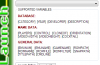
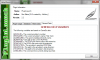
So as I look at the code, I right away take notice of the following: [ROM] isn't even a supported variable. You need to use [ROMNAME] if you're attempting to sub in the rom's file name without the extension. I put this version together, not Tom. So, in a nutshell, Tom and I don't do everything exactly the same. Next time, make sure you RTFM! Lol! In case you were unaware, there is also a HELP button on the form that shows a description of each supported variable as well:
-
I think it may be an issue with quotes. I'll look into it.
-

[PLUGIN DEVELOPMENT] Visual Basic 2010 Project Template
Adultery replied to Adultery's topic in User Projects
Updated to 1.0.1 LINK -
Version 1.0.1
32 downloads
Every good plugin starts with a good template! Simply drop this zip file into your Visual Studio's VB templates folder and get started developing! Included in the template are: GameEx Plugin Class All of GameEx's functions that pass through the plugin system are included and internally documented Includes updated Menu Change numbers! Logger Utility A full logging utility, based on a modified class by our very own Hedakaze Includes standard and debug logging Make sure you import the DracLabs namespace to use this! INI Utility A full INI reading/writing utility, based on a modified version of Ludvik Jerabek - LINK Make sure you import the DracLabs namespace to use this! A sample configuration form Just a very basic form so you can get an idea of how the plugin behaves I made this template in VS 2012 Ultimate, and the needed System.Management is imported already (which is needed for the log file's diagnostic mode). If you have questions or need advice, PM me on it. Enjoy! -
I put this together as I was in the planning phase of a new Xpadder plugin for PinballX. If you want to get into making a plugin for Tom's interface, here's the only start-up tool you'll ever need! All you need to do is drop the zip file in the Visual Studio Templates>Visual Basic directory. Included in the package are: Updated PinballX Plugin class Includes the new keypress function!Logger Utility Based on a modified version by our very own Headkaze! Built in support for debug loggingINI Utility A comprehensive INI reading and writing utilityA sample configuration formThe template was created in VS 2012 Ultimate. If you have questions or need advice, don't hesitate to ask! Download the template from here.
-
Version 1.0.0
64 downloads
Every good plugin starts with a good template! Simply drop this zip file into your Visual Studio's VB templates folder and get started developing! Included in the template are: PinballX Plugin Class All of PinballX's functions that pass through the plugin system are included and internally documented Includes the new keypress event! Logger Utility A full logging utility, based on a modified class by our very own Hedakaze Includes standard and debug logging Make sure you import the DracLabs namespace to use this! INI Utility A full INI reading/writing utility, based on a modified version of Ludvik Jerabek - LINK Make sure you import the DracLabs namespace to use this! A sample configuration form Just a very basic form so you can get an idea of how the plugin behaves I made this template in VS 2012 Ultimate, and the needed System.Management is imported already (which is needed for the log file's diagnostic mode). If you have questions or need advice, PM me on it. Enjoy! -
It's using the known word out of the two for verification, and taking what it knows already and looking for a close match. In other words it doesn't know all the time but it makes an educated guess. Check the learn more link.
-
Extremely cool! I'll be less annoyed when I see them now... Ingenuity at its finest.
-
There is an Xpadder plugin for this in the works for those of you who prefer it. Sorry to sidebar.
-
Also tested and working on my 32-bit Windows 7 VM, for the record. I also performed a clean install prior to testing. It doesn't seem to work on my Ubuntu though.
-
That's great news! Thanks for your help in addressing this, your patience while I fix it, and your support for using it.
-
Harsh posting, and nice username. Let's try and be civil please... Acting entitled to something being fixed that's free is bulls*it in it's own right. If it's an issue, Tom will look at it. Not because you deserve it or demand it, but because he's a stand up dude.
-
Again, your log and INI would be helpful. Please read this: When reporting a possible GameEx bug or error, please ensure you submit a copy of your log.txt and gameex.ini file so we may quickly assist you. Please refer to this link for additional information.



