|



joyrider3774
-
Posts
811 -
Joined
-
Last visited
-
Days Won
63
Content Type
Profiles
Forums
Events
Downloads
Store
Articles
Everything posted by joyrider3774
-
you got all the info you need it's not a frontend problem. just create a batch file and kill using taskkill (with force parameter) any app that remained open and problem is solved i'm actually doing the same thing for some to the tables you mentioned. I did not bother to look into it further if it just works with a launch after batch file but my guess it might be something in vpx script file of those specific tables These i use taskkill /IM UltraVPServer.exe /T /F powershell -Command "Start-Process 'taskkill' '/IM UltraVPServer.exe /T /F' -WindowStyle hidden -Verb runAs" powershell -Command "Start-Process 'taskkill' '/IM UltraDMD.exe /T /F' -WindowStyle hidden -Verb runAs" the reason i use powershell is because i can let taskkill run with elevated rights then as i was not sure if it needs it but i first try without it I'm not sure i still need to test the pfx2 stuff if it works for @Outhere
-
use the force parameter like taskkill.exe /F /im notepad.exe https://docs.microsoft.com/en-us/windows-server/administration/windows-commands/taskkill without /F it probably sends a WM_CLOSE or similar (like pressing on the X button of the form) then it might execute some code when the program closes with /F its the same as killing a process using taskmanager nothing will get asked.
-
i had the same problem with Wizards of oz but i don't consider it a pinball x (frontend) problem and indeed i also added a launch after script to kill any leftover programs still running like dmdext or some parts of b2s server that fixes it with me as well and never had a problem doing this. i can test this weekend to see if i got the same problem with pinball fx 2 and xbox 360 ce, i did not use pinball fx2 because all the tables i own there are also in pinball fx3 (i don't own every table in pfx2) but i'm willing to test it and see if i got the same problem. @Outhere The inverse is also possible they don't function if you do not let them run as administrator but it's usually outdated programs (from xp) or the program doing things that requires elevated rights (or the scripts used in vp) But you are correct in saying that when you start with one running with elevated rights that all others possible need it as well. I've seen it with our programs at work as well and we had to do modifcations one of the things we came across were the WM_MESSAGES stuff but theres many more things sometimes you don't have a choise and must set run as administrator to make a(n older) program work. It was just an idea to see if it was related or if it might fix it. @PcTeknic your not the only one with the problem and it's an old problem see https://www.zebsboards.com/index.php/forum/digital-plunger-v2/288-pinball-fx2-x360ce-issue-in-pinballx maybe the links in that thread contain a solution i just did a simple google search so could be someone had found the cause or solution eventually
-
not sure if it's needed or being used but did you set run as administrator on the xbox360 ce binaries in pinballfx2 directory ? I'm not too familiar with xbox 360ce but i was under the impression one had to copy the files from xbox 360ce in the folder of the executable of the game. The only thing i'm doubting about is if xbox360ce binary is actually ran when you run the game my guess its only using the (wrapper) xinput dll it creates then but not sure. Anyway what i'm trying to say is if you got run as administor enabled on pinballx frontend you might need to do it on xbox 360ce as well or if you have it enable on some executable pinball x runs you might have to enable it on pinball x executeable. I know some things like sending WM Messages around between apps where one app is ran elevated and ther other not that they can't communicate with each other (not receive the WM_MESSAGES) due to difference in (elevated) rights. But i'm not certain it's applicable to xbox 360 ce in this case as dlls don't require elevated rights set, it takes as the binary that loads the module / dll has it set. Just an idea though something you could try ... like test if it makes a difference if you set pinballx to run as administrator / elevated or verify the xbox 360 ce programs if you got multiple one in each game folder. Another thing might perhaps be that the working directory is not correctly set when running pinball fx 2 and it can't find the dll's although usually they (windows) look for dll's in the directory of the executable as well
-

pls help , finishing stages of cabinet table huge problem
joyrider3774 replied to slickric's topic in General
if you use seperate systems for "visual pinball" and "visual pinball X" then you need to place your media also in the correct system directories Like "Media\Visual Pinball\..." for your vp9 tables (visual pinball system) and "Media\Visual Pinball X\...." for your vpx tables (visual pinball X) system. they might still exist in your original media folder. Each system has a seperate directory under media and if you created 2 systems one for visual pinball x and one for visual pinball (9) you need to place them in correct directory ... -
Malzbie's Pinball Collection - On my cabinet
joyrider3774 replied to joyrider3774's topic in User Projects
Ah ok, that explains where your initial fault came from and why dmdext was not working intially with you -
pls help , finishing stages of cabinet table huge problem
joyrider3774 replied to slickric's topic in General
I actually use a seperate list xml for visual pinball system and don't create a seperate system for vpx. That list xml only contains vpx tables and i use the alternateexe tag for all those tables to tell it to launch vpx instead of vp9. Seems to work fine and i can make a seperate group for vp9 and vpx tables. Its just an alternate way, my guess is also that vpx tables got added to the wrong game list in his configuration. -
Malzbie's Pinball Collection - On my cabinet
joyrider3774 replied to joyrider3774's topic in User Projects
@sauro nice one, yes indeed you need to add a launch after batch file or edit it to kill dmdext. Not sure i mentioned that in any of the previous posts, but i'm doing the same thing also using taskkill command. But watch out with spaces again it's /f /im .. not / f / im -
Malzbie's Pinball Collection - On my cabinet
joyrider3774 replied to joyrider3774's topic in User Projects
Make sure when using the tool from @GAH1068 that your screens if you need to rotate your playfield screen is rotated. Basically make sure its in same orientation as when you would play the game or it will give wrong positions otherwise because width & heigth are not switched on the playfield screen if you need to rotate your playfield screen. Its logical but just mentioning it to be sure you are aware. Also if you have your playfield already setup in portrait mode all the time in windows you don't need to do this but then you don't need irotate either -
Malzbie's Pinball Collection - On my cabinet
joyrider3774 replied to joyrider3774's topic in User Projects
Yes the commando should open dmdext. You can test the commando manually also in a cmd prompt without the start "" part and see if it gives errors. the script assumes dmdext.exe is located in same directory as the batch file in my case it was the scripts folder. If you have it installed somewhere else you need to adopt the command to start your dmdext in different directory or the commando won't do anything. You can also test by running the batch files manually... Also your copy pasted text contains spaces on places where it should not but it could come from copy pasting... For example this is wrong : "-virtual-position = 1080 1114 1366 414" (should be "-virtual-position=1080 1114 1366 414") or "--destination = virtual" is also wrong (should be "destination=virtual) and it's wrong on other places... it should not contain spaces verify my supplied line for the batch file and don't add spaces where i did not do it... but i'm not certain thats your problem just run manually from cmd prompt and see what it says. It just basic running of dmdext the start part is only used in the batch file to not make the batchfile wait for dmdext to end but go on with the next command immediatly And i'm not going todo the calculations for you it's just plain simple adding up dimensions. If you want someone todo the (simple) calculation for your give your complete setup so all monitor resultions (also say if they are portrait or not) + monitor order (like in exact order as windows see them) because if windows sees your dmd as 2nd monitor or 3rd monitor it affects calculations to position the dmd. But start by running dmdext manually and see that it actually runs. In your case it does not so you either messed up the commando or dmdext.exe is not located in same directory as the batch file or you did not change commando to reflect your install location of dmdext or you did not install it all -
Malzbie's Pinball Collection - On my cabinet
joyrider3774 replied to joyrider3774's topic in User Projects
take a screenshot of the game while it's running rotated as you would run it from pinballx. And verify if these are the position + dimension of the dmd inside the screenshot: --position = 382(X) 10(Y) 318(W) 130(H) Next you need to calculate your 3rd monitor position (like add up any previous screen size dimensions and remember playfield screen is rotated so need to switch width + height) -virtual-position = 1080(x) 1114(y) 1366(w) 414(h) <- those values need to change i placed between () what they mean. If you got 3 screens and your 3rd screen is the dmd monitor for example (this is hypotetical example): 1920x1080 <- playfield = screen 1 1920x1080 <- backglass = screen 2 1280x720 <- dmd = screen 3 You need to do the following for X Position : 1080 (from playfield but screen is rotated so 1080 and not 1920) + 1920 (from backglass) = left pos of your dmd monitor. You can not copy paste the values but need to the calcuations yourselve. Unless you are using pindmd instead of a monitor then you don't need to use a virtual destionation and position. Only you know your setup and monitor dimension widths / heights and which monitor is used for what -
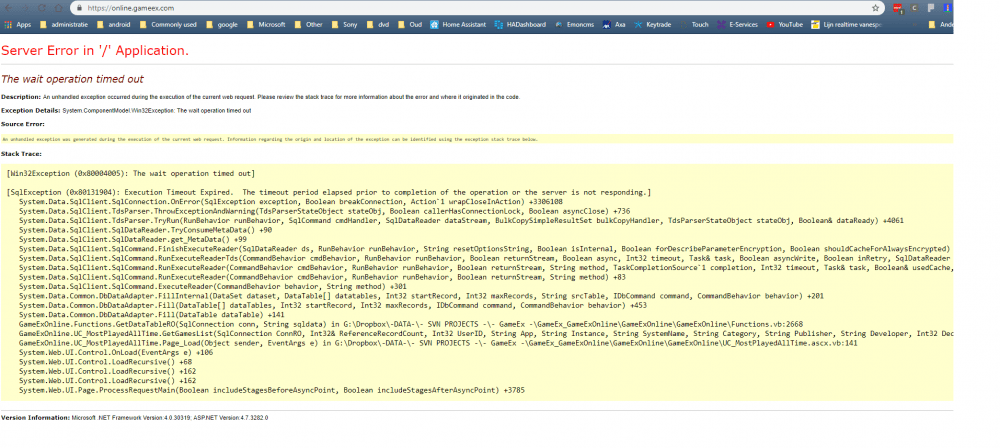
I had tried this from my main pc a few weeks ago and it showed me all my installed pinball tables. However i think its either down for upgrades / maintenance or is having problems accessing the SQL database .. https://online.gameex.com/
-
Malzbie's Pinball Collection - On my cabinet
joyrider3774 replied to joyrider3774's topic in User Projects
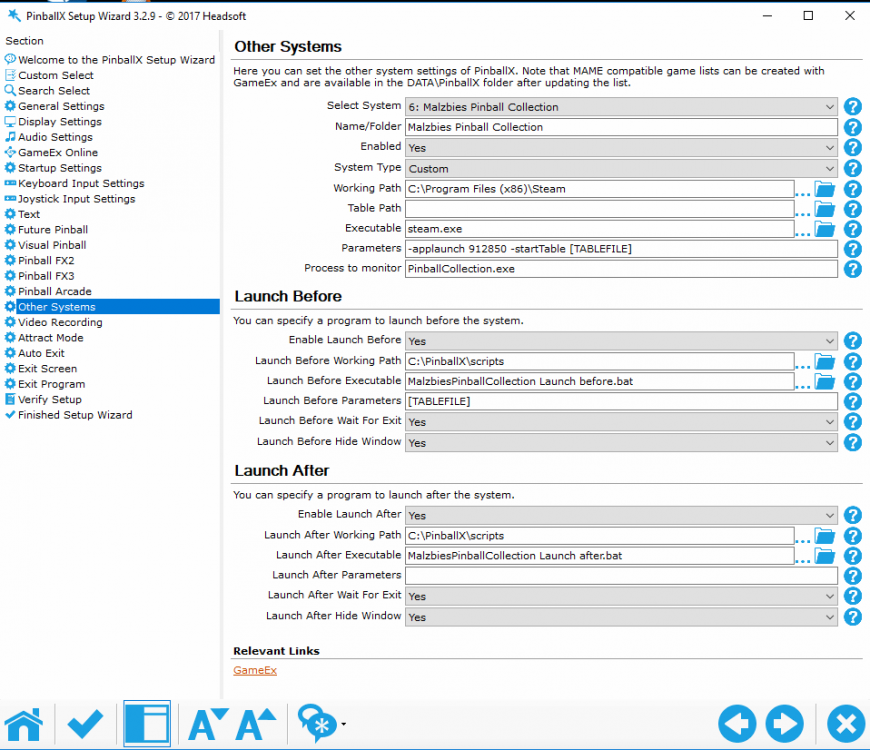
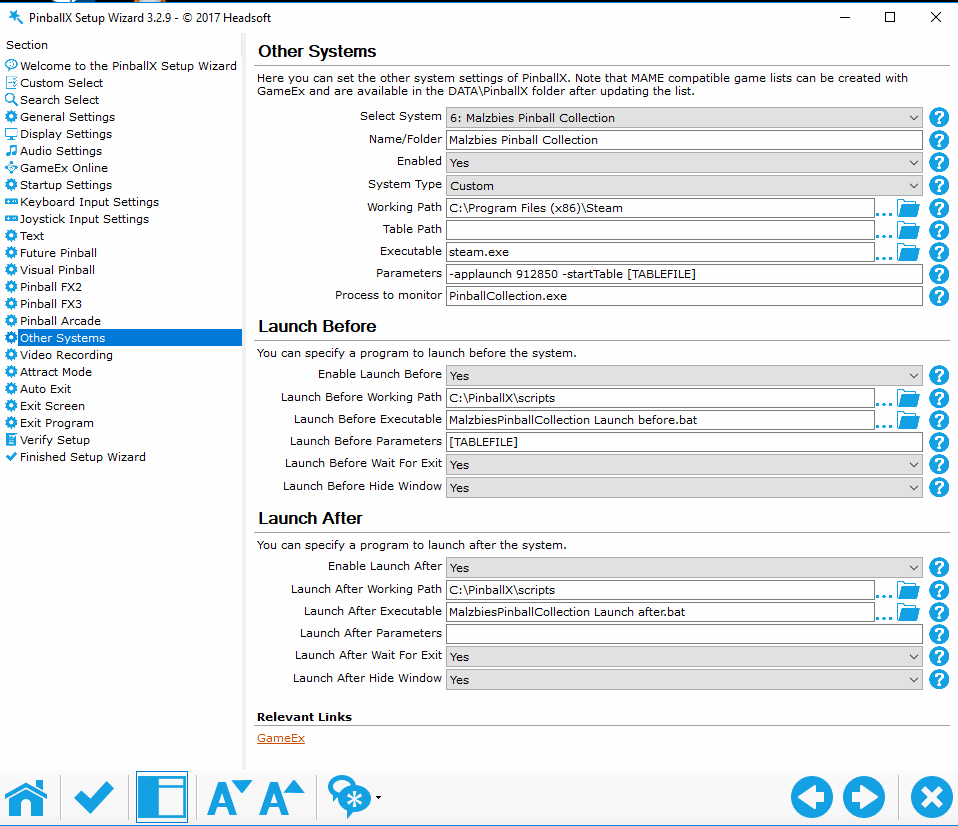
Just a small follow up in my screenshot the appid is wrong. The games appid is 729580 not 912850, 912850 is actually the appid for the dlc content of the playground table But it seems to work to launch the game as well. So it's a small detail but better use 729580 (if that works as have not tested on cabinet yet) but it should normally https://steamdb.info/app/729580/ https://steamdb.info/app/912850/ -
Good to hear its fixed and an old ahk version was the cause, couldn't wrap my around it initially as what was causing it. I must be using some new features not compatble with the version you had installed. I know what i was using whats probably causing the incompatibility with older ahk versions. I use A_Args array for detecting commandline parameters and that probably did not exist in previous versions. If arguments are empty (because in old ahk version it would detect it as a empty variable) it would just start single player
-
@Outhere could you compare against this auto hot key script: LaunchPinballWicked.ahk the version you downloaded ? you can use beyond compare or something similar online if it exists (or verify manually) it should be the same unless there's an old version floating around somewhere. Another thing that comes to mind is which version of autohotkey are you using ? is it fairly recent ? I compile using autohotkey version 1.1.30.01 (you can look up your version in control panel in the listing in the software section, where you'd normally uninstall a program) If it fails i'll try to create a few versions with the seconds you requested and you can see if it still works
-
@Outhere, thats kinda weird and you do not press any button when the game is launching not even on the 1st screen where it's says press A to continue ? As the script assumes you don't press any button not even to skip menu's faster until the table had launched. I had just tried it with me and seems to be working fine even if i recompile. Another thing you could check if you are not pressing any buttons until the table has started is to see the launchers ini still contains the needed parameters to specify multiplayer options. Like so. It could be they got lost but i wonder how it would happen then. [BUTTON_ONE] TEXT=1 Player (Pure) ENABLED=1 PARAM=1 [BUTTON_TWO] TEXT=2 Players (Pure) ENABLED=1 PARAM=2 [BUTTON_THREE] TEXT=3 Players (Pure) ENABLED=1 PARAM=3 [BUTTON_FOUR] TEXT=4 Players (Pure) ENABLED=1 PARAM=4 [BUTTON_FIVE] TEXT=1 Player (Action) ENABLED=1 PARAM=1 Action [BUTTON_SIX] TEXT=2 Players (Action) ENABLED=1 PARAM=2 Action [BUTTON_SEVEN] TEXT=3 Players (Action) ENABLED=1 PARAM=3 Action [BUTTON_EIGHT] TEXT=4 Players (Action) ENABLED=1 PARAM=4 Action
-
I think pinballx hides the taskbar when a game is started (can be done in code) and shows it again when the table has finished at least that seems to be whats happening if i observe behaviour on my end but i'm not 100% certain. So if that would be the case and you kill pinballx while it had locked up (during a game / table being played) the taskbar is and will stay hidden as you noticed. Edit: just tested it when playing a game and by killing pinballx so its probably hiding the taskbar and thats why you would not see it if pinballx might crash when a table / game is playing or you kill it using taskmanager as it could not run the code to show the taskbar again. So basically what i said above. Another trick would be to just start pinballx again and start a game and close it then the taskbar reappears (you can still bring up part of the startmenu by pressing windows button) so you can start pinballx if you got a shortcut or place a shortcut on your desktop (unless you want to keep it clean) I can understand why pinballx is doing that as it could popup when people are running windowed full screen games / visual pinball .. so i think it's intended to do that but just not that it locks up or you having to kill it Just an idea but does your version of malzbies pinball collection have an option to run the game windowed (fullscreen/borderless) instead of fullscreen ? if so you could give that a shot and see if it still gives you that problem of locking up
-
I'm sorry i was unaware of a physical release i could not find any information about that. You could also ask the author how you can update the physical release.. You could try contacting him on steam or using facebook https://www.facebook.com/malzbiegames latest steam version is Version 1.6.4.4 (12/29/2018)- The Game now remembers the last used camera position of each table. https://steamcommunity.com/app/729580/discussions/0/1697175413668515976/ So it does indeed seem you got some older version which does not have the command line parameters. the command line parameters got added in this version: Version 1.6.4.3 (12/27/2018)- Added a direct load of a table by using the command line argumet -startTable following by the table name I can send you my initial script which navigated the menu's but it's slower than command line and i'm not sure it would work with the physical release ... would save you from buying it again ? It was what i used in my initial video But i'll have to modify the parameters first so it can use the same tablenames as the one the author is using in the steam version and you would need to modify it a bit as well to reflect your installation path to launch pinballcollection.Exe as it currently tries to run the steam version
-
Which version of the game do you have then ? i'm not aware of any other version available then on steam. It could be the version you have does not have the required changes to run with commandline parameters as the author only added them in (on steam version) like a day or 2 ago? Or is the game available on some other platform ? it's not a pirated version is it because then your on your own i do not support that. All games dlc together is less than 5 euro so there's no excuse for pirating it if that was the case Could you try running from a cmd prompt while first cd'ing into your F:\games\malzbies pinball collection directory and then running without quotes to see if it runs the starts the time to fight back table ? so something like run cmd when doing window key +r then typing each line below and pressing enter after each line and check if F:\games\malzbies pinball collection is still the correct one f: cd F:\games\malzbies pinball collection PinballCollection.exe -startTable ttfb If not it could be your game is not updated to have the commandline parameters. I still have my original AHK script to select tables using the menu's so you could use that if you want to but it needs modifcations as i did not use the same parameters as the author used (but i can modify) and i first want to make sure your not running a pirated version before i would supply that script Also if the loading screen / blackscreen stays it could mean a number of things Your launch before scripts hang meaning you did not use start parameter in batch files to run certain things or if your using irotate it does not quit and you had set wait before launch before script executed but thats needed anyway because you need to make sure your playfield screen is rotated before you start the game (so that's the reason why i don't use start parameter on irotate and let it exit immediatly using /exit after it has rotated the screen). or you use another programs in launch before script which do not quit and pinballx is waiting for them to quit before going further It could also mean the game crashes or is hanging (see if pinballcollection.exe is running or not in windows taskmanager) or you supplied wrong parameters or you did use steam version but are trying to run exe directly (which normally should work as i think it would start steam anyway then due to included. I just tested it myselve from cmd prompt it seems it does not start the steam client with me so it's indeed possible to launch using exe directly. if you did buy steam version but run exe directly did the cmd command work ? if not its either your launch before script, the game hanging or something else also did you add "-starttable [TABLEFILE]" without parameters to your parametes sections of the exe and did you make sure to update the game recently through steam (for example if you run your cab offline)? or show me your pinballx settings / ini file again so i can check the setup myselve
-
Malzbie's Pinball Collection - On my cabinet
joyrider3774 replied to joyrider3774's topic in User Projects
I have uploaded & overwritten my old backglasses (which were bad quality) on the ftp with the backglasses the author provided. Also about the camera saving. It won't save your camera position if you do it using the commandline options well actually through pinballx it may still do it if you use the games quit menu instead of pinballx ways to quit the game. You need to set your windows in portrait mode then launch the game and start each table manually, change the camera (c key) depending on the table (sometimes you need to press it once, sometimes twice to get best view for cabinet). Exit table start new one and repeat until you did all camera positions. Then cleanly exit the game using the menu's and your camera postion is saved. When you start from pinballx it will immediatly go to that view you had setup during normal play. I also tested my joystick problem unfortunatly it's not fixed but you can go around it and it does not affect anything during gameplay (when launched from pinballx) only when setting up things and you might not even encounter the problem. @GAH1068 did you have the same problem in the menu's when launching the game normally on your cabinet ? You especially notice it in the options menu but also on the main menu. Normally all menu buttons (play / options etc) should be the same width / size when the game is first launched and you don't press / touch anything. If they are not something is constantly activating the menu and i can't use my mouse nor my keyboard correctly in that case. You also notice it when going to the options menu it seems settings are changing randomly when moving the mouse then Also this is the dmdext command i use with a virtual dmd placed on my backglass screen. My playfield screen is 1600x900 my backglass screen 1024x768 but because playfield screen is rotated dimensions become 900x1600 (it's important todo the calculations). On 900x1600 the dmd position is in my case (without borders) at 323,14 and is 253 pixels wide and 103 pixels in height. I show it on my backglass monitor scaled to a width of 630x175 (yes i know i don't maintain aspect ratio) so 1024 (from backglass monitor) - 630 = 394. so that's the space left the dmd does not use on the backglass monitor then to do the center calculation you do 394 / 2 = 197 and 900 (from rotated playfield screen) + 197 = 1097 to make the dmd appear center in the backglass monitor. The height you can choose just make sure it says within backglass height if you add up y position of dmd + scaled dmd height (in my case i took 584 -> 768 (my backglass monitor height) - 175 (scaled dmd height) = 593 - 9 pixels (to have a space between lower border of backglass screen) = 584. To find out dmd position ingame take a screenshot using steam (f12) key while you play using the same settings as when running from pinballx (so rotated screen etc). then zoom in & using mouse find out position & width and height of dmd in some image editing program (gimp which is free for example) I also increase default virtual dmd dot size (being 0.8) to 1.1 to make it be better visible on my backglass (bigger dots) and i set it to stay on top because my image monitor view tool is also on top (so make sure to run dmdext after running the image monitor view tool if you display both on same monitor) start "" /min dmdext.exe mirror --source=screen --position=323 14 253 103 --destination=virtual --virtual-stay-on-top --virtual-hide-grip --virtual-position=1097 584 630 175 --virtual-dotsize=1.1 Final video of my setup and yes i finally speak in a video (which i don't like doing) -
Malzbie's Pinball Collection - On my cabinet
joyrider3774 replied to joyrider3774's topic in User Projects
Hey guys, more great news, the author was kind enough to release a high resolution blackglass media pack. https://steamcommunity.com/app/729580/discussions/0/1744480967013716715/ Also the update where the camera positions are remembered should be live, as well as an attempt to fix the joystick problem i had but i have yet to test it, currently at the pub -
Hey carny_priest, I don't think i'll be able to run this in my cabinet as i don't have enough buttons its also something i don't think i'd play much so i have not tried and it's still around 9.99€ with the 50% reduction so i think i'll pass for now
-
[RESOLVED via WORKAROUND] Pinball FX3 Randomly exiting fullscreen
joyrider3774 replied to joyrider3774's topic in General
Instead of fighting to stay fullscreen i choose to be running borderless windowed now and that works great now don't have a problem anymore. The only downside is i run at a lower resolution now (1600x900) because my windows playfield screen is set at lower resolution but i'm fine with that still looks good and everything playable so i tested around 10-15 table launches including my launcher (where i did had to change the forceforegroundwindow option to bring my launcher once to the foreground at startup otherwise it would sometimes not receive input). So i'm fine with this it's no solution for the problem but a workaround it works fine for my cabinet -
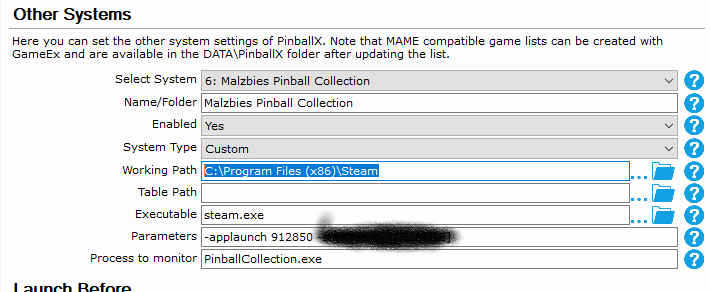
@simbamame the xml is the game database so you put it in the databases folder in a folder you defined when setting up your system (see 2nd entry in your screenshot). However you will not need my xml if you want to run the main game only and select tables manually (ingame instead through pinballx) What you need to do is keep your settings, but i would run it through steam using same parameters i used. It's possible it will run using the exe as well. What you need to do next is add a bogus game table through game manager and call it "Launch Malzbies pinball collection" with a made up gamename. Then it will just start the game if you choose that (bogus) table. You might wanna add a groups xml as well so you can select it from the lists menu like this one "Malzbies Pinball Collection.xml" place it in databases / Groups and just create one bogus game for it using game manager. You will however have problems with the game if your playfield is not running in portrait mode and you might have problems with menu's if you encounter the joystick problem i have and had described in the other topic. On a side note the author is going to release a backglass media pack to get higher resolution screens of the backglass and he's also going to release (normally today) a new version of the game where it should remember the last used camera per table plus the joystick bug might be fixed but will need to be tested first. He added a deadzone for the joysticks before reacting to it. If the problem was a no deadzone setting it should be fixed if the problem was the zaxis of the plunger it will probably not be fixed and you might have problems navigating the menu's Basically the only thing you were missing was a bogus table / game to launch it
-
Malzbie's Pinball Collection - On my cabinet
joyrider3774 replied to joyrider3774's topic in User Projects
Ok i just tested using commandline parameters and its working without a problem and since we skip menu's i don't have the joystick problem either so i don't have to disable it before launch i only have to disable the joystick hid devices if i want to change the game options. If you notice the game menu's acting weird i would start by disabling your joystick hid input device in windows device manager and start the game set everything up (like your keys / graphic settings etc). and once done enable it again and only launch using pinballx with commandline parameters then you don't have the problem. You'll quickly notice it if the menu is acting weird. The author is going to try and fix it but if you want to play already it's not needed to disable the joystick device then and it has no impact during game play. if you are using a joystick encoder instead of keyboard encoder you might have problems getting your buttons setup if you have the problem but once you manage to set it up it wont interfere during game play when launched from pinballx So first things first you'll still need irotate / powershell or some other commandline tool to rotate your screen before launching the game in a launch before script and rotate to orginal position in a launch after script (where you wait till the rotations is done) given your playfield is in landscape mode for portrait mode you actually don't have to do all this. That's all thats needed but you can expand if you want backglass shown during game play or even dmd mirrored using dmdext. https://www.entechtaiwan.com/util/irotate.shtm These are the settings i have in pinballx (edit: the games appid is 729580 not 912850, 912850 is actually the appid for the dlc content of the playground table But it seems to work to launch the game as well.) this is the game database : Malzbies Pinball Collection.xml in the launch before and launch after script you need to call irotate to make windows sit in portrait mode before starting the game thats why i wait for the launch before & after script to finish. launch before to rotate screen 1 90°: powershell -Command "Start-Process 'irotate.exe' '/1:rotate=90 /exit' -Verb runAs -WorkingDirectory 'C:\Program Files (x86)\iRotate\'" Launch after to rotate screen 1 back to original: powershell -Command "Start-Process 'irotate.exe' '/1:rotate=0 /exit' -Verb runAs -WorkingDirectory 'C:\Program Files (x86)\iRotate\'" the only reason i'm using powershell to start it is because of the "-Verb RunAs" option wich will run irotate with elevated rights (i also have uac prompts disabled in windows settings) as irotate requires elevated rights If you want to show a backglass during play you can use my Image_Monitor_View.zip tool. it accepts 2 parameters the first one the 0 based monitor index (so monitor 1 = 0 , 2 = 1 etc) to where the backglass should be displayed and the 2nd parameter the full path to a jpg, gif, png or bmp filename . Do note this is only needed if your playfield screen is setup in landscape mode and because of irotate clearing the backglass screen of pinballx. if you already run in portrait mode you can set hide backglass to false and let pinballx show the backglass it will not clear the screen to black then and works just as good. I only have to use this tool because i rotate the screen & the backglass from pinballx becomes black then (which is all normal as it should not play video's / draw anything while a game is playing to not waste cpu power on things you normally don't see) As you notice i pass the [TABLEFILE] parameter also to the batch file i do this so it can display the correct backglass per table. I do this like so: start Image_Monitor_View.exe 1 "C:\PinballX\Media\Malzbies Pinball Collection\Backglass Images\%1.png" Monitor 1 (is the 2nd monitor (remember 0 based) which is my backglass monitor) and the %1 part is what will be replaced with the tablename parameter i let pinballx pass to the batch file. and in the launch after you need to kill the app: taskkill /IM Image_Monitor_View.exe And that's basically it. although you could still use dmdext to mirror the dmd on the backglass or dmd monitor The wheels / backglass (which are very low quality as they have been taken from ingame screenshots of the ingame backglass) and table video's are uploaded to the ftp under "/-PinballX-/Other Uploads/Joyrider3774/Malzbies Pinball Collection/" here you can see the files (but not download) http://ftpbrowse.gameex.com/-PinballX-/Other Uploads/Joyrider3774/Malzbies Pinball Collection/ i also uploaded the gimp xcf file for the wheel images i created just in case anyone want to reuse the images but with different logo's or so For the moment the games does not remember camera postion on the tables so you would need to have a button mapped on your cab to change the camera or use a real keyboard until it has been implemented