|



joyrider3774
-
Posts
811 -
Joined
-
Last visited
-
Days Won
63
Content Type
Profiles
Forums
Events
Downloads
Store
Articles
Everything posted by joyrider3774
-
 Thanks for this, There used to be more game modes listed, i think all were accessible at least at the time i tried them out it and i could run all challenges but there was a typo in 2 game modes and they asked me not to disclose those 2 until they fixed it in a patch. I see they fixed the typo's now but I just tested it out and it seems they block the other game modes now so probably they are still working on it and don't allow running those until finished. Also "Pro" does not seem to work it always starts classic but Practice does work. You can see in what game mode your if you pause the game, it will list it at the top then. I'm sure the other game modes will arrive in a patch sometime soon, if takes them a while i'll ask someone from zen i talked with earlier related to these game modes (who asked me also to wait until disclosing the other names because of typo's).
 -
- added Verne's Mysterious Island - added A Samurai's Vengeance - added Whirlwind pinball also uploaded to ftp
-
- added Verne's Mysterious Island - added A Samurai's Vengeance - added Whirlwind pinball Also uploaded to FTP
-
Yeah i was not sure about the names as well, but i think game manager searches on table name so i think i had to use the numbers for it to find them. I don't know why zen went with the numeric way, but i figured if they 100% match it would be fine About the database, in the database i had i had also added "release year" and i used the date of availability listed here https://pinballfx.fandom.com/wiki/Pinball_FX_Wiki so not pinball FX release year, but year it first appeared in any pinball FX games, but for the williams tables i took release year of original table. I will see if i can somehow add them to your database as well and then it will be easier to add them when new tables release, as the years are kinda needed if you want to generate the topper videos (i use), using your other program
-
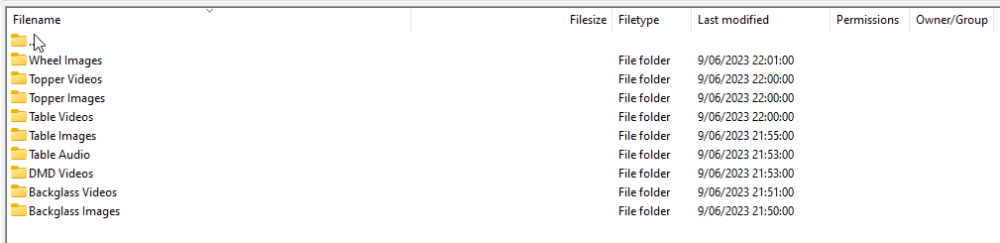
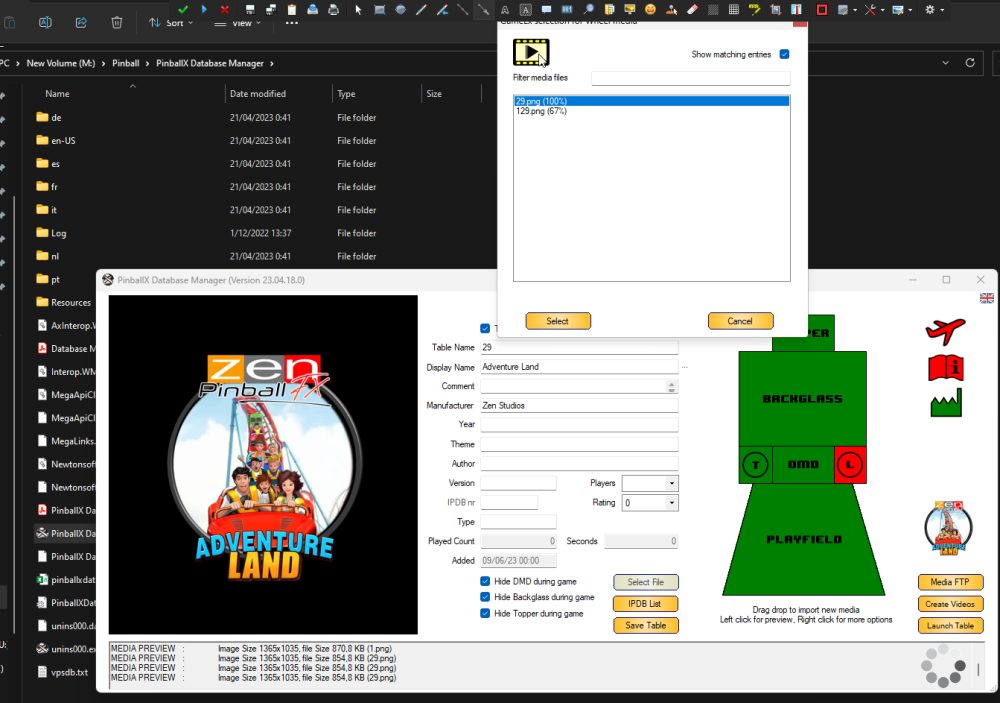
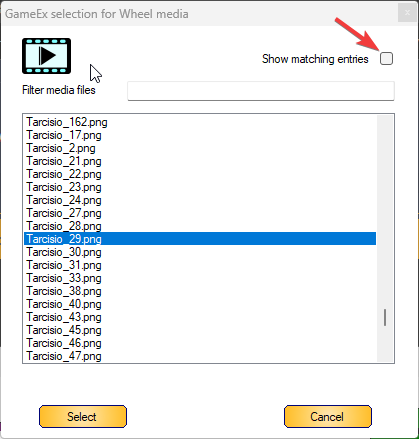
I just uploaded my renamed media to the ftp to the "official location" this means you can use both game manager and mike's database manager to download the data from FTP and they will 100% match because i used the numeric game names. So it will be very easy to download the media. see '/-PinballX-/Media/Pinball FX' directory on ftp I uploaded: for wheels i uploaded Tarcisio, logo and docklet wheels, but took the docklet wheel as 100% match However it seems the names i took for the tarcisio and logo wheels do not show by default in mikes database manager but you can untick this option to see them : Game manager should be able to download these also but i did not test it. Table Audio is incomplete, i have not tried extracting table audio from pinball FX i know there is a way some people did it already with beta versions, but the game's data files are aes encrypted so we need the decrypt key. Also i did not do anything yet for the 3 newly released tables so their media is currently missing also
-
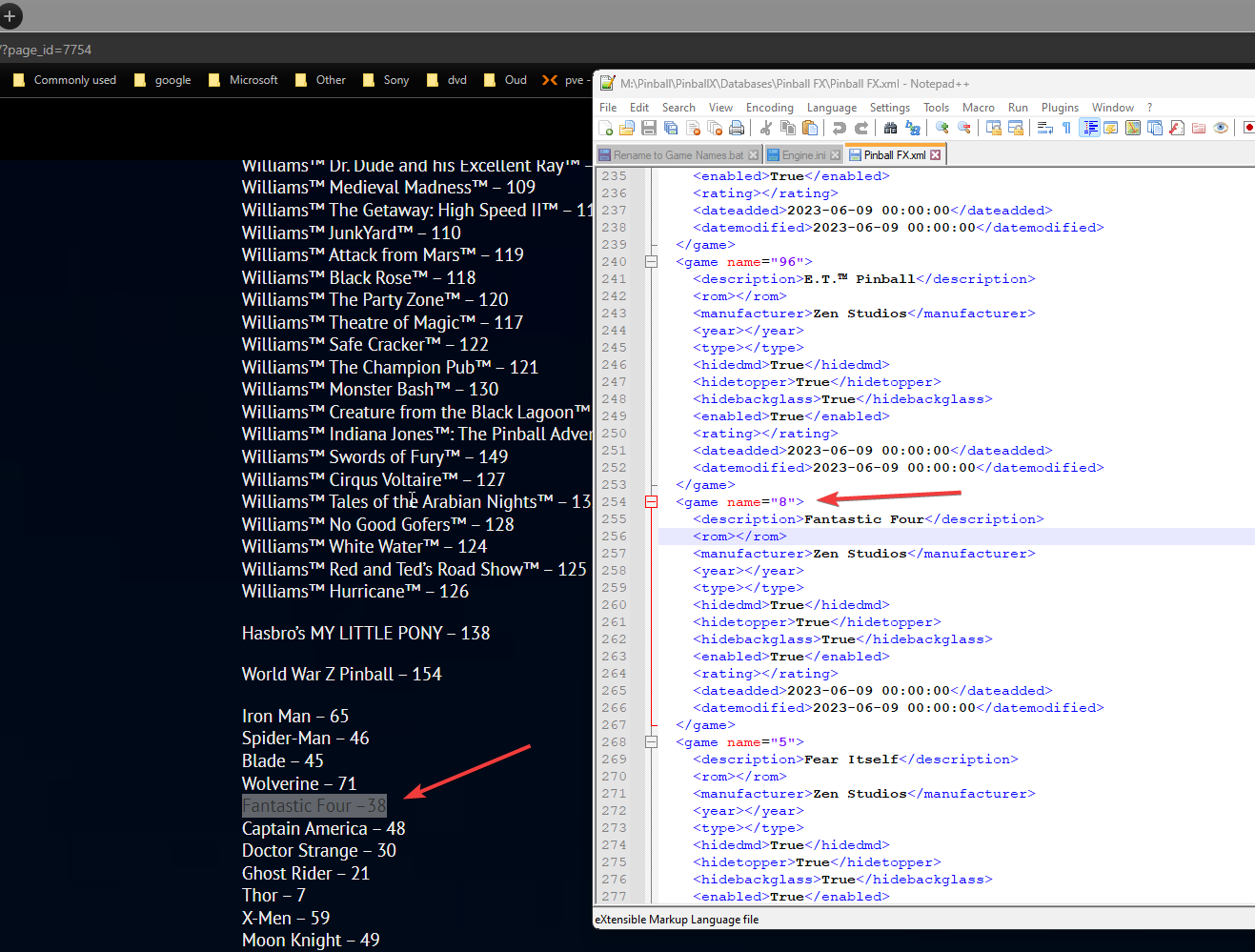
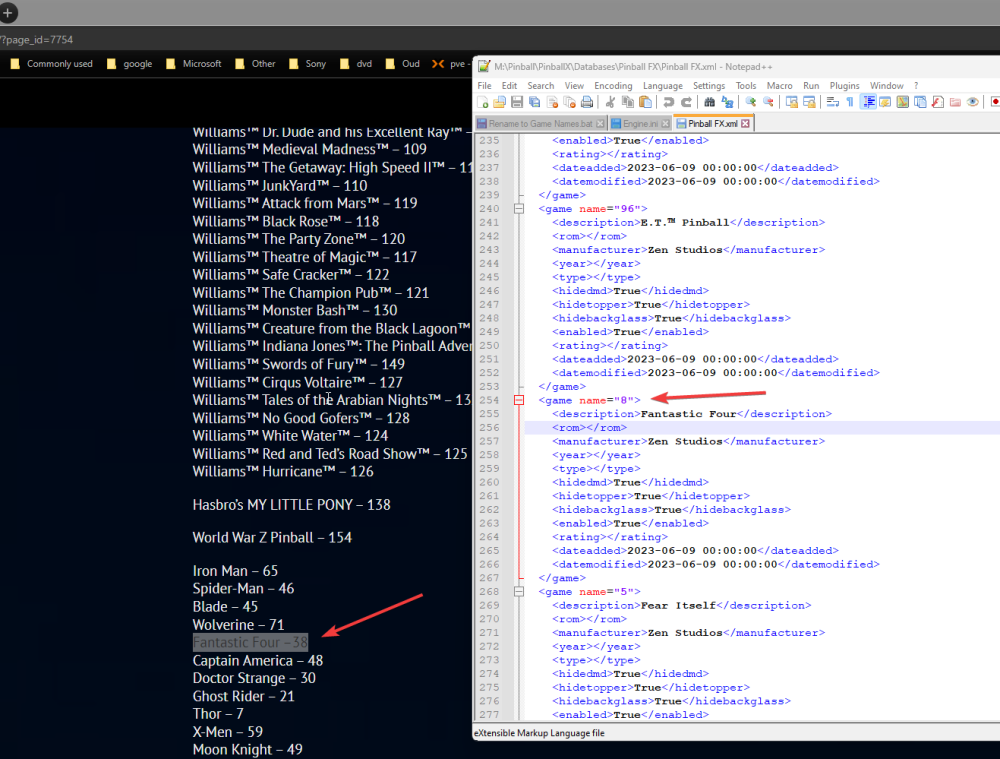
@Mike_da_Spike small typo in your database, fantastic four is 38 not 8
-
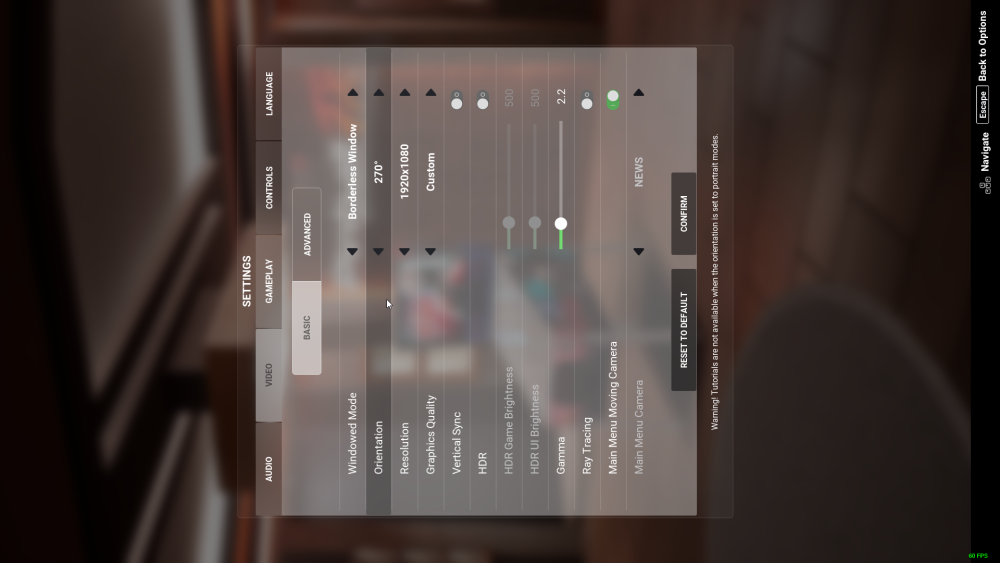
hey @Mike_da_Spike i have not updated or created anything new. Just wondering, i can easily rename my media that is in my github to the numbered names, should i upload those to a "Pinball FX" directory in the official place on ftp ? Btw you don't need an external program to rotate playfield anymore, you can do it in the ingame settings
-
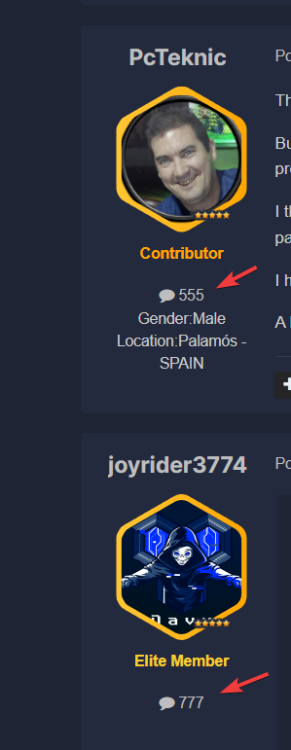
just offtopic and i broke it now but what were chances of this ever happening lol (that nr is total nr of posts posted) pcteknic had exactly 555 and i had exactly 777 and we even posted in same topic right after each other reaching these numbers
-
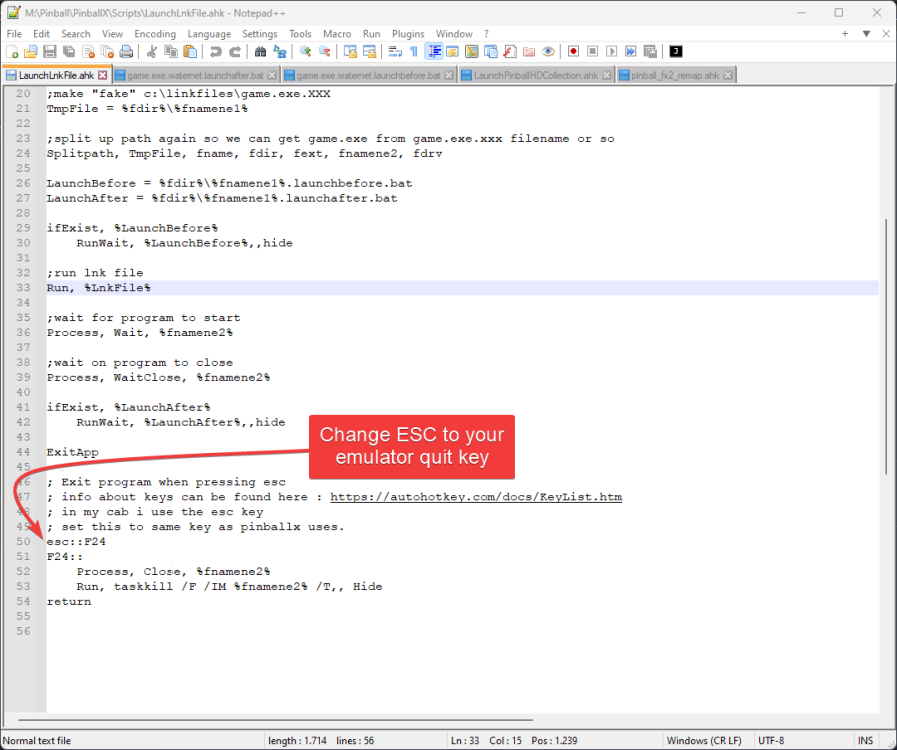
ok it seems there is still as in issue that pinballx closes the script, making pinballx return immediatly even though the launchafter batch file may still be running. but i have no idea how i can fix this. If games and exe's close rapidly and the launch after batch file does not take much time it will be fine, but if it the game takes a while to quit and the launch after script also takes a while it's in theory possible that pinballx has already killed the script before it can launch the launch after script or that it will return to pinballx before launch after script has finished. I have no idea how to fix this because pinballx seems to kill an application. If this is an issue for anyone and you have a spare button on your cabinet, set a different quit key in the script for quiting the games than the quit emulator key that pinballx uses and always use that key to quit the application, everything will run normally then as i don't think i can fix this issue (i tried on a few ways but if pinballx kills the process there is no way around it). Unless there is somehow a way in autohotkey to prevent the key being pressing being seen in pinballx (and the script just closes) but i can not find such option Edit: solution found by remapping the emulator quit key to F24 (which most keyboards won't have) and then making F24 quit the game / application. This way pinballx will never seen the emulator quit key being pressed, but the script will see it (as F24) and quit the Exe then pinballx will see the script is no longer running and return to the game selection (after the launch after script had run no matter how long it takes to run) I updated the script in 1st post with the changes and made new screenshots. It's absolutely vital that you set this key inside the script to your emulator quit key or the script won't work
-
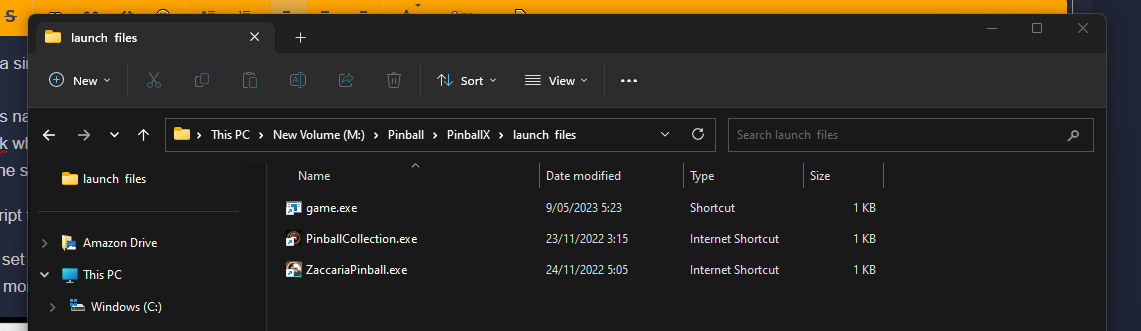
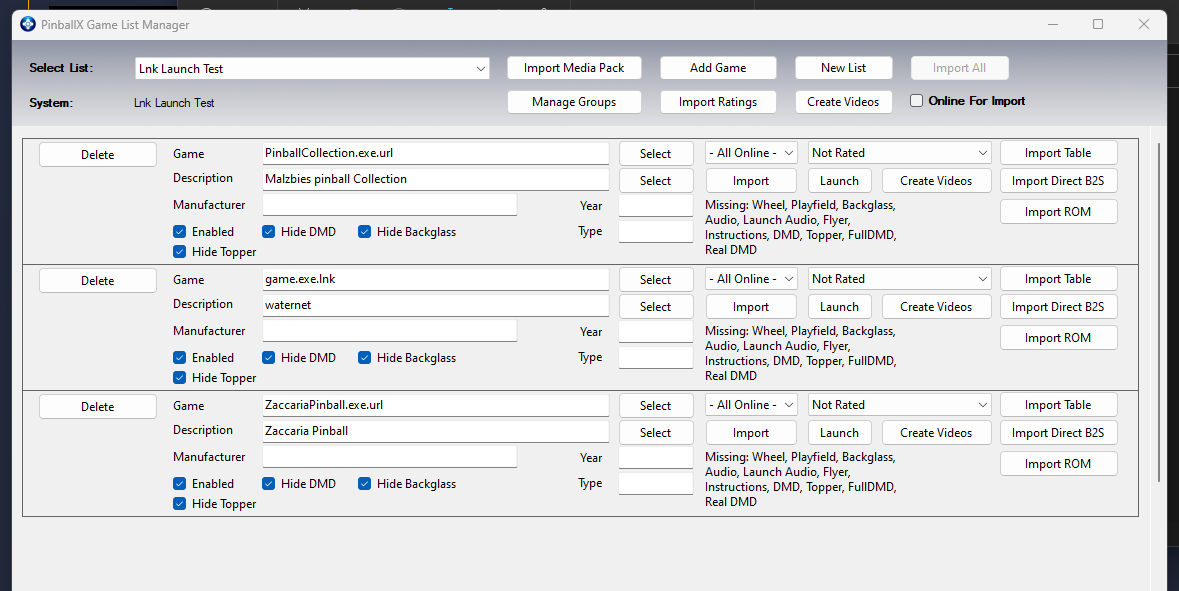
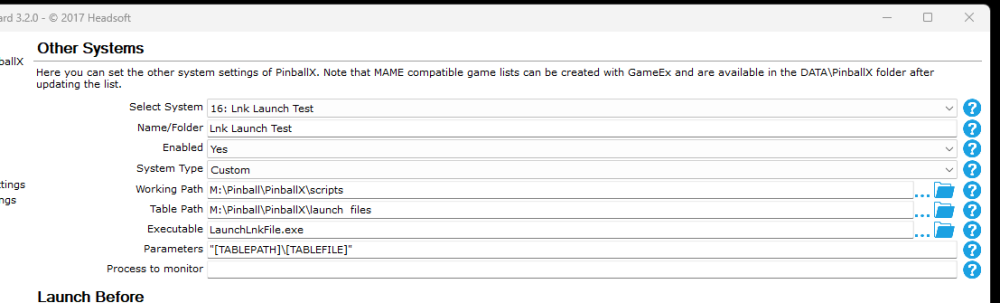
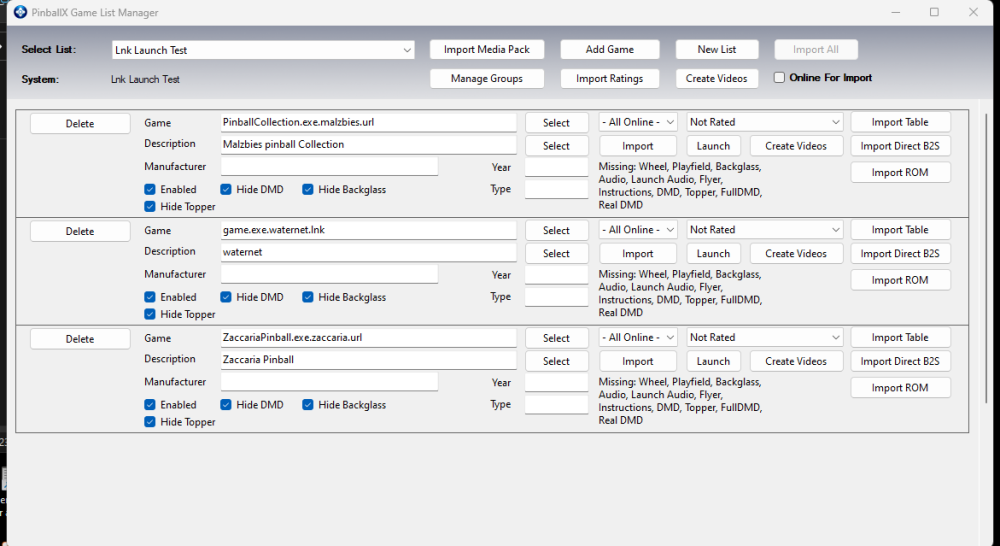
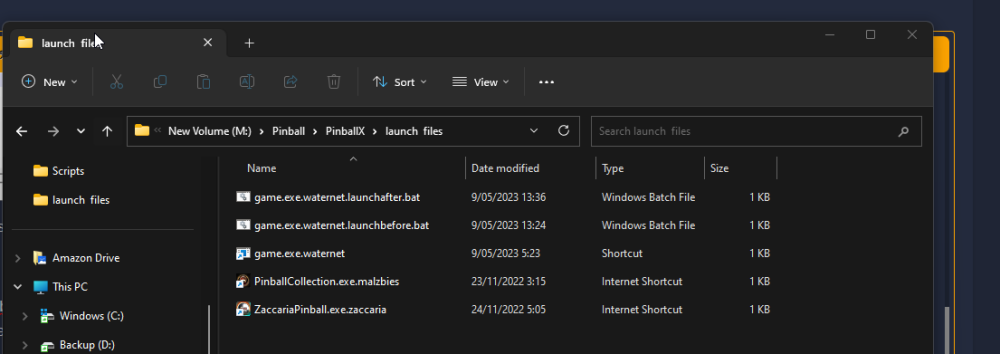
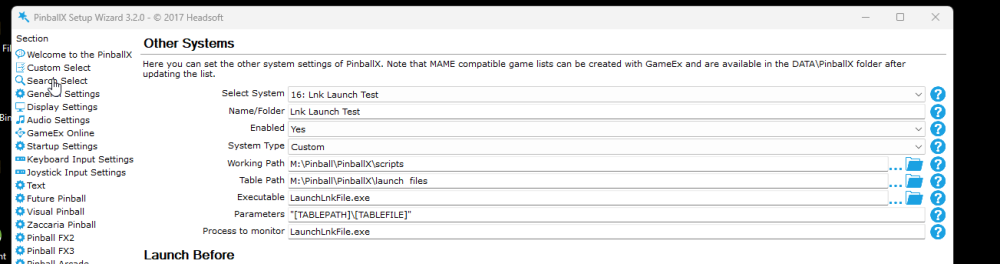
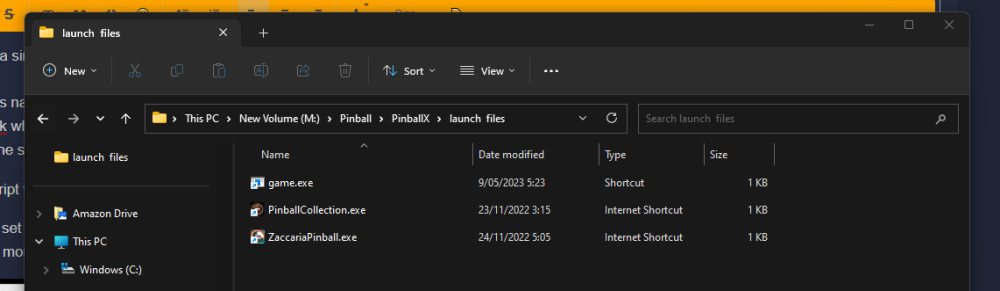
Based on @PcTeknic request in #general to launch multiple exe's but put them inside a single system i made a new launch script that can launch .lnk or .url or .bat files (or even .exe or .com files but it's better to create a .lnk (shortcut) file to it then). This makes it easy to put single application or games inside a single system, you can even make multiple such systems and folders if you like to group them or so. The way it works is you need to create a directory with shortcut or url or .bat files named like so : [game.exe].[idenitifier].lnk the [game].exe needs to be the exe filename of the program you are launching using your lnk (url or bat) file, it's the process we will monitor. The [idenitifier] can be anything you like it's been mainly added just in case you have multiple games using same [game.exe] filenames so you can still create multiple shortcut files just never use a point inside the identifier name. For example Malzbies pinball collection exe is named PinballCollection.exe, create a shortcut (or url in this case of steam, you can use steam to create the shortcut on the desktop, in case of shortcuts to exe files, goto the folder of the exe file and right click and drag it to an empty spot and choose create shortcurt) afterwards name that shortcut "PinballCollection.exe.Malzbies.url" and copy it to your launch files folders this is also the game name you need to use inside gamemanager. the script will then extract [game.exe] from the filename and launch the shortcut or url or batch file, wait for [game.exe] process to start and then wait for it to stop and quit the script. You can and WILL NEED TO setup a key in the script here, being the same one as the key you use for quiting games inside pinballx. The script will then close the game and stop running. also DO NOT set process to monitor to the script.exe filename if you do that the launch after script will never work because pinballx will kill the script before it can run the launch after batch file. Launch before and after bat files are also supported. the script will check if [game.exe].[identifier].launchbefore.bat exits and launch it (while waiting for it to finish) before starting the shortcut. The same is applied for the launch after bat file, it checks for [game.exe].[identifier].launchafter.bat and launch that either when the game exits naturally or when you press the key i spoke of earlier (the script closes the game / exe file when you press that key and it will no longer wait on the process to end and then run the launch after script). this is the script: LaunchLnkFile.ahk this line you need to change the key to your quit key (same one as you use in pinballx) This is how my launch files folder look like: This how to set it up in pinballx (note do not put process to monitor.exe the script handles this if you do set it to the script filename, the launchafter bat file stuff will not work as pinballx will kill the script then) these are the games are setup for the system inside game manager If you want to add commandline parameter for some games add them to your LNK files for example: if you need more control over a specific file use a [game.exe].[identiefier].bat file to launch the game and put all required commando's inside the batch file i did not test this but this should work also
-
I have a version with launch before and launch after batch file support i'm currently documenting it in the user projects section will tag you Edit here is the link to the improved version of the script with launch before & after support as well as going around the issue if multiple exe filenames have the same name (or in case someone stumbles on this topic)
-
sure will do but will first see if it suits pctechnics needs, for me at least it works but i could probably expand it a bit to do what i suggested in case multiple games use same filename for exe files as well perhaps add launch before and after batch file support
-
You can put the parameters inside the shortcut itself but launch before and launch after is indeed not possible but i could probably edit the script to run a specific batch file before and after launching the game but not sure if it work ok it would not be 100% the same as in pinballx (like it won't wait or at least don't know yet how to make it wait)
-
Here i create a simple autohotkey script just for this so you can launch .url and .lnk files. if your game is named pinbal.exe create a shortcut with name pinball.exe.lnk or if you want to start a steam game (which seem to use .url files) name it [game.exe].url where [game.exe] is the name of the process you want to monitor and also want to close when pressing ESC key. Basically you provide in the name of the shortcut also the name of the process to monitor (and thus name of exe of the game). and you put all these shortcuts (lnk) or url files in the same directory. here is the script for download (compile to exe) LaunchLnkFile.ahk This how you set it up in pinballx, the launchlnkfile.exe will keep running as long as the game runs or until your press ESC key so you can set the script exe as process to monitor This is my `M:\Pinball\PinballX\Launch files` directory with LNK and URL files containing the game exe filename And this is how you set it up in game manager: doing it using this simple script and workaround way you can just create one single system for all your LNK or URL files for games to launch and you can provide any parameters for the game inside the LNK (shortcut) and basically launch any single exe, url, bat, com etc file you want. It's also easy to backup as you only need to backup the script and the folder containing all the LNK or URL files, There is however one downside to the script if multiple games use same name for their exe you won't be able to launch them using this system but normally each game have an almost unique exe name. If that ever is the case we could adapt the script so that you can name your files [game.exe.01].lnk [game.exe.02].lnk until [game.exe.99].lnk in case of duplicate game.Exe's it should not be that hard todo. Let me know if that is needed or not and i'll adapt the script but first see if it'll suit your needs and if you can get it working

-
Pinball FX Video, Audio etc Media
joyrider3774 replied to joyrider3774's topic in PinballX Media Projects
btw guys recheck the url, on sunday i recorded the remaining / missing tables. I might redo some of the dmd's of the new original tables so it no longer displays the dmd while having a ball at the plunger but so it will show the little attract mode they seem to have build in (displayin tablename / scores and sometimes a little extra). But not sure yet when i'll do that. -
Pinball FX Video, Audio etc Media
joyrider3774 replied to joyrider3774's topic in PinballX Media Projects
yeah i also prefer to wait, if people can't wait to grab things in its current state they can do so from the mega link. And once direct table launch has been released i can upload it then as we would know the real naming convention by then -
Guys, I recorded some of the new tables in pinball fx, yesterday evening but also during the night i took the time to add videos, dmd's animated backglasses etc from pinball FX3 and renamed to the names my launcher uses as well there is not that much difference between these tables in pfx3 and pfx and i don' want to rerecord these. I also created topper videos using mike's tool, as year i took for zen tables the year the very first time a table appeared in any zen game (according to pinball fx fandom) not just pinball fx and for bally / williams i took their original release year. I also added my wheels there to it as well as table audio i had from pinball fx3. There are about 90-95 tables out of the 105 that now got this completed media, the rest i need to record. You can find these here https://mega.nz/folder/0kB0GDYK#p7uNEhTR5AJFW1jHMsjung Now my question should i upload these to pinball X ftp in a Pinball FX Directory in the official downloads, or to my the other downloads section ? The reason i'm resistive on doing it already is because they are named the way my launcher uses them, i did add rename batch files to rename them to the TABLE_XXX.YYY format that zen seemed to use for the backglasses so i could rename them already also before uploading them and upload in the other format, but since direct launch has not been released yet by zen for pinball fx it is actually not known as of yet what the parameters, and thus filenames would eventually be (there's a high chance it will be TABLE_XXX.YYY format though) . Maybe it's more logical to wait on the implementation of direct launch by zen to at least know what the filenames would need to be, i could leave them maybe only on the mega at the moment and just upload to ftp in an "offical Pinball FX" directory when the official release for direct table launch has been done. Not sure what your idea's are
-
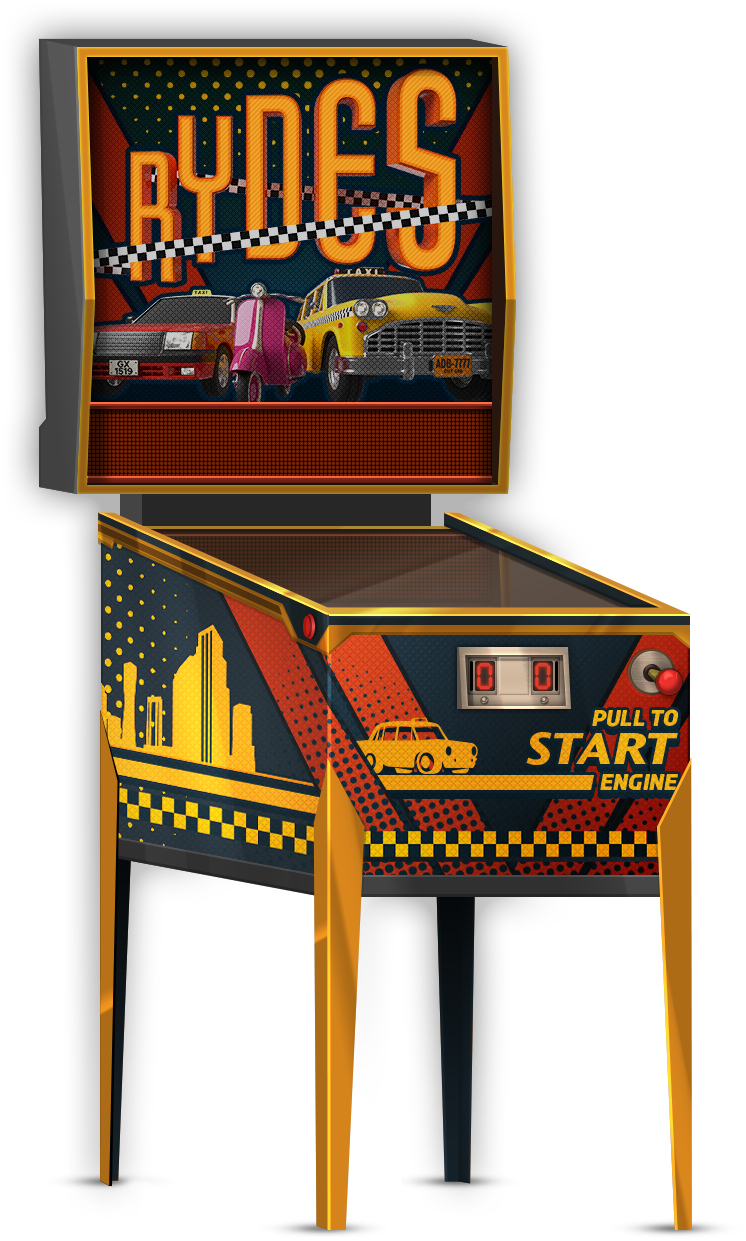
Added 19 new wheels in total for latest released tables: - the marvel ones - Twilight zone - Fish Tales - Sorcerer's Lari - The Godzilla Vs Kong Pack
-
Added 19 new wheels in total for latest released tables: - the marvel ones - Twilight zone - Fish Tales - Sorcerer's Lari - The Godzilla Vs Kong Pack
-
also made these today (no logo's sorry, did not want to spend time on trying to extract them from backglasses or so)
-
Simple Pinball Deluxe Reloaded Wheels View File just some Simple Pinball Deluxe Reloaded Wheels based on extracted pinball tables images from the game Submitter joyrider3774 Submitted 02/25/23 Category Wheel Images
-

Version 1.0.0
303 downloads
just some Simple Pinball Deluxe Reloaded Wheels based on extracted pinball tables images from the game -
Hey, Seems this game had an update with a new table, i quickly extracted backglass & table wheel (like the previous ones) Edit: also uploaded media to `/-PinballX-/Media/Pinball Deluxe Reloaded` on ftp Here's is the database :Pinball Deluxe Reloaded.xml


-
they did not send out emails or so about the form only on socials and normally only for early access bought stuff not sure but this is the link to form https://forms.gle/VhYWMkES1euw3GJB9 Btw for anyone wondering cabinet mode in pinball fx works also for the trial tables (tables you don't own) and the wild wild west table is the free table you get with downloading the game. So you can test it out with my script before deciding to buy any tables or so. The one year exclusivity deal with epic ends around march somewhere (if early access time is included) that would mean steam version could come as soon as april
- 47 replies
-
- 1
-

-
- launch script
- docklets
- (and 1 more)