|



Mike_da_Spike
-
Posts
3795 -
Joined
-
Last visited
-
Days Won
242
Content Type
Profiles
Forums
Events
Downloads
Store
Articles
Everything posted by Mike_da_Spike
-
Think you almost there Tom ! Launching a non vpinmame table, shows indeed after 1 minute the media for that table. Exiting to to PBX, makes it blank again. launching a vpinmame table after that, shows the rom on the real DMD and when exit this table, shows the DMD media it in the front end again Enabling 'use pinmame in the front end', doesn't show any rom in the front end and for launching tables same behaviour as above Hope this make sense to you XDMDlog.txtlog.txt
-
Hi Derek, What is your installpath of PBX ? It should not be installed in tne program files folder of Windows. Can you post your pinballx.ini and the files in the log directory as attachments?
-
Can you create a video of it what is happening ? Also, you mention multiple people has this issue, can you give an url to those issues? And did this happen from v 5.05 and you didnt have it with the bersion before ?
-
I'm on Windows 10 pro 20H2 and using the 64 bit of PinballX as well. Workign like a charm for me (I understand that it should work as well on W7, but if you are able to do a quick install, give it a shot on W10)
-
Maybe a stupid question : why not upgrading to w10 ? W7 is out of support by Microsoft, but the upgrade is still free.
-
 Not sure if it is a good idea or not, but can we have in the menu, entries where we can launch applications ? For example : I use PinemHi leaderboard. This runs in the background, but to start a challenge, a key press (or joy press) is needed. also to check highscores or start the weekly challenge. If I could add entries in the menu that would start a program, I could do a key send as well Why not assigning the keys to the joy ? I run completely out of buttons ! And think this will help me (and others ?) with the same issue Forget it. I think I need something like this
 -
New release : 21.04.26.0 Only bugfixes (yes we make mistakes too, but we fix them !) update to latest version, to avoid any issues
- 418 replies
-
- 1
-

-
- mikedaspike
- scutters
- (and 1 more)
-
We are getting all old Tom. I shall wait a bit longer for the new DMD feature. Maybe I was too impatient EDIT: I see the following in the log file But nothing on my realDMD displayed EDIT2: When exiting a table after the above message appears, I don't see anythign in the frontend anymore on my DMD XDMD tries to initialize, but didn't work. And pindmdlog spits out a lot of errors I hope the logs helps you pinDMD_log.txtXDMDlog.txtlog.txt
-
I had that once as well ( thats why i mentioned the pac as well) I use DOFlinx for background and didn't update it since last FX3 update, so I have black background as well Glad it is (quickly) solved
-
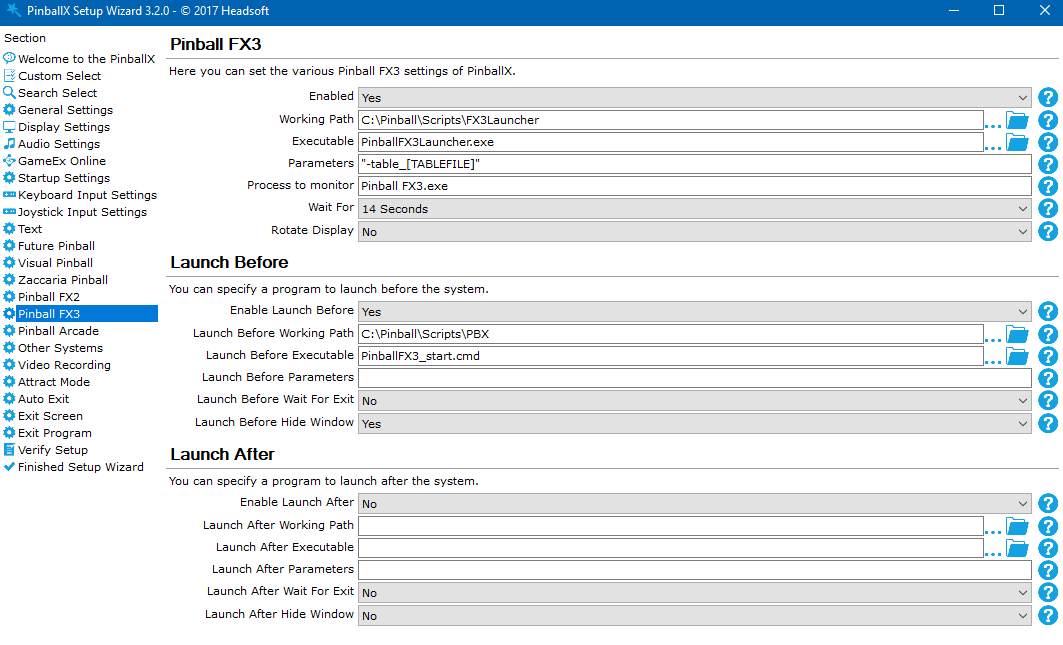
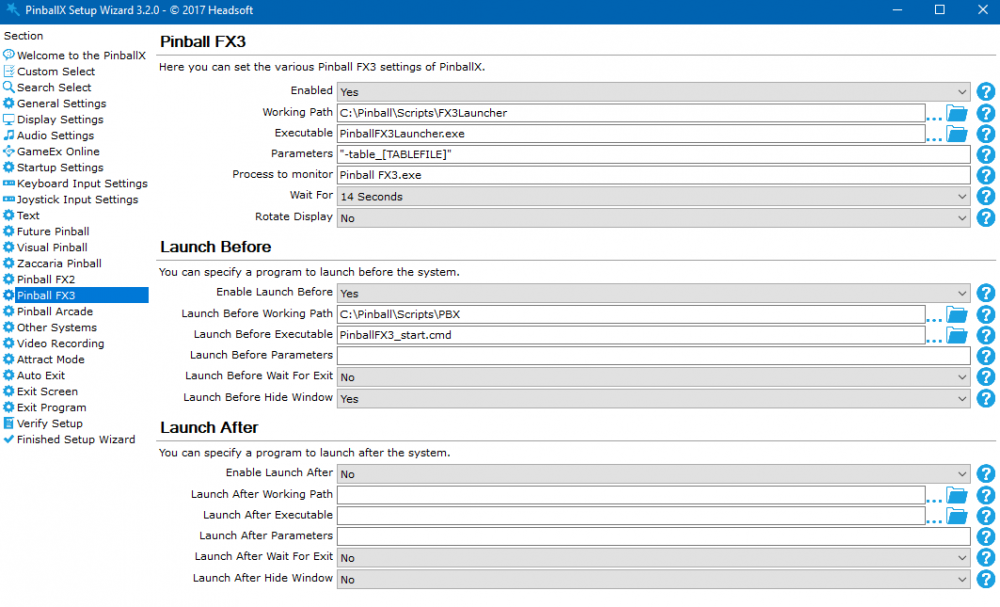
Do you have the Steam cabinet code set up in FX 3 ? Without setting this up, you will not able to launch FX3 directly to a table Pinball FX3 Cabinet Mode FAQ – Zen Studios Misread your question. I will check mine now .... Mine is still working. Maybe try to reactivate your PAC within FX3. EDIT : Should the parameter -table between double quotes ? I use Joyriders launch script, and that paramter needs double quotes :
-
Good morning buddy. You where busy yesterday ! I Installed latest version on the cab, Real DMD is showing. Launches a table with pinmame. Pinmame is showing. Pause table, I go to PBX screen and real DMD is showing pinmame (but in pause state) Continue with table and pinmame still showing score Exit table PBX is showing my MP4 Launches a table with pinmame again. Pinmame is showing. Pause table I go to PBX screen and real DMD is showing pinmame (but in pause state) Click exit table from PBX menu VPX is closing and PBX is showing mp4 on real DMD Enabling pinmame in frontend : No PinMame in front end (just black) Nothing in log file about it. Switching to non table in frontend shows video, but table doesn't show anything When launching a non Pinmame table, the realDMD stays black (nothing on it atatched 2 log files: one in attract mode where Pinmame is enable din front end and nothign is show (log_pinmame_enabled in frontend.txt) other is launcheing a non pinmame table where nothing is shown on the real DMD (log_tablelaunch_no_pinmame.txt) I hope it make sense to you log_tablelaunch_no_pinmame.txt log_tablelaunch_no_pinmame.txt
-
Controller issue (one press causes multiple presses)
Mike_da_Spike replied to Quadrasputnik's topic in General
And there is no other button flashing as well ? I had the same strange behavior, when one of my switches (coin dip switch) was activated and stuck. In your log, you have 3 joysticks attached. Is that the pop n music controller? -
I saw you uploaded new version(s) Will do some tests tomorrow morning.
-
I can test I have a real dmd. Its a pindmdv3.
-
For FX3 all the media is on the normal place and can be downloaded via gamemanger./database manager : Even Volume 6 is there Not sure if you like it, but I uploaded (in the past) all the flying tables in 4K and for (real) DMD , I created the videos (1 loop) . Not for volume 6, as Freezy doesn't work All to be downloaded from both the media managers And with Database manager, you can select which media you want to download . Just set your prefer4ence in the settings tab: and if you uncheck "Overwrite existing media", it will only download the missing media for a table or for bulk FTP


-
Not sure, but thought I added flying videos to the ftp as well for fx3 (dont have fx2). Check Databasemanager for the ftp download, make it so easy. If wheels are missing, I can upload them tomorrow
-
Maybe stupid question, but why you use pbx recorder, instead of pinballX recorder ? And I thought that Pinballx indeex records the videos as 30 fps in 4k. But because you have an nvidia card you can record ot in 60hz 4k with the nvidia hardware capture. I use nvidia capture with PinballX recorder as (via database manager). I record only playfield and backglass
-
Found a small bug when file was uploaded. Please use 21.04.16.01 to fix it
- 418 replies
-
- 2
-

-
-
- mikedaspike
- scutters
- (and 1 more)
-
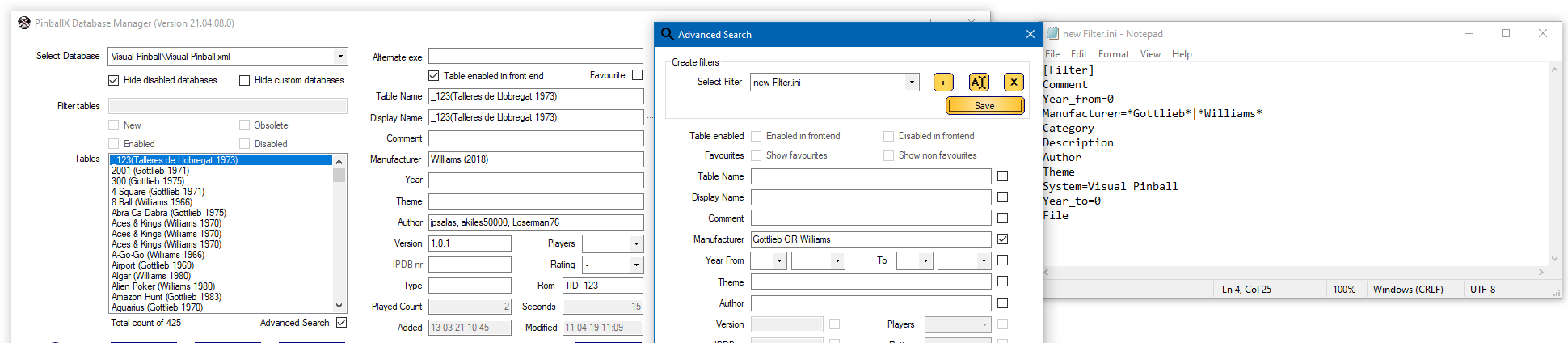
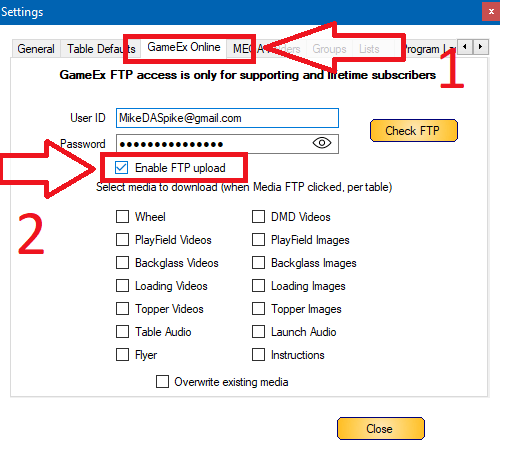
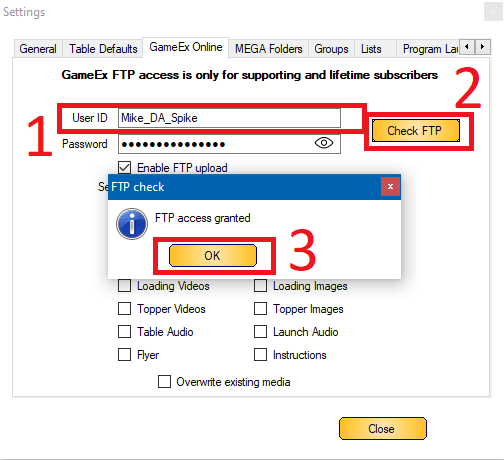
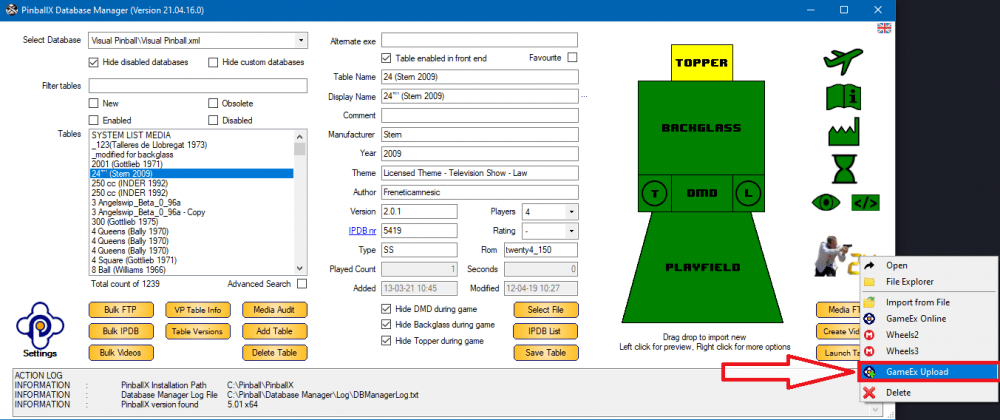
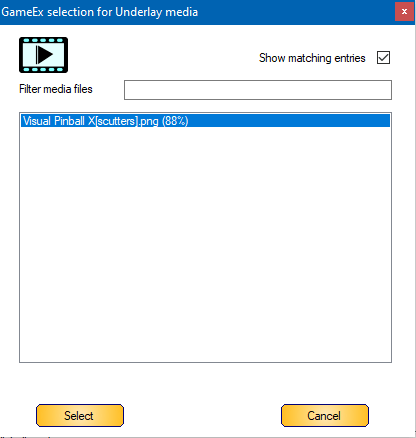
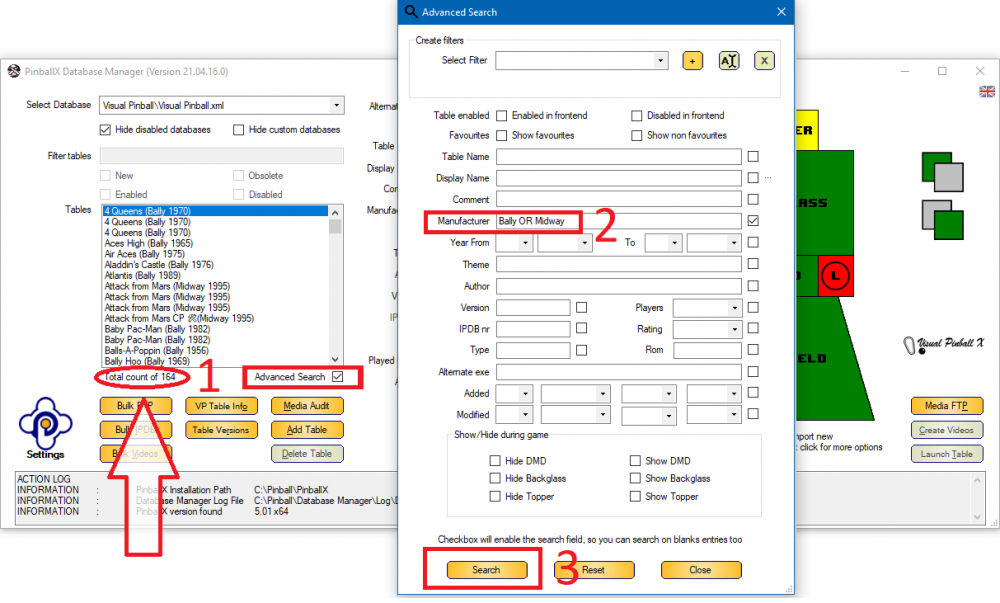
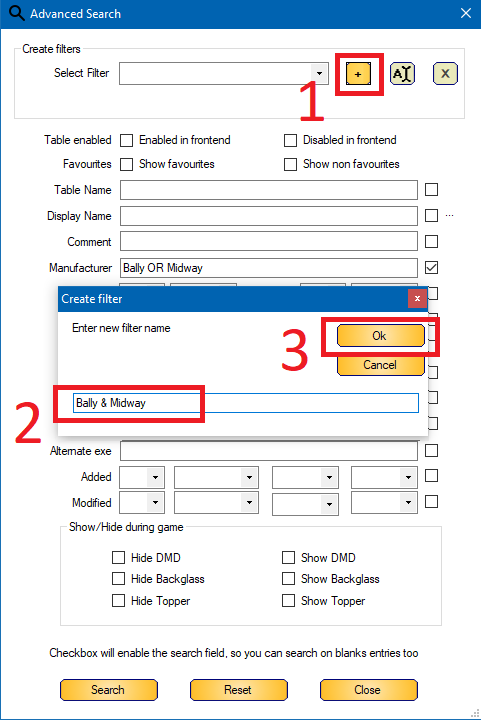
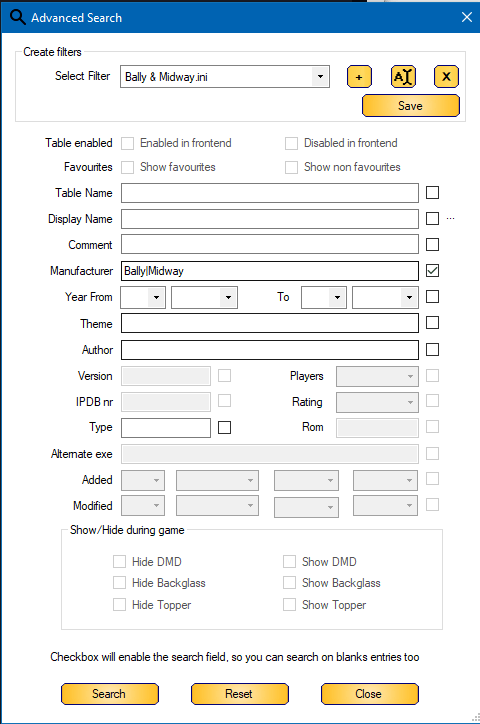
8 days ago, @scutters and I released version 2021.04.08 and today we released 2021.04.16 ! This also because @Tom Speirs released PinballX 5.01 which support an OR in the filters. We also implemented an FTP upload feature (approved by Tom) and requested by @MetallicaVPin To be honest, the FTP upload was on our deny list for a long time. Scutters and I discussed this last year already and we didn't wanted to screw up the FTP file structure. But we found a solution for it . Here's a short guide : To help the PinballX community for missing media (or improved media), you can upload easily with an 1 click. By default this option is disabled. This need to be enabled through the Settings dialog -> GameEx Online tab -> Check "Enable FTP upload" Make sure your User ID is not set to an email address, but to your GameEx login name. To check your GameEx login name, go to the GameEx forum (https://www.gameex.info/forums/forum/30-pinballx/) and check the right top corner To change your User ID, type the correct name in the "User ID" field, click on "Check FTP". If the User ID and password match , it will give you an message "FTP access granted" (click OK to close) You only have to do this once. When User ID is correct and the checkbox "Enable FTP upload" is checked, you will get an extra button when you right click on an Media box (if you a media file for it) It doesn't matter, if it is a system entry or a table entry. All media should have the upload feature now. The filename will have have your GameEx user name in it between square bracket (for me [Mike_DA_Spike]. This is prevent that we overwrite any other media that is currently on FTP Only 1 upload per media/per table is allowed. When you upload for example a wheel for 24, it will be saved. if you have another wheel (alternative) and you want to upload, it will overwrite your file. When downloading from FTP, you will see the user who uploaded the file : Another feature that we build in (and that's because Tom Speir implemneted this in PinballX version 5.01. See [NEWS] PinballX 5.01 - PinballX - News and Updates - Spesoft Forums (gameex.com)), is that our advanced search completely can be used with an " OR " (in uppercase) and/or with an "|" (pipe) command. When creating/modifying an filter , it will be used in PinballX as well. Purpose ? Maybe you want to have multiple companies in an filter. See example Select the "Advanched Search" checkbox (1) Type the Keywords. Splitted with " OR " (uppercase and with spaces) or with "|" (pipe without quotes) Click search Notice the 164 records that returned Create A filter for your search : Click on the "+" sign (1) for creating a new filter (or select an existing filter) Type the name of your filter (2). this will be the name within PBX Click "OK" to save your filter (3) Th filter will be used and the fields that cannot be used in the filter will be greyed out : Open PinballX and look for your filter Select a table, open menu-> and select lists. This will show you all your filters (and some defaults) select your filter And notice that the same amount of tables are showed as we had in database manager Enjoy this release



- 418 replies
-
- 4
-
-
-
- mikedaspike
- scutters
- (and 1 more)
-
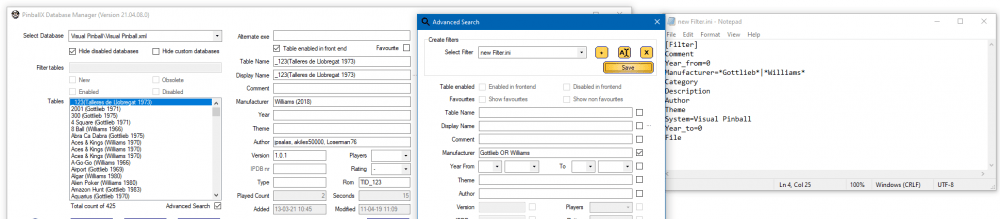
And in the new version of Databasemanager we can use OR and/or | as well : Sneak preview :
-
In your normal system folder, you can place a file called - system - This represents the system. It can be an image or video. With pinballx Databasemanager you can easily adddd them in the gui. Dragg and drop, use file. Explorer or download from ftp/mega links
-
See Joyriders tutorial and number 3
-
Problem with FX3 table launching and returning to PinballX Wheel
Mike_da_Spike replied to Cindyh's topic in General
As Draco said, attach the log file and the pinballx.ini after you simulated the issue. Does zen pinball fx3 loads at all ? -
Within Joyriders tutorial, you need to adjust dmdext.exe to match your dmd. I don't think anything is wrong with PinballX or that the log will show anuything. Just setup all correctly outside PinballX and it can be used in the frontend
-
See #3 of Joyriders post and with the link of dmext. That should help you positioning your dmd