|



Mike_da_Spike
-
Posts
3794 -
Joined
-
Last visited
-
Days Won
242
Content Type
Profiles
Forums
Events
Downloads
Store
Articles
Everything posted by Mike_da_Spike
-

[PLUGIN] FLEXDMD real DMD video player (version 1.3)
Mike_da_Spike replied to Mike_da_Spike's topic in User Projects
Do you see the text Flexdmd initialized during pinballx start ? Can you post the pinballx log file and the plugin log file(in the plugin directory) -
[RESOLVED] Anyway to turn the display off on the pindmd 3?
Mike_da_Spike replied to chadman's topic in General
Its a bit early for me, and maybe not understand it, but if you want to get rid of the default text. You can initialize the Dmd with xdmd, flexdmd or dmdext (or any other program) and send an extra blank frame to it. Didn't the dMd come with a command line tool to send media to it ? EDIT : Maybe this will help : -
very nice my friend ! good work !
-
Definitely!
-
Last year I made a request to make the 'scroll-able' so that you can have more entries :
-
Please post your ini file and your logfile
-
MegaBalls Wheel Images for Pinball FX2 / FX3 / FX / M
Mike_da_Spike replied to PcTeknic's topic in PinballX Media Projects
Why not automate it and all the uploaded files will be added to ftp as well ? Most of the folks in IT are lazy bastards (yes, I'm one of them). If I spend 2 hours to automate something instead of doing things twice, i spe d the time for automation -
MegaBalls Wheel Images for Pinball FX2 / FX3 / FX / M
Mike_da_Spike replied to PcTeknic's topic in PinballX Media Projects
Sory, i just clickef some files on my mobile device and started to download,. I didnt check firther, but it never finished @Tom Speirs is this something you can check/fix this ? -
Sorry buddy. Your first question was clear, but all the reactions on it, made your question looks like you asked something different. It is not much, but this is the information I have : So, you can only use direct EXE files as table name, with no parameter's at all. And the exe must be exact the same what you launch, other wise it cannot monitor the process and goes back to PinballX. So no go for Steams app that needs steam.exe to launch (maybe a feature request for adding Steam games would be a nice to have ?) I would update the PinballX documentation with the following note : System Type Specify a system type. If other than Custom, PinballX will treat it as the specified in built system and allow features such as high score support. Note: ‘Custom – Exe Files’ doesn’t require any of the next parameters. This type just points in Game Manager to the full path of an EXE file and monitors this process until it stops. Pressing the exit button will exit this process as well. No Parameters can be used
-
MegaBalls Wheel Images for Pinball FX2 / FX3 / FX / M
Mike_da_Spike replied to PcTeknic's topic in PinballX Media Projects
The links and downloads are still working for me. What part is not working? And do you get an error? -
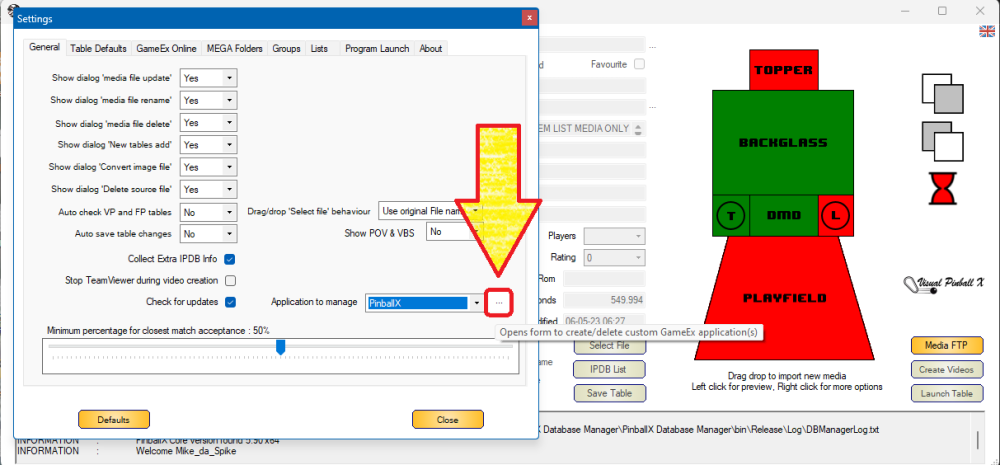
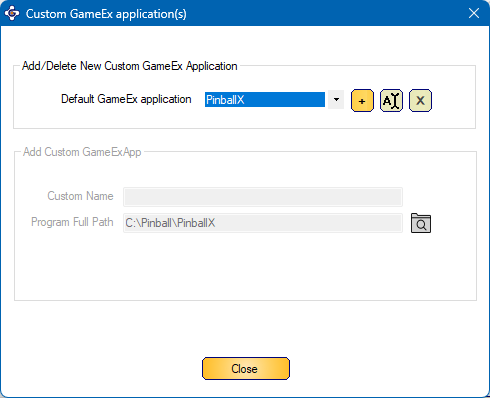
@Tom Speirs released PinballX release 5.90 last week which combines the installation of PinbalLX xp/32 bit and the.net core version. DBM was relying on the Windows installation GUIDs to find the programs. To fix this issue, @scutters and I changed the part to identify PinballX and/or Touch-Play You still need a valid installation of one of the 2 GameEx applications on your system, but if you have multiple versions of PinballX on your cabinet (which is just a copy of all the PinballX files with different settings, database and media files). If you want to manage multiple versions of PinballX or Touch-PLay, just go to settings and click on the 3 dots next to the pull down menu of the 'application to Manage' This brings the following dialog : The 'default' applications will be in the pull down box and if you create new 'custom' GameEx applications, those will be added as well (and in the settings you can choose which application you want to manage. Some rules for adding custom applications : Custom Name must be unique and cannot be the same as a default application Program Full Path must be unique as well (otherwise you have 2 entries to manage the same app) Program Full Path should always be PinballX.exe or Touch-Play.exe Default applications are only showed for visibility and cannot be changed from this dialog Thanks to Scutters for all his help on this release again, and off course thanks to Tom Speirs, for his amazing PinballX front end and all the updates he is doing on it.
- 418 replies
-
- 2
-

-

-
- mikedaspike
- scutters
- (and 1 more)
-
Sounds like a feature request?
-
Won't launch cmd for dmdext after upgrade of PinballX
Mike_da_Spike replied to chadman's topic in General
Hey Tom With both versions of XDMD.dll PinballX crashes immediately Application: PinballX.exe CoreCLR Version: 6.0.1623.17311 .NET Version: 6.0.16 Description: The process was terminated due to an unhandled exception. Exception Info: System.IO.FileLoadException: Could not load file or assembly 'XDMDNative, Version=1.1.8523.3577, Culture=neutral, PublicKeyToken=null'. The located assembly's manifest definition does not match the assembly reference. (0x80131040) File name: 'XDMDNative, Version=1.1.8523.3577, Culture=neutral, PublicKeyToken=null' at PinballX.FrmMain..ctor() at PinballX.FrmMain.Main(String[] CmdArgs) XDMDNative.dll is still in the directory. Reverting to the XDMD.dll that is shipped with latest version, launched PBX again Using your (modified?) Pindmd.dll Pressing launch, shows me 30 seconds of black screen, and DMD is not working during VPX 07:03:40.88 4-5-2023: Setting default net connection limit to 25 07:03:40.89 4-5-2023: Started 07:03:41.53 4-5-2023: Starting Real DMD Thread 07:09:13.42 4-5-2023: Launch System 07:09:13.42 4-5-2023: Not Hide Backglass! 07:09:13.42 4-5-2023: Waiting for threads 07:09:13.47 4-5-2023: Disposing display 07:09:43.60 4-5-2023: Shutting down XDMD 07:09:43.87 4-5-2023: Set Plugin data 07:09:44.23 4-5-2023: c:\Pinball\Visual pinball\VPinballX.exe -play "c:\Pinball\Visual pinball\Tables\VPX\Cosmic Princess (Stern - 1979).vpx" -ExtMinimized 07:09:44.28 4-5-2023: C:\Pinball\PinballX\vpauto.exe 07:09:48.18 4-5-2023: VPX Full screen exclusive mode detected 07:09:48.18 4-5-2023: VPX Full screen exclusive focus hack set 07:09:53.34 4-5-2023: Found PinMAME ROM: princess 07:09:55.30 4-5-2023: Visual Pinball Player window foreground: 11 pinDMD_log.txtXDMDlog.txt Above log files files are at the moment when the VPX is launched XDMDlog.txtpinDMD_log.txt Above files are created when returning to PBX again log.txt Complete log file of this test Downloading the X64 version of pindmd.dll from the website and rename it, results in the same results. When launching directly a game after PBX is launched, takes around 20 seconds, before it actually is starting to launch the table, but the DMD is working Waiting for screensaver and launch it (actually, screensaver didn't start, but waited a longer period), shows the same behaviour as before. Long wait before XDMD is closing, but stil NO DMD during VPX tablelog.txt -
Won't launch cmd for dmdext after upgrade of PinballX
Mike_da_Spike replied to chadman's topic in General
3 dll's to test ... temperature is getting higher and attic is get hotter... But as I'm awake early, I will try to test it tomorrow (although I promised scutters to do some other work as well). Choices, Choices, choices.... Think scutters needs to wait -
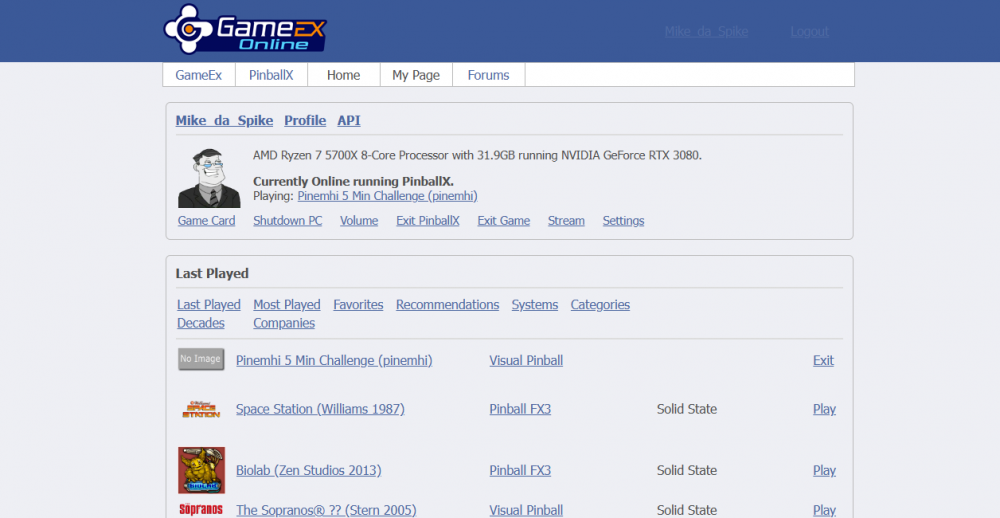
It is for pinballx as well. most features are also for PinballX. See my page below As I mentioned in my previous post, You must have setup your pinballx settings, to use gameex online. And for shutting down the PC and volume control, you must have PinballX running as well it need to show the following message on the left lower side of the screen as well : hope this helps

-
Not following exactly what you mean with "I can't find any control functions into gameex website" If you configure your user email and password in settings.exe, your "statistics" will be send to gameex online (like last played tables, all tables) wat kind of info do you expect as well ? Edit: there's also a highscore category https://online.gameex.com/PinballHighScores.aspx
-
Won't launch cmd for dmdext after upgrade of PinballX
Mike_da_Spike replied to chadman's topic in General
can you post the logs for Tom ? Also the xdmdlog.txt and pindmd_log.txt thanks ! -
Won't launch cmd for dmdext after upgrade of PinballX
Mike_da_Spike replied to chadman's topic in General
I checked the pindmd_log.txt in my backup from that moment, but that was a complete empty file. Not sure why -
Won't launch cmd for dmdext after upgrade of PinballX
Mike_da_Spike replied to chadman's topic in General
Yeah, its overwrites everytime, and this was when i closed the last table and returned to pinballx. It couldn't initialize the dmd at that moment My assumption is that xdmd didn't close correctly when table launched and when try to initilize when table closed, it shows this -
Won't launch cmd for dmdext after upgrade of PinballX
Mike_da_Spike replied to chadman's topic in General
ok. thats not good. So maybe my device is not fine. On the other side : If I don't use XDMD during PinballX, but initialize FlexDMD via plugin (that also may have a delay during start of Pinballx), when game starts, it just leave FlexDMD open, but stops displaying anaything, so it will not lock the dmd (i asume) So instead of closing and re-initialize the DMD when game starts/end, it just stop displaying anything on the real DMD when game starts and start displaying when game is stopped. Maybe this is not the propper way and causing memory leaks or high CPU, but never run into a problem of this Tested 5.96 I have good and bad news But lets wait for that for the screensaver tests I thought we had some good news as well. but tested more and didn't work quit wel Launch Table directly after PBX is started XDMD is closing fast, but 15 seconds delay after closing down XDMD and set plugin data Exiting table shows DMD videos within PBX Launch same table again after it was closed XDMD is closed after 7 seconds when table launch is initiated, After that table is launched quickly Exiting table shows DMD videos within PBX After exiting previous table, wait for screensaver mode and launch Table Good news : DMD is showing when table is launched during screensaver mode ! Bad news : I must have a lot of patience to start a table when I launch it during screensaver mode. As it took nearly 3 1/2 minute before the launch command takes place after the table was launched (and table launch and getting PinballX to background took only 10 seconds) Exiting table shows DMD videos within PBX Exit previous table and wait again for screensaver mode. Actually launch of table (executable) now tooks 20 seconds after I pressed the button, but when table was launched, no DMD Returning to PinballX results that I don't have DMD videos on the DMD I don't see it initialized in the log either For the test all the plugins where disabled I really don't have a clue what's going on. Attached log files, and the XDMDlog.txt log.txt XDMDlog.txt -
[RESOLVED] Future Pinball takes a long time to load in PinballX
Mike_da_Spike replied to Segador's topic in General
So, you dont have any fancy videos that shows up within pinballx ? Just the pinballx logo and animated backglass from pbx? -
[RESOLVED] Future Pinball takes a long time to load in PinballX
Mike_da_Spike replied to Segador's topic in General
good catch @scutters ! But isn't that only for tables that you launch only for the first time ? Although the option and feature is good, I prefer loading videos with Scutters his de-randomizer (sorry Tom) -
[RESOLVED] Future Pinball takes a long time to load in PinballX
Mike_da_Spike replied to Segador's topic in General
Good catch ! I didnt noticed that. Thats indeed an extra 'delay' of 24 seconds. This screenshot will be created one time, right (@scutters)? So curious what happen 2nd time when loading this table But yeah, try to disable the option first to check if it makes any differents. -
[RESOLVED] Future Pinball takes a long time to load in PinballX
Mike_da_Spike replied to Segador's topic in General
According to your log, you are still launching fp incorrectly (see scutters his first post). Fp should be launched via BAM's fploader.exe. see https://forums.gameex.com/forums/topic/18508-guide-how-future-pinball-should-be-setup-for-bam-doflinx-pinball-x/ And looks like its taking 30 seconds to load: 09:19:13.68 2023/04/24: D:\Future Pinball\Future Pinball.exe /open "D:\Future Pinball\Tables\Batman Joker Edition ULTIMATUM 1.04.fpt" /play /exit /arcaderender 09:19:43.06 2023/04/24: PinMame Not detected. Potentially loading DMD image/video 09:20:34.03 2023/04/24: Exit System Control Pressed To open a command prompt see: https://en.m.wikiversity.org/wiki/Command_Prompt/Open -
Won't launch cmd for dmdext after upgrade of PinballX
Mike_da_Spike replied to chadman's topic in General
Nice ! If you launch pinballx, wait for a couple of minutes, and launch a fx3 table. Is that still working as well?