



|



Mike_da_Spike
-
Posts
3793 -
Joined
-
Last visited
-
Days Won
241
Content Type
Profiles
Forums
Events
Downloads
Store
Articles
Everything posted by Mike_da_Spike
-
Create work @scutters ! Here's a little video demonstration (sorry for my bad camera recording) 20190923_073559.mp4 I set up the systems as a "2" liner and table as a "1" liner I use the font "DigiFace" as Scutters has in his screenshot (Digiface is not standard on the os. just download this Digir___0.ttf and hit install) The positions of the displays, is a bit of try out. My playfield is 4K (3840x2160) and my backglass is HD (1920x1080) This is how my INI file looks : PBXStatsDisplay.ini Maybe a small request .. The high scores does't show the ranking. maybe pre-fix it with 1), 2) or 3) ?
- 108 replies
-
- 1
-

-
- plugin
- statistics
- (and 5 more)
-
Where you able to download pbx ?
-
Update 153 worked for me, but now using 1.73. Check this post. I downloaded 1.73 fro. There https://vpinball.com/forums/topic/freezy-dmd-question/#post-115676
-
I thought that dmdext 1.72 doesn't work with the bally and williams. On Freezys website (github) there is a thread with a modified exe file that will work. Also dmdext 1.73 is working for me
-

[RESOLVED] Documentation/manual available?
Mike_da_Spike replied to Mike_da_Spike's topic in General
Got it Tom ! Roms where pretty old. I have a full rom set and those are working now. I set the exit to [KEYCODE_ESCAPE] (instead of [KEYCODE_ESC]) and that is working. Got all working except the weather report, but thats no big deal. Thanks for your help ! And sorry for the noob questions I had. -
[RESOLVED] Documentation/manual available?
Mike_da_Spike replied to Mike_da_Spike's topic in General
Checked today again, removed and reinstalled all. But the mame roms won't be listed Just added 20 roms from my old cabinet, and the [LIST_MAME_VERIFY].txt shows that the roms are bad [LIST_MAME_VERIFY].txt Installing HBmame and copy the files, all the roms are listed I also installed GameEx. That has a lot of settings, but the same roms works with the MAME emulator. And I have set the ESC key of the keyboard to exit emulator, but that doesn't work. Works fine in Gamex itself Small other thing. The weather plugin doesn't work in Gameex Evolution. Worksfine in gameEx for me [SETUPWIZARD].log[GAMEEX_EVOLUTION].log -
[RESOLVED] Documentation/manual available?
Mike_da_Spike replied to Mike_da_Spike's topic in General
Just away of the pc now. Thought the exit button was mapped to esc. Using it in emulators didn't close it (was not on rdp. But directly behind) And did click the audit games button, but didnt show anything. Well... need to figure out more . Getting step by step closer ! Will give it a try tonight or tomorrow again ! -
[RESOLVED] Documentation/manual available?
Mike_da_Spike replied to Mike_da_Spike's topic in General
Tested with some laptops/tablets I had, but looks like front end needs a "powerfull" machine Had a Core I5-4300u with an intel HD4400 GPU and 4gb memory. Front end was sluggish. used a CoreI5 -8350u with UHD620 and 8gb memory and front end is working fine. So need to have a system setup with that specs. Just one question. for configuration ( i think I miss something) I have 3 emulators added. Mame/SNES/Atari 2600. Added some roms too in the subfolders :"UserData\Emulation\ROMs" For SNES and Atari I can add the roms to the system, but for mame, I don't see anything. At a sudden moment, I saw in total around 3300 roms (but just added 20) . And all showed me rom not found. So how do I get mame roms added to the list ? [SETUPWIZARD].log[GAMEEX_EVOLUTION].log[GAMEEX].ini And how do I quit from a game ? I left the defaults, but ESC doesn't quit the emulator. but will shows the features in SNES and Atari emulator. -
[RESOLVED] Documentation/manual available?
Mike_da_Spike replied to Mike_da_Spike's topic in General
Thanks Tom. It didn't launch and gave an error in eventlog. Tested on laptop and worked. I will try upgrading the ram or will buy a new pc for it. Still fighting how to get all mame roms get copied over from "old" system to EVO. But I will get there someday. Thanks all for the help ! And sorry to be a noob in this -
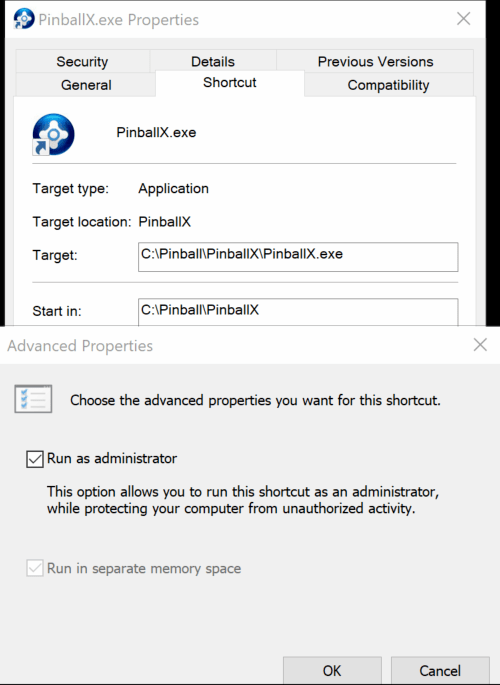
PBX should take care of it, but you can try something like: taskkill /IM VPinballX.exe and you are sure that PBX is running as admin ?
-
c:\program files and/or c:\ program files (x86) These are normally good folders for installing software, but permissions wise (executing files and DLL blocks) doesn't really help. I don't say this is the silver bullet, but give it a try (So installing VPX and PBX to another folder)
-
Not sure. I see that PBX doesn't see the exit command. But I asume you pressed it. Another thing I do noticed (not sure if that causing issues) is that you install all in the program files dir. When I started my virtual pinball adventure, I read on a lot of forums, to skip that because of windows priviliges. I have all installed in c:\pinball (even p-proc). Also for backup (i recooment to backup) it is easy to put all in the same directory
-
Can you simulate your issue and post the logfile after simulation ? In your current logfile, I don't see any launch of a table
-
[RESOLVED] Documentation/manual available?
Mike_da_Spike replied to Mike_da_Spike's topic in General
Thanks ! Tom adviced me to use GameEx Evo. I want the Mame, but also the nintendo, sega and atari. I will first try to get some extra memory, before going further. If I setup Evo on a test computer and configure the emulators, can I easily copy over the complete directory to the cabinet ? -
Hi, I'm a totally newbee for Gameex evo. I've bought an arcade cabinet years ago. This was pre-installed with a front end thats loaded in DOS. I started this week to change the harddisk and installed w10 on it. I found that the pc only had 1gb of ram and a dualcore e6500. I suspect memory is on the low side, so need to find if i can find 4gb modules. Anyway... checking and reading this forum for weeks now, but could not find a real manual or install documentation for Evo. I installed it today on my cab, but there are so much settings, that I was totaly lost. Is there a quick reference guide? Sorry for this noob question
-
Is PBX running in admin mode ? Button 10 is your exit button ? And attach the log, don't put the complete text in here
-
thanks ! I appreciate it
-
Updated version to 0.92b System video's will be skipped again ...
- 53 replies
-
- 1
-

-
- application
- loading videos
- (and 1 more)
-
Hmmm... I should skip the - system - (see your previous log). It doesnt hurt, because system is not used. But must recheck the code. As I said: I'm not a programmer .
-
pinballx settings Very cool bingo pinball simulation site
Mike_da_Spike replied to ttrenkner's topic in General
What program do you use to map your cab buttons (joystick) to keyboard ? I tried different ones, but can't find a good one -
Updated version to 0.91b See changelog
-
Here's a small program In made to create the loading videos with overlays:
-
Is logfile created ?(if so, please attach it with your ini file) Tried 32 bit and 64bit of pbx? Any more info ?
-
Thanks. I didn't have them in my folders, but will exluded them in the following release. I have already a complete areay what to excluded abd will add these 2 files to. Thanks for bringing it up !
-
Lol. I feel honored by all the detections :p this i written in vbs and compiled to exe. Code is not on github. It is code that my colleague and me started in 2001. We build classes for logging. Registry, active directory. We made our own framework to make programming easier for ourself. With this code we could adminitrate our complete environment. We still using it in a very large environment, and never got complains about virus detection. I realy wsnt to learn visual studio, but don't have time for it(i have a lot of ideas)