|



Mike_da_Spike
-
Posts
3794 -
Joined
-
Last visited
-
Days Won
242
Content Type
Profiles
Forums
Events
Downloads
Store
Articles
Everything posted by Mike_da_Spike
-
 Well.. that won't happen again. The name of the ini file and exe file are changed, because it had DMD in it. I removed both. Sorry. need to set it up once again
 -
damned ! Forgot that ! (oeps sorry for my language). Will upload soon
-
@joyrider3774 You sure ? It is embedded in the exe file. When launching it will extract the exe to the current workig directory. Thats why the exe is a bit big
-
Not yet, but can be added if needed.
-
Malzbie's Pinball Collection - On my cabinet
Mike_da_Spike replied to joyrider3774's topic in User Projects
Nice work @joyrider3774 ! Looks pretty good. I don't have Malzbies on my cab. Is it worth to buy it ? -
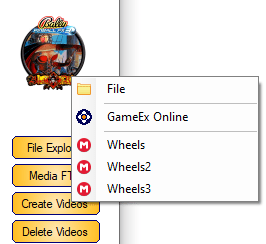
Looks very nice ! I don't have a topper (i have a led matrix as topper), but maybe I can build a small display above it. Very cool @joyrider3774. i hope to make you happy this weekend with an update Btw. Are those the DMD videos I created for FX3 ? EDIT : Updated code to v3.1 Some bug fixses and topper videos added Don't tell @scutters that I prioritize this instead of PinballX database manager Sneak preview on database manager new feature :
- 78 replies
-
- 1
-

-
- app
- application
- (and 1 more)
-
Within database manager uncheck the DMD hide during game checkbox or in game manager, uncheck the hidebackglass
- 1 reply
-
- 1
-

-
@joyrider3774 if I have some time this weekend, I will add some extra parameters for saving to dmd and/or topper folder. But ... also working together with @scutters on a new release for pinballx database manager with GameEx and Mega download. And guess who will be a tester for this ?
- 78 replies
-
- 1
-

-
- app
- application
- (and 1 more)
-
Sure. Should it use the @scuttersoverlay ? In the ini file, just name it to the system file. It should popup in settings with system name (like bingo game room)
-
Updated code to VB.net, included a settings program to setup all easier Program is in download section :
- 78 replies
-
- 1
-
-
- app
- application
- (and 1 more)
-

Version 4.0.0
394 downloads
I created a small program I('m not a programmer !) , that will create "Real DMD Color Videos" an/or "Topper" from your wheel image(s). I was inspired what @Thalamus posted on Vpinball forum. He posted Real DMD color Video's that first shows the wheel image for some seconds, than the year published and finally the company logo. This all makes a video of around 7 seconds. If you enable high score showing in PinballX, it is a nice show when scrolling through your front end. Until version 3.0 all was created in VBscript. Started from version 3.0 it is transferred to VB.net . Also created a settings program, that you need to run first (and setup) In the attached ZIP there is also a folder with PNG,s of year. You can change these to your off color/font For Real DMD users, it will create a video of 128x32 pixels For DMD users, it will create a video of 1280x320 pixels with an dotted overlay (thanks @scutters for this) Please used the following thread for any issues (this is my 2nd VB.net, so think I missed some things) -
Ok. Hard decision. I7 is indeed overkill (although i have a i7 7th gen in my cab) Maybe ask the visual pinball guys for advice
-
Oh dear ...you have an issue ... I'm not good with wood too, but very good with electronics and pc's. Bought a 2nd hand medion pc. Corei7 7600 with nvidia 1060 , 16 gb of ram and 128gb ssd. Replaced the video card 2 years ago for a 2070 (the 1060 wasn't fast enough for 4k). Changed the ssd for a 1tb ssd (just sata ) completly stripped the computer case and build in my hand made cab. Too bad my cab can only have a 40" monitor/tv in it. good onces are not for sale anymore. but back to you. As we say in nl:" I cant look in your wallet"walletI would recommend to upgrade a bit. I ordered a couple of months ago some parts to do some more video/picture eddittibg and to run Visual Studio on. Core i5 9600, asrock itx mb, pcie ssd (1tb) , powersuply and case. Was "just" 400 euros, and made my life must happier
-
Hey All, I didn't use my pinball cabinet for the last 3 months, because most of the time I used for Scutters and my program for managing the XML files I screw around a lot with XML and INI files, and not sure if I miss something now. I lost my recently added in the list of pinballX. Checking the statistics.ini, the DateAdded is not there anymore too. It updates the last played fine. I checked the settings, and the config.ini file, but could not find it. Think I overlook something, but what ?? Statistics.iniPinballX.inilog.txt
-
So, you didn't make your own cabinet @joyrider3774? Shame on you what are your specs ? Edit : I checked my cab this morning pretty quick. I use freezy too, to use my PINDMDv3 When turning freezy off, my CPU reach at max 20% Turning it on reaches 35% I know I have another CPU that you have, but doesn't make a hige difference for me. Using a table with PinpupPlayer (for some reason I can't get Freezy's DMD to work properly there), my system reach up to 75% CPU ! GPU is pretty low. Around 40% running a VPX table in 4k
-
What list ? Game list can be found under pinballx/databases/<systemname>/<databse.xml> Go to this directory via explorer and delete the xml thats is not needed
-
Not sure whst your question and issue is. Will this helps? http://www.gameex.info/wiki/index.php/PinballX:Visual_Pinball_Settings_(Setup_Wizard) Edit : If you want emulators like Visual pinball , fx3, future pinball too work, make sure it just works on your pc and that you can launch a single table from the command prompt. If you get this to work, it is easy to implement within pinballx
-
Nice one @joyrider3774!
-
In the pinballX directory, there is also a file ToggleStarWithWindows.exe . You dont see anything, but running this once, causes for me that pinballx launches at startup
-
No problem my friend We all be in the same startup issues. Thats why we try to help each other. Best way is to right click the executable and select properties. There is an option to set "run as admin:" this will always run the program as admin
-
Next time just attache the files instead of past :p isee a "Zugriff verweigert"(access denied) can you try to run pinballx as admin and redo the test ?
-
Please attach logfile when issue occurs and your pinballx.ini
-
Looking for someone to test LEDBlinky with 64bit GameEx
Mike_da_Spike replied to arzoo's topic in General
Not using ledblinky on pbx, but just the default ledwizard, but want to help you with testing. -
Lol .. Well . normally my sound is off in the cab, because only using the cab at ridiculous times. The audio is just the table audio from Adams family table. So not really something for visual pinball x. will be fixed in next release ( I blame @scutters, he should check my Denglish part everywhere just kidding) oh dear ... untested features ???? I think we are good with the settings one, but if you find something, please let us know !
-
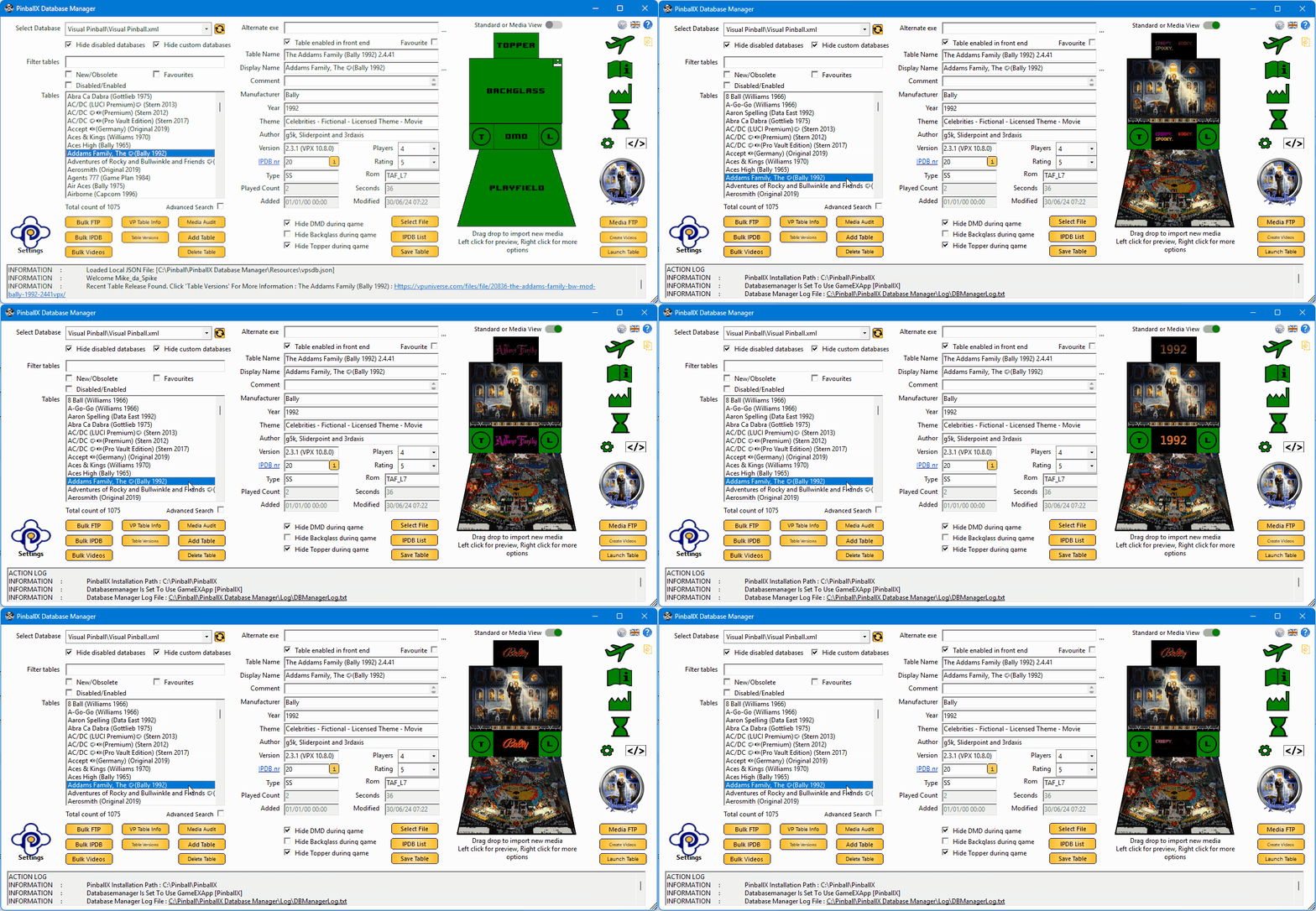
If you download the program and you like it, please leave a review with 5 stars rate at the download page ! After 2 1/2 months of programming, @scutters and I are proud to present to you PinballX Database Manger We created a program to manage your PinballX database files and your media files on a easy way. The download can be found in the download section : There is a manual attached in the setup as well. Thanks for the testers @simbamame, @BrandonLaw, @greynurse and @joyrider3774 GreyNurse give us the idea, to get information populate data from Visual Pinball tables (Author,Version and Rom) Very special thanks to Joyrider3774 who did a great job to find all kind of bugs during Beta testing. Thanks @Tom Speirs for letting us use PinballX logo's and for his approval to use FTP support. And off course for the great program PinballX he created with still a lot of support on it. Also that Tom added our custom fields to be filters in PinbalLX (PBX version 4.54 or higher) Thanks to Dux Retro who created a Google sheet with info for us that is used since version 1.9 ! Thanks to our translators @PcTeknic (Spanish), IJsblokje (German) and Rute O.(Portuguese) for helping translate 600+ words/sentences And a big thank to @scutters. Don't forget to mention him Without him, this program wasn't what it is now. Enjoy !
- 418 replies
-
- 11
-
-
-
- mikedaspike
- scutters
- (and 1 more)