|



headkaze
-
Posts
5120 -
Joined
-
Last visited
-
Days Won
37
Content Type
Profiles
Forums
Events
Downloads
Store
Articles
Everything posted by headkaze
-
Just use one of the buttons on your CP assigned to it, so you hold it down and use the joystick to scroll through the pages.
-
GameEx scan scroll through lists a page at a time. This is called the "paging" key (by default is the "C" key) held down along with up and down.
-
That's right, it's a feature "in the works".
-
Any place I can get these bezels in one zip file so I don't have to download each one?
-
Thanks Trixstar appreciate your help!
-
IE7 is nice, nothing that hasn't been done before. But it is cool to finally get tabbed browsing, something I'm very fond of. I do notice it's a little slower at starting up, but the tabbed browsing makes up for it.
-
Maybe you are Swedish and didn't realise it?
-
lingpanda I think your tutorials are f'n great and Tom should create a section for them on the official site. There is nothing easier than learning something through a visual way like that. Lets get Tom to check these out and lets find some place to host them. The only thing that I think you could improve upon is in the Setup Wizard ones, you should try and use Custom Wizard Mode more often, so you don't watch screen after screen of clicking Next. With Custom Mode you can select all the pages you want to demonstrate and go to them immediately. I would like to see more use of Custom Mode, because I put it in there after getting sick of clicking Next 1000 times! Apart from that I think you've done a stellar job. Again, Tom should make a place called Tutorials just for this!
-
Did it work for you before? I'm working on the audio thing still with loadman. I'm hoping to get this thing sorted soon. Thanks for your help.
-
Their website is currently down for maintenence, but when their back online check out http://www.daemon-tools.cc/dtcc/portal/daemonhelp.php
-
Good point Emphatic. I totally forgot to mention that!
-
Can you download again from the first post. I have changed the audio capture to use DirectSound. Can you see if it's still working for you now.
-
Check out the demo wav files on the FreeTTS site. I wonder if we can write a plugin for this voice, it sounds alot clearer than M$'s TTS. EDIT: Actually check out this demo for the AT&T TTS engine. You can write something into the website and it will say them in any voice. Pretty cool!
-
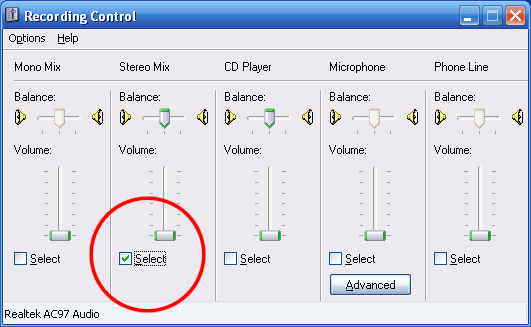
Okay, can you please download it again from the first post. I forgot to set the state to all on for the LED's before running the audio demo, so that would explain why it wouldn't work. You need to make sure your recording mode is set to Stereo Mix. So you need to select the Volume control application (Start > Programs > Accessories > Entertainment > Volume Control).
-
The following also works, but like I said in the other thread, Goodbye will not finish being said before the exit. The System.Threading.Thread.Sleep(2000); line does nothing to help the problem, it's the fact that it is being played asyncronously that solves the expection on exit. public void Event_App_Exit() { voice.Speak("Goodbye", SpeechLib.SpeechVoiceSpeakFlags.SVSFlagsAsync); }
-
Yeah, I'm not sure what's up with the audio thing just yet, but it appears it's not working as I expected it to, I'm hoping loadman will make a little video of it in action so I can figure out what is going on.
-
Did you manage to fix the Speech "Goodbye" bug?
-
So yeah your code will work, as will the above code. But it will cut out the voice halfway through. The code below dosn't work however... public void Event_App_Exit() { voice.Speak("Goodbye", 0); System.Threading.Thread.Sleep(2000); } I take it your not getting this exception at all?
-
20:09:41.1 26/11/2006: Testing Main Loop Once: Processing Frame 20:09:41.3 26/11/2006: Testing Main Loop Once: Main Loop ran successfully 20:09:48.5 26/11/2006: PlugIn: "Speak Game Name" caused an exception and is being disabled. 20:09:48.5 26/11/2006: Exception has been thrown by the target of an invocation. 20:09:48.6 26/11/2006: at System.Reflection.RuntimeMethodInfo.InternalInvoke(Object obj, BindingFlags invokeAttr, Binder binder, Object[] parameters, CultureInfo culture, Boolean isBinderDefault, Assembly caller, Boolean verifyAccess) 20:09:48.6 26/11/2006: at System.Reflection.RuntimeMethodInfo.InternalInvoke(Object obj, BindingFlags invokeAttr, Binder binder, Object[] parameters, CultureInfo culture, Boolean verifyAccess) 20:09:48.6 26/11/2006: at System.Reflection.RuntimeMethodInfo.Invoke(Object obj, BindingFlags invokeAttr, Binder binder, Object[] parameters, CultureInfo culture) 20:09:48.6 26/11/2006: at System.RuntimeType.InvokeMember(String name, BindingFlags invokeAttr, Binder binder, Object target, Object[] args, ParameterModifier[] modifiers, CultureInfo culture, String[] namedParameters) 20:09:48.6 26/11/2006: at GameEx.PlugIns.Event_AppExit() 20:09:48.6 26/11/2006: Exiting GameEx! 20:09:48.6 26/11/2006: Saving Settings 20:09:48.7 26/11/2006: Disposing Plugins 20:09:48.7 26/11/2006: Checking for applications to Launch On Exit All I have to do to get the above error is open GameEx, then close GameEx. So that narrows it down. Also removing the last "Goodbye" speech line removes the error. BTW We could use the SpeechLib.SpeechVoiceSpeakFlags.SVSFPurgeBeforeSpeak so it doesn't queue up speech. I think you can just | (OR) them together SpeechLib.SpeechVoiceSpeakFlags.SVSFPurgeBeforeSpeak | SpeechLib.SpeechVoiceSpeakFlags.SVSFlagsAsync Should mean it will speak without waiting and not queue up speech.
-
-
See my EDIT2, I think it's working fine aside for the Goodbye causing an exception when you exit. If I comment out voice.Speak("Goodbye", 0); I no longer get the exception. I think the bugs have been sorted now Yep I think I'm right about this one. Change the line to voice.Speak("Goodbye", SpeechLib.SpeechVoiceSpeakFlags.SVSFlagsAsync); and it will cut out the voice halfway through saying "Goodbye" but will not cause an exception. BTW You don't actually notice the exception unless you view the log file.
-
Nope still getting the same errors. Perhaps you need to change that true back to false. It might be causing the a problem. Since we FreeCoTaskMem I don't think it should destroy the structure first. This is after a fresh reboot, and when I exited GameEx I also got a Application Error. Sorry I always close them before I remember to take a screenshot. EDIT: There still is something wrong. Try running GameEx from remote desktop, the Plugin will cause an exception after you select a game. EDIT2: I think I've found out why I'm getting that error Tom. You must be Disposing the plugin before the "Goodbye" when you exit because I removed "voice.Speak("Goodbye", 0);" from the plugin and I don't get that error anymore. The second parameter in voice.Speak() as "0" means play asyncronously so when it finishes saying the word "Goodbye" it goes to return back to the plugin but it has been disposed already. I dunno, just a guess.
-
lol returning before freeing the the mem! Doh! I'm glad it was something simple
-
Still getting those "memory could not be read" errors. Also a new error message 18:31:01.5 26/11/2006: PlugIn: "Exit GameEx" caused an exception and is being disabled. 18:31:01.5 26/11/2006: Object reference not set to an instance of an object. 18:31:01.5 26/11/2006: at System.Runtime.InteropServices.Marshal.StructureToPtr(Object structure, IntPtr ptr, Boolean fDeleteOld) 18:31:01.5 26/11/2006: at GameEx.PlugIns.InvokeMethod(Object obj, String sProperty, Game_Info oValue) 18:31:01.5 26/11/2006: at GameEx.PlugIns.Event_GameShowInfo(Game_Info gi) 18:31:30.1 26/11/2006: PlugIn: "Speak Game Name" caused an exception and is being disabled. 18:31:30.1 26/11/2006: Exception has been thrown by the target of an invocation. 18:31:30.1 26/11/2006: at System.Reflection.RuntimeMethodInfo.InternalInvoke(Object obj, BindingFlags invokeAttr, Binder binder, Object[] parameters, CultureInfo culture, Boolean isBinderDefault, Assembly caller, Boolean verifyAccess) 18:31:30.1 26/11/2006: at System.Reflection.RuntimeMethodInfo.InternalInvoke(Object obj, BindingFlags invokeAttr, Binder binder, Object[] parameters, CultureInfo culture, Boolean verifyAccess) 18:31:30.1 26/11/2006: at System.Reflection.RuntimeMethodInfo.Invoke(Object obj, BindingFlags invokeAttr, Binder binder, Object[] parameters, CultureInfo culture) 18:31:30.1 26/11/2006: at System.RuntimeType.InvokeMember(String name, BindingFlags invokeAttr, Binder binder, Object target, Object[] args, ParameterModifier[] modifiers, CultureInfo culture, String[] namedParameters) 18:31:30.1 26/11/2006: at GameEx.PlugIns.Event_AppExit() 18:31:30.1 26/11/2006: Exiting GameEx! 18:31:30.1 26/11/2006: Saving Settings 18:31:30.2 26/11/2006: Disposing Plugins 18:31:30.2 26/11/2006: Checking for applications to Launch On Exit There is definately something fishing going on!
-
Can you not get the error on your machine? It's easy to get it to happen here. All I do is go into the Mame list, select the first game (005), press backspace, select game again, press backspace etc. a few times then it will cause the exception. I don't understand this, it was working fine before!