



|



headkaze
-
Posts
5120 -
Joined
-
Last visited
-
Days Won
37
Content Type
Profiles
Forums
Events
Downloads
Store
Articles
Everything posted by headkaze
-
I just noticed that Wasteds World has Pleasuredome torrents for download. That is a big no no and the quickest way to get shitlisted.
-
Maybe Tom tries to keep the aspect ratio of the video within the box area rather than stretching it to the exact dimensions of the bounding box? *shrugs* Nice work as always amos. I reakon a nice mono coloured image with about 70% opacity in the bg would pimp it out a bit more, but I still love it.
-

Completed Feature Requests (Moved)
headkaze replied to jr9770's topic in FAQs, Guides, & Other Useful Information
Lol, I just mentioned that to Tom the other day. Trust me things like this will be very easy to add to GameEx soon. Here's a hint: GameEx Plugin's -
For PC games, I quite often have to have ShowDesktop=true. Also, it may not help much, but I wrote a little command line tool that will launch a lnk and wait for it to finish. It's called runwaitlnk
-
You can read about it here
-
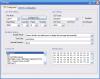
Do you have BetaBrite, BPP-440, CrystalFontz, PJRC, ProLite or LEDWiz hardware, then please run this test for a plugin I'm writing and report back here. To test it, just run LEDTest.exe and setup the COM port and enable the device, then select a game from the Controls.dat listbox. It should (hopefully) output game information to your LED/LCD Sign. For a LEDWiz, select the LEDWiz tab, setup your inputs on your LEDWiz, then select a game from Controls.dat (hopefully) the buttons for that game will light up. Also try the "Start Attract Mode" and "Stop Attract Mode" buttons for the LEDWiz. UPDATE: The LEDWiz code is confirmed as working. I'm looking at improving the LEDWiz dancing to music feature. UPDATE 2: The dancing to music feature has been improved. UPDATE 3: Bug fix. Fixed bit order for LWZ_SBA() Thanks for your time! LCDTest.zip

-
Hey Sam, if you like LEDWizLighter you are gonna love the new plugin I'm working on. It's a good idea to add support for other emulators other than Mame. I need some people to test the plugin in it's current form, and I will consider adding support for multiple emulators. Check out my new topic about the LED/LCD Plugin for GameEx.
-
Your not the only one who has been confused by that! That line is just debug output and is not the actual command used to launch the emulator. The way GameEx works is it creates a batch file called DATA\runitgame.bat and launches that. So to test the last game launched from GameEx outside of GameEx try running runitgame.bat and see what happens.
-
You can of course use the Selector Bar pack which incidently I used the exact technique described by amos to create. Or there is the Selector bar creator in the Theme Editor which can generate them for you.
-
GameEx currently only exits using CTRL-ALT-DEL when you disable exit in GameEx. BUT there will be a password exit feature coming soon
-
First of all I just wanted to say that WinUAE is by far the hardest emulator to set up on a cab, so it's understandable that your having a problem. The Setup Wizard has not been designed to be so intelligent. Considering one may place an emulator in any folder it would be arrogant of me to assume the place they download is the place I should modify the config folder to point to. It only has a default location, so if you download using the default location, the paths are already setup, otherwise you have to change them yourself. It's the reason there is a default path, if you use the default it's easier to setup. The Setup Wizard can be run at any time, so you can imagine how annoying it would be if the Wizard changed your config settings every time you ran it to some path that's wrong. It's just too hard to predict things like that. The WinUAE Config Creator is not very intuitive I know. First of all it's only recent versions of WinUAE that have support for 7Zip. So I don't think the Config Creator even searches for 7Zip files I think it searches for the adf files, so you need to extract them. The problem is that WinUAE needs a config file to run a game from command line. So you have to create a config file for EVERY game. So the way you do it is you setup your controls etc. for a game and use that config with the WinUAE Config Creator to generate the configs for every ROM. GameEx launches WinUAE with the config as the parameter NOT the ROM. Finally, I have not setup WinUAE on my cab since my recent reinstall of GameEx. So I am going to re-write the WinUAE Config Creator so that it works with 7Zip and a few other things I want to include like the ability to setup your controls from it. I think it's really confusing setting up the controls for WinUAE. If someone wants to help me they can find out where WinUAE stores the joystick info in the config. For example, if you have an IPAC and set up the default keys to be mapped to the Amiga joystick input where does it save this info? I would like to be able to have it so this info can be entered into the Config Creator so you don't have to rummage through and setup your key input through WinUAE (which from memory is a nightmare).
-
LEDWizLighter is not complete because I didn't realise that controls.ini only has controls for parent ROMs. But forget LEDWizLighter anyway, there is a better solution coming I can't say too much as Tom will announce it when the new version of GameEx is released. All I can say is that LEDWiz will be better supported soon and fully integrated into GameEx, including the ability to light up controls while you scroll through the list. Eventually I hope to include some attract mode patterns also. We will need some testers, so keep your eye on the boards because I will be looking for people soon.
-
Press CTRL-ALT-DEL.. then Task Manager.. File->New Task (Run...) then type "explorer.exe". That should get you back to your shell, then you can run Instant Sheller again to undo the changes.
-
Hi sty151, thanks for the feedback I'm glad you find the Setup Wizard helpful. Thanks for spotting the config mistake, I'll let Tom know about it.
-
If it's worthwhile I'll rewrite the wrapper to support this version.
-
There is also a program called MNG2AVI which will convert your MNG's to AVI. Or you can always download the set on pleasuredome, although I find the audio for those a little crappy.
-
Did they get that name from GameEx? lol I wonder I also wonder.. did it start out as this? Also does it work with my chankast_launch wrapper?
-
The Setup Wizard can be helpful for cases like this. Select Start->Programs->GameEx->Setup Wizard. Then select Custom->Joystick Input. Click the "..." button to map the navigation setting to a button on your joystick.

-
You can get the log file in your GameEx directory under LOG\log.txt. The full default location is C:\Program Files\GameEx\LOG\log.txt
-
You should also make sure you don't have the official DivX/XVid codecs installed as they will often be used instead of ffdshow and they don't work with GameEx. Also the latest version of ffdshow will not work with GameEx. So uninstall ALL of your codecs then install ffdshow-20051129.exe.
-
Why are you telling people not to use the Wizard? If you browse your Mame path in the Wizard it automatically finds the most recent Mame exe and all the other paths for you. More than likely the default paths are not matching the actual paths or the name of the exe is wrong. But there is no benefit to using the standard configurator over the Wizard. In fact the Wizard is more intuitive in many ways.
-
It's important you setup your emulators to run in fullscreen mode outside of GameEx. Different emulators work different in how you achieve that. But if you are using the configs that come with GameEx they should have the correct command line parameters. All you have to do is make sure it runs in full screen otherwise you will get booted back to GameEx.
-
Actually I was aware of the batch file GameEx creates for launching an emulator. DATA\runitgame.bat. Totally forgot about it! @ECHO OFF C: CD "C:\Emulators\Mame32" Mame32.exe bzone -rompath "C:\Roms\Mame" -triplebuffer -nowindow -joy You should probably try running that to see if the game launches. The log file is obviously not the command it uses to launch. Oops
-
Have you got custom input turned on in the config program?
-
That's not true, running from start does not run cmd, so it's not running twice. Well, if your Mame and Roms are not located in the same place as his then of course you will get nothing! Okay, I've done some testing myself, running the following on my machine (with paths changed) does not work... Start->Run cmd /c C: C:\Emulators\Mame32\Mame32.exe bzone -rompath C:\Roms\Mame -volume -32 But this DOES work... Start->Run cmd /c C:\Emulators\Mame32\Mame32.exe bzone -rompath C:\Roms\Mame -volume -32 After launching bzone from GameEx I get the following from the log file... 05:52:59.8 2/11/2006: Running: cmd.exe /c C: C:\Emulators\Mame32\Mame32.exe bzone -rompath C:\Roms\Mame -triplebuffer -nowindow -joy The game launched fine from GameEx with that line above, so now I'm pretty sure there is something other than GameEx causing your problem.


