



|



headkaze
-
Posts
5120 -
Joined
-
Last visited
-
Days Won
37
Content Type
Profiles
Forums
Events
Downloads
Store
Articles
Everything posted by headkaze
-
Yeah I'm with Tom on that one, I love the Mame attract screensaver, it kicks ass all over plain old videos. I do have a few videos playing but I have the higher ratio on Mame. Nothing better than having my cab sitting there showing me games to try I'm guessing you have video game ads or something from EmuMovies?
-
GameEx already shows previews of videos but it uses the actual videos for the preview so you shouldn't need to create any yourself.
-

All contributiors of wrappers, launchers, utils, docs etc Please Read
headkaze replied to Tom Speirs's topic in General
Okay I found them, they are actually on ConfigHQ. http://www.hfc-essentials.net/gameex/tutorials.php along with some tools http://www.hfc-essentials.net/gameex/othertools.php -
All contributiors of wrappers, launchers, utils, docs etc Please Read
headkaze replied to Tom Speirs's topic in General
What about all those tutorials made my lingpanda? Some of them are @ http://www.gameex.info/forums/index.php?showtopic=2759 Okay I tried downloading them but they have been removed. Perhaps you can contact him by e-mail Tom and get him to send them to you for hosting? I've also sent of my utils/wrappers etc. to your e-mail. -
All contributiors of wrappers, launchers, utils, docs etc Please Read
headkaze replied to Tom Speirs's topic in General
You dont really need a wrapper for ScummVM, I use a folder with empty file entries, a map file and ScummVM.ini. But I suppose a wrapper would make it easier to use. I've attached the file to show what I mean anyway. ScummVM.zip -
All contributiors of wrappers, launchers, utils, docs etc Please Read
headkaze replied to Tom Speirs's topic in General
Guys an easy way to find what you've attached is to go into your "My Controls" area and click "Manage Attachments" from the menu on the left. I'll go through and send them to you via e-mail Tom. -
Try using the -d3d option in Mame command line settings. You may experience stuttering using the old -dd option (Direct Draw). I had that sound stutter problem on my fairly decent machine.
-
Part of the reason why this project is taking so long (apart from all the new features I keep adding on), is that it has a full featured CP Editor built in that is always available to tweak and edit your own CP. I have created a few of the default CP's with it and it is very easy to use. So in short, yes there is a CPEditor and yes it is full featured BTW I thought from the first few screenshots that was obvious. They are of the actual editor in action, although you can't tell I guess but you can drag all those buttons around and have a huge selection of controls to add and remove as you please. Even though I wrote the GameEx Theme Editor and it's CPEditor, this one is written from scratch and it alot more flexible. I guess in a way it will replace that, but there will still be the GameEx built in CP viewer to use while inside GameEx.
-
I worked in Helpdesk for a few years and if someone rang up and said "I can't connect to the internet" or something along those lines, the first thing we would say is "have you tried rebooting your machine?". 9 times out of 10 it solves the problem
-
Look under your Mame menu. Do a list update for the MAWS Hall of Fame.
-
Thanks one2three these are really good quality. I will add these in when I get some time EDIT: I might have to offer these as a separate download, the package is already huge with the graphics I have already. I have removed the backgrounds in these images though.
-
Here is a program that will convert a color to the number needed in a Theme.ini file. ColorCode.zip
-
I have most of the graphics I want already, but I can take a look at what you've got. Sorry I should have mentioned this I didn't realise people were still hunting for graphics. Yes this will work pretty much like how the current GameEx CP viewer works and of course it will mesh smoothly with GameEx This is what I refer to as a "companion" program that runs in the background.
-
Actually I may be wrong there. It does at least give an error message as to what is going wrong. From memory I got a .NET error that didn't say anything about the problem causing it.
-
Yep I've had that problem many times before myself, and I can tell you it will not be an easy bug for Tom to track down.
-
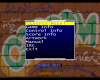
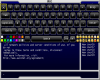
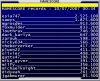
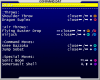
Sorry I havn't given any updates on the progress of this lately, but I've had some technical problems at home which has taken my mind off the project a bit. But I have some exciting features to announce that should make it into the first version. First of all I have two new features to announce to the CPViewer, first is IRC and the second is Highscore tables. Screenshots are attached to wet your appitite. I'm sorry about the delay I have been working on this and a release should be soon.


-
Hey don't be sorry, your work is always appriciated, I'm sorry if I didn't sound thankful for the work you do but I am. There are so many great contributors to GameEx, it's not just a piece of software anymore - it's a community!
-
Havn't you heard the saying "don't drink and configure or your a bloody idiot"?
-
Looks to me like you've deleted some important files. Try downloading the theme your using again, or just restore all the deleted files from your Recycle Bin. It really is an insignificant amount of space it uses.
-
The problem you are experiencing is called "tearing" and it's cause by the screen refresh being out of sync with the monitor refresh rate. There is a setting in your display settings called VSync or Vertical Sync which will cause the monitor refresh to be synced with the display refresh (if the software uses the default refresh rate which quite often it does). This will also mean you should crank up your monitor's refresh rate as far as it goes. 75Hz is standard for most LCD's these days but you might get higher on a CRT.
-
Hey Brian, a better portable document format is.. well pdf hehe. Check out PDFCreator it's a free download and basically adds a printer to your PC. When you print to this printer it writes to a pdf file instead, so you can just print to it from Word and it will create a pdf for you.
-
Woohoo! Love this one
-
Woah how big are your hands! Those buttons are too far apart for my liking!
-
You already won a free licence bkenobi! And perhaps it was something to do with your contribution to the board? (I have a sneeky suspicion it did) http://www.gameex.info/forums/index.php?s=...ost&p=22772
-
To eliminate elements, make the png file totally black.


