|



Adultery
-
Posts
10152 -
Joined
-
Last visited
-
Days Won
159
Content Type
Profiles
Forums
Events
Downloads
Store
Articles
Everything posted by Adultery
-
Because that's the parent ROM and in a "clean list", all others would be filtered. You must have either clones off or something. If you want all your games and not just the parent sets you need to turn some filters off in GameEx's ADVANCED MAME CONFIGURATION. In this case if you wanted the 4-player version you would just add xmene.zip to the DO NOT FILTER list. )
-
I needed a way to assign specific profiles to specific games, so I added it in. An update will be forthcoming soon.
-
Start a new topic in main and I'd be glad to help ya.
-
A flavor explosion not flavored with bong er I mean bog water? LOLOL! Or should I say... Liquid AWESOME????? Wow look at me! I can make a four leaf clover in my horse manure based liquid pork chop! Chicks will love me as I puke up black tar after the night's over! LOL! All prodding aside, Guinness sucks.
-
What is this the Guinness Penis Stroking thread now? LOL! You deserve that cut for drinking shitty beer!!!!
-
It's out. Download it from the first post. Tested and working in all kinds of crazy situations. LOL! I SHOULD ALSO MENTION that MAME doesn't support DirectInput, so this will not work without modification to MAME.EXE. Mmmkay?
-
@HK: Thanks, I know I needed one, so I figured I should make one. Well, that and it's easier than explaining it to folks. @Drac: Well... *big breath* The configuration side was 100%, reading and writing configs no problems, I added the GameEx code today and haven't tested it yet, but it's pretty simple to put together once the XML parsing is done so I don't see any big issues there. Once I release it, I'll update. Unrelated: Anything planned in Plugin system implementations on the horizon? It'd be cool to get the rest of these features (a bunch of things say "not supported" in the plugin template). Not complaining, mind you... I'm sure there's plenty more stuff to play with in there. Just wishing/wondering.
-
Actually I prefer a wireless one, but to each their own. Thanks for the kind words Han.
-
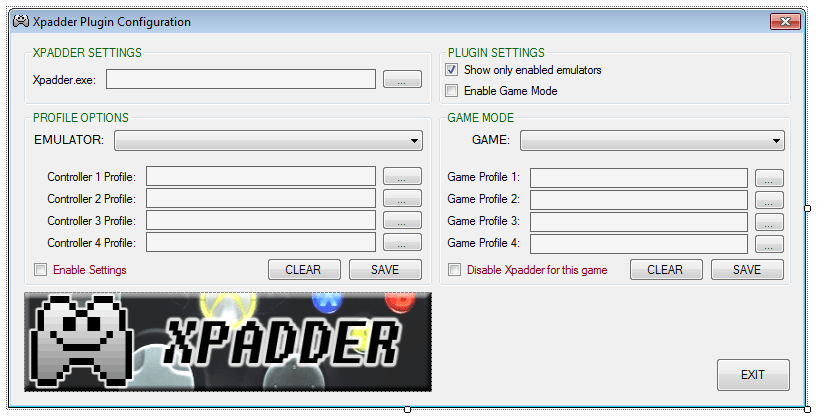
XPADDER PLUGIN Current Version: 1.3.8 What is this thing? It's an Xpadder plugin for GameEx! Seamlessly integrate Xpadder with GameEx with just a few simple clicks. Set the path to your Xpadder.exe, select your emulators from the drop down list, then set up your controller profiles. When GameEx runs the emulator you select, the magic happens in the background. No need to worry about .bat files or messy LaunchBefore/LaunchAfter commands. Say farewell to blank Xpadder profiles! This plugin handles the launching, the closing, and the profile switching quickly and easily without the hassle. If you use Xpadder, you'll love it! /end sales pitch OK, so how do I use it? It's simple really. Here's the rundown: Create your Xpadder profiles, or use your existing ones. Unzip the PLUGINS folder to your GameEx directory. Launch the Plugin Manager from your GameEx start menu folder. Point the plugin at Xpadder.exe Select the emulator (or GameEx interface) from the drop-down list. Browse to your Xpadder profiles. Click "SAVE" Play your games! OTHER FEATURES: Click the "EDIT" button next to your profile to launch Xpadder and change your key mappings on the fly Check the box to leave Xpadder running when GameEx updates Check the box to load blank profiles instead of closing Xpadder while GameEx is running Check the games in subfolders option if you keep your games in subdirectories Set up profiles for each individual game installed, or set the option to disable Xpadder for the game Wow that's super easy! What if I find a bug? Report it here! Any questions? Ask away. Feel free to offer suggestions on how I can make it better. If you have a bug, please upload a copy of both your GameEx log and the plugin log so I can address it in a timely manner. Download it here: Download @ GameEx Community Download Portal.
-
I can't speak for Tom, but it's probably easier to address areas in code this way than to use a seperate INI section for each (maybe not though). Really depends on the code. We should just switch to XML parsing anyhow. <General> <Emulator_10> <VideoSnapPath>F:\EMULATORS\SNES\Assets\Videosnaps</VideoSnapPath> <CustomArtPath1>F:\EMULATORS\SNES\Assets\Adverts</CustomArtPath1> <CustomArtName1>Locandina</CustomArtName1> </Emulator_10> </General> /my 2c: EDIT: NM. These seem to be marked as INTERNAL in the INI. There are still [EMULATOR] sections in there.
-
Maybe you have GameEx installed in more than one place? Do a search for gameex.exe and see if more than one exe pops up. :EDIT: Dang, Tom beat me! LOL!
-
No problem! Marking this as [RESOLVED]!
-
It'd be rare. Tom may need to step in here.
-
This has been updated by the way. 2.0 adds a GUI and a couple minor changes (moved the log and ini to it's own folder instead of the root directory), but at it's core,code inside is still Headkaze's. It might be inside GameEx already, but if not here's the rar:
-
GameEx Plugins MAME Commander 2 / MAME Commander Lite A plugin for GameEx to fully control your MAME collection. You an easily apply any MAME command-line arguments on a per-game basis. Type them in or simply select them from a drop-down list. Set an emulator to launch instead of MAME. Apply Launch/Before/Launch After/Also Launch commands on a per game basis. Set overrides for your global command line on a per game basis. Lots more! MAME Commander Lite is a more basic version, without the switch database and a simple interface. You can also search MAME for games without loading a bulky XML file. Xpadder Plugin (GameEx Edition) Xpadder Plugin (PinballX Edition) A plugin for GameEx that integrates Xpadder seamlessly, taking the guess work out of setting up your profiles to run with your emulators and games. You can also edit your profiles and assign profiles to specific games from within the plugin's configuration. The PinballX port of this plugin allows kepad editing and profiles for each system emulated. Per-game profiles will be coming in a later update. Game Info Plugin A plugin for GameEx that displays game info and jukebox data on your secondary monitor, and also retains some information like play time, count, and last played date. All the graphics are customizable, and there is Last.FM functionality available via a patch. Virtual Drive Loader A plugin for GameEx that integrates Daemon Tools (or any other virtual drive with CL support). This also supports ROMs in folders, which native GameEx support currently does not. Hi-Score Snapper A plugin for GameEx that takes snapshots of your high scores for the GameEx Hi Scire Competition. The plugin also adds some mandatory info to the snap, and uses a watermark to authenticate submissions. QuickLaunch (GameEx Edition) QuickLaunch (PinballX Edition) A plugin for GameEx to launch programs with selected emulators. Supports multiple Launch Before, Launch After, and Also Launch commands, customizable from the plugin configuration. This also supports many GameEx ROM variables. The PinballX port also supports multiple Launch Before, Launch After, and Also Launch commands, and also supports many PinballX ROM variables. Visual Pinball Plugin A plugin for GameEx that hides the Visual Pinball table editor with something more customizable, and handles the exiting of the emulator gracefully without a complicated setup. This project is discontinued with the advent of PinballX. GameEx Projects GameEx Favorites Manager Build ROM sets based off of your GameEx favorites file. Launcher-X A simple EXE that is meant to be launched instead of GameEx or PinballX. The EXE will allow users to launch your front end automatically after 60 seconds (or any other time you specify). Especially useful for users that don't use Instant Sheller but still want to launch GameEx/PinballX on startup, while still being able to us their gaming rig as a PC. DracLabs Plugin Downloader This program makes it possible for you to download all of my GameEx plugins, launch the Plugin Manager to make changes, see what's available and what each plugin is for, keep up to date on the latest versions (as well as update your existing plugins), and read the latest blurbs from DracLabs Software. GameEx Hi-Score Database Manager Simply put, this is the offical tool for keeping track of the GameEx Hi-Score Competition database, the overall leaderboard, and the RSS. This software can be downloaded and used by the general public, but is not accessible for making chanes unless you have been added to the database management crew. MegaMAME Theme A theme for GameEx featuring a fully skinned interface, emulator screens, a controller template, and PSD files to make your own screens. This theme also includes Draco1962's logo pack. BlueBox Mod Theme A modified version of Greatflash's BlueBox theme, featuring many custom emulator pages and the PSD to create your own. This theme also includes Draco1962's logo pack. Other Projects Abobo's Big Adventure GUI A front end for the fan game Abobo's Big Adventure. Features a skinnable interface and integrated keymapper app support, and is offline compatible. Last.FM Data Machine An app used to tag mp3s, look up artist and album data, get artist and album art, cross-reference with MusicBrainz (useful for MusicBrainz Picard), and more. This app also has an online updater. Map File Maker A utility for creating and editing MAP files used to create game lists for GameEx. Add color, select from popular ROM naming formats (NoIntro, AdvanScene, Good Name, TOSEC), import and export XML-based color schemes to make your lists pop! This app also has an online updater. Plugin Development Tools GameEx VB.NET 2010 Plugin Project Template A fully documented snap-in project template for Visual Studio 2010+ for developing GameEx plugins. PinballX VB.NET 2012 Plugin Project Template A fully documented snap-in project template for Visual Studio 2012+ for developing PinballX plugins. Function Logger for GameEx A GameEx plugin that logs events and variables when GameEx is active. Function Logger for PinballX A PinballX plugin that logs events and variables when PinballX is active.

-
- 7
-

-
Thanks! And happy fathers day! I have 2 boys, one I made and one I acquired through adoption. Its a gift in and of itself!
-
Me too! Now let me see if I can fill it up with crap! Lol!
-
Either you didn't run the reg key or your system isn't online. Mine's working. Re-run the reg fie if you already have and see if it works.
-
Nah. You need to go to 'get a gamer tag' on Gameex.com
-
It's likely got something to do with the pruning Tom mentioned (the attachments were getting to be a lot of excess load on the server). He may have put a restriction in place to keep it from happening again. I will ATTN: TOM to the post, he can elaborate further.
-
Thanks Tom!
-
It doesn't really bother me (I like the loading screen a lot), but it's been that way since you fixed the loading screen.
-
So I see we got a new progress bar, eh? I updated the update screen to look a bit nicer, and to make the progress bar seem as if it were part of the theme. Now that the loading screen has been fixed, I'm updating that next.
-
Do you maybe have GameEx installed in two places on your hdd? That would explain the reg issue and the custom menus one. I've seen it happen where a user changes the install location and the registry doesn't get updated.
-
The only thing I keep on the cloud is my music collection so I can Bluetooth it into my car stereo. Google Music does a great job of that (20k songs free).