|



Adultery
-
Posts
10152 -
Joined
-
Last visited
-
Days Won
159
Content Type
Profiles
Forums
Events
Downloads
Store
Articles
Everything posted by Adultery
-
I wanna test it out myself first, but I added a "PREVIEW" button to the config so you can see what your screen will look like, and I added several more colors for the font. I also added a field so you can customize the text on the screen where it says "Preparing table... Please wait!" Should be a new beta soon.
-
I think issue one is an issue with unicode chars, which is indeed a bug. However, for issue #2, Tom probably doesn't inspect FileAttributes of each file in the directory when he does the file list, so it would pick up all media as opposed to only media that's not "hidden".
-
It must be beta day! I just uploaded a new beta that closes Xpadder from command line instead of killing it (that should fix the multiple icons in the notification area). I also did a number on the whole process class I was using... There was a speed improvement after all was said and done. Enjoy!
-
I just put up a beta for you to toy with (if anyone would be so kind). Changes: Added Drac's custom made logo to the config form (Thanks buddy! It looks great!) Added a check to see when Visual Pinball goes full screen (no need for setting the delay anymore) Better integration with Howardc's Visual Pinball launcher (GetAsyncKeyState was crashing the plugin when his launcher was running) Other minor optimizations to code I would really appreciate some testing.
-
I don't understand why they're in the INI to begin with is the problem, you should be able to choose it how you like without screwing with the INI in the emulator's config. You could simply delete those entries that specify files for specific emulators. It's probably the emulator's TitleText property.
-
That shouldn't matter if you selected the page manually from "Advanced Emulator Setup".
-
Updated to 1.0.1, please reconfigure the plugin with this new version (the old one didn't support multiple emulators). Also did a little tweaking to make this plugin meld well with howardc's Visual Pinball Wrapper (see notes above). Thanks for the props everyone, and happy 4th of July + 1.
-
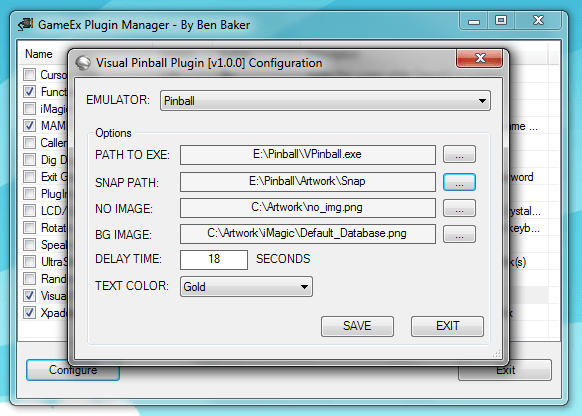
Visual Pinball Plugin 1.0.2 What is it? If you use Visual Pinball/PinMAME, I don't have to tell you what a bummer it is when you fire up the rig for some hot Street Fighter pinball action and your guests stare at the table editor like deer in the headlights. Maybe it was a pain in the ass for you to set up too? I know it was for me! After I finally figured out how to load the tables, I couldn't exit them without a mouse. Yeah, I hear ya saying "well gee Adultery, there's an AutoIT loader for that". Sure there is, but I'd rather not get complicated with it. I just wanna set it up and play pinball. Enter the plugin. Basically you set up a couple things and let the plugin handle your "light work" for ya. Launch the table, a nice, pretty, and customizable form comes up and covers up the table editor, then goes away so you can play your game. Simple as that. I juiced it up some too... You can press [ESC] to get out of the emulator quickly and get back to picking new games to play! I won't get too technical on ya, but basically when you press [ESC], GetAsyncKeyState picks it up and sends the "Q" that quits to the editor. Then before ya know it, the process is stopped automagically and you're all set! No need for mapping anything! Well, except your play keys! LOL! I even took it a step farther and built in a nice pinball-ish LED font. Yay for fashion!!! That's it! Nothing to it, right? How do I use it? Three minutes or less and you're all set. Select your Visual Pinball emulator from the drop down list. Browse to the Visual Pinball EXE. Set your snap path that you'd like to show on the "cover" screen. (Yes! Animated GIFs are supported too!) Set a default snap for that rare occasion you don't have a snap to show off. Choose the background image you'd like to use. Select the color you want the text to be. Click "SAVE" or "PREVIEW" Go play, hassle free! Wow that's super easy! What if I find a bug? Report it here! Any questions? Ask away. Feel free to offer suggestions on how I can make it better. If some cool thing occurs to me or is suggested I'll happily post a beta here for you to try. I spent all day yesterday and all night last night testing and tweaking this (it's almost 10 AM and I've had it for the night). It's working perfectly now. Goodnight my friends! Download it here: Beta Version: There is currently no beta available for this plugin. NOTES: Special thanks to Tempest for his Visual Pinball wrapper... It served me well over the years. This plugin is sort of a tribute to that. I also want to recommend howardc's Visual Pinball Launcher. It really is sweet! If you haven't tried it... You should! Update 1.0.1 ensures compatibility with his awesome work.

-
Oh it is! I can beat it though thanks to G4. If there's something in there you want, you need to do some studying first. I used this same tip to get the Zelda plushie I have in my man cave. The magic number was 15 in that case. I spent at least 4 hours watching and learning.
-
Ahh it was nothing really... I already had the backend done way before iMagic even. I would really like to see more plugins come down the pipe... The plugin system just didn't feel "approachable" to me at first and I intend to change all that.
-
Goldeneye plays like shit on my rig! Any suggestions on emulator/setup for that game? TBH, I REALLY wanna play Perfect Dark, and if Goldeneye will work I assume PD will too.
-
LOL @ naborneo! You sooo crazy! Looks cool though, your party was bangin' I bet!!!
-
Updated to 2.2: Thanks a million Bigby for the rigorous testing! The plugin now works 100% with DTLite, and case is irrelevant in variable names.
-
Function Logger - 1.1.0 - What is it? It's a Plugin Development tool that does some logging of plugin data. If you need to know what event is triggered when, this tool is your friend! You can log everything, only events, only menu changes, and only inputs with a check in the appropriate box. Select the option to log GameData if you're tracking the GameExInfo variables, and select the UI Timer option to log GameEx timer ticks. I've been using this plugin for a while so I can learn my way around GameEx's PlugIn system, and I added an interface for the end user so you don't have to struggle to learn the ins and outs like I did my first time. How do I use it? Configure it, and enable it in the PlugIn Manager. By default (in its unconfigured state) it logs all activity and game data. What if I find a bug? Report it here! Any questions? Ask away. Feel free to offer suggestions on how I can make it better. Download it here: Download @ The GameEx Community Download Portal NOTES: I'm still working on enumerating the MenuChange event. If you use this and you get an "Unknown Menu!" popup in GameEx when you select an item, it would be helpful to me if you could post the menu number and the menu that was up on the screen at the time it was displayed so I can add it in to the MenuNumber enum in the plugin system. If you miss the popup, you can also find it in the log.
- 10 replies
-
- 5
-

-
- plugin
- function logger
- (and 1 more)
-
http://retroarcade.hfc-essentials.com/Retro_Arcade_HD.rar
-
OK, I need more info on this. Do me a favor: Overwrite your plugin with this one: Then go to GameEx/Plugins/PlugInLaunch and post a copy of the log file for me.
-
@Bigby: Meet me in chat. I'll see if I can isolate the problem.
-
So the whole line in the table of plugins is colored (the line that contains the plugin you want to configure), as in highlighted and not checked, and then you hit configure? Its working just fine for me.
-
Well in their case they make a bajillion dollars, and you could have been more seriously injured. There's no excuse for weak glass if they test it properly. If Tom put out GameEx with a block of code that chops your hand off I'd sue his ass. Just saying.
-
I got caught slipping! LOL! Had to change something (I was using the ComboBox.SelectedText property when I should have been using ComboBox.SelectedItem). This is gonna need an update. After I know it works I'll post a new version. Sorry guys. :*(
-
Holly balls sacks. I can't believe I made such a rookie mistake! LOL! Had to change: comboEmulators.SelectedText() To: comboEmulators.SelectedItem.ToString() I probably shoulda used a datatable instead, but oh well. Fricking embarassing! LOL!!!! So this works, I addressed that bug, added in the block that lists all emulators instead of the enabled ones, and fixed another bug lurking in there. I can see I have to perform some cleanup on this before I make it an official release, but here's a 100% functional version for you to use in the mean time. Sorry for my n00b1ne$$!
-
Ruh roh! Lemmie have a look. Just a sec.
-
Did you click the plugin and highlight it first?
-
In the GameEx start menu folder select the PLUGIN MANAGER.
-
I'm till willing to bet you could have gotten a lot more if you'd been more pissed or threatened legal action.