|



Adultery
-
Posts
10152 -
Joined
-
Last visited
-
Days Won
159
Content Type
Profiles
Forums
Events
Downloads
Store
Articles
Everything posted by Adultery
-
Lame!
-
These are smexy! They would look nice in Game Extender.
-
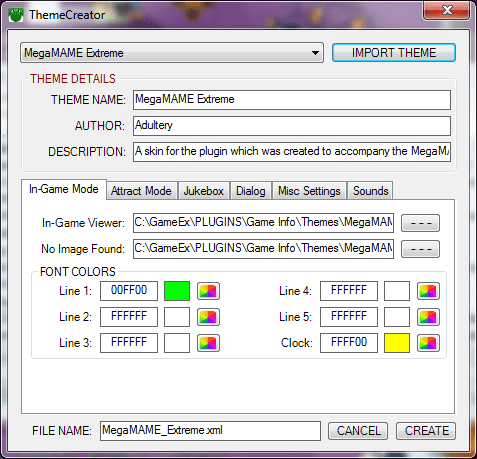
So as of the next installation of GameEx, the MegaMAME theme will no longer be included in the installer (the size was so big, it just made sense not to include it). That being said, you can always download the full version of the plugin, along with all the themes, from the Plugin Downloader. I also offer themes on my web site for you to download. I will likely also add a Theme Downloader to the configuration window in the future. I am also working on a way to create themes easily within the configuration menu itself. Here's a sneak peek: Using this you will be able to not only edit existing themes, but quickly and easily create your own without any need to know the way the XML is laid out. Just point the various fields at your images or font, pick your colors either by typing HTML codes or using the Color Picker dialog, press the CREATE button, and select your theme from the Theme Picker option in the configuration. This is gonna take some time to finish, so don't hold your breath or anything... I'll probably have the downloader and the theme creator done at the same time and just push out a major release instead of offering betas. Thanks for your continued interest in this project.
-
You're probably behind on your updates too if you haven't used it for months. :-)
-
As for databases, you are right, it's sqlite if you wanted to make edits. Feel free to share then when you're finished as well. :-)
-
 Yup, he's a decent guy to have on your side. :-) Sorry we couldn't help ya, Steam is still a new feature to the community. I think we all learned something though. :-) I updated my Steam app today and all is working great. :-)
 -
Aww shucks! Happy birthday GreatFlash! I hope you have another truly awesome year. May you prosper at everything you set out to achieve. Godspeed my friend.
-
Oh okay, gotcha.
-
I imagine if you were to register it that problem will go away. :-)
-
Yeah that's too be expected, if there's a problem loading the custom bak for whatever reason, it defaults to the emubak. This happens sometimes to me as I mentioned before.
-
I'm not sure but are you running more than one install? Or did you install in a different location? Are you sure you ran the right reg key? Did you run it as administrator? I think the problem is a location issue personally. Do a search for gameex.exe or gameex.ini and see if either pulls more than one result.
-
Thanks for the patience, friend. I went ahead and added this feature to the new version. Just check the box "Don't change state on game exit" and you should be all set. My internet sucks at work, so until I can update the portal, you can download it from the Plugin Downloader software, or get it from here. Version 1.1.9 Released! Added option not to change Xpadder state when game exitsAdded a label displaying your current version of Xpadder and your host ID
-
Well jeez, thanks! :-)
-
Just make a new one in the main forum, and call it "Steam issues" or something.
-
If you had a 2nd monitor you can see the high score leaderboard while you are actually playing the game using Game Info. Aside from that unfortunately there's no way to do this, but you can point MAME at the official RSS feed using the Theme Editor so all the top scores scroll along the bottom of the MAME game selection menus.
-
Are your Rom files in subfolders? Like is the folder tree: psx/roms/road rash/game.iso ? If not and all your iso files are in the main folder, disable the ROMs in subfolders option in your emulator config. :-) Probably couldn't hurt to change your Rom filter to whatever the rom file type is while you're at it. :-)
- 7 replies
-
- 1
-

-
- psx
- extensions
- (and 2 more)
-
I should have mentioned that to clear the font color and the background folder, you just remove the text in the appropriate box, which then deletes the node for that emulator. :-)
-
Yeah it shows up as soon as it gets installed. For me anyways. :-)
-
Well if you wanted a quick fix, make .lnk files of the games and put them in a folder. Name them however you would like them to appear in the game list. Then create a new emulator. Use the link folder as the working path, set the rom filter as *.lnk, and set the command line as "[RomPath]\[RomFile]" You can set the rest of the options that you would like, such as the artwork directories. That will at least get you by for the time being. :-)
-
Okay, I jumped the gun and missed a bug where Attract Mode Info wasn't pulsing correctly. Instead of forcing an update just to fix that, I also added some fun new stuff. Here's a peek at the new Status Icons I added to the configuration form: In order, the icons are for Last.FM, Check For Updates, Extender Viewer, Control Panel Viewer, Plugin Co-op, Hi-Score Viewer, and Audio. If a feature is disabled it has a red slash through it, like the Audio Status icon above. I also added new emulator options: You can now specify a folder containing backgrounds for the In-Game Viewer. If there's a match on the image based on the ROM name, the image will be displayed instead of the generic In-Game viewer. You can also set an override font color for that specific emulator if a custom image is found. That will be it for a while hopefully, I just didn't want to put out a new version without adding something of value. Here's the official rundown: Version 1.2.6 released! (CONFIGURATION) Added new features to the Configuration FormNew status icons showing wether features are enabled or disabled in the pluginAdded custom backgrounds option for emulatorsThe Game Info Viewer will now look to the folder you specify for custom Game Info Viewer backgrounds. As with any other artwork, the viewer image must be named the same as the image you wish to useAdded a Font Color override which takes effect of a custom label is found (Colors must be in HTML format)(CONFIGURATION) Added option to enable or disable Hi-Score Snapper Co-op(PLUGIN) Added Hi-Score Snapper plugin co-op, which displays a camera icon for Hi-Score games in the Icon Viewer while the game is running(PLUGIN) Fixed a bug on the Attract Info Viewer where pulse wasn't working properlyGet more details and a download link from the first page.
-
Just to be clear, these games you have installed in Steam, are they just Windows games you imported in from your own library or games you bought off the Steam store?
-
Who knows, he's got me stumped here... @OP: Remind me, what's your GameEx install path? And you have Steam installed in C:/Steam right? You shouldn't need wrappers for most games...
-
Actually it was Tom's idea.