|



Draco1962
-
Posts
19254 -
Joined
-
Last visited
-
Days Won
664
Content Type
Profiles
Forums
Events
Downloads
Store
Articles
Everything posted by Draco1962
-
If you are running a 64-bit OS, then you might want to take advantage of it by running the 64-bit UI build (and checking the block accordingly).
-
Great go0gly-m0ogly! Good job, Adultery!
- 44 replies
-
- 1
-

-
- gameexlaunch
- addon
- (and 1 more)
-
Take it you didn't have a backup of your gameex.ini?
-
See my original response for corrected text.
-
Check your PM - also posting here.

- 44 replies
-
- 4
-
-
- gameexlaunch
- addon
- (and 1 more)
-
Awesome job!
- 44 replies
-
- 1
-
-
- gameexlaunch
- addon
- (and 1 more)
-
You might also want to let Tom know so he can host the Logo pack on the main GameEx site.
-
If not too much trouble, an adjustable timer may a good thing. If one is using a multipurpose PC, depending on their load times and other programs pre-loading (some of which the user may require loaded prior to GameEx), being able to tweak it from 30 seconds to as much as 3 minutes might not be a bad idea.
-
With 800mhz and 512MB RAM, he would definitely benefit from more RAM and a juicier external card. 3.2ghz is going to provide considerably more computing cycles in comparison and will allow for the onboard video snappiness except for the later generation consoles as noted. In some cases, the onboard video may have some dedicated RAM installed but it is rare with the exception of mostly higher-end laptops that I have witnessed.
-

[LOGOS] KRC's Compilation Backdrops (Ongoing)
Draco1962 replied to KRC's topic in GameEx Media Projects
Now you can do all of the Sonic games! Woot! -
OK, I would price about the RAM to bring you up to at least 1GB (4 if you can swing it) and a video card compatible with your mobo (PCI-e) and you should see a marked improvement with your audio processing and video as well. Of course, if you are looking for an excuse to get a new PC, you could justify it easily since most starter PCs are going to have more power than what you have and may be just a little bit more than what you will pay for additional RAM and a video card.
-
Keep in mind that with MAME, while you might have ROMs for the more recent builds, not all ROMs are going to be available through GameEx or MAME for that matter. There are a lot of clones (which you may want to have enabled BTW in addition to allowing for imperfect). Mechanical (slots, pinball, etc) ROMS are automatically excluded by GameEx.
-
32-bit version of Win 7 I am assuming. 512MB is way too lean for Win 7. Here are the minimums per Microsoft: If you want to run Windows 7 on your PC, here's what it takes: 1 gigahertz (GHz) or faster 32-bit (x86) or 64-bit (x64) processor 1 gigabyte (GB) RAM (32-bit) or 2 GB RAM (64-bit) 16 GB available hard disk space (32-bit) or 20 GB (64-bit) DirectX 9 graphics device with WDDM 1.0 or higher driver Per the GameEx minimum requirements: Pentium 3 800Mhz CPU (or equivalent) DirectX(DirectDraw) Compatible Video card, capable of 16 bit colour at 640X480. [Your video card does not normally need to be too special unless using videos or DVD, although older motherboard onboard video is not recommended] DirectSound Compatible Sound Card. 256MB Ram Windows 2000 (SP4), XP (SP2), MCE, Vista, Windows 7 250MB Free hard drive space Microsoft .net framework 2 service pack 1 Microsoft Direct X 9.0 Windows Media Player 9 or above IMO these may need to be updated as some of the minimums for GameEX are below the recommended for XP and above. Even for XP, I wouldn't recommend emulation on anything less than 1GB and an external video card with at least 256MB. Your system would probably be fine for MAME on XP if you up the video. If you are intent on running Win 7, then a newer, more robust PC would be in order.
-
HI - it might help to know more about what you have under the hood besides the mobo description (i.e. how much RAM, onboard audio, etc.). I would recommend ensuring you have the latest audio drivers installed, latest DirectX version for your OS. Also, you may wish to consider installing a separate PCI-e video adapter with at least 256MB RAM. If running on XP, you can install up to 4 GB of RAM if the mobo supports it, even though it will only recognize a little over 3.3GB of it. A separate video card will provide less utilization of system RAM which is may also help with increasing audio throughput.
-
I can understand. The company for which I contract is a property insurer of "last resort" for the state of Florida. They have activated their EOC for which my department (IT) has to be available for support. Starting Tuesday, I will be working 12 hr (7-7) shifts each day for up to a potential 3 weeks. This is due to any support loads for phones or floor tech availability as several of the full timers will be out on the road supporting the EOC trailer uplinks to our offices to initiate the claims process in areas affected by the storm. Latest storm tracks have Isaac coming your way as a strong 1 or even a 2. I think what has everyone wiggy is that the tropical storm strength winds (below 70 MPH) will extend up to several hundred miles in either direction from the eye. It is a big storm.
-
I am showing that you have version 12.78 installed. Would you mind downloading and installing the latest version 12.79 and reporting back any errors (will require a new log.txt. file)? Also, once you download and install the latest version, you need to setup your MAME paths. Per your log file, they are not setup correct as confirmed by the following lines: 22:22:37.9 23/08/2012: MAME Path is: C:\GameEx 22:22:37.9 23/08/2012: MAME EXE file is: Mame Mapping Magician.exe Keep in mind that you can install your emulators via the initial installation of GameEx, but you are going to have to configure each emulator to run outside of GameEx first, then modify MAME other emulator settings and file paths through the Setup Wizard in GameEx. Once you have all of this squared away, we can further assist with additional troubleshooting. As nice as it would be to have GameEx to automagically setup and install everything for us, being that it is a frontend software and not an emulator, you will have to do some more work to get Mame (and other emulators) running properly inside and out.
- 6 replies
-
- 1
-
-
- Launching
- MameEmuMap
- (and 1 more)
-
You should be able to run Spotify as an External Application through GameEx without much issue. Others have done so successfully with Pandora or Slacker so shouldn't be much different.
-
Did you perform a new install or just a copy over from your laptop? A copy of your gameex.ini file and log.txt (under \gameex\config\ and \gameex\log\ paths respectively) may be helpful to us in assisting you. Thanks!
-
Feature & Enhancement Requests
Draco1962 replied to Tom Speirs's topic in FAQs, Guides, & Other Useful Information
Don't forget to program the abort with the "Any" key! -
Feature & Enhancement Requests
Draco1962 replied to Tom Speirs's topic in FAQs, Guides, & Other Useful Information
I think that something could be done crudely via .bat file, less crude but still not so tidy looking via AHK, or an Adultery solution (probably a simple executible, and, If I know him, he will have to where you can plug in your own image file(s) and configure the timer within a certain time range (0-60 should be sufficient). -
Did pretty good with one hand! Will have to give this a go sometime on my machine. I used to burn plenty of hours on the game on the N64 port with one of my sons.
-
We've all been quiet. That's OK. We all need an excuse to tear ourselves away from here once in a while. I have been checking in with the "real world" the last few days and I am quickly reminded why I hang out here so much - it's nicer here!
-
The current source and diffs are fine for the Compiler. Same instructions apply. For a manual compile, when you apply a DIFF patch after you have previously compiled (say, from 0.139u1 to 0.139u2), it is best to do a clean compile, which basically means to delete your obj folder before you compile (Courtesy of Mr. Do's Castle). Selecting this option from the compiler accomplishes the same task. Disable Warnings as Error basically tells Windows not to display errors in the box as the compile is taking place. This has no impact on warning or "nag" screens generated in MAME when you load a game. That is the purpose of the diff files. Hope that is of help!
-
You will have to load the theme up in Theme Editor and change the font size under Edit>Options>Fonts tab. Select the size you desire, then click OK and Save icon.
-
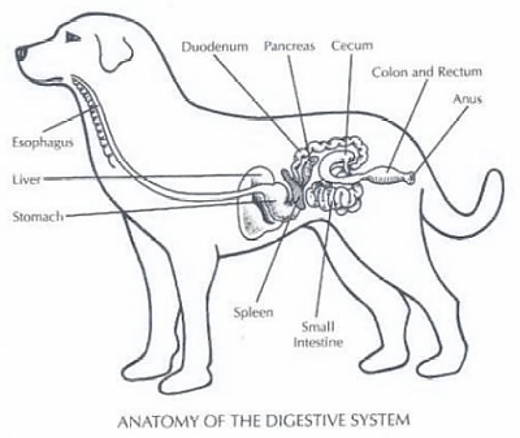
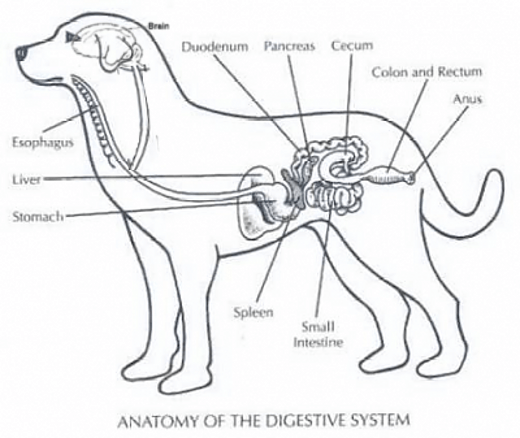
I have discovered that my yellow labrador Jack (whose middle name just happens to be "Ass" when I am angry) has an additional digestive pathway. It explains oh so much...