



|



joyrider3774
-
Posts
811 -
Joined
-
Last visited
-
Days Won
63
Content Type
Profiles
Forums
Events
Downloads
Store
Articles
Everything posted by joyrider3774
-

Malzbie's Pinball Collection - On my cabinet
joyrider3774 replied to joyrider3774's topic in User Projects
Hi draco, i'm not sure about that, i did not request that. Adding commandline parameters usually does not take a lot of work as the game normally already has a function to launch a table directly from within the menu. So adding commandline parameters to start a table usually is not that much work just mapping a command line parameter to the launch table function call with a certain parameter for the table. I'm still talking to him on steam forums trying to get the weird menu behaviour fixed. Its either due to the tilting sensor or the Zaxis (used for the plunger) not being centered. I can go around that by disabling the joystick used by my cabinet to show x & y & z values from the tilting sensor and analogue plunger but this will not work if people are actually using joystick as input for their cabinets. It could also be this problem might be solved when direct launching the tables as it skips the menu's. Anyway what i was trying to say is that adding support for commandline parameters is easy and usually does not involve many changes but adding 2 monitor (or even 3) and dmd repositiong requires more work and is not always so simple. So i have not asked about it. I'm already happy with the commandline parameters (i still have to try them out though) -
Malzbie's Pinball Collection - On my cabinet
joyrider3774 replied to joyrider3774's topic in User Projects
Hey an ahk script might not be needed anymore very soon. The author of the game has implemented command line options to start a table directly and when quiting the table it will quit the game. The only thing is the camera position per table to be remembered but the author said he will implement that in a next update so then i don't see any need for a ahk script anymore. I'll be sure to test it out and see how it works and do modifications or remove my ahk script as well as rename all my media parameters to match the ones the author chose -startTable ttfb-startTable Carnival-startTable garden-startTable sheriff-startTable ghosthouse-startTable mudrace-startTable playground see topic here https://steamcommunity.com/app/729580/discussions/0/1742225999457571167/ -
Hi, I Had bought some more pinball games during steam wintersale like worms pinball, pinball hd collection, retro pinball but none of these are good for cabinet. I'm not saying the games are bad some are good but they got some quirkcs that make it difficult to use in a cabinet. For example forced high score name input using keyboard and not flipper buttons and no way to cancel it decently or no options for portrait mode or relying heavily on mouse input and no keyboard support to make selections (make's it difficult for an ahk script as it needs changing depending on the resolution used). However i did find one (free to play) game with optional buyable DLC tables that did have everything to make it work in a cabinet and it's Malzbie's Pinball Collection. https://store.steampowered.com/app/729580/Malzbies_Pinball_Collection/ while the game did work perfectly on my main pc it did not on my pinball cabinet. For some reason it had problems with the joystick it detected from my tilting / nudging system that made the menu's freak out and not usable. Luckily i eventually found the problem and the solution was to disable the joystick hid input device before launching the game and reenable it after quiting the game. I used http://www.nirsoft.net/utils/device_manager_view.html to accomplish this. When i'll release / finish everything for this game i'll make sure to explain how you can detect this problem and disable / enable the joystick device(s). for the rest it was creating a little AHK script to launch the game, select the table and change the view of the table as it's not remembered per table and some tables need a different amount of keypresses for changing view that fit's a cabinet. I also used my little image viewer tool again to show the backglass during gameplay after i have rotated the screen using irotate. For the rest it was creating table video's, for the backglass images i took a screenshot of the backlgass shown when the table starts it was very low res so these are not of the greatest quality but it works. For the wheel image i took a screenshot of the table and created the text logo's online using a site where you could create these (once posted here in another thread flamingtext or something). It's working fine currently and i don't need mouse or keyboard for this game to work. It even has "flipper button" input for inputting your name if you have a highscore which is a big plus if you ask me. The only thing i might still try is to mirror the dmd using dmdext on my backglass monitor. but i have not verified if the game always postions the dmd on the same position per table, if not i'll have to specify different coordinates per table used which i think is doable as i pass the table name to the launch before batch file (it's needed to display the correct backglass image using my tool). I'll update / change this initial post once i got all the instructions and have it finished so other can try as well and the great thing is you can try out the tables first before deciding to buy them as dlc but imo the game is not expensive only 99 cent per table dlc and i think the author is working on more tables. I requested on the steam forums for support for commandline parameters to launch the tables but i'm not sure he'll implement it. Someone already asked it before me but did not explain everything so the author of the game had no clue what was requested. Here's a preview video
-
[RESOLVED via WORKAROUND] Pinball FX3 Randomly exiting fullscreen
joyrider3774 replied to joyrider3774's topic in General
Yup got teamviewer also installed on my main pc. I'll try uninstalling it and test again it's the last thing i can think about that might have an impact I had already created a topic about it as well on steam discutions about the game but no responses. I do know i'm not the only one having the problem. Another person on pfx3 facebook group has the same problem -
yeah it was trying to load those image while it could not find them and then give error but immediatly exited the app. Thanks for finding my mistake i did not see it as i had the pinballfx3 launcher in the same directory (it's same binary launcher except with diffrent ini file and uses same image files) I should have at least tested it once in a seperate directory. I did not do it because then the default ini would have changed / contained the other values required after starting once which i do not want to include in the default ini
-
@Outhere found the culprit i had forgotten to include the images needed for the launcher. They are the same ones as the pinballfx3 launcher one. I have updated the zip in the 1st post so that includes those images now. extract everything again. I still need to update the google link but the one attached to first thread of post should be updated and included background.png, selection.png and noselection.png edit: google drive link version is also updated in first post.
-
Did you place the ini file from the zip file in the same directory as pinballwickedlauncher.exe before launching it ? You need to do that so it keeps the original settings i provided to launch it not just copy the exe. You need to run it once manually then and press alt + F4 so it adds the extra ini settings. It seems to me you only copied the exe or did not extract everything and ran the executable already once. If you did not do this please explain how you managed to get that ini you showed. Did you edit manually did it get generated or overwritten ? Compare this intial settings ini ( PinballWickedLauncher.ini ) and change where it's different in your ini also don't forget to setup your keys or joysticks as per the documentation of the launcher. If you launch it again afterwards does it result in the same ini file as you showed me before ? As it could be a bug but could also be you did not have the launchers exe or started manually. It should normally not erase the path settings etc as in the default one i provided. The default one does not contain all settings but running it once and pressing alt+f4 should populate the mssing settings so you can alter them afterwards in the ini. LaunchPinballWicked.exe might need to exist in same directory as well edit: just tested i can make it happen also the problem i'll investigate to see what the problem is
-
@Outhere i modifed first post the include all needed files & launchers as well as some information about it all. It really is not that hard but it will not work out of the box if you want to use dmd mirror etc. (it looks harder than it is when you look at all the text i posted just give it a shot or only use the launcher itselve) You could however just use the launch script (without extra launcher to select multiplayer, action / pure mode) to launch your game always in single player pure mode. and use irotate & my img monitor view tool to show backglass. only the launching script is available here but it's also available in the pinbaclwicked.Zip in first post LaunchPinballWicked.ahk Final video of how its all working together / looking in edited first post as well
-
Hey, I've got a verry irritating problem where the Pinball FX3 game will exit fullscreen mode randomly. I've seen it happen once or twice on my main pc when just launching the game directly from steam. I also have it happen on my pinball cabinet so i had disabled any launchers, any launch before & after script and any kind of extra tools in pinballx (so using default settings for it). It still happend. Then to exclude pinballX itselve i started running the game from commandline like so (if you got cabinet mode) and sure enough the game still exited fullscreen on the last launch of sorcerers lair so it's not pinballx as it happens without pinballx as well. So either something windows / drivers related or even the game itselve C:\Program Files (x86)\Steam>steam -applaunch 442120 -table_Mars C:\Program Files (x86)\Steam>steam -applaunch 442120 -table_Citadel C:\Program Files (x86)\Steam>steam -applaunch 442120 -table_Archer C:\Program Files (x86)\Steam>steam -applaunch 442120 -table_Citadel I also tried updating video drivers, i reattached my two screens so they are all attached to my nvidia card and disabled onboard video (from cpu) in bios. I have tried with full screen optimasations option disabled on the exe, have tried with running the game as administrator (elevated). I have game mode / game dvr disabled through policies and am currently running windows 10 professional 1803 on my cabinet (not 1809 yet) The weird part is, that when the loading screen appears the game is running fullscreen without a problem but when it happens it always happens just before the table itselve is fully loaded / about to be displayed or when that messages comes up asking if you want to start a new game or continue. This problem is starting to anoy me and i can't find a definitive solution for it. I'm not running anything fancy in the background that might steal focus from pinball fx3 that could cause this. I do have teamviewer installed but it happens also when nobody is connected to the cab / pc and i'm not sure if teamviewer can be the cause when nobody is connected (have not tried uninstalling it) Does anyone else have this problem ? I always have to have a keyboard & mouse attached to my cabinet just in case it happens i can alt+tab back.
-
released a new version with joystick support that might work with cabinets not using keyboard encoders but where a joypad is simulated. I also added a new FORCEFOREGROUNDWINDOW where you can specify how the app forces its window to the foreground. In the initial version it was pushing it always to the foreground every x milliseconds (= value 1), but now will default to not forcing it to the foreground at all (value = 0) and you can also specify a value 2 where it will force the window only once to the foreground at startup and never again. So if you want previous settings change value to 1 after starting the new version once. https://github.com/joyrider3774/PinballX_Launcher_app/releases/tag/v2.0 Be sure to read updated readme to find out more info related to joystick / joypad setup https://github.com/joyrider3774/PinballX_Launcher_app/
-
@Carny_Priest i just got bigscore working with dmdext... I basically rotate my screen first using irotate, use my little tool to display the backglass, used a modifed / trimmed down version of your launcher script (that also did the fake borderless window and removed input mappings / ffmpeg stuff.) but what i had forgotten initially was the windowed parameter inside the cfg otherwise it kept running fullscreen and that was making the ffmpeg system not work. since now my windows was running in portrait mode before i launched the game and maximized it (windowed) i needed new camera settings so i added a new cam setting for this mode where i don't use the ingame portrait mode ($ARCADE2 0 -15 200, i'm not sure this works on all resolutions my playfield runs at 1600x900 or 900x1600 in portrait mode currently) otherwise i saw the table wrong. i also added in the cfg my portrait mode resultions (width & height swapped) as i could not choose that ingame. Then all what was needed whas running dmdext and it works by just mirroring. It could be i can run the game fullscreen again now with the dmdext option but i have not tried it yet. Btw it is indeed a good table, but you need to be able to get it all working Edit: fullscreen does not work has side effects, well it works for dmdext, but dmdext window gets hidden when launching the game & activating it again & going back to big score pinball does make it work but left flippers keeps being pressed in then. In pinball wicked it also produces problems so i kept pinball wicked at borderless fullscreen to make dmdext work correctly
-
@Outhere i'll try to make a detailed guide / release all needed scripts next week. My ahk script can take parameters to select multiplayer and works in tandem with my launcher executable i made for pinball fx3 with a changed ini to be able to select multiplayer options. But i need to release my updated pinball fx3 launcher first
-
@GAH1068 got the dmdext thing working so much simpler and no more latency that i can notice. I'm goana modify the bigscore pinball scripts i use to make my playfield screen rotate and also use dmdext instead of ffmpeg + ffplay. I can swap easily to test things as i had the ffmpeg part in seperate script. Thanks for letting me know about dmdext virtual dmd
-
Nice one ! I could not find a simple one either, thats why i created one myselve it was only like 5 lines of code and some form I'll make sure to upload the source to github eventually
-
Ah will need to try that out and see how it goes but not sure it'll work, the windows needs to be placed always on top as i display the backglass image also always on top. Btw make sure to do the call to image_monitor after your screen has fully rotated at least thats what i do
-
@GAH1068 I don't have a real dmd screen unfortunatly i use a 2 monitor setup. However i'm using a modified / adapted version of the script @Carny_Priest used for big score pinball to mirror the dmd on my backglass monitor. It works but there is latency as you can notice in the video below as well. I also have fixed the no backglass problem that occurs due to rotating the screen and pinballx not redrawing it anymore. I basically created a small delphi program that can display a png, jpg, bmp or gif (don't think animated have not tried) full screen, always on top on a certain monitor. I'll supply you the little program you can use it to fix your backglass problem as well. I've attached it as an attachment to this thread: (edit: use version from zip in 1st post, this version was outdated not the same) there is not much help in the program and you'll need to figure out the monitor nr you need to use but basically the program works like this: Image_Monitor_View.exe [0-based monitor nr] [image filename] like for example to display the image on my backglass monitor (nr 2 in monitor i supply the following command): start Image_Monitor_View.exe 1 "C:\PinballX\Media\Pinball Wicked\Backglass Images\Black_Flaggers.png" The monitor nr is 0 based, so it starts counting from 0 till monitor nr count -1. i don't know if it follows windows monitor positioning order but you can test it out from command line and try 0 1 2 etc as nr. Do watch out as it shows it strechted so make sure the image your using is same resolution as your monitor or it might look weird. And supply invalid monitor nr will make it use the first monitor it finds in the monitors array (delphi object). I added it in my launch before batch script and used the start batch command so the batch file does not wait for the program to end to go on with things and i kill it using taskkill.exe in the launch after script so i can see pinball x backglass back
-
@Carny_Priest i got the mirroring using ffpmpeg & ffplay working and positioning on correct location but i got another problem well i had two. If i hide the ffplay cmd window as was done in the original ahk script, the video playback window of ffplay never shows, so i removed the hide parameter and then it shows & play however it only plays if the ffplay window is activated and if its activated the big score pinball game does not react to input. So i actvate big score pinball window again but then the ffplay window is not playing the dmd anymore so you see the loop problem here. I'm not sure why it does that maybe because the game is running in fullscreen (have not found out how to let it run windowed or fullscreen windowed) or maybe because of ffplay.exe version where something changed as the topic was from 2016 or perhaps due to my windows 10 and / or windows 10 build. Which version of ffplay.exe do you use ? i tried latest as well as version from 2017 and which version of windows + build nr ? or maybe i'm missing something to be able to run the game windowed. Haven't been able to figure this problem out yet. I did split up the script into 3 parts, the dmd mirror part, launching part & key remap part. but all works fine except above mentioned focussing problems. The reason i splitted up the script is because i wanted to add command line parameters for scaling, positioning etc basically make it generic so i could use it perhaps with pinball wicked as well if i got it working. Btw i do notice the small delay in playback as well it's minor but noticeable Edit: nvm, i just read through your original post again. The problem is indeed the full screen mode and in your original post you said how to change to windowed. The option is not available ingame edit2: starting ffplay with -noborder option hide's title bar and borders so there's no need for the gui window and draw a black bar i placed the -noborder as first option and seems to work fine so i removed the gui part
-
Hey @Carny_Priest, This is what i found out related to the backglass showing ingame... If i rotate my screen (even only the playfield screen) the backglass window gets blackened and erases the backglass picture and pinballx does not seem to redraw the backglass anymore while a game is running, which i think is normal as it would just eat cpu / gpu for nothing if it kept redrawing. So it seems using irotate to rotate the screen makes it black, probably because it does not get redrawn after rotation. I then tested by not using irotate and never rotating any screen and then the backglass picture from pinballx did indeed stay visible all the time during gameplay but the game would be running in landscape mode then as that's how my orentation of the playfield screen is setup in pinballx. So i see only 2 solutions one is to make my playfield screen be running in portrait mode in windows so i don't have to rotate anything but then visual pinball is behaving badly and dmd's (from vpinmame) are not positioned right, that can be fixed but i rather not go down that rabbit hole. I did not setup the visual pinball myselve i've gotten it preconfigured. The other solution would be to find an image displaying program that supports parameters and can be run fullscreen immediatly on a certain monitor and just put a command in my launchbefore script, after the screen has rotated to show this (backglass) picture using such program on my backglass monitor. I have not looked yet if such programs exist, one that comes to mind is infranview but have not checked yet what kind of parameters it allows. Do you run your playfield screen in windows in portrait or landscape mode ? about media for pinball wicked on their press page they have a good picture for backglass and also the text "back flaggers pinball" i used that and created a wheel docklet image out of it all as well. I can share my pictures on ftp if needed http://pinballwicked.com/presskit/ btw i bought SlamIt: Big Score Pinbal 0.99 cent is indeed not much but have not looked at it yet, i don't think i'll need the ffmpeg part to mirror dmd as i don't have a 3rd monitor i only have a 2 monitor setup. Unless it can be used to mirror play the dmd on my 2nd screen, then it might be even usefull for pinball wicked as well to grab the dmd from main playfield and display (scaled) on my 2nd monitor as well somewhere. Edit: Went with option 2, but created a very simple application myselve in delphi that just displays and image full screen always on top on a certain monitor which i pass in the commandline parameter as well as image filename. I use the same image as the backglass used in pinballx. Start it in my launch before command & kill it in launch after. The programs is like 5 lines of code (in delphi) and its working great
-
what i did was create a very simple AHK script to map the key my launch button is assigned to (1), to the return / enter key and let it launch when i start a game using launch before option and use taskkill in a batch file to kill the remap script on launcher after. that way you can press the launc button to press enter / return on the "play" button. Such AHK script is really simple only this: #noenv 1::Enter this ahk scripts maps my "1" key to "enter" key. the 1 key is what my launch button normally is using but in zaccaria it will use enter key then and you can use it to for the "play" button but also when a game is finished on the "restart" button
-
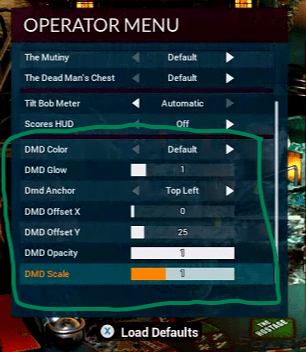
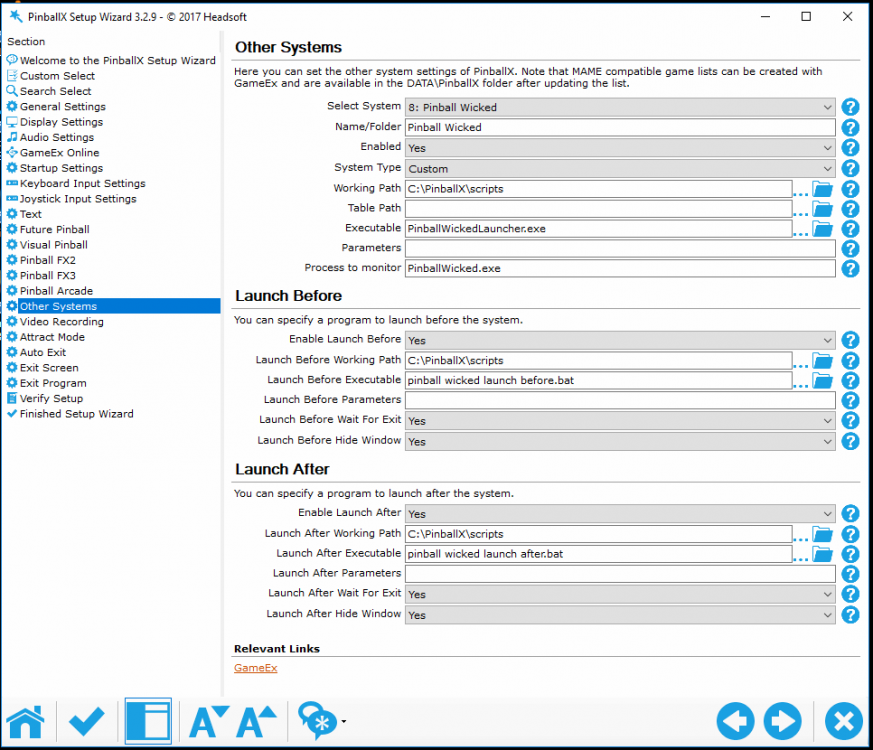
Please read this post on how to set everything up the post below describes the old method before pinball wicked had cabinet support --------------------------------------------------------- OLD WAY ---------------------------------------- Update 27/12/2018: i had forgotten to include some image files in the zip please redownload the zip ... Pinball_wicked.zip and start over / overwrite ini file again I run in 1600x900 my playfield screen and my backglass in 1024x768 and i have a 2 monitor setup so i display using dmdext a mirrored backglass over my backglass picture. you can do the same with 3 monitor setup but you'll need to change settings and postions of dmdext. You can even use pindmd to do this. I also don't know if dmd positions ingame will be the same at higher resolutions than 1600x900 if not take a screenshot of the game running and showing dmd and find out and change the dmd positions HOWTO: 1) download and install irotate https://www.entechtaiwan.com/util/irotate.shtm 2) if not running windows 10 download powershell (i use it to run irotate with elevated rights and i have disabled uac prompts for the user i'm logged in with in windows) 3) download and place dmdext files somewhere if you are not using it already i placed it in my scripts folder if it's installed in other location you will need to change parameters in batch files calling dmdext you'll also need to change it if you are using pindmd and not a virtual dmd like i do. https://github.com/freezy/dmd-extensions/ check the readme for parameters for pindmd etc 4)download Pinball wicked.zip it contains everything (launcher script, extra launcher, launch before / after commands backglass etc) except the playfield video (playfield video is available on ftp here /-PinballX-/Other Uploads/Joyrider3774/Pinball Wicked ) or use this file with included table video : https://drive.google.com/file/d/1foqCcH1M2n5vuNOw3KKa6rTbgOdVu1g2/view?usp=sharing 5) start pinball wicked from steam and set it up to use windowed full screen borderless also set up the dmd settings exactly like this (using other settings will need to make you find out the values for dmd positoning) for dmext. Also set camera used to 8 so you see the table full screen. 6) Launch PinballWickedLauncher.exe once and press alt+f4 to exit. It will fill in extra required settings in PinballWickedLauncher.ini then edit the ini file to use your keyboard or joystick just like it was done for pinball fx3 launcher. It's just a copy of that launcher with different ini file. all info here https://github.com/joyrider3774/PinballX_Launcher_app This is only needed if you want to be able to select multiplayer and pure or action mode you can also use LaunchPinballWicked.exe directly to start single player pure mode without the extra launcher executable with multiplayer options (you'll also need to change pinballx settings then to use LaunchPinballWicked.exe directly instead of my launcher app) 7) Edit and recompile LaunchPinballWicked.ahk. (download and install autohotkey for this, edit ahk file using notepad then rightclick & choose compile) - check if 10 seconds on this value is enough for your system to show the pinball wicked menu: WaitForMenu = 10000. If the menu loads faster decrease the value, if the menu loads slower increase the value its the value used to wait for the menu to be visible ingame - IMPORTANT change the key used to exit the game to the same key that is assigned in pinballx / you use to exit normally. Default is mapped to ESC change it to your key if you are not using the ESC key ; Exit Table ; pinball wicked does not seem to react well on the quit game key from pinball x ; so change the ESC key below to the key you have set in pinballx as quit game key ; info about keys can be found here : https://autohotkey.com/docs/KeyList.htm ; in my cab i use the esc key Esc:: ;<----- change HERE Gosub killApp Return 8) use my Image_Monitor_View.exe to test displaying the image file on the backglass it uses 0 based monitor index so first monitor is value 0, 2nd value 1 etc. I don't know if it follows windows monitor positioning but you can find out by testing first. You can close the backglass using taskmanager/ rightclick on icon on taskbar and choose exit and perhaps alt + tab to to form and then press alt + f4. There is no other way. In my case my backglass is on 2nd monitor and i had to use 1 then to display it there. It will display the image stretched to full screen on it. start Image_Monitor_View.exe 1 "C:\PinballX\Media\Pinball Wicked\Backglass Images\Black_Flaggers.png" if it's a different screen or value change "1" value also verify the media folder if it's the same with you 9) edit Launch before bat file using notepad and check if your playfield monitor is monitor 1 to rotate. If you are not running in landscape in windows but already in portrait mode you don't need irotate to rotate your screen so remove it from launch before & launche after script. If you run landscape you can change the rotate parameters in this value "powershell -Command "Start-Process 'irotate.exe' '/1:rotate=90 /exit' -Verb runAs -WorkingDirectory 'C:\Program Files (x86)\iRotate\'"" 10) if you don't have a 2 monitor setup but a 3 monitor setup or even use pindmd you'll need to change the dmdext parameters position. I'll explain the values here but you all will probably need to change the values needed for your setup except perhaps the postion of the dmd ingame (if it does not change on higher resolutions): The command i used for dmdext was the following in the launchbefore script : start "" /min dmdext.exe mirror --source=screen --position=93 46 328 83 --destination=virtual --virtual-stay-on-top --virtual-hide-grip --virtual-position=1084 530 656 166 --position=93 46 328 83: defines ingame dmd position to copy and mirror it could be you don't need to change this if it stays the same on other resolutions than mine if it's not correct take a screenshot ingame using steam (f12 is default button) when game is launched using the launcher etc of course (so screen is rotated) and then using gimp or other image drawing program find out dmd offset the x=93,y=46 and 328 = width, 83= height --virtual-stay-on-top <- is needed because i display the virtual dmd over the backglass my Image_Monitor_View.exe is drawing (after screen was rotated) it's needed because my imagemonitor view is also displaying on top --virtual-position=1084 530 656 166 <- X,Y, Width, HEight of the position of the virtual dmd you will definatly need to change this for your backglass / dmd monitor as you can see i double the original width and heifht of the dmd to be mirrored the 1084 and 530 are the x and y value where it needs to be placed. you need to add up any previous monitor sizes (remember playfield is roated so take that into account) + a value to center the dmd. 11) you need to have ENTER mapped to your plunger Launch / button, if you don't do this you can not confirm player ready screen in multiplayer so i used simple ahk script to map my &/1 key to enter you need to do something similar if your launch button does not use ENTER by default. you can do that using pinball_wicked_remap.ahk script and you need to recompile the exe provided is setup for my system 12) use these pinballx settings: You need to make sure to wait for the launch before & launch after scripts are done so that the rotation if the screen is done using irotate alraedy before using the intermediate launcher or the direct launcher. Irotate is not called with start parameter so i'm sure it's executed all the rest is called with start command so batch file does not wait until the process is ended. otherwise it will get stuck if you don't use start with the wait for exit params set to true 13) launch after script uses taskkill.Exe to kill all started apps in launch before and rotate screen back to normal positioning LaunchPinballWicked.exe can also be used instead of pinballwickedlauncher.Exe to directly launch single player pure mode if you don't need multiplayer selections. LaunchPinballWicked.exe accepts as first parameter player nr (1 2 3 or 4) and as second parameter only "Action" if thats specified it will use action mode. If you don't provide any parameters it will launch single player pure mode. Examples: LaunchPinballWicked.exe <- launch 1 player pure mode LaunchPinballWicked.exe 1 Action <- launch 1 player action mode LaunchPinballWicked.exe 2 <- launch 2 player pure mode LaunchPinballWicked.exe 2 Action <- launch 2 player action mode etc.. Video of final version i'm using now
-
[RESOLVED] New fx3 tables...how to add to pinballx lists?
joyrider3774 replied to chip9399's topic in General
you need to add the games yourselve with the correct game names, so either edit the pinball fx3 database xml manually or use game manager to add a new game and copy exactly the game names as below (including correct capitalisation / case sensitivity) ..description etc you can choose anything for what you like. You'll also need to either find or record game play video's yourselve. I have created some already so will upload them somewhere externally as i only had them uploaded to gameex / pinballx ftp these are the game names needed: • BALLY_Attack_from_Mars • BALLY_BlackRose • BALLY_Party_Zone here are the video's that can be used with pinballx i have included both the original table view as the graphically enhanced ones (alternate you'll need to rename them if you want to use them to exact name as game name). and some dmd video's but they turned out too big as i had accidently let ffmpeg scale them (but pinballx does downscale them again so they can be used). The table video's are fine however (need to be placed in media folder for pinball fx3 under table videos). https://drive.google.com/file/d/1_B4pXzC7XvNbosz-aUovl1nDEImRstUh/view?fbclid=IwAR1j8JpbVXvo3lhHg7TZa5Z6ytS7nE66pD3Qxm-v9P7epnZX2si1rL12OMU in the future if new packs are released and you want to know the name to add in pinballx's game manager or xml's manually. Goto your pinball fx3 steam's game folder like in my case : E:\Games\Steam\steamapps\common\Pinball FX3\data\steam you'll see all kind of files with pxp extension. Look for newly added ones not in your pinball fx3, pinballx database and only those that seem to have a correct name for being a table. The table names are those filenames without pxp extension as you can see here https://imgur.com/a/omaMFJI you could also check this topic's xml and search for the above mentioned table names and copy the corresponding section to your xml. Also check the media section there are some wheels there for the new tables to be used -
UPDATE 20/12/2019: Pool champion 2018 Playfield video + 1600x1200 backglass image + 1920x1080 backglass image uploaded to ftp all named pchampion2018.XXX
-
thanks, I'll create new video and backglass screenshot for it, will append to same folder and tell here when i'm finished doing it and update the other thread as well as i just bought the table as well was only about 1 euro since i can rebuy platinum at 50% discount. Edit: video + 1600x1200 backglass + 1920x1080 backglass uploaded to /-PinballX-/Other Uploads/Joyrider3774/Zaccaria Pinball/ all named pchampion2018.XXX
-
Thats why the first thing i did when receiving my cab was setting up an incremental backup system so i have snapshots of all file changes. I use duplicati for this with 1tb onedrive. Although you can also set it up with extra disks if you prefer your cab to be offline. It applies to all things on pc ... But always make sure to have backups... I dont know about all the extra addons as i'm not using them but i do know plugins like dll's might fail to load when mixing 32 and 64bit. But i can't tell well nobody can except you how your system was setup. But it could be the system restore might have broken more, i never use it and if i do it would only be as a last resort like if my windows would not boot but not for when software is not working as usually that can be fixed. Windows system restore also does not restore programs, well not if they are not from winows itselve, it's for the windows system but i do know it reverts registry changes. And vpinmame for example stores a lot of settings in the registry. There are valid reasons to still use 32bit versions of applications even though your windows is 64bit. Combatibility between programs and more specifically libraries (read dll) are one such thing. I know it does not help much now but try getting basic things started again like pinballx without extras and build it up again piece by piece for your cab and once its working start making backups even if its just files manually copied to external disks in foldernames with dates. It will not have backed up everything since some things are stored in windows registry and you would need a full system backup software for this like making images of partitions etc but its better than nothing when doing it frequently I hope you can get it all working again but do it one step at a time not all at once it might save you some trouble. Btw about has stopped working messages, windows event viewer should have created more details about the event like exception codes etc and also specifying program and or module sometimes (read dll) where it happened. A text like "CLR20r3" does not say much unless someone recognizes wich program it shows. But with program has stopped working message i've never seen such a thing usually the it's the exception code and related modules (binaries / dll's) that might give clues. but mixing 32 & 64 bit binaries might give windows messages about this program has stopped working. Basically it means a program has had an unhandled exception and "windows (program) error watchdog" has killed the app thats usually the cause but it could also happen due to system files being messed up. But upgrading pinballx does not cause such things mixing 32 & 64 *might* cause such messages poping up or registry corruptions etc
-
did you use 32 bit or 64bit version of pinballx before upgrading it ? try installing 32 bit version instead of 64 bit version.


