



|



Tom Speirs
-
Posts
19663 -
Joined
-
Last visited
-
Days Won
1076
Content Type
Profiles
Forums
Events
Downloads
Store
Articles
Everything posted by Tom Speirs
-
[RESOLVED] GameEx 14.93 all launch emulator KO help !!!
Tom Speirs replied to 175650's topic in General
Really sorry folks. Its fixed. Just rebuilding and uploading new version now. -
Sorry for no action on me from this. I can confirm it is fixed for the next release.
-
Sorry guys but I didn't update the game manger to allow the new Pinball FX 3 support in the product. This is now resolved in this release. View the full article
-
Sorry guys but I didn't update the game manger to allow the new Pinball FX 3 support in the product. This is now resolved in this release.
-
- 1
-

-
This is fixed in 2.41 available in 5 minutes. I hadn't added support in the Game Manager for FX 3. This is now resolved.
-
Ah okay. Didn't realise the Game Manger was missing FX3. Will fix now.
-
PinballX 2.40 has been released and now officially includes integrated Pinball FX3 support. www.pinballlx.com View the full article View the full article
-
PinballX 2.40 has been released and now officially includes integrated Pinball FX3 support. www.pinballlx.com View the full article
-
- 4
-
-

-
Can't hang around. Lots of competition these days
-
Official PinballX support for Pinball FX3 in PinballX 2.40. Now available.
-
PinballX Enhancements/Features Requests
Tom Speirs replied to Draco1962's topic in FAQs, Guides, & Other Useful Information
Okay will do. The existing work and support people had done hadn't occurred to me. Will do today. -
Pinball Arcade Direct Table Launch with Free Camera Mod!
Tom Speirs replied to bduncan's topic in General
Most welcome. -
Here are the settings for Pinball FX 3 with cabinet support using the in build Pinball FX settings in the setup wizard. [PinballFX2] Enabled=True WorkingPath=C:\Program Files (x86)\Steam Executable=steam.exe Parameters=-applaunch 442120 "-table_[TABLEFILE]" Process=Pinball FX3.exe If you do not have Cabinet Mode enabled see here:
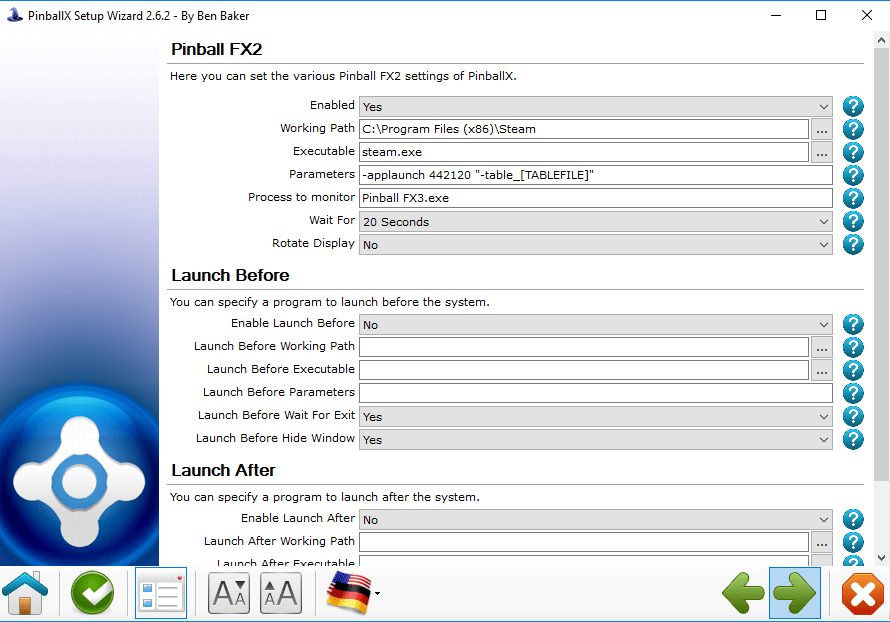
-
[NEWS] PinballX 2.39 - Pinball Arcade Fixed. FX 3
Tom Speirs replied to Tom Speirs's topic in PinballX - News and Updates
I'm more in to producing bloat free these days. So it depends on demand. -
I think it was all but its each now.
-
That setting is depreciated now. its replaced by the "change menu" in the front end.
-
Pinball Arcade Direct Table Launch with Free Camera Mod!
Tom Speirs replied to bduncan's topic in General
Just wanted to update the topic and say official Pinball Arcade support is working again in PinballX including direct table launch. See here: -
PinballX 2.39 This release has Pinball Arcade working again with the latest version of the software. Ensure to set the interface version as 4 in the Setup Wizard. Pinball Arcade Camera Mod is now directly supported as the launch target instead of the Pinball Arcade Executable and direct table launch is supported. This is automatically detected if the executable is the camera mod and the -table [TABLEFILE] parameters are used. Ensure that PinballX runs as administrator when trying to use the camera mod. Here is what the settings should like for direct table launch with the camera mod. Otherwise the latest version of Pinball Arcade is supported using grid selection with this release. [PinballArcade] WorkingPath=C:\TPAFreeCamMod Executable=TPAFreeCamMod.exe Parameters=-table [TABLEFILE] Process=PinballArcade11.exe Pinball FX is now also forcibly killed for those of you that had to have a launch after to kill the process. This should no longer be required. Pinball FX 3 release is just over a day away. I don't have access to a Beta but I am told these settings work with the Beta with cabinet support enabled: [PinballFX2] WorkingPath=C:\Program Files (x86)\Steam Executable=steam.exe Parameters=-applaunch 442120 "-table_[TABLEFILE]" Process=Pinball FX3.exe View the full article
-
PinballX 2.39 This release has Pinball Arcade working again with the latest version of the software. Ensure to set the interface version as 4 in the Setup Wizard. Pinball Arcade Camera Mod is now directly supported as the launch target instead of the Pinball Arcade Executable and direct table launch is supported. This is automatically detected if the executable is the camera mod and the -table [TABLEFILE] parameters are used. Ensure that PinballX runs as administrator when trying to use the camera mod. Here is what the settings should like for direct table launch with the camera mod. Otherwise the latest version of Pinball Arcade is supported using grid selection with this release. [PinballArcade] WorkingPath=C:\TPAFreeCamMod Executable=TPAFreeCamMod.exe Parameters=-table [TABLEFILE] Process=PinballArcade11.exe Pinball FX is now also forcibly killed for those of you that had to have a launch after to kill the process. This should no longer be required. Pinball FX 3 release is just over a day away. I don't have access to a Beta but I am told these settings work with the Beta with cabinet support enabled: [PinballFX2] WorkingPath=C:\Program Files (x86)\Steam Executable=steam.exe Parameters=-applaunch 442120 "-table_[TABLEFILE]" Process=Pinball FX3.exe
-
It seems I needed to catch up on what Last FM does now and I can't see why a last FM addin wouldn't be a good thing.
-
It still exists. Feel free to contact me.
-
Its in the GameEx downloads section but please try deleting those files I said. Okay?
-
Just to confirm. Please do what I asked with the ICON bitmaps. It wont be fixed in an update. Sorry.
-
Also, do you have codecs installed? It may be crashing trying to play a video file. It wont be fixed in an update.
-
Delete all the bitmap files in the media folder beginning with SurfIcons
