



|



Tom Speirs
-
Posts
19664 -
Joined
-
Last visited
-
Days Won
1077
Content Type
Profiles
Forums
Events
Downloads
Store
Articles
Everything posted by Tom Speirs
-
I would just put the rom path in mame.ini not in the setup wizard. I think Draco is getting confused with GameEx. According to your MAME.ini right now it is looking in the roms folder within where your mame.exe is.
-
Probably your rom path is missing from mame.ini
-
Have not had a chance to look yet but it is supposed to be backwards compatible.
-
Your more than owed buddy. I will take a look later.
-
Hey RedDog, Please get me that version of MAME and I will gladly take a look for you. Cheers., Tom.
-
XMatch is the official Spesoft and GameEx artwork matching utility for matching your artwork and video files to your game filenames. Common sense matching. Not overzealous. Reports on non matches. Ability to use a single media file to replace anything not matched. Same logic as EmuMovies Sync Simple to use. Only the needed the features Download here. View the full article
-
XMatch is the official Spesoft and GameEx artwork matching utility for matching your artwork and video files to your game filenames. Common sense matching. Not overzealous. Reports on non matches. Ability to use a single media file to replace anything not matched. Same logic as EmuMovies Sync Simple to use. Only the needed the features Download here. View the full article
-
XMatch is the official Spesoft and GameEx artwork matching utility for matching your artwork and video files to your game filenames. Common sense matching. Not overzealous. Reports on non matches. Ability to use a single media file to replace anything not matched. Same logic as EmuMovies Sync Simple to use. Only the needed the features Download here. View the full article
-
XMatch is the official Spesoft and GameEx artwork matching utility for matching your artwork and video files to your game filenames. Common sense matching. Not overzealous. Reports on non matches. Ability to use a single media file to replace anything not matched. Same logic as EmuMovies Sync Simple to use. Only the needed the features Download here. View the full article
- 1 reply
-
- 2
-

-

Version 1.00
2338 downloads
XMatch is the official Spesoft and GameEx artwork matching utility for matching your artwork and video files to your game filenames. Common sense matching. Not overzealous. Reports on non matches. Ability to use a single media file to replace anything not matched. Same logic as EmuMovies Sync Simple to use. Only the needed the features Requires the .net framework 2/3.5. If file will not launch install the required .net framework. -
Hi, Yes it is Handel Gothic BT. Right clicking the file and installing it followed by a reboot should fix the issue. The issue is fixed for new installs of GameEx and GameEx Arcade Edition but updating to Windows 10 creators edition does break things if a previous install was present. Sorry that you got an abrupt response. I think we are just a little confused because if you had the font issue you would not even be able to get GameEx started up. If GameEx runs now the font issue is resolved for sure.
-
Hi, You should have received a registration key via email. Please check any junk mail folders. If you still don't get it let me know via email at [email protected]
-
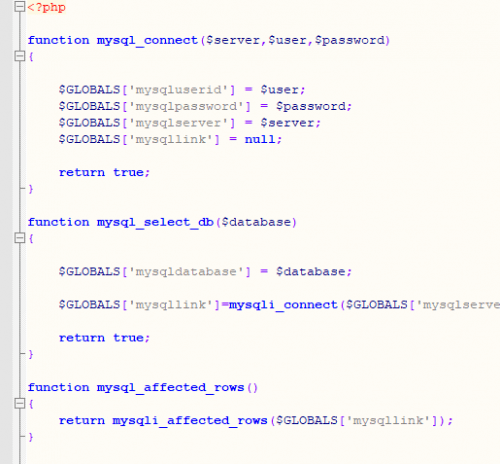
Version 1.0.0
8 downloads
This is a simple PHP include script that acts as a wrapper for the depreciated and removed old MySQL functions. It maps the most used functions to the MySQLi procedural equivalent functions. Useful for quickly updating old sites and scripts by simply including the file on a PHP 7/7.1 host. -
Hi, I am happy to help but your follow up post is a separate issue. The log you posted shows the font issue. For any other issue please again post the log and ini.
-
I am aware of the issue and it has been reported several times. Yes, it is an issue caused by Windows 10 Creators Edition due to new features (restrictions) of how windows handles fonts. Please try manually installing the font in the GameEx Arcade folder then reboot.
-
Emulator downloads freezing repeatedly on latest version
Tom Speirs replied to RyuHayabusa1978's topic in General
That's what I find too. I think the point is its a little confusing for the users. -
Emulator downloads freezing repeatedly on latest version
Tom Speirs replied to RyuHayabusa1978's topic in General
Yes, the first icon does not work. you need to click to the right of it. Is that what you mean? Its kind of a design issue I guess. -
[RESOLVED] New version of Gamex Arcade Edition crashing on boot
Tom Speirs replied to hirkos97's topic in General
I'm not sure what the issue but it is an issue with the font. Removing, reinstalling it, reboot should fix it. Please post the full log next time. Thanks. Tom. -
Emulator downloads freezing repeatedly on latest version
Tom Speirs replied to RyuHayabusa1978's topic in General
I can easily duplicate the issue by selecting multiple emulators to download. Have reported to Headkaze. -
Emulator downloads freezing repeatedly on latest version
Tom Speirs replied to RyuHayabusa1978's topic in General
Its a setup wizard issue. No ini and log for this. -
Emulator downloads freezing repeatedly on latest version
Tom Speirs replied to RyuHayabusa1978's topic in General
We will look into it. In the meantime please try downloading one at a time. If it fails on a specific emulator please let me know. -
Nah, it was not taken the wrong way at all. Its just the way I wrote GameEx anything that is not caught throws the error log/reporting app.
-
No, but there really aren't any that are internal only external, normally caused by codecs/videos.
-
Sorry for the vagueness. I basically rewrote ShowLog.exe and got the error reporting working again. Launch it and take a look.
-
[RESOLVED] Gameex is always taking the current windows resolution
Tom Speirs replied to MoggFanatic's topic in General
Turn off 16-bit color mode. GameEx is actually trying to change the resolution but is failing with an error.