



|



Tom Speirs
-
Posts
19656 -
Joined
-
Last visited
-
Days Won
1076
Content Type
Profiles
Forums
Events
Downloads
Store
Articles
Everything posted by Tom Speirs
-
Seriously, love all you guys, and wish you the best. My point is this is our escape and safe zone here. Tom.
-
Temporary ban imminent…. ALERT ALERT. FUEL LEVEL LOW!
-
Until further notice, I am declaring the forums a zombie apocalypse safe zone. Anyone mentioning or talking about the Zombie Apocalypse, Brexit, or for that matter Donald Trump too will be receiving a temporary ban until the Zombie Apocalypse is over and you have been tested to be zombie hormone free twice in twenty four hours. On behalf of Ground Control. Tom Speirs PS: That also includes the royal family and the pope. Keep your mouth shut. Don't want to hear it. Even if you are a comedian. PS 2: Retro gaming or pinball talk etc is still encouraged and welcomed. PS 3: Also includes CEO's if I didn't ask.
-
I would suggest you just install and try. You do not need to purchase to try them out. If you don't like it no worries. The MAME features in all editions of GameEx are generally very complete and the most worked on features in general. The primary author started the whole thing with a passion for Arcade/MAME as opposed to DOSBox I believe.
-
I can see you are using regular GameEx. Did you add the games to the do not fllter list, and update the list again? Let me know if so and I will look into those particular games further.
-
Hi. The games are probably flagged as not working. GameEx Arcade edition has some stuff hard coded that regular GameEx and GameEx Evolution do not nd only supports working games. Cheers. Tom.
-
 Thank you guys
 -
[RESOLVED] GameEx Arcade Edition 16.10 - Game missing
Tom Speirs replied to Torkyo's topic in General
Yes, it should be fixed in 16.27. Looks like your still on 16.26. -
Sounds like you have turned on show systems first and quick launch
-
Instant Sheller: Windows 10 elements randomly reappear
Tom Speirs replied to Pastamania's topic in General
I think maybe your just expecting too much. Ive never heard of things randomly changing though. -
Please take a moment to think about online activity if your stuck at home. Watch your younger kids as usual whilst they seem quiet and occupied. Watch out for an increase in scams and other activity whilst criminals and other undesirables are also loosing income and targets. Watch your own addictions too. If in doubt and you see this post feel free to run it by me. Be safe. View the full article PS: It is our biggest asset right now but potentially our worst enemy. If you have not had that talk with your mom about scams, it is time to do so especially whilst there is nothing she wants more than to talk to someone.
-
I was thinking about this and I wonder if the theme is trying to access an online news feed that is slow or not available? Would make sense to me
-
Not a good idea to share your passwords buddy. Suggest you change them. Cheers.
-
Its normal, although get that its not ideal. Cheers.
-
Yes, wrong forum but easy to move. Answer is only one time.
-
Table audio doesn't stop playing while launching a table.
Tom Speirs replied to Timog2179's topic in General
Or are you just saying two audio files are playing at the same time? Is this a bug or just a peroneal preference thing? -
Table audio doesn't stop playing while launching a table.
Tom Speirs replied to Timog2179's topic in General
Weird. I thought I already fixed this issue. It only affected windows 7 if I recall. Ill build a VM and see if I can duplicate the issue. -
Pinballx frontend attract video cuts in and out during gameplay
Tom Speirs replied to Oldschool4's topic in General
Fair enough, Most people use B2S with visual pinball on cabinets. I guess you got a desktop setup or went a different route, -
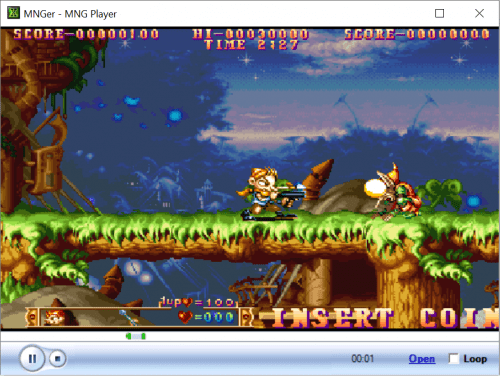
Version 3.01
105 downloads
MNGer is media player for MNG and APNG videos/animations. It associates MNG files with the player upon setup, and is a very quick, nice easy way to play MNG videos, and also plays supporting audio files (MP3, M4A, OGG, WAV, AIF) if available Its simple to setup, configure and simple to use, and works just like any basic Media Player. After setup either launch the application, or just double click on a MNG file to play. Usage: Launch application and select MNG/APNG Drag and drop MNG/APNG file Open a MNG in Windows Explorer Open from the command line '-fullscreen' plays the MNG/APNG full screen and exits when MNG is complete '-fixaspect' attempts to detect video orientation and fix the aspect ratio to 4:3 or 3:4 '-hidemouse' hides the mouse pointer e.g. mnger.exe c:\mame\snap\1942.mng -fullscreen -fixaspect For anyone interested MNG is an open source / open license image animation format developed by the same people that developed the PNG image format. It was meant to replace the CompuServe GIF image format that at the time had some people worried about its licensing and is limited to 8 bit color. Time has gone by, MNG never became mainstream along with APNG and GIF is still well alive. -
(Fix date)
-
Pinballx frontend attract video cuts in and out during gameplay
Tom Speirs replied to Oldschool4's topic in General
Its because you have the game set to show the backglass as shown in the log. Hide backglass is the default and should normally never be changed for visual pinball. PS: Different issue should be new topic. -
[RESOLVED] GameEx Arcade Edition 16.10 - Game missing
Tom Speirs replied to Torkyo's topic in General
Thanks for reporting the issue and sorry for the delay. The issue is fixed in 16.27, available in about 20 minutes. Cheers. Tom, -
This stands out: 18:57:09.60 17/02/2020: Total verifyable roms: 0 18:57:09.60 17/02/2020: Verify ROMs took 0 minutes, 0 seconds. Probably due to the old MAME version.
-
Pinballx frontend attract video cuts in and out during gameplay
Tom Speirs replied to Oldschool4's topic in General
Hard to fix bugs or troubleshoot an old version that I don't even use buddy. -
Its just settings here but are you talking about within PinballX or the launched table?


