



|



gorgeousjorge
-
Posts
41 -
Joined
-
Last visited
Recent Profile Visitors


gorgeousjorge's Achievements

Super Member! (3/5)
1
Reputation
-

[RESOLVED] input string was not in a correct format
gorgeousjorge replied to gorgeousjorge's topic in General
Again, a BIG THAN YOU SIR. Going to install the fix on my 2 machines. -
[RESOLVED] input string was not in a correct format
gorgeousjorge replied to gorgeousjorge's topic in General
Tested, all good mate. Dumb question, can i just reinstall over the existing one? No configs lost? -
[RESOLVED] input string was not in a correct format
gorgeousjorge replied to gorgeousjorge's topic in General
WOW. Just WOW. It was a simple fix? Can you provide some details on what was going wrong? Many thanks man really. -
[RESOLVED] input string was not in a correct format
gorgeousjorge replied to gorgeousjorge's topic in General
First of all, thanks for your inputs on this. I did not installed the .net framework, just run that code to check wich versions were installed. Gameex Evolution worked always fine, i installed it several years ago so no new installs, 4 years or more ago, and it was only now that the bug presented itself. Mind you that last time i fired up the software was 4 months ago or so, and then when i started this thread, so something in that time frame must have changed. Please don`t remove it, i like it much more than the "normal" gameex and i bet a lot more people are on the same pace. It´s just a "bug" if you press ok on the error it will go away and the software works like it should, it`s just my "nerdiness" on the subject eheheheh. -
[RESOLVED] input string was not in a correct format
gorgeousjorge replied to gorgeousjorge's topic in General
Was there any update on your part Draco1962? No worries Tom Speirs, just glad i can give any help. For context i run win10 pro and i only make updates yearly more or so, the pc´s wich gameex is installed don`t change much in terms of software. I run backups with Macrium Reflect and my first action was to roll back to 4 months ago, the issue persisted. In the meantime i´ll just block it with the firewall as a workaround. Regards. -
[RESOLVED] input string was not in a correct format
gorgeousjorge replied to gorgeousjorge's topic in General
Hi. Just ran this command to get the versions installed listed: Get-ChildItem 'HKLM:\SOFTWARE\Microsoft\NET Framework Setup\NDP' -Recurse | Get-ItemProperty -Name version -EA 0 | Where { $_.PSChildName -Match '^(?!S)\p{L}'} | Select PSChildName, version Also checked the file version. I´m up to 4.8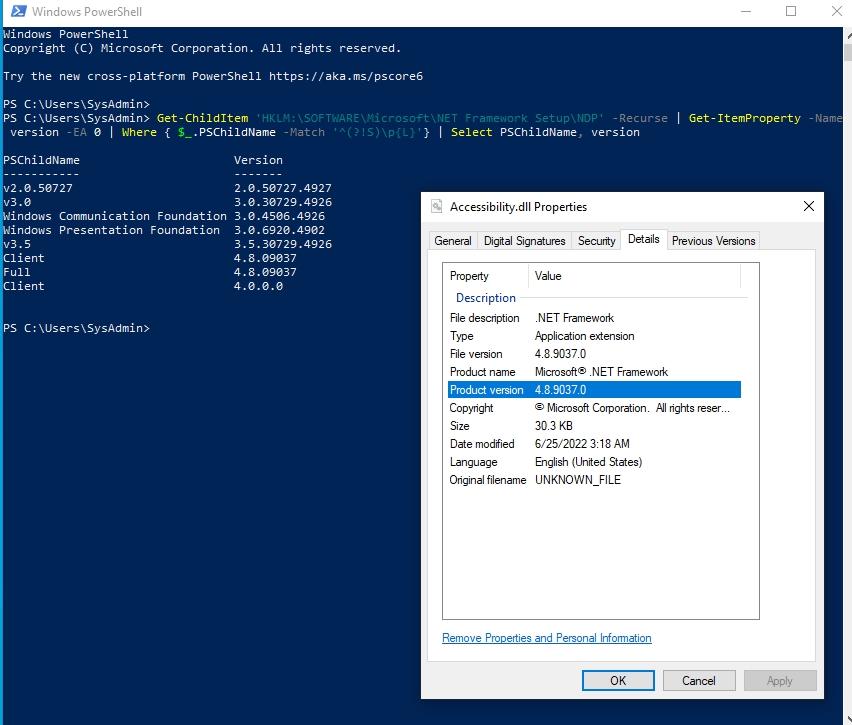
-
[RESOLVED] input string was not in a correct format
gorgeousjorge replied to gorgeousjorge's topic in General
Yep, on a fresh windows install, no credencials inputed. Must be something else. -
[RESOLVED] input string was not in a correct format
gorgeousjorge replied to gorgeousjorge's topic in General
https://carrapice.synology.me:2977/vs/vs/sharing/WjbvKDCn#!aG9tZV92aWRlby04NjI= Windows VM fresh Install, all updates done. -
[RESOLVED] input string was not in a correct format
gorgeousjorge replied to gorgeousjorge's topic in General
I´m currently installing on a fresh stock vm. Doing updates. Next game ex evolution with no credentials, no emulators no nothing. Stock. -
gorgeousjorge changed their profile photo
-
[RESOLVED] input string was not in a correct format
gorgeousjorge replied to gorgeousjorge's topic in General
Did the log i provided give you any clue? -
[RESOLVED] input string was not in a correct format
gorgeousjorge replied to gorgeousjorge's topic in General
Just found what`s going on after 4 hours of virtual machines testing: Internet. If i disable the adapter or disconnect the cable no error message. So i assume it os something due to my account on your servers? Double check the login and password, all is ok. Can you provide some feedback? -
[RESOLVED] input string was not in a correct format
gorgeousjorge replied to gorgeousjorge's topic in General
I mean, where do i find that log? The one in the screenshoot in my first post. Ok i think i´ve found it. [GAMEEX_EVOLUTION].log -
[RESOLVED] input string was not in a correct format
gorgeousjorge replied to gorgeousjorge's topic in General
Can someone point me into what the final line points to? This one "Headsoft.Tools.LogFile" Here is this log file? Thanks. -
[RESOLVED] input string was not in a correct format
gorgeousjorge replied to gorgeousjorge's topic in General
I will try some of those options, have to virtualize the os first for testing purposes. Thanks. -
[RESOLVED] input string was not in a correct format
gorgeousjorge replied to gorgeousjorge's topic in General
Hi. No worries, i would hope someone had this problem before and could share the solution to it. I´ll try myself and if i find the resolution, i´ll post it here. Best regards.
