



|



Adultery
-
Posts
10152 -
Joined
-
Last visited
-
Days Won
159
Content Type
Profiles
Forums
Events
Downloads
Store
Articles
Everything posted by Adultery
-
There's the problem. You don't have the hi-score.xml I'm that folder. It needs to be there for the plugin to work. Download it manually and put it in there. You won't need to change the command line at all unless your snaps are coming out black.
-
I'll figure something out if it comes to be a problem, but I'd like to see some results in that situation first. The way these are placed, it shouldn't be too obtrusive.
-
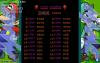
It's enough to get on the board at least... Initials: DNK Score: 15380
-
I have a block of code that snags the mame version for mame commander so that's not out of the question at all. Probably not any good way to get dip switch settings though, unfortunately. Looks like I need to dust off my string drawing abilities. That's gonna take a bit. Haven't had to do that in forever but I do remember how though.
-
I might just run with that... Good idea Null! I'm using a graphic currently, but I might draw an outlined string on there with a user name, time, and date instead of the Hi-Score Competition logo. I still have some work to do, this is just more of a proof of concept. Things always evolve so fast, I can't settle on one thing so early in the development cycle.
-
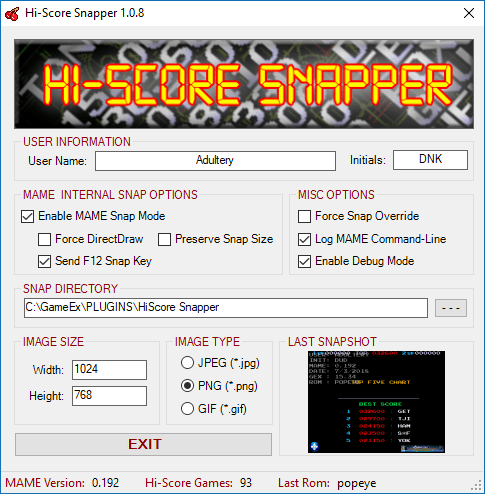
GameEx Hi-Score Snapper - 1.0.9 - What is it? It's a plugin to take official snapshots of your MAME hi-scores for the GameEx Hi-Score Competition. This tool saves some leg work of having to type the same data everytime, and overlays some information and artwork to make it harder to fake. The overlay contains your username, initials used, MAME version, GameEx version, ROM name, and Override Mode (if used). Just take the snap and upload it to the game's competition thread. How do I use it? The configuration is really simple, just type in your user name and initials. Everything else is automatic. This plugin downloads and uses a centralized gameslist which is updated with the Hi-Score Database. As long as you have an active internet connection, you will always have the latest game list available. Offline users can download the gameslist.txt from here and place it in the GameEx>Plugins>HiScore Snapper directory. The plugin only enables itself for games that are in the database, so there's no effect on your MAME games at all. Just take a snap of your high score by holding [sHIFT+HOME] (I have a hotkey set up for this in Xpadder and it's working great! You can take many pictures in a row in the case of blinking hi-scores). I also added a camera shutter sound effect that plays when the snap is taken, so you know you got it. The snap is then overlaid with the artwork and information in the picture, and you can come upload it to the thread when you're done. You can set several options from the Configuration screen, including: User Name This is the username you use for all your leaderboard entries. The global leaderboard depends on this! Initials The initials you type into the game for your hi-score Snap Directory All your snapshots will be saved into this directory. By default, they are saved in the plugin's configuration folder located in GameEx>Plugins>HiScore Snapper Image Size Specify the height and width of the snap with these values. By default the size is 1024x768 Image Type Choose to save your images as JPEG, PNG, or GIF The images are saved in the root folder specified, with a subfolder for the game name. The physical file name is generated based on a time stamp of when it was taken. To view the last game snap you took using the plugin, click on the preview image in the lower right corner to open a viewer window. There is also a status strip at the bottom of the configuration form that will show what version of MAME you currently have set up in GameEx. There's a small catch though. Here's the rub... I can't seem to get pictures from D3D without a great deal of extra work (the snaps all come out black). So unfortunately I have decided that the only way I can support D3D snapshots is by having the user compile their own version with DirectInput enabled. The process really isn't that difficult, and helps with adding support for things like Xpadder compatibility to your build. UPDATE: As of 1.0.3, you no longer need to worry about renderer changes if you compile MAME and enable Direct Input. MAME Mode supports all renderers that MAME supports instead of forcing DirectDraw. Where can I download it? Get it from the GameEx Community Download Portal
-
If you need to use bin and cue files, May I suggest a virtual drive? This one dude made a plugin for it I heard, so you also have that option. No matter what you choose, welcome to our little corner of the world, and feel free to ask for assistance if you get stuck in anything else. There are quite a few folks around here more than willing to help.
-
Thanks Tom.
-
I forgot to mention it, but you can get a look at the theme.xml here to see how sounds are added into the theme's layout. I will also be doing some updating this evening, catching up on the Game Info web site (it's a few versions behind, but I'm not putting out any more for now), and updating the themes I made to take advantage of the new elements I've since added to the plugin and sounds for them. If you have a theme of your own, please share it with the community... I like to see people's take on the visual aspects. @ehuonder: I hope it's not too much of a bear, I have never had to set it up from scratch since I kinda always use it. I'm here for ya if you hit a snag... Let me know how you get on. I can't wait to hear your opinion... I'm probably a little jilted since this is kind of my baby.
-
Hmm, that's odd. Do you have any video files in the directory of the theme you're using? Could you also please post your GameEx.ini for us to have a look at? Are your video card drivers up to date? Your initial post made it sound as if it were a mame issue, so more documentation is going to be needed.
-
Game Info went to 1.2.4 today. This version adds sound effects to some actions in the plugin. Get the details here: http://www.gameex.info/forums/files/file/16-game-info/
-
UPDATED TO 1.2.4: (PLUGIN) Added new sound effects optionsAdd custom wav sounds to your theme for updates, notifications, fade in and out, and the CP display.(THEMES) Updated MegaMAME theme with new audio samples(CONFIGURATION) Added option to disable audio samples
-
To be critical of the fix, the user actually had to use ddraw or gdi instead of d3d (which I believe is what mame uses by default).
-
I'm not sure what this is about... 17:43:01.8 9/25/2013: Available texture memory: -1306MB I don't think I've ever seen a negative in this area before...
-
Pretty ballsy to attempt a Tool cover, but not bad.
-
Version 1.0.9 is out! Fixed a bug in "Roms In Folders" Option (Thanks to Stu1983 for his help in testing this feature!)This makes the plugin your best option if using GameEx's Roms In Subfolders option, since the native DT support does not currently work with that configurationFound and fixed a bug in the Command-Line variable support that was introduced in the new plugin versionSome minor code tweaks and cleanup
-
Thanks Stu! This should do it then: Thanks for your help bud! I'll dedicate the new version to ya.
-
Updated to 1.2.3! (PLUGIN) Plugin now features a Co-Op mode for other plugins, detects and avoids possible conflicts(PLUGIN) Added new In-Game GameExtender style image viewerDisplays Title or Snap during game similar to the way GameExtender does, but can be customized like the Attract Mode Viewer(PLUGIN) Added new jukebox GameExtender style image viewerDisplays an artist image or the album art (Last.FM patch users only!)(PLUGIN) Added a GameExtender Manager to cleanly hide and show GameExtender when need be(PLUGIN) Cleaned up and optimized a big chunk of code(CONFIGURATION) Added option to disable Hi-Score Viewer(CONFIGURATION) Added option to disable Plugin Co-Op ModeSnag it right here!
-
Try this one for me:
-
Ahh ok, thanks for the report Stu. I'll look into this right now. I probably just made a mistake in the search algorithm. Hang tight.
-
NEW PLUGIN RELEASED! Check out MAME Commander Lite: A simple yet powerful plugin to add command-line arguments to MAME on a per-game basis. Check it out here: http://www.gameex.info/forums/files/file/47-mame-commander-lite/
-
Updated to 1.0.2! Added search options (Must have MAME set up in GameEx!)Supports wildcard searchesSee some data about the ROMDetected MAME version is displayed in the status stripCode tuneup and more logging for debug modeI also got the download page up and running on the portal. Thanks for using this, short of bug reports I'm probably not going to do anything else to this... It hits all the goals I set for it.
-
Version 1.0.2
270 downloads
MAME Commander Lite WHAT IS IT? MC Lite is a very basic, stripped down version of MAME Commander for users that just want to add new command-line arguments to MAME on a per-game basis. If you know the ROM name, and you know what arguments you want to use, this tool is your friend. HOW DO I USE IT? Simple really... Add new games to the plugin by pressing the button Remove games by pressing the button Type the arguments you wish to use in the text box The status bar in the bottom shows the last ROM you ran and when it was run If you have MAME set up in GameEx, MAME Commander allows you to perform a search for your ROMs Type in the name of the ROM and you can see some data about it: Game Title, Clone Of, Driver, and Status You can use a wildcard (ex: tetr*) in your search and see a list of possible matches Since the plugin will append GameEx's arguments, you can override a global switch by adding the counter switch. For example, if you were using -ka to maintain the aspect ratio, adding -noka to the plugin will force MAME to stretch the game. WANT MORE INFORMATION? Visit the GameEx Project Thread for more information about this plugin, to report bugs, make feature requests, or to view the full changelog. If submitting a bug report, please attach a copy of your log file! -
This looks cool although I will probably stay with Ubuntu and run the steam client that way... Most notably when the family game sharing plan comes into play.
-
Actually that's probably by design, bit it should be easy to fix, assuming that he can enable the global exit hook after the credit button has been pressed.


