



|



Draco1962
-
Posts
19238 -
Joined
-
Last visited
-
Days Won
663
Content Type
Profiles
Forums
Events
Downloads
Store
Articles
Everything posted by Draco1962
-
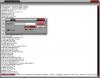
If you did the delete as you noted, then you should see a list of deleted ROMs in the section excludedmameroms . Open GameEx.ini and ctrl+f to open find window and paste that section name and then click Find Next and you should see a list of all ROMs you have excluded through the Delete function in GameEx.
-
If you know the ROM name you can remove it from the deleted list within the gameex.ini file.
-
Try clearing the cache files from the \gameex\data path & rebooting your PC if you have not already done so. You may not of changed anything, but there are many processes that can change things, especially MS updates.
-
Are you getting any errors when they attempt to load? Can you post a copy of yoru log file and gameex.ini (open your gameex.ini in notepad and save as.txt file first as the Forum software will not allow for .ini files to be posted).
-

GameEx NetPlay - Client/Server MAME/Mess
Draco1962 replied to Tom Speirs's topic in FAQs, Guides, & Other Useful Information
How do you have it setup for running from within GameEx (i.e., paths, etc.)? By default it installs to c:\Emulators\MAMEHub . Do you just set the path to c:\Emulators\MAMEHub\dist to work? -
ehuonder - have you considered networking your cab using powerline ethernet? I have purchased a few modules and tested with my Xbox 360 and the speed is pretty constant. I will probably purchase some more modules and place them in my living room and anywhere else I don't want to climb in the attic and fish wires through the walls. I think there are a few others use this solution where their cabs are not in a favorable location for wired or wireless ethernet.
-
Would think that there may be a decent visualization style screensaver that would work nicely with your jukebox.
-
No mahjong or adult games showing here - oddness.
-
Tom or Ben, I have discovered that the issue seems to affect all pages with the exception of the Start, MAME, and Daphne. Whenever I go "deeper" than these pages (Say from Start to an Emulator) the foreground transparency effect stops working. The solid black showing transparent when it shouldn't appears on logo files and on portions of the 3D cabs. My guess there are two actual rendering issues taking place and both impacting me (likely others as well). I am not sure what else I can do at this point as I don't want to roll out a theme that is going to look crappy when others use it or give it look. MIke
-
I had tried it a while back, but testing from a Win 7 system it did not seem to like the newer OS. Or it could just be me and something I missed.
-
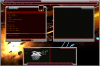
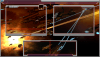
Not certain if the issue was just with black (or shades less pure) I tested the same screen and applied a 40% opacity to all image and text fields with different colors (Navy, Maroon, Olive, and some sort of Brownish-Gray color). Attached is the result. GameEx is treating the semi-transparent areas as solids instead of allowing for transparency. I have attached another copy of the same image with the background and foreground images as a point of comparison of how it should look.
-
The ones in the download have been converted from the Gozer files and renamed to be consistent with MAME naming conventions.
-
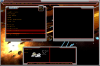
Here are some conflicting examples - one is ansnap where pure black is being treated as transparent. Second is an example of near black elements with 30%opacity treated as if 100% opaque/solid. (screen elements, title, menu bar, scroller (at bottom), etc.

-
Also make sure that VMR9/EVR is enabled in the Advance Configuration - Multimedia/HTPC section.
-
Andres - Mameui 0.141 when compiled with the hi_score.txt file provides as much highscore support. Also, MAMEUIFX is an unofficial build based off of the MAME/MAMEUI core. Regardless, are you able to see the games and play them from MAMEUIFX? Did you recently upgrade your MAMEUIFX version? If so, did you audit your ROMS? It may be much easier for us to help you troubleshoot the issue when you are home (you did say you won't be home for another 3 days, right?) and can provide us with some more detailed information as Tom asked. It has been my experience that if I upgrade to an old version of GameEx to the next version, I make it a part of the upgrade process to re-run the list. You may also want to look at the gameex.ini file as you can see what ROMS are being excluded. Please zip a copy and attach it in your response and give us examples of what ROMs specifically you are no longer seeing. I know you may have quite a few, but time is precious to us as well and trying to guess what is missing and pick for details is a bit frustrating when attempting to help you resolve your error.
-
Do you have a Future Pinball image in your LOGO directory for your theme? Does the name of the file match the name in the Logo section of the emulator?
-
I would have to disagree with you, Ranzo, about XP 64-bit, primarily due to the sorry response from manufacturers to provide suitable drivers. Software that took advantage of 64-bit capabilities were also sorely lacking. Any of the OSs can be scaled back regarding overhead or "bloatware" and run great. For balance of ease of use, stability, and making the best use of memory and architecture, I believe that 7 is the best in show, with XP 32-bit a close 2nd due to its longevity and wide-spread support.
-
Sorry about that, reading is fundemental, eh? Not sure as I don't use them but my guess would be that you would have to use the advanced configuration to utilize on of the Custom Art paths to point to the folder containing your 3D console folders for each emulator.
-
Yep! GameEx will match the 3D Cab folder name with the game name and, will default to the cab over marquees in the standard view.
-
GameEx is the best FE that I have had the pleasure of working with. Thanks, Tom!
-
Tom - I am bumping this as I am running into some problems. It appears that GameEx is not handling the rendering for pure black and near black consistantly. I have been working on this new theme and thought I was in the home stretch when I discovered that some screens the near black that I had had used successfully on others with 30-40% opacity is now being treated the same as pure black and 100% opaque. Is it possible to update GameEx to allow for turning off color keying in the theme.ini as Ben has suggested? Or can you tell me if it is possible for me to manually edit the theme.ini file manually to acheive the desired results? Thanks!
-
Hmm, not sure of the question, but will take a stab at the answer. I left mine in their folders (extracted them in my setup to C:\GameEx\Media\Xfiles\ and set the path accordingly in Advanced Configuration). Will probably move them to the Assets\Mame\ path eventually as I will start moving everything to my 1.5 TB secondary to free up room on my root drive.
-
You may want to look at the Custom Menus application that was part of your initial GameEx installation. Between that and enabling/disabling features through the Advanced Configuration app you can customize GameEx to your liking.
-
I guess with all that beer, typing or using the Search feature might be problematic
-
The external MAME Screensaver does have the means to filter by ROM name - just have to go into the screensaver options. I'd be curious to see if I can "port over" my list via copy&paste from my excluded ROMS within GameEx - will tell ya if that is possible.




