



|



TT11
-
Posts
33 -
Joined
-
Last visited
-
Days Won
2
TT11's Achievements

Super Member! (3/5)
9
Reputation
-
I think it is to do with my ipac connecting via PS/2 port. If I was able to use my ipac via USB connectivity, then I think it would still function ok. I unfortunately cannot run my ipac via a PS/2 to USB connector. Close the log.
-
Just noticed a 7.14 release issued. Haven't been at my cab for a few days as have been away. Should I just try under this new version?
-
Sorry, I run Windows 10 Home. Not sure what I am supposed to do with .net framework and editing json files putting in 8 instead of 10 ?? I don't run a 10.8.1 BETA whatsoever. I have VP9, VP10.7, VP10.8 and FP and FP PinEvent as my systems. I just have the .exe still named as BETA as 10.8 was in BETA for so long..... My GOTG table runs VP10.7 DX in 32 bit. VP10.8 is my only 64 Bit DX system.
-
This has turned out to be a very strange issue!! Not only will Game Of Thrones not launch, but I have noticed that NO TABLE (VPX, VP9 etc.) will exit properly anymore...... I also cannot get screen dumps using the 'O' button to function..... Yes the version of GOT is the one scutters mentions above. I also use VPX 10.8 DX Final, but I keep it named as BETA as it was in BETA for so long and can't be bothered transferring all the tables to a new folder/setup until 10.8.1 is bedded down more. and authors start insisting on using it. I just went back to PBX 7.02......
-
Trying to run VPW's Game of Thrones via PBX 7.12 has issues. Loading the table from the wheel, the backglass appears, then the VPX table editor appears on my Playfield, blinks a few times and then closes back out to the PBX wheel. Tried a different backglass and same issue occurs. If I remove any backglass from my Tables directory the table will load fully under PBX, but obviously with no Backglass present and only the Flex DMD showing. Funny things is, I then can't exit the table back to the wheel..... It seems to be like I am clicking on the 'Q' key to suspend the table.....?? Running the table standalone, it functions perfectly and no issue loading/running with Backglass, FlexDMD and VPX.... Moved back to 7.02 and seems to work under PBX again...... log.txt PinballX.ini
-
Thanks Draco, the iPac 2 works flawlessly for all my tables. It shows up correctly in Windows with no failure of drivers etc. I can see all the buttons mapped and working in the iPac programme also. If I hold down my flipper buttons it shows as being held down in the iPac programme. It's OK I'll live....
-
No driver updates at all to do with the iPac ever. Been using it for 11 years.... Have already tried re-inserting and unfortunately, it does not get power from USB anymore. Only way I can use it is via my PS/2 port. Might try a different PS/2 to USB adaptor I have lying around.
-
No Joysticks - I use an iPac 2 via PS/2 port for my flippers, nudge, coins, start, exit etc. I do recall it had a problem a few months ago where it was attached via PS/2 to USB adaptor but it stopped powering up the iPac. I then pulled the adaptor off and connected it directly to my PS/2 port which powered it up immediately...... ? Might I have to check my iPac key settings?
-
Updated to 7.02 and nope, no change. Only my shift key make tables scroll, not my L + R Flippers still. My L + R Nudge buttons function as Magna Saves and jump a whole letter and more if I keep them held down, so it's just my L + R Flippers causing me grief.... Files attached log.txt PinballX.ini
-
Hello Guru's, Dutifully running v. 7.00 and about to update to v. 7.02. Is it just me, or has something changed recently where inside PBX holding down your Left or Right Flipper buttons only scrolls one table at a time? I thought we used to be able to hold down a L or R Flipper key to keep tables scrolling past ?? It definitely, still works if I push the Left or Right Shift keys via a connected keyboard, just not the Flipper buttons..... ???
-
Terry Red's PinEvent V2 tables settings for PBX?
TT11 replied to TT11's topic in FAQs, Guides, & Other Useful Information
I was thinking you could possibly put these screen shots in PBX Documentation as examples of adding 'Launch Before' commands -
Terry Red's PinEvent V2 tables settings for PBX?
TT11 replied to TT11's topic in FAQs, Guides, & Other Useful Information
And this is what my new emulator settings contains..... AND IT WORKS 100% - Thank you everyone for your inputs!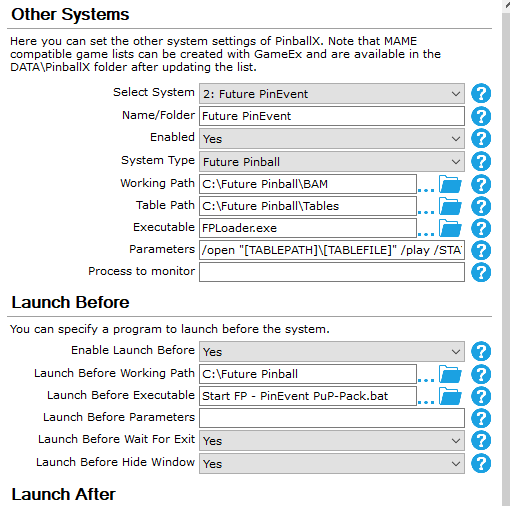
-
Terry Red's PinEvent V2 tables settings for PBX?
TT11 replied to TT11's topic in FAQs, Guides, & Other Useful Information
This is what I added to my PBX using the batch file created by Terry Red and removing the start FPLoader.exe command. It worked well for my regular FP tables... Now I will set up a new "Other" emulator called 'Future PinEvent' and make the required changes to remove the backglass and Arcade mode.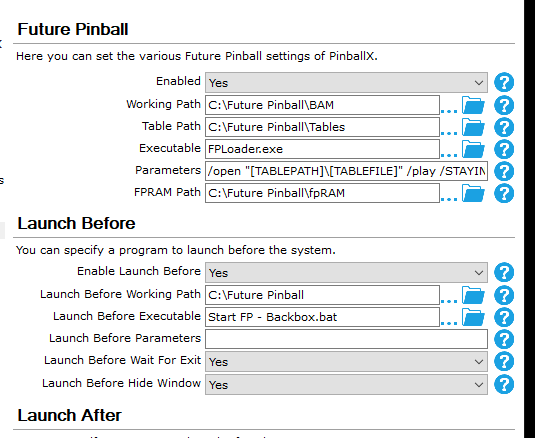
-
Terry Red's PinEvent V2 tables settings for PBX?
TT11 replied to TT11's topic in FAQs, Guides, & Other Useful Information
These are what is in Terry Red's AIO document. Thank you for replying! I have tested both of these batch files and they do the required changes and start and run FPLoader.exe. I have attached the settup wizard screen from PBX but unsure if the Launch Before area can run a batch file rather than an .exe ???? Start FP - Backbox.bat Start FP - PinEvent PuP-Pack.bat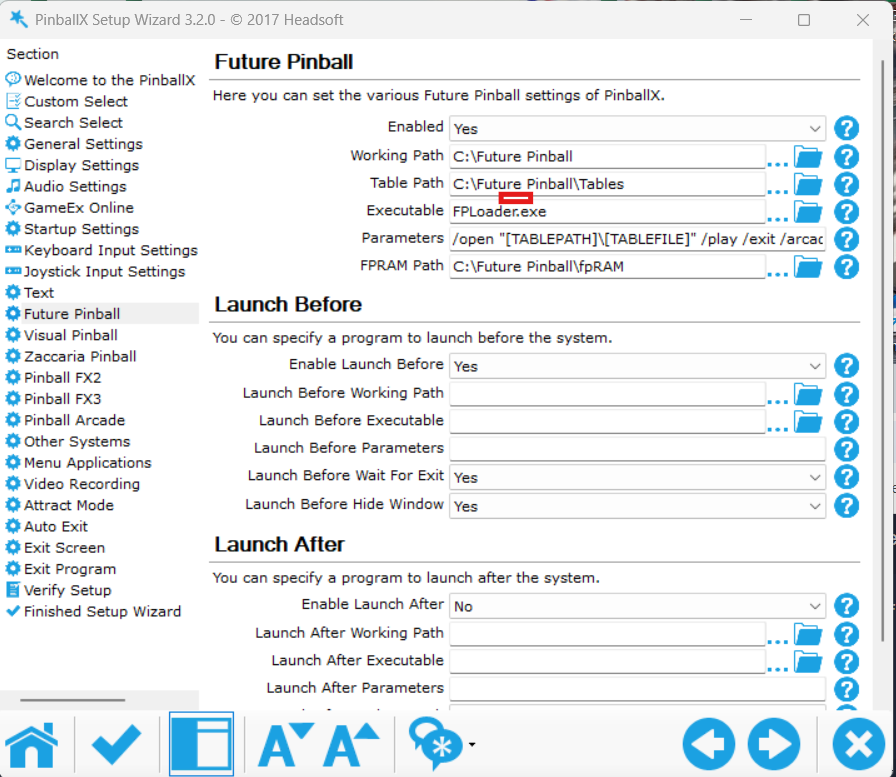
-
There is a lot of info out there from Terry Red about setting up PinEvent V2 tables which are the latest upgrades to his FP tables. He uses Pinup Popper as a Front end. I have a 2 screen cabinet and all current systems (VP9, VP10.7, VP10.8, FP) work fine. The main thing about these PinEvent V2 tables means that the backglass and Arcade Mode must be turned off before launching a PinEvent V2 table. That works fine for me outside of PinballX. I can do it manually. I thought of making a copy of FPLoader.exe to be called FPLoader PE.exe for PinEvent tables and make that another emulator in PinballX. The problem is this turns the required settings off, but they stay off. I have to manually go into one of FPLoader's each time to turn back on the backglass and Arcade Mode for all the non-PinEvent V2 tables. Is there any definative guides on settings in PinballX that allows for regular FP tables to run with backglass and Arcade Mode on, and then having a different setting for only the PinEvent V2 tables? Terry Red has created batch files for his PinEvent V2 tables.... Should I just use one of these in the Launch Before/Launch After area of PinballX..... Running PBX 7.00 and all my FP tables run and so do the PinEvent V2 ones if I make the required changes......
