|



fRequEnCy
-
Posts
3889 -
Joined
-
Last visited
-
Days Won
10
Content Type
Profiles
Forums
Events
Downloads
Store
Articles
Everything posted by fRequEnCy
-
Yeah. Sorry I was little late in responding. LOL. But glad you got it all worked out. Love it when that happens cuz is less work for us.
-
Looks promising. It seems to have problems running fullscreen though. But something to keep an eye on perhaps. Already can work in GameEx as it supports the command-line using the following: vbjin.exe "[ROMPATH]\[ROMFILE]"
-
You again Krakerman? LOL.
-
Just tried and verify that it is down. It's probably just a temp thing. Give it some time.
-
Na. Only mods have that power. That's what the forums are for. Can always add "Delete this post" in hopes that a mod will see it and clean it out. But i wouldn't worry about it.
-
Cool! Glad you got it working. Hopefully next time you'll get it before you post. LOL.
-
fba.exe [ROM] Path must be setup before using in GameEx so that FBA knows where to launch the roms from.
-
-
Wow! Very nice. Thanks Tom. A huge leap forward.
-
Good deal. Glad you got it sorted out. Have fun!
-
Can use Tempest's suggestion or you can take a look here. zarkok created a script for this very thing.
-
Hmmmmm. I'll have to do some testing when I get a chance. Another solution would be just to create 2 link (lnk) files and name them how you want and then don't need to deal with an emulator group or a map file to list. Would be much cleaner that way. Just point them to your 2 executables that you created.
-
Ok. Only solution would be to use a wrapper for that particular version. There are 3 versions of that emulator. Only 2 that I have tested will have the capability I mentioned. I would say to use the Original version or the TnL edition. After reading forums of that version it seems that command-line support was not added but was by another user. Doesn't seem it was released. Since these emulators are no longer supported then not much else can be done other than creating a wrapper or use one of the other 2 versions with the instructions I gave earlier. Sorry.
-
Ok. After reading it seems that I tested the normal version. Seems you're using the Platinum Edition. Just tested and as you mentioned, that parameter doesn't work. Let me test now that I have the same version as you. Will see what I can come up with.
-
Only simple solution I could come up with was to have 2 executable files. One for KI and one for KI2. It's stated in the readme included with the emulator. So copy the u64emu.exe to u64emu2.exe and setup that one for KI2. When running it always remembers the last rom loaded so no other easy way of launching a game except with maybe a wrapper. So setup as mentioned and you can run both games from command line using the following: u64emu.exe -auto or: u64emu2.exe -auto Sorry if not clear on that. If you're confused on it then let me know and I'll try to be more thorough. Edit: After searching there seems to have been a wrapper for this emu. But for the life of me it's a hard one to find since no longer posted on the authors site. Talk about it can be found here at GameEx or even over at the byoac forums. There are many talented scriptors here at GameEx that could help you if not wanting to go the route I mentioned above. I don't claim for that to be the only solution but it was the quickest one I could come up with without having to spend a lot of time on something I don't use.
-
I would think the requirements are the same. What are the specs of your machine? As far as not running on your machine, what are the details of it not running? Games just running slow? Getting errors? What?
-
32X in MESS has a status of Not Working. IMO I think Fusion does emulation for all the supported systems just fine. I've tried a few. It's also rated highest on many emulator websites.
-
Some games might have the border. To take care of this you might wanna play with the Video settings in Fusion. I can't test right now but maybe uncheck the Fixed Aspect settings so that it might switch.
-
I personally don't use this one but just downloaded to test for you and I don't see the problem. The following command-line worked just fine for me: "Gens32 Surreal.exe" "[ROMPATH]\[ROMFILE]" Note: Notice the quotes around the executable. Very important because of the space in the name. If this doesn't work for you then please post your config.
-
Nice. Guess it's good to know for users who don't update as frequently. . Update your stuff! You're behind.
-
Using version 0.137 here.
-
What version of MESS are you using?
-
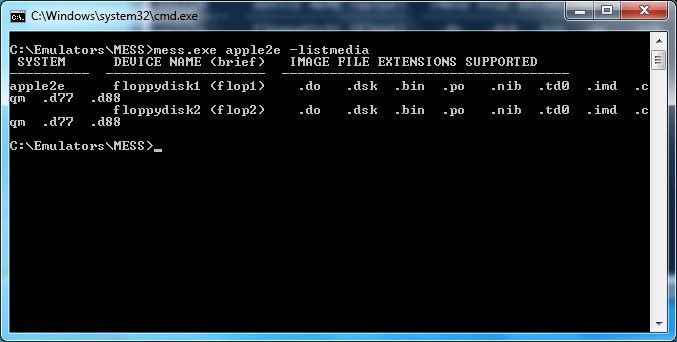
Actually the correct parameter would be the following: mess.exe apple2e -listmedia The one you listed will give the details of that device (system) which is what will be needed to run the system. -listmedia will give a brief description which is the switch needed to run the rom. Also it gives a list of the extensions supported.
-
Please post your config. Details on how to do so is listed here by Tempest.
-
LOL. No problem. When I found the post, I didn't realize it was you who had asked before. . Always best to check with MESS to see the supported media so that you'll know the correct parameter for launching.