|



Tom Speirs
-
Posts
19656 -
Joined
-
Last visited
-
Days Won
1076
Content Type
Profiles
Forums
Events
Downloads
Store
Articles
Everything posted by Tom Speirs
-
Sorry, there is no VC++ .net example at this time. I'm guessing it should be possible to do one, but Im really not that great with C++. Im just adequate with it. Sorry. EDIT: Maybe you can convert the VC code to an activex/com dll or traditional dll, or even .net dll then code the plugin part in c#?
-
Bkenobi, I think youve already done enough testing for me by confirming its the -1 thats causing the problem. That should save me some work. By the way HK, like the new CPWizard sig
-
Hi, This is a known bug to me with Gamelauncher mode. I do keep meaning to fix it. I will do soon. Cheers. Tom.
-
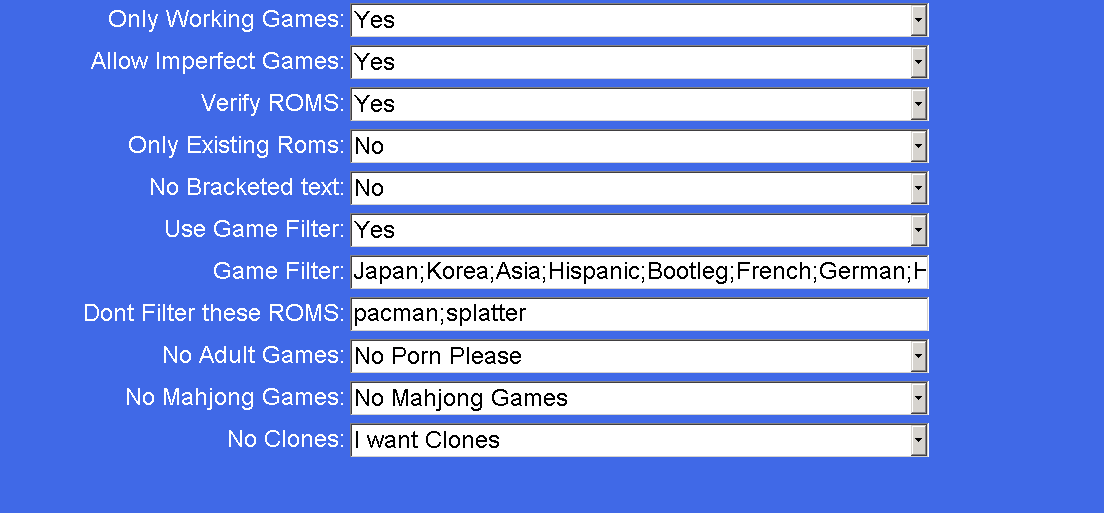
Run the advanced configuration application. Select Advanced MAME settings. The default settings should look like the attached. Mainly make sure verify roms is turned on.

-
Thats pretty much how I feel
-
Thanks Brian. If GameEx was a corporate company you would be senior VP of covering my ass! I hope you dont get burnt out!
-
Hi sbaby, just to let you know, a good explanation of what your talking about is enough too. You dont have to go to great lengths to put english each time as long as we have at least a good idea of what's going on.
-
Yeah, sorry, I just figured out what you meant. its fixed now. will be in next release. Thanks.
-
How is it different? I dont understand
-
Hi, there curently hard coded and not configurable. I will try and look at this in a future release. Thanks. Tom.
-
Do you mean the multimedia menu only displays on the start page if you have one of the other multimedia options enabled? If so that was a bug and will be fixed in next release. Otherwsie im not with you. Can you explain?
-
Sorry, I dont quite know what your saying there. Can you try again please?
-
Thanks for the feedback. Headkaze, Ill try and include the latest version from now on. Sorry about that. I missed that youd been so busy with it.
-
Thanks sbaby. Its in 8.99
-
Sounds nice
-
24th November, 2007 - GameEx 8.98 New Media Library. The Media library brings all your pictures, videos and audio together in one place. It can also be used as an alternative to the jukebox by allowing you to view your music by folder and filename. Registered version feature. New jukebox queue mode setting, to allow disabling of queuing tracks when clicked and making them instantly play. Initial support for Unicode languages such as Japanese has been implemented Fixes picture slideshows not playing when 3d transitions used Fixes please wait animation showing in wrong position when display rotated on Vista Updated shoutcast radio stations for registered users.
-
Im releasing it now. Should be available in about 10 minutes.
-
It seems some bugs have been introduced with rotation. I've just fixed these, and therlll be in the next version. Sorry about that.
-
Are you running a lite or barebones xp install? You can try installing .net 2.0.
-
The 802x602 thing is a gameex bug. Ill look at that and the pointer issue. Upping the font size should increase the button size. Did you try that?
-
Just out of interest, what are bucking magnets?
-
GameEx should dispose the plugins even if it fails. What you have to do is use threads if you want code to run more often.
-
Try that, if not I may be able to send you some .net code.
-
You could look at the AutoIT ActiveX Control.
-
Post it then. My betting is your usb hard drive is on the way out. Or your gameex install got corrupted. A lot of those options regarding the list, require another update to take affect.